Maxon Red Giant 2026.5.0: Professional VFX, Motion Graphics, and Color Grading Tools
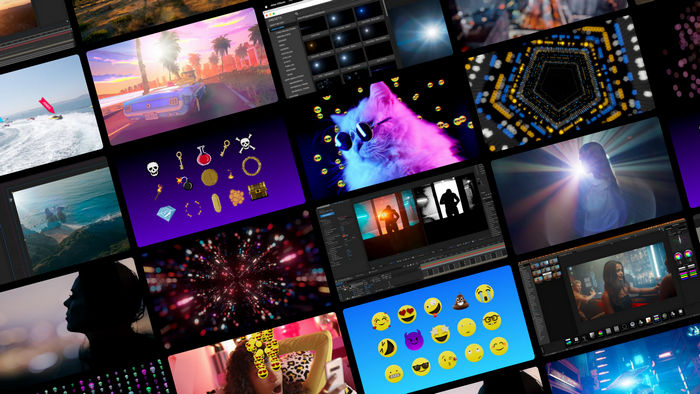
Maxon Red Giant 2026.5.0 is a comprehensive collection of professional plugins and creative tools developed for video editing, visual effects, motion graphics, compositing, and cinematic color grading.
The Red Giant toolkit is designed for filmmakers, motion designers, video editors, YouTube creators, advertising professionals, and visual-effects artists who want to produce polished content without building every effect manually.
Its extensive collection of effects, transitions, particle systems, keying tools, tracking features, lighting effects, and color-correction solutions can significantly improve the quality and speed of post-production workflows.
What Is Maxon Red Giant?
Maxon Red Giant is a professional post-production toolkit that brings together several well-known plugin collections for creating visual effects, motion graphics, transitions, cinematic looks, and advanced composites.
The package integrates with supported video-editing and compositing applications, allowing artists to apply its tools directly inside their usual production environment.
Instead of relying only on the basic effects included with an editing program, Red Giant provides specialized tools for generating particles, removing backgrounds, tracking objects, adding realistic lighting, creating transitions, correcting colors, and combining multiple visual elements.
Main Components of Red Giant
Trapcode
Trapcode is one of the most popular parts of Red Giant and is primarily designed for particle effects and motion graphics.
It allows artists to create:
- 3D particle systems
- Smoke and fire simulations
- Energy effects
- Abstract backgrounds
- Motion trails
- Technology interfaces
- Animated logos
- Geometric patterns
- Audio-reactive animations
- Organic particle formations
Trapcode Particular is especially useful for generating complex particle animations directly inside Adobe After Effects.
Users can control particle movement, size, color, lifespan, physics, turbulence, lighting, and interaction with three-dimensional environments.
Magic Bullet
Magic Bullet provides professional tools for color correction, cinematic grading, skin enhancement, noise reduction, and film-style processing.
It can be used to transform ordinary footage into a more polished cinematic production by adjusting colors, contrast, exposure, shadows, highlights, and skin tones.
Magic Bullet tools are suitable for:
- Films and short movies
- Interviews
- Music videos
- Commercial advertisements
- Wedding videos
- YouTube content
- Documentaries
- Product presentations
- Social media videos
The collection includes ready-made looks and customizable grading controls, making it useful for both beginners and experienced colorists.
VFX Tools
The visual-effects tools included with Red Giant are designed for compositing, keying, cleanup, tracking, lighting, and environment enhancement.
These plugins can help users remove green-screen backgrounds, add realistic reflections and shadows, insert glowing elements, track objects, and combine multiple layers into a more believable scene.
They are particularly useful for creating:
- Science-fiction effects
- Screen replacements
- Green-screen compositions
- Holograms
- Light effects
- Digital interfaces
- Environmental enhancements
- Atmospheric effects
- Action sequences
- Product visualizations
Universe
Universe is a collection of accelerated video effects and transitions for editors and motion-graphics artists.
It includes tools for stylization, distortion, retro effects, glitch animations, text treatments, image enhancement, and animated scene transitions.
Universe can help creators produce visually engaging content quickly, especially when working on music videos, trailers, advertisements, social media clips, and YouTube projects.
Professional Particle Generation
Red Giant provides advanced particle-generation tools capable of producing detailed animations and simulations.
Particles can be emitted from points, lights, layers, text, logos, images, and three-dimensional objects. Users can then control their movement using gravity, wind, turbulence, resistance, and custom physics.
These features make it possible to create effects such as:
- Rain and snow
- Fire and smoke
- Sparks and explosions
- Dust particles
- Magical energy
- Floating lights
- Space environments
- Motion trails
- Abstract animations
- Logo reveals
Particle-based effects can also react to music and audio, making them suitable for visualizers and promotional videos.
Cinematic Color Grading
Color grading is an essential part of professional post-production, and Red Giant provides a wide selection of tools for improving the mood and appearance of footage.
Users can apply cinematic looks, correct inaccurate colors, balance exposure, enhance skin tones, and match footage captured with different cameras.
The included color tools can help with:
- Primary color correction
- Secondary color adjustments
- Film emulation
- Skin-tone enhancement
- Highlight and shadow recovery
- Color matching
- Noise reduction
- Lens effects
- Contrast adjustments
- Creative color styling
Ready-made presets allow users to achieve fast results, while manual controls provide greater precision for advanced projects.
Chroma Key and Background Removal
Red Giant includes professional keying tools for removing green and blue backgrounds.
These tools analyze the selected background color and separate the subject from the original environment. Users can then place the subject over another video, image, virtual studio, or digital scene.
Additional refinement controls can improve difficult areas such as hair, transparent objects, soft edges, shadows, and motion blur.
This makes the software suitable for virtual productions, tutorials, online presentations, advertisements, filmmaking, and social media content.
Motion Tracking and Object Placement
Motion-tracking tools allow visual elements to follow the movement of objects inside a video.
Editors can attach text, graphics, effects, lights, images, or replacement screens to tracked points. This can be used for smartphone-screen replacements, product labels, interface graphics, facial effects, and digital advertisements.
Tracking reduces the need for manual frame-by-frame positioning and can significantly speed up complex compositing tasks.
Lighting, Glow, and Lens Effects
Red Giant provides many tools for creating cinematic lighting effects.
Users can add lens flares, glows, light rays, reflections, shadows, optical highlights, and atmospheric lighting to existing footage.
These effects can be used to improve realistic scenes or create stylized science-fiction, fantasy, and promotional visuals.
Lighting controls often include brightness, position, color, intensity, spread, animation, and interaction with other layers.
Transitions and Stylized Effects
The software includes a broad collection of transitions and visual styles that can make edits more dynamic.
Available effect categories may include:
- Glitch transitions
- Light transitions
- Blur effects
- Distortion effects
- Retro television styles
- Film damage
- VHS effects
- Camera shake
- Chromatic effects
- Digital interference
- Zoom transitions
- Geometric wipes
These effects are useful for trailers, music videos, gaming content, social media clips, presentations, and advertisements.
Presets and Customization
Red Giant includes ready-made presets that allow users to apply professional effects quickly.
Presets can be useful for beginners who want immediate results, while advanced users can customize individual parameters to create unique visual styles.
Many effects include controls for color, movement, speed, intensity, scale, blending, lighting, randomness, and animation.
Users can also save customized settings for use in future projects.
Supported Editing Applications
Red Giant is mainly designed to work as a plugin collection within supported professional video-editing and compositing applications.
Depending on the individual tool, supported host programs may include:
- Adobe After Effects
- Adobe Premiere Pro
- DaVinci Resolve
- Final Cut Pro
- Apple Motion
- Avid Media Composer
Compatibility can vary between individual plugins, operating systems, graphics processors, and host-application versions. Users should always confirm that their editing application is supported before installation.
Performance and GPU Acceleration
Many Red Giant effects use graphics-card acceleration to improve previews, rendering, particle simulation, and final export performance.
A powerful dedicated GPU can provide a smoother editing experience, especially when working with high-resolution footage, complex particle systems, multiple effects, and large compositions.
Performance also depends on the processor, available memory, storage speed, project resolution, host application, and number of active effects.
For demanding professional work, a modern multi-core processor, dedicated graphics card, sufficient RAM, and fast solid-state storage are strongly recommended.
Suggested System Requirements
The exact requirements may vary depending on the installed plugins and host applications, but a suitable professional configuration should include:
Windows
- 64-bit Windows 10 or Windows 11
- Modern Intel or AMD multi-core processor
- At least 16 GB of RAM
- 32 GB of RAM recommended for complex projects
- Dedicated NVIDIA or AMD graphics card
- At least 4 GB of graphics memory
- 8 GB of graphics memory recommended
- Fast SSD storage
- Supported Adobe, DaVinci Resolve, or other compatible host application
- Internet connection for installation, licensing, and updates
macOS
- A compatible recent version of macOS
- Apple Silicon or supported Intel processor
- At least 16 GB of unified memory or RAM
- 32 GB recommended for demanding projects
- Compatible Metal-capable graphics hardware
- Fast SSD storage
- Supported editing or compositing application
- Internet connection for activation and updates
Users should check the official compatibility information for the exact plugin and host-application combination before installing the package.
Who Should Use Maxon Red Giant?
Maxon Red Giant is suitable for:
- Video editors
- Visual-effects artists
- Motion-graphics designers
- Filmmakers
- Colorists
- Advertising agencies
- YouTube creators
- Music-video producers
- Social media designers
- Game-trailer editors
- Educators and course creators
- Freelance content professionals
Beginners can start with presets and automated tools, while experienced artists can use the advanced controls to create original visual effects and complex animations.
Advantages of Maxon Red Giant 2026.5.0
- Comprehensive collection of professional plugins
- Powerful particle-generation tools
- Advanced cinematic color grading
- High-quality visual effects
- Professional chroma-key features
- Motion tracking and screen replacement
- Large collection of transitions and presets
- GPU-accelerated processing
- Suitable for both editors and motion designers
- Direct integration with supported host applications
- Useful for films, advertisements, and online content
- Customizable controls for advanced users
Disadvantages of Maxon Red Giant 2026.5.0
- Requires a compatible host application
- Can be demanding on older computers
- Complex particle effects may require significant rendering time
- Some tools have a considerable learning curve
- Compatibility varies between plugins and editing applications
- A professional subscription can be expensive for casual users
- High-resolution projects require a powerful graphics card
- New users may need time to understand the complete toolkit
Is Red Giant Suitable for Beginners?
Red Giant can be used by beginners, especially through its presets and simplified effect controls.
However, mastering advanced particle systems, professional compositing, detailed color grading, and complex tracking may require practice.
Users with basic knowledge of After Effects, Premiere Pro, or another supported application will generally find it easier to understand how the plugins work.
Tutorials, templates, and experimentation can help new users gradually move from simple preset-based effects to fully customized professional designs.
Is It Good for Professional Projects?
Red Giant is designed for professional post-production and can be used in commercial films, advertisements, television content, music videos, online productions, and corporate media.
Its combination of motion graphics, visual effects, color grading, tracking, and transitions makes it a versatile toolkit for individual creators and production studios.
The software is particularly useful for professionals who need to produce high-quality effects quickly without creating every visual element from the beginning.
Final Verdict
Maxon Red Giant 2026.5.0 is a powerful creative toolkit for video editing, visual effects, motion graphics, compositing, and cinematic color grading.
Its collection of particle tools, keying plugins, tracking features, lighting effects, transitions, and professional color controls can transform ordinary footage into polished visual content.
Although the software requires capable hardware and a compatible host application, it offers significant value for filmmakers, editors, motion designers, advertising professionals, and digital content creators.
For users who want an integrated collection of high-quality post-production plugins, Maxon Red Giant remains one of the most comprehensive solutions for creating advanced visual effects and professional motion graphics.