Q-Dir 12.82 – Free Quad File Manager for Windows
Overview of Q-Dir 12.82
Q-Dir 12.82 is a free and lightweight file management program designed to make organizing, copying, moving, and managing files on Windows computers faster and more convenient. Developed by SoftwareOK, Q-Dir offers a powerful alternative to the traditional Windows File Explorer, allowing users to work with multiple folders simultaneously through its unique four-panel interface.
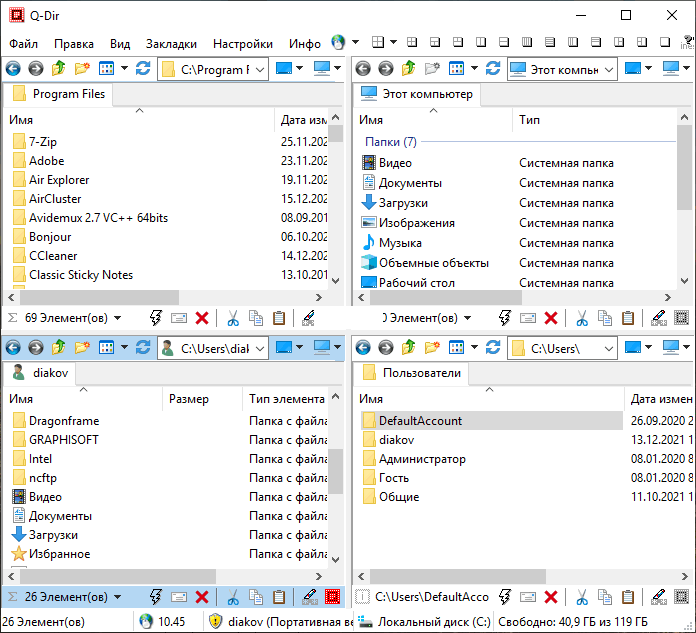
Unlike conventional file managers that usually display a single folder at a time, Q-Dir allows users to open up to four different directory views within one window. This makes it particularly useful for people who frequently transfer files between folders, organize large collections of documents, or manage multiple storage devices.
The software combines a familiar Windows Explorer experience with additional features, flexible layouts, and convenient navigation tools.
Key Features of Q-Dir 12.82
Four-Panel File Management
The most distinctive feature of Q-Dir is its Quad Explorer interface, which allows users to display four different folders simultaneously. This arrangement makes comparing directories, transferring files, and organizing content significantly more convenient.
Users can also switch between different panel layouts depending on their preferred workflow.
Easy File Copying and Moving
Q-Dir supports drag-and-drop functionality, allowing users to move or copy files between different panels without repeatedly opening and closing folders.
Standard file management operations such as copying, pasting, renaming, deleting, and creating folders are supported, making the program easy to use for both beginners and experienced users.
Multiple Tabs and Flexible Navigation
In addition to its four-panel layout, Q-Dir supports multiple tabs within individual panels. This allows users to keep several folders accessible without opening additional application windows.
The program also includes directory trees, address bars, and navigation options that help users quickly locate files and folders.
Quick Access to Favorite Folders
Q-Dir allows users to save frequently accessed folders and folder combinations as favorites. This feature is especially useful for users who regularly work with the same directories and want to access them without navigating through multiple locations.
Portable Version Available
One of the advantages of Q-Dir is that it can be used as a portable application. Users can run the program without a traditional installation, making it convenient to carry on a USB flash drive or use on different Windows computers.
Customizable File Views
The program offers several display modes, including detailed lists, thumbnails, icons, and tiles. Users can customize their file management experience to suit different tasks.
Q-Dir also supports highlighting file types with different colors, making it easier to identify specific files inside directories.
Support for Different Storage Devices
Q-Dir provides convenient access to local hard drives, external drives, USB storage devices, network folders, and other locations accessible through Windows.
This makes it a practical solution for managing files across several storage devices from one interface.
What’s New in Q-Dir 12.82?
Version 12.82, released on October 24, 2026, focuses on improving stability, reliability, and the overall file management experience.
The main changes include:
- Minor bug fixes and general program refinements.
- Rebuilding and recompiling the application with an EV code-signing certificate and SHA hash information in the executable.
- Improvements to directory-tree navigation through the Explorer address bar.
- General optimizations to the Quad Explorer interface.
- Updated language files for improved multilingual support.
These refinements help maintain Q-Dir as a reliable file management utility for Windows users.
System Requirements
Q-Dir is designed to work on a wide range of Microsoft Windows operating systems.
Program Information
- Software Name: Q-Dir
- Version: 12.82
- Developer: SoftwareOK
- Category: File Management Utilities
- License: Freeware
- Supported Systems: Windows 11, Windows 10, Windows 8.1, Windows 7, and various other Windows versions
- Architecture: 32-bit and 64-bit
- Portable Version: Available
- Internet Connection: Not required for normal local file management
The application has a small download size and can run on computers without requiring extensive system resources.
Why Choose Q-Dir Instead of Windows File Explorer?
Although Windows File Explorer provides the essential tools needed to manage files and folders, Q-Dir offers greater flexibility for users who work with multiple directories regularly.
Its four-panel interface reduces the need to switch between separate windows, while tab support and saved folder combinations make repetitive tasks more convenient.
Q-Dir is particularly useful for organizing downloaded files, transferring data between storage devices, managing backups, and working with large collections of documents, images, and other files.
How to Install Q-Dir 12.82
Installing Q-Dir is straightforward. Download the application from the official developer’s website, select the appropriate version, and launch the installer.
Users who prefer not to install additional software can choose the portable edition instead.
After launching Q-Dir, the main interface displays multiple directory panels that can be customized according to personal preferences.
Users can then begin browsing folders, organizing files, and configuring their preferred layouts.
Final Thoughts
Q-Dir 12.82 is a practical and versatile file management utility that provides a convenient alternative to the standard Windows File Explorer.
With its four-panel interface, flexible navigation, multiple tabs, portable edition, and customizable file views, the application simplifies everyday file management tasks.
Whether you are organizing personal documents, managing game files, transferring data between drives, or working with multiple directories, Q-Dir offers useful tools that can make your workflow more organized and efficient.
For users looking for a free, lightweight, and feature-rich file manager for Windows, Q-Dir 12.82 is certainly worth considering.
Official Website:
Developer: SoftwareOK