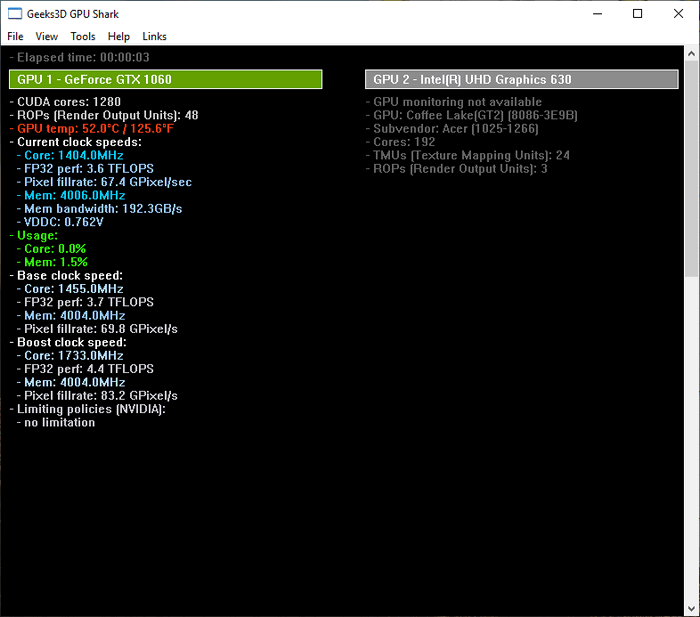
GPU Shark 0.33.4 – Lightweight GPU Monitoring Tool for Windows
GPU Shark 0.33.4 is a lightweight and easy-to-use graphics card monitoring utility designed to provide users with essential information about their GPU in real time. Developed by Ozone3D, the program is particularly useful for gamers, hardware enthusiasts, technicians, and anyone who wants a quick overview of their graphics card without installing a large or complicated system-monitoring suite.
The application focuses entirely on GPU information, keeping the interface simple and straightforward. It supports NVIDIA GeForce and AMD Radeon graphics cards and provides a convenient way to monitor important hardware parameters while gaming, benchmarking, troubleshooting, or testing system stability.
Simple and Detailed Monitoring Modes
One of GPU Shark’s most useful features is its ability to display GPU information in different levels of detail.
The simplified view focuses on the most important information, allowing users to quickly check the graphics card model, GPU temperature, clock frequencies, memory clock, and other essential operating values.
For users who need more technical information, the detailed mode provides additional hardware and driver data such as the GPU codename, graphics driver version, BIOS information, device identification details, and other GPU-related specifications.
This makes GPU Shark suitable for both beginners who only need basic monitoring and advanced users who want more detailed technical information about their graphics hardware.
Real-Time GPU Monitoring
GPU Shark provides real-time information about the current operating state of the graphics card.
Users can quickly monitor GPU temperatures and clock speeds, making the application useful when testing demanding games, running benchmarks, checking cooling performance, or diagnosing graphics-related problems.
Monitoring these values can also help users determine whether a GPU is operating normally under load or whether high temperatures, unusual clock behavior, or thermal limitations may be affecting performance.
Lightweight and Easy to Use
One of the biggest advantages of GPU Shark is its simplicity.
The program does not include complicated configuration menus or unnecessary features. Instead, it concentrates on presenting GPU information clearly and quickly.
Its small size also makes it useful as a portable diagnostic utility that can be kept alongside other PC maintenance and hardware-monitoring tools.
GPU Shark 0.33.4 is approximately 577 KB in size, making it significantly smaller than many complete system-monitoring applications.
Useful for Gamers and PC Technicians
GPU Shark can be particularly helpful when troubleshooting gaming performance problems.
For example, users can monitor the GPU while running a demanding game to determine whether the graphics processor is reaching high temperatures or operating at unexpected clock frequencies.
PC technicians can also use the program as a quick diagnostic tool when inspecting computers equipped with NVIDIA or AMD graphics cards.
Because the application concentrates specifically on graphics hardware, users can access the required GPU information without navigating through unrelated CPU, storage, memory, or motherboard statistics.
GPU Shark 0.33.4 Compatibility
GPU Shark is available as freeware and is designed for Microsoft Windows systems.
The 0.33.4 release is listed as compatible with Windows 11, Windows 10, Windows 8, and Windows 7.
It supports GeForce and Radeon-based graphics cards, although the amount of information displayed may depend on the graphics card model, installed driver, and hardware capabilities.
GPU Shark vs GPU Shark II
Users should also be aware that GPU Shark II is available as the newer successor to the original GPU Shark application.
However, the classic GPU Shark remains useful for users who prefer an extremely lightweight application with a simple interface and a strong focus on quick GPU monitoring.
GPU Shark 0.33.4 therefore continues to be a practical option for users who do not require the additional functionality provided by larger hardware-monitoring packages.
Conclusion
GPU Shark 0.33.4 is a compact and practical GPU monitoring utility that provides essential information about NVIDIA GeForce and AMD Radeon graphics cards.
Its straightforward interface, real-time monitoring capabilities, detailed hardware information, and extremely small program size make it a useful addition to any PC diagnostic toolkit.
Whether you are monitoring temperatures during gaming, testing graphics card stability, checking clock frequencies, or simply identifying detailed information about your GPU, GPU Shark provides a fast and convenient way to access the most important graphics hardware data without unnecessary complexity.