Lazesoft Recovery Suite 5.3.0.1 Unlimited Edition – Complete Windows Recovery and Rescue Toolkit
Lazesoft Recovery Suite 5.3.0.1 Unlimited Edition is a comprehensive Windows recovery and maintenance toolkit designed to help users and IT administrators recover lost data, repair unbootable Windows systems, reset forgotten passwords, clone disks, manage partitions, and create bootable rescue media.
Instead of requiring several separate utilities for different recovery situations, Lazesoft Recovery Suite combines system repair, data recovery, password recovery, disk imaging, cloning, and partition management tools into a single package.
The Unlimited Edition is particularly suitable for companies, government organizations, educational institutions, and IT departments because its organization-wide license allows the software to be used across multiple computers within the licensed organization.
Complete Windows Recovery Environment
One of the strongest features of Lazesoft Recovery Suite is its ability to work even when Windows can no longer start normally.
Users can create bootable recovery media and launch the recovery environment independently of the installed Windows operating system.
Once inside the recovery environment, users can access important files, repair startup problems, recover deleted information, restore partitions, reset Windows passwords, clone disks, and perform various maintenance operations.
This makes the suite especially useful when dealing with serious Windows failures that prevent access to the normal desktop.
Create Bootable USB or Recovery CD
Lazesoft Recovery Suite includes a WinPE Recovery CD Builder that can create bootable rescue media using either a USB flash drive or optical disc.
The bootable environment provides access to the recovery tools without requiring Windows to boot successfully.
This can be extremely useful when dealing with:
Windows boot failures, corrupted system files, damaged boot configurations, forgotten passwords, damaged partitions, accidental formatting, virus-related problems, or situations where important files must be copied from a computer that no longer starts.
The official Lazesoft feature set includes support for creating both bootable CD/DVD media and USB recovery drives.
Repair Windows Boot Problems
Lazesoft Recovery Suite includes dedicated Windows Recovery tools designed to repair systems that fail to start.
The suite can address problems involving the Master Boot Record, boot sectors, Windows boot files, registry configuration, and other components required during the Windows startup process.
This can help recover computers affected by corrupted boot information, failed updates, accidental configuration changes, damaged system files, and certain malware-related startup problems.
Instead of immediately reinstalling Windows, users can attempt to repair the existing installation while preserving installed programs and personal data.
One-Click Windows Repair
For less experienced users, Lazesoft Recovery Suite provides automated repair capabilities that can simplify the process of diagnosing and repairing common startup problems.
The recovery environment attempts to identify issues affecting the Windows installation and provides suitable recovery options.
More experienced administrators can also access individual tools for greater control over the repair process.
Recover Files from an Unbootable Computer
A Windows installation does not necessarily need to function correctly for users to recover their important documents.
Using Lazesoft’s bootable recovery environment, files can be accessed and copied from a computer even when the installed operating system refuses to start.
This makes the suite valuable in situations where the main priority is recovering documents, photographs, videos, project files, databases, or other important information before repairing or reinstalling Windows.
Powerful Data Recovery
Lazesoft Recovery Suite incorporates the company’s Data Recovery technology for recovering accidentally deleted or lost files.
It can recover files that were deleted normally or removed from the Windows Recycle Bin.
The recovery engine can also search damaged, formatted, reformatted, or corrupted partitions for recoverable information.
Supported recovery scenarios include accidental file deletion, drive formatting, partition corruption, partitioning errors, damaged storage devices, unexpected shutdowns, and certain software-related failures.
Recover Data from Formatted Drives
Formatting a storage device does not always mean that every piece of data is immediately destroyed.
Lazesoft Recovery Suite can scan formatted partitions for recoverable files and attempt to reconstruct their original information.
This can be useful after accidentally formatting a hard drive, SSD, USB flash drive, memory card, or another supported storage device.
For the best recovery probability, users should avoid writing additional data to the affected storage device until the recovery process has been completed.
Recover Lost or Deleted Partitions
Partition tables can become damaged because of accidental deletion, disk-management errors, software problems, power failures, or storage corruption.
Lazesoft includes partition recovery capabilities designed to locate lost partitions and recover their contents.
The software can scan the physical disk for partition information and allow users to preview recoverable files before saving them.
Its recovery capabilities include support for common Windows file systems such as FAT, FAT32, and NTFS.
RAW Partition Recovery
When Windows cannot correctly recognize a file system, a partition may appear as RAW.
A RAW partition can prevent users from accessing otherwise important files through File Explorer.
Lazesoft Recovery Suite can scan RAW partitions and hard drives for recoverable information, providing another option before formatting the affected storage device.
Recover Different Types of Files
Lazesoft’s recovery engine can search for many common categories of data.
Users can attempt to recover documents, photographs, videos, music, email files, and other important information.
The software can also identify certain files according to their file signatures, which can be useful when the original file-system information has been damaged.
NTFS File Recovery
NTFS is the primary file system used by modern Windows installations.
Lazesoft Recovery Suite includes dedicated support for NTFS recovery and can preserve original date and time information when recovering supported lost files from NTFS partitions.
Maintaining this metadata can be useful when restoring large collections of documents or photographs because it makes recovered files easier to organize.
Mac HFS File System Recovery
Although Lazesoft Recovery Suite is primarily a Windows recovery product, its data recovery engine can also work with Mac OS HFS file systems.
This provides additional flexibility when recovering files from storage devices previously used with Apple computers.
Windows Password Recovery
Lazesoft Recovery Suite includes powerful Windows password recovery functionality.
If a Windows local account password has been forgotten, the bootable recovery environment can be used to regain access to the computer.
The software can clear or reset Windows local account passwords and unlock disabled user accounts.
Because password recovery can be performed from the bootable environment, users do not need to log into Windows first.
Windows Domain Password Recovery
The Unlimited Edition extends password recovery functionality to Windows domain environments.
According to Lazesoft’s edition comparison, the Unlimited Edition supports Windows Active Directory Domain Controller password resetting in addition to standard local Windows account recovery.
This capability makes the edition particularly useful for authorized system administrators responsible for business or institutional Windows environments.
Recover Windows Product Keys
Reinstalling Windows can sometimes require access to the system’s original product information.
Lazesoft Recovery Suite includes Windows product key recovery functionality that can help locate Windows installation keys.
It can also retrieve supported Windows OEM product keys stored in system firmware or BIOS information.
This can be useful when preparing a computer for Windows reinstallation.
Disk Imaging and Backup
Lazesoft Recovery Suite is not limited to emergency recovery.
It also includes disk imaging tools that can create backups of complete disks or individual partitions.
Users can create compressed disk images for backup purposes or perform sector-by-sector imaging when a more exact copy is required.
Disk imaging can provide an important safety layer before performing major system changes, drive upgrades, partition operations, or recovery procedures.
Clone Hard Drives and SSDs
The suite includes disk and partition cloning functionality.
Users can clone an existing system drive to another hard drive or SSD, making the software useful when upgrading storage hardware or replacing an aging drive.
The cloning engine can copy only used sectors for faster migration or perform sector-by-sector copying when required.
It can also automatically adjust partition sizes to accommodate the destination drive.
GPT Disk Support
Modern Windows computers frequently use GPT partition tables, particularly systems configured for UEFI booting.
Lazesoft Recovery Suite supports backup, restoration, and cloning operations involving GPT disks.
This allows it to work with modern Windows system configurations rather than being limited to older MBR-based computers.
Partition Management Tools
The suite includes several partition-management capabilities.
Users can create partitions, delete partitions, format storage volumes, hide partitions, and mark partitions as active.
These tools can be useful when preparing drives, configuring replacement disks, fixing partition-related problems, or reorganizing storage.
Lazesoft includes these capabilities directly within its recovery environment, reducing the need to use a separate partition manager.
Secure Disk and Partition Wiping
Lazesoft Recovery Suite can also wipe partitions and complete hard disks.
Disk wiping is useful when permanently retiring a computer or storage device and users want to prevent old information from being recovered easily.
It can also be useful before repurposing storage hardware for another system.
Because wiping operations permanently destroy data, users should carefully verify the selected drive before starting the process.
Registry Editor and Registry Recovery
Serious Windows problems can sometimes be caused by damaged registry information.
Lazesoft provides offline Windows registry tools that allow administrators to inspect and modify registry configuration without booting into the affected Windows installation.
Registry Recovery capabilities can also help restore corrupted registry information to an earlier functional state.
This is particularly valuable when a Windows configuration change prevents the operating system from starting.
Support for RAID Storage
The Unlimited Edition is intended for more advanced IT environments and includes support for RAID storage configurations.
This can be particularly important for servers, workstations, and business computers where storage may consist of multiple disks configured as RAID arrays.
Lazesoft specifically lists RAID support as one of the benefits of the Unlimited Edition.
Windows Server Support
Unlike the Home and Professional editions, Lazesoft Recovery Suite Unlimited Edition supports Microsoft Windows Server environments.
Official compatibility includes Windows Server 2025, 2022, 2019, 2016, 2012/2012 R2, 2008/2008 R2, and 2003-era server systems.
This broad server compatibility makes the Unlimited Edition particularly useful for corporate IT departments and administrators maintaining both desktop and server infrastructure.
Windows 11 Support
Lazesoft Recovery Suite supports modern Windows desktop systems, including Windows 11.
Officially listed desktop compatibility includes Windows 11, Windows 10, Windows 8.1, and Windows 7.
The recovery environment can therefore be used across both newer and older Windows computers.
Improved UEFI and Secure Boot Compatibility
Modern computers increasingly use UEFI firmware and Secure Boot instead of traditional BIOS configurations.
Recent Lazesoft Recovery Suite releases have improved compatibility with UEFI and Secure Boot environments, making bootable recovery media more useful on current-generation PCs.
Lazesoft highlighted improved UEFI and Secure Boot compatibility among the improvements introduced in the 5.2 generation of Recovery Suite.
These improvements remain important for the newer 5.3 release line.
Find Drivers Tool
Recent Lazesoft Recovery Suite releases also include a Find Drivers feature.
When using a WinPE recovery environment, Windows may occasionally lack the necessary driver for a particular storage controller, network adapter, or other hardware component.
The Find Drivers functionality is intended to make locating and loading appropriate drivers easier during recovery operations.
This feature was introduced as part of the Recovery Suite 5.2 generation.
Designed for IT Administrators
The Unlimited Edition is positioned differently from Lazesoft’s standard Home version.
While the Home Edition is designed mainly for individual users recovering their own computers, the Unlimited Edition provides organization-wide licensing.
A company purchasing the Unlimited Edition can use the software to maintain and repair computers throughout the licensed organization.
This makes it especially appropriate for corporate IT departments, schools, universities, government organizations, and businesses managing numerous Windows computers.
Unlimited Organization-Wide License
One of the defining features of the Unlimited Edition is its licensing model.
Lazesoft describes the Unlimited License as a business license that provides organization-wide usage rights for corporations, government institutions, and educational organizations.
This is different from the Technician Edition, which is specifically licensed for companies that provide recovery and repair services to external customers.
For internal organizational IT use, the Unlimited Edition provides the broader deployment rights required to maintain many computers.
More Than 40 Recovery and Maintenance Utilities
Lazesoft describes Recovery Suite as an all-in-one package containing more than 40 hard disk utilities and computer maintenance tools.
Rather than purchasing separate programs for data recovery, boot repair, password recovery, cloning, partition management, disk imaging, and rescue-media creation, users can access these functions from one integrated recovery package.
This integration is one of the biggest advantages of the suite for administrators who regularly troubleshoot Windows computers.
Useful Before Reinstalling Windows
One of the most common situations where Lazesoft Recovery Suite can help is before reinstalling Windows.
Users can boot into the recovery environment, copy important files from the damaged installation, recover the Windows product key, create a disk image, and attempt system repair before deciding whether a full reinstallation is necessary.
This provides several opportunities to protect important information before destructive troubleshooting procedures are performed.
Useful for SSD and Hard Drive Upgrades
The disk-cloning component can also simplify hardware upgrades.
When replacing an older hard disk with a larger HDD or faster SSD, users can clone the existing Windows installation instead of reinstalling the operating system and applications from the beginning.
Partition sizes can be retained or automatically adjusted to match the capacity of the destination disk.
Recovery for Serious Windows Failures
Lazesoft Recovery Suite is particularly valuable because many of its most important tools remain available even after Windows has become unusable.
Typical situations where the suite may help include corrupted boot files, damaged partitions, accidental formatting, forgotten passwords, blue or black screens, malware-related problems, disk replacement, or inaccessible data.
Lazesoft positions the Unlimited Edition as capable of addressing Windows boot and crash scenarios while providing access to separate data and disk-management tools from the same recovery environment.
Lazesoft Recovery Suite 5.3.0.1 Unlimited Edition
Version 5.3.0.1 represents the newer Recovery Suite build currently appearing in software distribution listings.
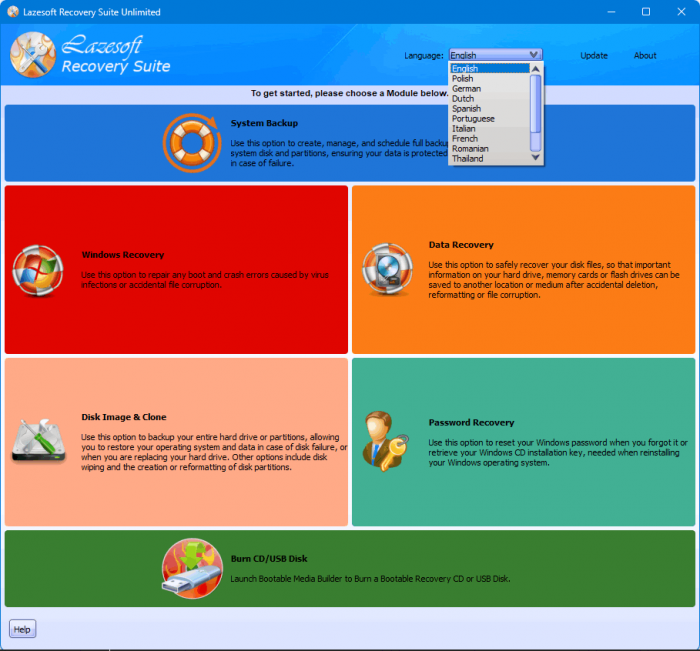
The core functionality continues to combine Windows System Recovery, Data Recovery, Windows Password Recovery, Disk Image & Clone, partition management, and bootable WinPE rescue capabilities.
At the time of writing, Lazesoft’s public Unlimited Edition product page still prominently documents the 5.2 release line, and a detailed official 5.3.0.1 changelog has not yet been published there. For that reason, specific undocumented changes in 5.3.0.1 should not be assumed beyond the established functionality of the current Recovery Suite product.
Conclusion
Lazesoft Recovery Suite 5.3.0.1 Unlimited Edition is a comprehensive rescue and maintenance package for Windows computers and servers.
It brings together data recovery, Windows startup repair, password recovery, bootable WinPE media creation, disk imaging, cloning, partition recovery, partition management, registry recovery, product-key retrieval, and disk-wiping capabilities within a single environment.
Its ability to operate from bootable media makes it especially valuable when Windows can no longer start, while support for Windows Server, RAID environments, UEFI systems, and organization-wide licensing gives the Unlimited Edition additional value for professional IT departments.
For organizations that regularly maintain Windows workstations and servers and want one toolkit capable of handling everything from deleted files and forgotten passwords to damaged boot configurations and complete disk migrations, Lazesoft Recovery Suite 5.3.0.1 Unlimited Edition provides a versatile recovery solution.