Topaz Video Pro 1.7.1 – Professional AI Video Enhancement and Upscaling Software
Introduction to Topaz Video Pro 1.7.1
Topaz Video Pro 1.7.1 is a professional AI-powered video enhancement solution designed for filmmakers, video editors, production studios, content creators, and professionals who need to improve video quality using advanced artificial intelligence technology.
Developed by Topaz Labs, the software combines powerful AI models with professional video-processing tools that can upscale footage, reduce noise, recover details, increase frame rates, stabilize shaky recordings, sharpen videos, and improve overall image quality.
Topaz Video Pro is particularly useful for restoring old footage, enhancing low-resolution recordings, preparing content for modern high-resolution displays, and improving technically difficult videos without requiring extensive manual editing.
Advanced AI Video Enhancement
Artificial intelligence is at the heart of Topaz Video Pro 1.7.1.
Instead of applying traditional filters uniformly across every frame, the software analyzes individual frames and attempts to distinguish real details from compression artifacts, digital noise, blur, and other imperfections.
This intelligent processing enables the program to reconstruct missing visual information while maintaining a more natural appearance.
The result can be significantly cleaner and sharper footage, especially when working with older videos or recordings captured using lower-quality equipment.
Powerful Video Upscaling
Video upscaling is one of the most important capabilities of Topaz Video Pro.
The program can increase the resolution of lower-quality footage while using AI models to reconstruct details that conventional resizing methods may not preserve.
Topaz Video Pro supports professional high-resolution workflows and can produce extremely large output resolutions for specialized projects.
This makes the software useful for converting older SD or HD footage into formats more suitable for modern 4K, 8K, and other high-resolution displays.
AI-Powered Video Denoising
Digital noise can significantly reduce the quality of footage recorded in low-light environments or using high ISO settings.
Topaz Video Pro 1.7.1 provides intelligent denoising technology designed to remove unwanted noise while preserving important textures and details.
Rather than simply smoothing the video, the AI analyzes the relationship between noise and genuine visual information.
This approach can produce cleaner footage without removing important facial details, textures, edges, or environmental elements.
Professional Video Sharpening
Soft or slightly blurry footage can often benefit from AI-based sharpening.
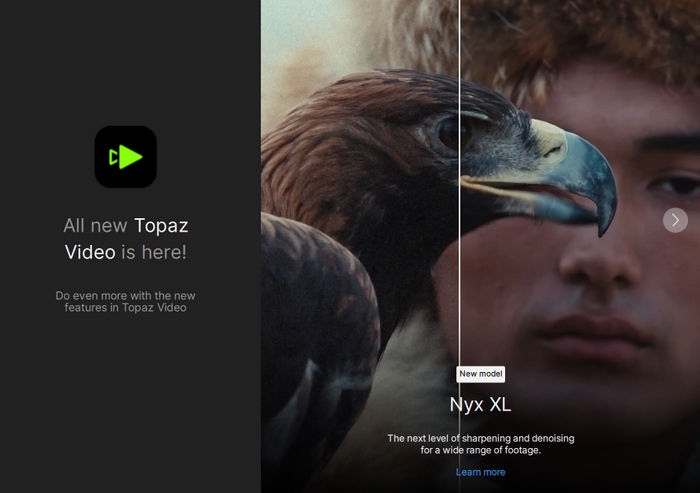
Topaz Video Pro analyzes video frames and enhances edges and textures while attempting to avoid the exaggerated halos and artifacts commonly associated with traditional sharpening filters.
This capability is especially useful when processing footage captured with older cameras, compressed video sources, digital archives, or recordings where focus was not completely accurate.
The sharpening technology can improve overall clarity and make the final footage appear more detailed and professionally processed.
Frame Interpolation and Smooth Motion
Topaz Video Pro includes advanced AI frame interpolation technology.
The software can generate additional frames between existing frames, allowing users to increase the frame rate and create smoother motion.
This capability can be particularly useful for converting lower-frame-rate footage into smoother video or producing high-quality slow-motion sequences.
Frame interpolation can help match footage recorded using different cameras and different frame rates within the same editing project.
AI Slow Motion
Creating convincing slow-motion footage traditionally requires recording at a high frame rate.
With AI frame generation, Topaz Video Pro can create intermediate frames and produce slow-motion effects from footage that was originally recorded at standard frame rates.
The software analyzes movement between frames and generates new visual information to maintain smoother motion.
This can provide editors with additional creative flexibility when working with existing footage that cannot be recorded again.
Advanced Video Stabilization
Camera shake can make otherwise useful footage difficult to watch.
Topaz Video Pro includes intelligent stabilization technology that analyzes motion throughout the video and reduces unwanted camera movement.
This functionality can be valuable for handheld recordings, action footage, drone videos, older home recordings, and footage captured without professional stabilization equipment.
The software can stabilize the frame while also helping recover details affected by movement and motion blur.
Motion Deblur Technology
Motion blur can appear when subjects move quickly or when footage is recorded using unsuitable shutter settings.
Topaz Video Pro provides AI-assisted motion deblur capabilities designed to improve clarity in moving areas.
By analyzing motion patterns across multiple frames, the software can attempt to recover sharper edges and more recognizable details.
This can significantly improve action sequences, sports footage, handheld recordings, and other videos containing rapid movement.
SDR to HDR Conversion
Topaz Video also provides tools designed to transform standard dynamic range footage into higher dynamic range video.
AI-assisted processing can improve brightness distribution, contrast, highlights, and overall visual depth.
This can help older or standard footage achieve a more modern appearance when prepared for HDR-compatible displays and professional production workflows.
The final results will depend heavily on the quality and characteristics of the original footage.
Professional AI Models
Topaz Video Pro provides access to advanced AI models created for different types of footage and enhancement tasks.
Different models may perform better depending on whether the original video is highly compressed, noisy, blurry, interlaced, animated, low-resolution, or already relatively high quality.
Professional users can experiment with different processing models and settings to determine which combination provides the most suitable result for each project.
The Pro edition can also provide access to additional professional-grade models designed for demanding production workflows.
Starlight AI Technology
Starlight represents some of Topaz Labs’ more advanced video enhancement technology.
These AI models are designed to perform sophisticated restoration and reconstruction of video frames, particularly when conventional enhancement models struggle with difficult source material.
Starlight-based processing can help recover textures, improve clarity, reconstruct details, and enhance degraded footage.
Professional variants are especially useful when working with challenging archival footage, heavily compressed recordings, or videos requiring substantial restoration.
Multi-GPU Rendering
One of the major advantages of Topaz Video Pro is support for professional multi-GPU workflows.
Video AI processing is computationally demanding, particularly when enhancing high-resolution footage or using advanced AI models.
Multi-GPU rendering allows compatible systems to divide processing workloads across multiple graphics processors.
Professional workstations equipped with several powerful GPUs can therefore achieve significantly faster processing times when handling large video projects.
Optimized GPU Acceleration
Topaz Video Pro is designed to take advantage of modern graphics hardware.
The application is optimized for GPUs from NVIDIA, AMD, and Intel, while some advanced models may have additional hardware requirements.
Powerful graphics cards can substantially reduce rendering time because AI enhancement requires a large number of parallel calculations.
For professionals who regularly process long videos or high-resolution footage, GPU performance is one of the most important factors affecting workflow efficiency.
Local Video Processing
An important advantage of Topaz Video Pro is its ability to perform video processing locally.
Local processing allows professional users to work with sensitive or confidential footage without necessarily uploading every project to external online services.
This can be particularly valuable for film studios, production companies, commercial agencies, and organizations working with protected content.
Local rendering can also provide greater control over hardware resources and professional processing workflows.
Professional Codec Support
Topaz Video Pro supports workflows involving a wide selection of professional and consumer video formats.
Supported input workflows can include formats such as Apple ProRes, Avid DNxHR, H.264, H.265, VP9, AV1, OpenEXR, PNG, JPG, TIFF, DPX, and CineForm.
This flexibility makes the program useful in professional post-production environments where footage may originate from different cameras, editing platforms, and production pipelines.
Integration with Professional Editing Software
Topaz Video Pro can be used as a standalone application and can also complement professional video-editing environments.
Support for professional workflows makes it possible to use AI enhancement alongside applications such as DaVinci Resolve and Adobe After Effects.
This allows editors to enhance footage with Topaz technology before continuing with color grading, compositing, visual effects, sound editing, and final production.
Restoring Old Videos
One of the most impressive applications of Topaz Video Pro 1.7.1 is video restoration.
Older recordings often suffer from low resolution, analog noise, compression artifacts, blur, unstable camera movement, and limited frame rates.
Artificial intelligence can help address several of these problems simultaneously.
Old family recordings, archived television footage, historical videos, and recordings from early digital cameras can potentially be transformed into cleaner and more visually appealing versions.
Enhancing Compressed Videos
Videos downloaded from older websites or repeatedly compressed over time may contain blocking, softness, ringing artifacts, and missing details.
Topaz Video Pro can analyze degraded footage and attempt to reconstruct cleaner textures and edges.
Although no software can perfectly recover information that has been completely lost, AI enhancement can often produce a considerable improvement compared with traditional sharpening and resizing techniques.
Improving Low-Resolution Footage
Low-resolution videos can look extremely soft when displayed on modern high-resolution monitors and televisions.
Topaz Video Pro can upscale this footage while attempting to generate additional visual detail.
The software is particularly useful when users have valuable footage that cannot be recorded again.
Instead of simply enlarging pixels, AI processing analyzes visual patterns and reconstructs details based on information learned from large training datasets.
High-Quality Video Export
Professional video enhancement requires more than simply improving individual frames.
Topaz Video Pro provides flexible export options designed to preserve high image quality throughout the production process.
Users can select appropriate output configurations depending on whether footage will be used for additional editing, archival purposes, streaming, online publishing, or final production.
Professional color and bit-depth workflows can also help maintain image quality when transferring enhanced footage into other editing applications.
Designed for Professional Production
Topaz Video Pro is primarily designed for professionals and organizations that require more advanced capabilities than standard consumer video enhancement software.
Film production teams, advertising agencies, restoration studios, television professionals, professional YouTubers, and commercial content creators can integrate the application into demanding post-production workflows.
Professional licensing and additional processing capabilities make the Pro edition especially suitable for commercial environments.
Simple and Efficient Workflow
Despite the complexity of the AI technology operating behind the scenes, Topaz Video Pro maintains a relatively straightforward workflow.
Users can import footage, select appropriate enhancement options, preview the result, adjust processing parameters, and export the enhanced video.
Presets can also accelerate common workflows by providing predefined enhancement configurations.
This allows experienced users to customize processing while helping new users achieve useful results without configuring every parameter manually.
Hardware Requirements and Performance
AI video enhancement can require significantly more computing power than traditional video editing.
A powerful modern GPU, sufficient system memory, and fast storage are recommended when processing high-resolution footage.
Advanced AI models and extremely high-resolution output can require considerably more VRAM than basic enhancement operations.
Professional users planning to work regularly with demanding AI models should therefore consider workstation-class hardware or powerful modern graphics cards to achieve better rendering performance.
Who Should Use Topaz Video Pro 1.7.1?
Topaz Video Pro 1.7.1 is suitable for filmmakers, professional video editors, content creators, restoration specialists, production studios, advertising agencies, archival organizations, professional photographers working with video, and users who need advanced AI enhancement.
It is particularly valuable for anyone regularly working with old, noisy, blurry, shaky, compressed, low-resolution, or low-frame-rate footage.
Why Choose Topaz Video Pro?
The primary advantage of Topaz Video Pro is its combination of multiple AI-powered video technologies within a single professional application.
Instead of relying on separate programs for upscaling, denoising, frame interpolation, stabilization, sharpening, and restoration, users can perform many of these operations within one integrated workflow.
This can save considerable time while providing access to sophisticated AI models that would be difficult to reproduce using conventional video-editing tools.
Conclusion
Topaz Video Pro 1.7.1 is a powerful professional AI video enhancement solution designed to transform difficult or low-quality footage into cleaner, sharper, smoother, and higher-resolution video.
With advanced video upscaling, intelligent denoising, sharpening, stabilization, frame interpolation, slow-motion generation, motion deblur, SDR-to-HDR processing, professional AI models, and GPU-accelerated rendering, the application provides a comprehensive toolkit for modern video restoration and enhancement.
Its ability to process footage locally, take advantage of powerful GPU hardware, support professional formats, and integrate into established post-production workflows makes Topaz Video Pro an impressive solution for demanding video projects.
Whether the goal is restoring valuable old footage, enhancing modern recordings, producing smoother slow motion, increasing resolution, or preparing video for professional production, Topaz Video Pro provides advanced AI technology capable of delivering significant improvements while maintaining an efficient workflow.