Topaz Gigapixel Pro 1.3.5 – Professional AI Image Upscaling and Enhancement Software
About Topaz Gigapixel Pro 1.3.5
Topaz Gigapixel Pro 1.3.5 is a professional AI-powered image enhancement and upscaling application designed to increase image resolution while maintaining impressive levels of detail, sharpness, and visual quality. It is particularly useful for photographers, graphic designers, digital artists, content creators, and professionals who regularly work with low-resolution or heavily cropped images.
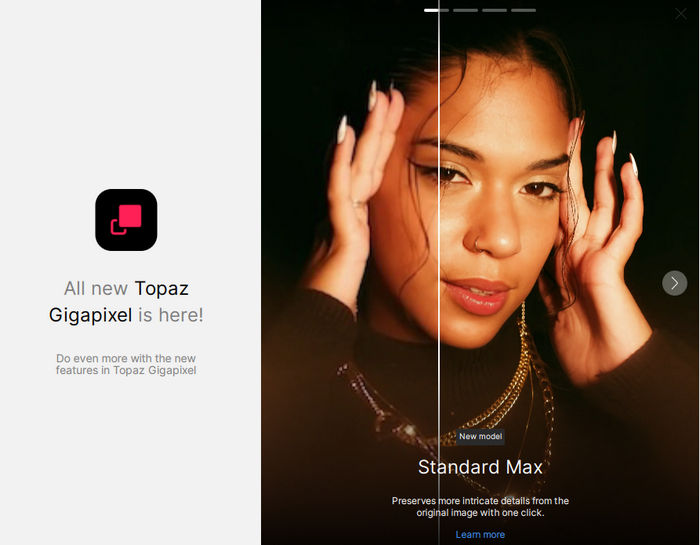
Unlike traditional resizing methods that simply enlarge existing pixels, Topaz Gigapixel uses artificial intelligence models to analyze image content and reconstruct details during the enlargement process. This approach can produce cleaner edges, more natural textures, and significantly better results than conventional interpolation techniques.
The software can handle photographs, digital artwork, graphics, portraits, scanned images, and many other types of visual content, making it a versatile solution for professional image enhancement workflows.
AI-Powered Image Upscaling
One of the main capabilities of Topaz Gigapixel Pro is intelligent image upscaling. The software uses advanced AI processing to enlarge images while attempting to preserve important details and minimize the softness and pixelation commonly associated with traditional resizing.
Topaz Gigapixel is designed to upscale images by as much as 6x while preserving clarity and detail. This makes it especially useful when preparing smaller images for large displays, printing, presentations, design projects, or high-resolution digital publishing.
Instead of simply stretching pixels, the AI analyzes patterns, edges, textures, and other visual information to generate a higher-resolution result that can look considerably more natural.
Improve Low-Resolution Images
Topaz Gigapixel Pro 1.3.5 can be extremely useful when working with images that are too small for modern high-resolution displays or professional design projects.
Older photographs, compressed internet images, cropped photos, archived pictures, and other low-resolution sources can often benefit from AI enhancement. The program attempts to recover visual clarity while reducing the obvious pixelation that becomes visible when small images are enlarged.
The final quality naturally depends on the condition and resolution of the original image, but good source material can produce impressive results.
Advanced AI Models
A major advantage of Topaz Gigapixel is its selection of AI-based processing technologies designed for different types of images.
Different photographs may require different enhancement strategies. A portrait, landscape photograph, digital illustration, and heavily compressed JPEG do not contain the same visual characteristics. Gigapixel’s AI-based workflow helps users select processing appropriate to the source material instead of relying on a single generic resizing algorithm.
This flexibility allows the application to deliver more balanced results across a wide variety of images.
Face Recovery Technology
Portrait enhancement is another important capability of Topaz Gigapixel. Face Recovery technology is designed to improve recognizable facial details in images where faces are small, soft, pixelated, or lacking sufficient resolution.
The technology analyzes qualifying faces and attempts to reconstruct more realistic facial details. This can be particularly useful when restoring older family photographs, enlarging group pictures, improving cropped portraits, or preparing low-resolution portraits for printing.
Users should still compare the enhanced result with the original photograph, especially when historical accuracy is important, because AI-generated detail is reconstructed rather than literally recovered from information that no longer exists.
Sharper and More Detailed Results
Increasing resolution normally introduces softness because conventional resizing algorithms must create additional pixels from limited information.
Topaz Gigapixel addresses this problem using machine-learning models capable of analyzing visual structures and generating additional detail during processing.
Edges can appear cleaner, textures can become more defined, and objects can retain a more natural appearance after significant enlargement. This makes the application particularly valuable for images that need to be displayed or printed at dimensions substantially larger than their original resolution.
Reduce Pixelation and Compression Problems
Small JPEG files and images downloaded from older websites can contain visible compression artifacts, blockiness, and pixelation.
When these images are enlarged using basic resizing tools, those imperfections become even more noticeable. Gigapixel’s AI processing can help produce a cleaner enlargement by intelligently interpreting the image rather than simply magnifying its existing imperfections.
The result can provide a better starting point for additional editing in applications such as Adobe Photoshop or other professional image editors.
Professional Photography Workflow
Photographers frequently need additional resolution after cropping an image. Wildlife, sports, landscape, and event photography can require aggressive cropping when the original subject occupies only a small portion of the frame.
Topaz Gigapixel Pro provides photographers with an additional option for increasing the resulting image dimensions without relying exclusively on traditional interpolation.
It can also be useful when preparing photographs for large-format printing, commercial displays, portfolios, advertising materials, and high-resolution online publication.
Digital Art and Graphics Enhancement
Topaz Gigapixel is not limited to conventional photography. Digital artwork, illustrations, game artwork, posters, wallpapers, and other graphics can also benefit from AI-powered enlargement.
This is particularly useful when the original artwork is available only at a relatively small resolution but needs to be adapted for modern high-resolution displays or larger print dimensions.
Depending on the original material, AI enhancement can help maintain cleaner lines and more convincing textures during enlargement.
Batch Image Processing
Professional users often need to process more than one image at a time. Topaz Gigapixel supports importing multiple images into its file list for batch-oriented workflows.
This can save considerable time when processing collections of photographs, product images, archived pictures, artwork, or other visual assets that require similar enlargement and enhancement settings.
Instead of manually opening and exporting every image individually, users can prepare multiple files and allow the software to process them more efficiently.
Standalone and Plugin Workflow
Topaz Gigapixel can operate as a standalone desktop application, allowing users to import images directly into the program and perform the complete enhancement workflow without another image editor.
Topaz also supports plugin-based workflows with compatible applications, making Gigapixel useful as part of a broader professional editing environment.
This flexibility is valuable for photographers and designers who want to integrate AI upscaling into an existing editing workflow.
Simple and Efficient Interface
Despite the sophisticated AI technology operating behind the scenes, Topaz Gigapixel is designed to provide a relatively straightforward workflow.
Users can import an image, preview the results, configure enlargement and enhancement settings, compare the processed image with the original, and export the final version.
The preview functionality is particularly important because AI enhancement can affect different photographs in different ways. Comparing the processed image before export makes it easier to determine whether the selected settings produce a natural-looking result.
Hardware Acceleration and Performance
AI image processing is computationally demanding, especially when working with high-resolution photographs or performing substantial enlargement.
A modern graphics processor can significantly improve processing performance. Current Topaz documentation recommends Windows 11, at least 24 GB of RAM for an optimal experience, a modern Intel or AMD processor, and a GPU such as an NVIDIA RTX 20-series or newer or AMD Radeon 5000-series or newer with at least 8 GB of VRAM.
Large and extremely large image upscales can require considerably more memory and processing resources, so performance will depend heavily on the computer configuration.
Image Export
After processing is complete, users can export the enhanced image for further editing, printing, archiving, or publishing.
Because Gigapixel focuses on producing high-resolution results, exported images can become substantially larger than their original versions. Users working with very large photographs should therefore ensure that enough system memory and storage capacity are available.
Topaz also recommends using the automatic AI Processor setting in supported configurations because it can utilize available RAM and VRAM resources together during processing.
Uses of Topaz Gigapixel Pro 1.3.5
Topaz Gigapixel Pro can be useful for restoring and enlarging old photographs, enhancing low-resolution images, preparing photos for large-format printing, improving heavily cropped photographs, enlarging digital artwork, creating higher-resolution wallpapers, preparing commercial graphics, processing professional photography projects, and upgrading archived visual content for modern displays.
Its combination of artificial intelligence and professional image-processing tools makes it particularly useful when conventional resizing methods cannot provide sufficient quality.
Advantages of Topaz Gigapixel Pro 1.3.5
The primary advantage of Topaz Gigapixel Pro is its ability to intelligently increase image resolution instead of relying exclusively on conventional pixel interpolation.
AI processing can preserve more apparent detail, produce cleaner edges, enhance faces, improve textures, and generate images suitable for significantly larger output dimensions.
The software is also flexible enough for both casual enhancement and professional production environments, with support for standalone operation and compatible plugin workflows.
Performance Considerations
Topaz Gigapixel can place significant demands on computer hardware. AI models require considerable CPU, GPU, RAM, and VRAM resources, particularly when processing very large images.
Users with older hardware may experience slower previews, longer export times, or compatibility limitations. Topaz specifically notes that underpowered systems can experience slow processing, crashes, and inconsistent behavior.
For demanding professional workflows, a modern dedicated GPU and sufficient system memory are therefore highly recommended.
Conclusion
Topaz Gigapixel Pro 1.3.5 is a powerful AI image upscaling and enhancement solution for users who need to transform smaller or lower-resolution images into larger, cleaner, and more detailed versions.
Its artificial intelligence technology provides a significant advantage over traditional image resizing by analyzing visual content and intelligently reconstructing detail during enlargement. Features aimed at image enhancement, facial recovery, professional enlargement, batch processing, and flexible editing workflows make it suitable for photographers, designers, digital artists, content creators, and other visual professionals.
Whether you are restoring an old photograph, enlarging a heavily cropped image, preparing artwork for high-resolution displays, or producing images for large-format printing, Topaz Gigapixel Pro provides a sophisticated set of AI-powered tools designed to maximize image quality while simplifying the enhancement process.