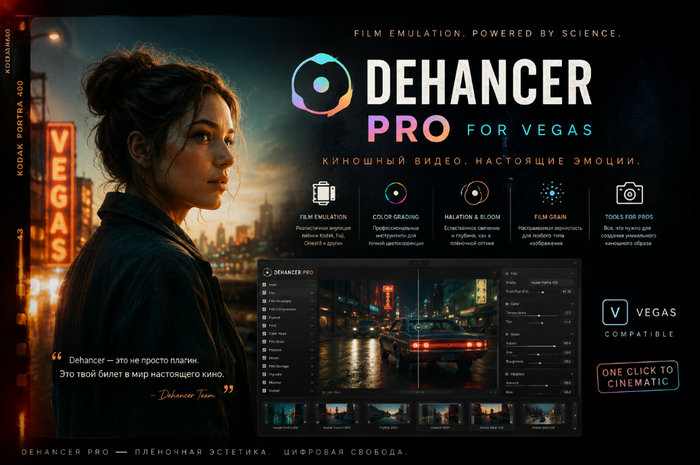
Dehancer 7.4.2 for VEGAS Pro – Professional Film Emulation and Color Grading Plugin
Introduction
Dehancer 7.4.2 for VEGAS Pro is a professional film emulation and color grading plugin designed for video editors, filmmakers, content creators, and colorists who want to reproduce the distinctive visual character of analog film inside their digital workflow.
Instead of functioning as a simple collection of LUTs or presets, Dehancer uses a sophisticated film-emulation approach that recreates many characteristics associated with traditional photographic and motion-picture film. It provides film profiles, realistic grain, halation, bloom, film damage, print-film simulation, and numerous additional tools directly inside VEGAS Pro.
The integration with VEGAS Pro allows editors to apply Dehancer through the Video Event FX chain without exporting footage to another application, making it possible to perform editing and film-style color grading within the same project.
Professional Film Emulation
The main purpose of Dehancer is to reproduce the appearance and behavior of analog film as accurately as possible.
Digital footage can sometimes appear excessively clean or clinical. Dehancer introduces the organic characteristics commonly associated with traditional film production, including natural grain structures, highlight behavior, subtle color shifts, glow, halation, and other imperfections.
This makes the plugin particularly useful for cinematic projects, short films, music videos, commercials, documentaries, YouTube productions, and other projects where a distinctive film-inspired appearance is desired.
More Than 60 Film Profiles
One of the most important features of Dehancer is its extensive collection of film profiles.
The plugin includes more than 60 film profiles based on various photographic and cinema film stocks. Instead of simply placing a color filter over the image, these profiles affect characteristics such as color response, contrast, tonal reproduction, and overall image character.
Users can quickly experiment with different film stocks to determine which aesthetic works best for a particular scene or project.
The Push/Pull controls provide additional creative flexibility, allowing the selected film profile to be adjusted in ways inspired by traditional film-processing techniques.
Extensive Camera Profile Support
Dehancer also provides support for more than 130 camera Log profiles.
Camera profiling is particularly useful when working with Log footage because it provides Dehancer with the appropriate interpretation of the source material before the film-emulation process begins.
This allows footage from many professional and consumer cameras to be integrated into a controlled color workflow while preserving important highlight, shadow, and color information.
Realistic Film Grain
Film Grain is one of Dehancer’s signature tools.
Instead of applying a basic noise overlay, Dehancer attempts to recreate the visual structure and behavior of real photographic grain. The result can provide digital footage with a more organic texture without simply making the image appear noisy.
Users can customize the grain depending on the desired film format and aesthetic. Dehancer provides tool profiles associated with formats including 8 mm, 16 mm, 35 mm, and 65 mm.
Subtle grain can add texture to clean digital footage, while stronger settings can create a much more noticeable vintage film appearance.
Halation Effect
Halation is another important component of traditional film aesthetics.
On real film, strong light can interact with the physical film layers and create characteristic reddish or warm edges around bright areas. Dehancer provides a dedicated Halation tool designed to reproduce this phenomenon digitally.
When carefully adjusted, Halation can make highlights appear less sterile and provide footage with a convincing cinematic character.
The effect can be particularly noticeable around bright lamps, windows, reflections, practical lights, and other high-contrast areas.
Bloom
Dehancer also includes a dedicated Bloom effect.
Bloom creates a soft diffusion around bright areas and highlights, helping reproduce the optical character associated with film and traditional imaging systems.
It can be used subtly to soften harsh digital highlights or more aggressively when creating dreamy, atmospheric, or stylized footage.
Combining Bloom with Film Grain and Halation is one of the most effective ways to transform extremely clean digital footage into something with a noticeably more analog appearance.
Film Developer
Film Developer provides additional control over the film-emulation process.
It is designed around concepts inspired by analog film development and allows colorists to modify the way the simulated film image is developed. This gives users considerably more creative control than simply choosing a film profile and accepting its default appearance.
It can be especially useful for advanced users who want to create their own recognizable visual style.
Film Compression
Film Compression helps reproduce another important characteristic of film.
Digital cameras and traditional film handle highlights differently. Film is often appreciated for its relatively smooth and aesthetically pleasing highlight response.
The Film Compression controls can help manage bright areas and produce a softer transition toward highlights, contributing to a more cinematic image when properly configured.
Print Film Emulation
The traditional cinema workflow does not end with capturing an image on negative film. Print film also contributes significantly to the final appearance.
Dehancer includes Print Film simulation, including profiles such as Kodak 2383 and Fujifilm 3513.
This allows filmmakers and editors to reproduce another important stage of the traditional photochemical workflow digitally.
Print-film processing can significantly influence contrast, saturation, colors, highlights, and the overall visual personality of the finished image.
CMY Color Head and Print Toning
Dehancer provides a CMY Color Head inspired by traditional analog color correction.
Rather than relying exclusively on conventional digital RGB controls, users can work with Cyan, Magenta, and Yellow adjustments that resemble techniques used in traditional film printing.
Print Toning provides another creative method for manipulating the final appearance and can be useful when creating unique cinematic color palettes.
These tools make Dehancer particularly interesting for experienced colorists who want to explore workflows inspired by photochemical film production.
Film Breath and Gate Weave
Perfectly stable digital footage can sometimes lack some of the subtle characteristics associated with projected film.
Dehancer provides Film Breath and Gate Weave tools to reproduce these imperfections.
Film Breath can introduce subtle variations associated with film exposure and processing, while Gate Weave recreates the tiny positional instability that can occur when physical film travels through a camera, scanner, or projector.
These effects should generally be used carefully, but they can dramatically improve the authenticity of vintage or analog-inspired projects.
Film Damage
For projects requiring a stronger retro appearance, Dehancer includes Film Damage simulation.
This tool can reproduce various physical imperfections associated with aged or mechanically processed film.
It is particularly useful for music videos, historical recreations, retro advertisements, experimental productions, title sequences, and projects intentionally designed to resemble archival footage.
Overscan
Dehancer also includes an Overscan tool that helps reproduce characteristics associated with the physical boundaries and projection of traditional film.
Combined with Gate Weave, Grain, Film Damage, and other effects, Overscan can contribute to a much more convincing analog presentation.
Vignette
The integrated Vignette tool allows users to subtly darken or otherwise control the peripheral areas of an image.
Vignetting can direct attention toward the main subject and contribute to the optical appearance of certain lenses and film systems.
Because it is integrated directly into Dehancer, editors can create the effect without adding another separate plugin to the VEGAS Pro effects chain.
LUT Generator
Dehancer includes a LUT Generator that can be useful for workflows where a created look needs to be exported or transferred.
This provides additional flexibility for professional workflows involving different software, preview systems, or production environments.
However, Dehancer itself should not be considered simply a LUT package. Many of its effects involve processing that cannot be fully represented by a conventional LUT.
Monitoring Tools
Professional color grading requires reliable methods of evaluating an image.
Dehancer includes monitoring functionality such as False Colors and Clipping tools. These features can help users identify exposure levels and potentially problematic highlight or shadow areas while performing color correction and film emulation.
This makes the plugin useful not only for applying creative looks but also for maintaining better technical control over the image.
VEGAS Pro Integration
One of the major advantages of the VEGAS Pro edition is its direct OFX integration.
Dehancer can be added to a clip through the Video Event FX chain, allowing the entire film-emulation workflow to remain inside VEGAS Pro. There is no need to render the footage, open another color-grading application, perform the grade, and then import the finished material back into VEGAS.
This provides a significantly more convenient workflow for editors who primarily use VEGAS Pro.
After installation, users can select a clip on the timeline, open the available plugins, locate Dehancer, and add it to the Video Event FX chain.
GPU Acceleration
Film emulation can require significant processing power, particularly when combining several effects such as Film Grain, Halation, Bloom, and Film Damage.
Dehancer for VEGAS Pro therefore relies heavily on GPU processing.
On Windows systems, NVIDIA graphics cards can use CUDA while compatible AMD hardware can use OpenCL. Selecting an appropriate rendering device is important for obtaining the best possible performance.
According to Dehancer’s documentation, VEGAS Pro currently has limitations regarding native GPU-memory access for plugins. Consequently, Dehancer may perform more slowly in VEGAS Pro compared with some other supported host applications.
System Requirements
Dehancer for VEGAS Pro is designed for 64-bit Windows environments and requires a compatible NVIDIA or AMD graphics processor supporting CUDA or OpenCL.
The official documentation currently lists Windows 10 64-bit and Windows 11 64-bit as supported operating systems.
GPU memory requirements depend heavily on project resolution. Full HD projects have considerably lower requirements than 4K, 6K, or 8K footage.
For Full HD production, approximately 4 GB of GPU memory is listed as a minimum, while 8 GB is recommended. For 4K projects, approximately 8 GB is considered the minimum with 12 GB recommended. Higher resolutions can require substantially more VRAM.
A powerful modern GPU is therefore highly recommended for users planning to combine several Dehancer effects with high-resolution footage.
Performance
Dehancer provides sophisticated image processing, but this quality comes with relatively demanding hardware requirements.
Film Grain, Bloom, Halation, Film Damage, and other processing stages can increase GPU workload considerably. Editors working with 4K or higher-resolution footage may notice reduced real-time playback performance depending on their graphics card.
Using optimized project settings, proxies, preview-quality adjustments, and an adequately powerful GPU can make the editing experience significantly smoother.
Advantages of Dehancer for VEGAS Pro
Dehancer provides one of the most comprehensive film-emulation environments available directly inside VEGAS Pro.
Its major strengths include realistic analog-film reproduction, more than 60 film profiles, extensive camera Log profile support, sophisticated Film Grain, Halation, Bloom, Print Film simulation, Film Developer, Film Compression, CMY Color Head, Film Breath, Gate Weave, Film Damage, Overscan, Vignette, LUT generation, and professional monitoring tools.
Direct OFX integration also means VEGAS Pro users can access these tools without leaving their normal editing environment.
Disadvantages
The primary disadvantage of Dehancer is its relatively high demand on GPU resources.
Editors using older graphics cards or systems with limited VRAM may experience slower previews and longer rendering times, particularly with high-resolution footage.
Another consideration is complexity. Beginners can obtain attractive results by selecting film profiles and adjusting a few basic parameters, but mastering the entire Dehancer workflow requires an understanding of color management, camera Log formats, film characteristics, exposure, and the interaction between different processing modules.
Excessive use of Grain, Halation, Bloom, Film Damage, or other analog effects can also produce an unnatural result. Dehancer generally produces its strongest results when the effects are balanced according to the footage and intended visual style.
Who Should Use Dehancer?
Dehancer for VEGAS Pro is suitable for filmmakers, professional video editors, YouTube creators, music-video producers, commercial editors, colorists, and anyone interested in producing convincing analog-inspired imagery.
It is particularly valuable for VEGAS Pro users who previously needed another application specifically for advanced film emulation.
Beginners can use the film profiles as a convenient starting point, while experienced colorists can explore the more advanced controls to construct highly customized cinematic looks.
Conclusion
Dehancer 7.4.2 for VEGAS Pro provides an extensive collection of tools for transforming modern digital footage into imagery inspired by traditional photographic and motion-picture film.
Its combination of film profiles, camera profiles, realistic grain, Halation, Bloom, Print Film emulation, Film Developer, Film Compression, CMY Color Head, Film Breath, Gate Weave, Film Damage, Overscan, and additional color-processing tools provides substantially more flexibility than a conventional collection of cinematic LUTs.
The direct integration with VEGAS Pro is especially important because editors can now create sophisticated film-inspired grades without leaving their existing timeline and editing workflow.
For creators who appreciate analog film aesthetics and want greater control over the cinematic character of their footage, Dehancer represents a powerful addition to the VEGAS Pro environment.