Adobe DNG Converter 18.5 – Complete Review, Features, Advantages and Disadvantages
Introduction
Adobe DNG Converter 18.5 is a specialized photography utility designed to convert supported camera RAW files into Adobe’s Digital Negative format, commonly known as DNG. It provides photographers with a straightforward way to standardize RAW photographs while maintaining the image information required for professional post-processing.
Unlike Adobe Photoshop, Lightroom Classic, or Camera Raw, Adobe DNG Converter is not primarily an image-editing application. Its main purpose is file conversion and RAW workflow compatibility. This makes it particularly useful for photographers working with different camera manufacturers, large RAW archives, or software that supports DNG but may not directly recognize a particular proprietary camera RAW format.
What Is the DNG Format?
DNG stands for Digital Negative. Adobe developed the format as an openly documented archival format for digital camera RAW data.
Camera manufacturers frequently use proprietary RAW formats. Examples include CR2 and CR3 from Canon, NEF from Nikon, ARW from Sony, RAF from Fujifilm, ORF from OM System and Olympus cameras, and several other manufacturer-specific formats.
DNG provides an alternative approach by converting supported proprietary RAW files into a more standardized format while retaining the flexibility associated with RAW photography.
RAW File Conversion
The fundamental function of Adobe DNG Converter 18.5 is converting supported RAW photographs into DNG files.
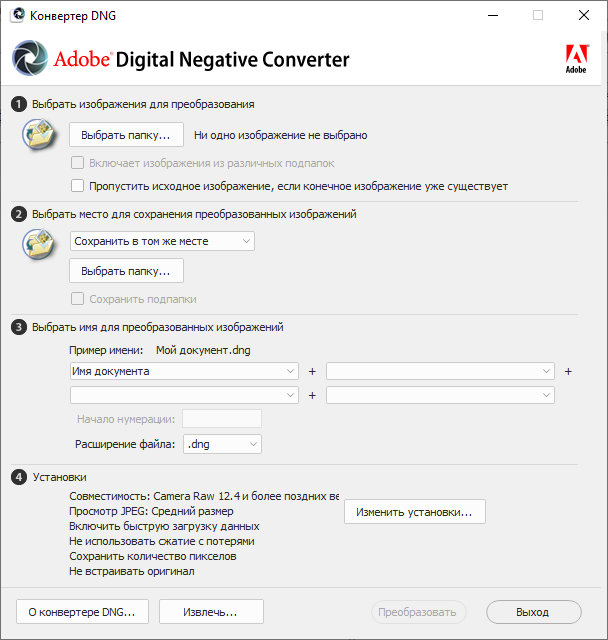
The process is designed to be straightforward. Users select the folder containing their source photographs, choose where converted files should be saved, configure the appropriate conversion preferences, and start the process.
This workflow can be especially convenient when hundreds or thousands of RAW photographs need to be converted simultaneously.
Support for a Wide Range of Cameras
Adobe regularly expands RAW support across its photography ecosystem as new cameras are released.
DNG Converter uses Adobe’s RAW compatibility technology to convert photographs from supported camera models into the DNG format.
This makes the utility valuable for photographers using cameras from multiple manufacturers because their RAW files can be standardized into a common format for archival and post-processing workflows.
Compatibility with Older Adobe Software
One of the most useful applications of DNG Converter is improving compatibility with older versions of Adobe photography software.
A newer camera may produce a RAW format that an older version of Camera Raw does not recognize directly. In certain workflows, converting that photograph into a suitably compatible DNG file can allow it to be opened by older Adobe software.
The converter provides compatibility settings that help users determine which Camera Raw generation should be able to process the resulting DNG.
This can extend the practical usefulness of an existing photography workflow when upgrading other software is not immediately desirable.
Preserving RAW Image Information
Converting a supported RAW photograph to DNG is fundamentally different from converting it to an ordinary JPEG.
JPEG processing produces a rendered image and generally discards substantial amounts of the original RAW sensor information. DNG is designed to retain RAW image data for subsequent photographic processing.
Photographers can therefore continue making extensive adjustments to exposure, white balance, highlights, shadows, colors, noise reduction, sharpening, and other parameters using compatible RAW-processing applications.
Batch Conversion
Adobe DNG Converter is particularly useful for batch processing.
Instead of opening and converting photographs individually, users can select a folder containing multiple supported RAW files and process them together.
This can dramatically reduce repetitive work after large photoshoots.
Wedding photographers, event photographers, wildlife photographers, studio photographers, and other professionals who regularly return with hundreds or thousands of photographs can integrate batch conversion into their file-management workflow.
Folder-Based Workflow
The application is designed around a straightforward folder-based conversion process.
Users can specify a source directory containing their RAW photographs and choose a destination for the resulting DNG files.
Subfolders can also be incorporated into certain workflows, making it easier to process structured photography archives without manually navigating through every directory.
This approach keeps the application focused on conversion rather than introducing unnecessary catalog-management complexity.
File Naming Options
Professional photography workflows often require consistent naming conventions.
Adobe DNG Converter provides file-renaming capabilities during conversion, allowing photographers to establish more organized naming structures for their DNG photographs.
Consistent file names can be particularly valuable when photographs originate from several cameras or memory cards.
A structured naming workflow can make files easier to locate, archive, deliver, and manage later.
DNG Compression
DNG provides compression options designed to help photographers manage storage requirements.
Depending on the selected conversion settings, photographers can choose approaches that prioritize maximum RAW preservation or smaller file sizes.
Lossless compression is particularly important for archival workflows because it can reduce storage requirements without intentionally discarding the underlying RAW image information.
Other compression options may prioritize smaller files but should be selected carefully when maximum original image data is important.
JPEG Preview Options
DNG files can contain JPEG previews that allow applications to display the photograph without immediately performing a complete RAW rendering operation.
Adobe DNG Converter provides options related to these previews.
Photographers can select settings appropriate to their storage and workflow requirements. Larger previews can improve convenience in some applications but can also increase the resulting file size.
Embedding the Original RAW File
One of the more interesting DNG options is the ability to embed the original proprietary RAW file inside the resulting DNG.
This provides an additional archival safeguard because the photographer can maintain access to the original camera file while using DNG as the primary working format.
However, embedding the original RAW file substantially increases storage requirements because the DNG contains both the converted information and the original RAW file.
For photographers with very large archives, this storage cost should be considered carefully.
Fast Load Data
DNG workflows can include optimization information intended to improve loading and processing performance in compatible Adobe applications.
This can be useful for photographers dealing with high-resolution photographs and large collections where small improvements in loading performance can accumulate into meaningful time savings.
Actual performance will depend on the software, hardware, storage device, and characteristics of the photographs being processed.
DNG and Metadata
Metadata is an essential part of professional digital photography.
DNG is designed to store relevant metadata together with the image information. This can include camera-related information and other photographic metadata used by compatible applications.
Keeping important information associated with the photograph can simplify long-term organization and reduce dependence on separate sidecar files in certain workflows.
Archiving Photographs
Long-term archival is one of the principal reasons photographers choose DNG.
Proprietary RAW formats depend on continued software support for individual camera formats. DNG was created as an openly documented format intended to provide a more standardized approach to RAW image storage.
For photographers maintaining archives over many years, standardizing files into DNG can simplify future management.
However, some photographers still prefer retaining their original proprietary RAW files alongside or instead of DNG files. The best strategy depends on the photographer’s archival requirements.
Integration with Adobe Camera Raw
DNG files integrate naturally with Adobe Camera Raw.
After conversion, photographers can open supported DNG photographs and perform the same types of RAW development commonly associated with camera-original RAW files.
Exposure, white balance, color, masking, sharpening, noise reduction, lens corrections, and many other adjustments can be performed non-destructively in compatible Adobe workflows.
This close relationship between DNG and Camera Raw is one of the format’s major advantages for Adobe users.
Integration with Lightroom Classic
Adobe Lightroom Classic also provides extensive support for DNG.
Photographers can import converted DNG files into Lightroom catalogs and organize them using ratings, flags, keywords, collections, metadata, and other library-management features.
The photographs can then be developed using Lightroom’s RAW-processing tools.
For photographers already using Lightroom Classic, DNG Converter can therefore serve as a preprocessing utility before images enter the main catalog.
Integration with Photoshop
DNG photographs can also be incorporated into Photoshop workflows through Adobe Camera Raw.
The DNG file can first be developed in Camera Raw, where fundamental photographic corrections are performed. The processed image can then be opened in Photoshop for more sophisticated retouching, compositing, graphic design, and pixel-level manipulation.
This creates a natural workflow from RAW conversion to development and finally advanced editing.
DNG vs JPEG
DNG and JPEG serve very different purposes.
JPEG is primarily a finished or near-finished image format designed for convenient viewing, sharing, websites, social media, and general distribution. Its compression reduces file size but also limits the amount of original photographic information available for extensive editing.
DNG is designed around RAW photographic information and professional post-processing.
For this reason, photographers normally use DNG during the editing and archival stages and export finished photographs to JPEG or another delivery format afterward.
DNG vs Proprietary RAW Formats
Whether photographers should convert proprietary RAW files to DNG is a long-standing workflow decision.
DNG provides standardization, strong integration with Adobe applications, metadata advantages, and potential storage benefits.
Keeping the camera manufacturer’s original RAW format, however, preserves the exact proprietary file produced by the camera and may provide advantages when using manufacturer-specific software.
Some photographers convert everything to DNG, while others keep their original RAW files permanently. Another approach is maintaining both when storage capacity permits.
There is no universal solution because archival priorities and software workflows differ between photographers.
Performance
Adobe DNG Converter is relatively straightforward compared with full image-editing applications, but conversion performance still depends on the computer.
High-resolution RAW photographs contain substantial amounts of data, and processing thousands of them can require significant CPU, storage, and disk activity.
Using a modern processor and fast SSD storage can substantially improve large batch-conversion workflows.
Available storage should also be monitored carefully, particularly when embedding original RAW files inside DNG files.
Advantages of Adobe DNG Converter 18.5
One of the greatest advantages of Adobe DNG Converter is its simplicity. The program concentrates on one primary task and performs it through an uncomplicated workflow.
Batch conversion makes it practical for large photography collections, while compatibility options can help photographers use newer camera files with certain older Adobe RAW-processing environments.
DNG also provides a standardized RAW format that integrates extremely well with Adobe Camera Raw, Lightroom Classic, and Photoshop workflows.
The ability to preserve RAW information distinguishes DNG conversion from ordinary image-format conversion.
Disadvantages of Adobe DNG Converter 18.5
Adobe DNG Converter is not a photo editor. Users cannot expect it to replace Camera Raw, Lightroom Classic, or Photoshop.
Converting photographs also introduces another step into the photography workflow, which may be unnecessary when the photographer’s existing software already supports the camera’s original RAW format.
Some photographers prefer retaining proprietary camera RAW files because they want to preserve the exact original files generated by their cameras or maintain maximum compatibility with manufacturer-specific software.
Embedding the original RAW file inside DNG can solve some archival concerns, but it also significantly increases storage requirements.
Who Should Use Adobe DNG Converter?
Adobe DNG Converter 18.5 is particularly useful for photographers who want to standardize RAW files from different cameras into a common format.
It can also be valuable for users working with newer cameras and older compatible Adobe photography applications, photographers maintaining long-term digital archives, and professionals who prefer a DNG-centered workflow.
Users who already have complete support for their camera’s proprietary RAW format and prefer retaining camera-original files may have less reason to perform conversion.
Conclusion
Adobe DNG Converter 18.5 is a focused but valuable utility for photographers who need a reliable method of converting supported camera RAW photographs into Adobe’s Digital Negative format.
Its strengths come from its straightforward batch workflow, RAW data preservation, compatibility settings, flexible conversion options, metadata support, and close integration with Adobe’s professional photography ecosystem.
The application does not attempt to replace a RAW editor. Instead, it solves a specific problem: creating standardized DNG files that can move efficiently through compatible photography and archival workflows.
For photographers who rely on DNG for long-term storage, compatibility, or standardized RAW processing, Adobe DNG Converter 18.5 remains an important companion to applications such as Adobe Camera Raw, Lightroom Classic, and Photoshop.