W10Privacy 6.0.0.0 – Advanced Privacy and Telemetry Control for Windows 10 and 11
W10Privacy 6.0.0.0 is a free Windows privacy utility developed by Bernd Schuster that gives users more control over privacy, telemetry, background services, applications, and other system settings in Windows 10 and Windows 11. The program collects a large number of privacy-related options into a single interface, making it easier to configure settings that would otherwise be scattered across Windows menus, Registry locations, and administrative tools.
What Is W10Privacy?
Windows includes many settings related to diagnostics, telemetry, advertising, application permissions, and online services. W10Privacy is designed to make these settings easier to find and manage.
Instead of manually navigating through dozens of Windows configuration pages, users can review available options from one organized application and decide which features should remain enabled or disabled.
Version 6.0.0.0 is the current release as of August 2026, and the software remains available as freeware.
Main Features of W10Privacy 6.0.0.0
Privacy Management
The primary purpose of W10Privacy is to improve user control over privacy-related Windows features.
It provides settings that can help reduce unnecessary data collection and modify how Windows communicates with Microsoft services.
Telemetry Control
Windows telemetry can transmit diagnostic and usage information in the background. W10Privacy provides several options for limiting or disabling selected telemetry functions.
This makes the program particularly useful for users who prefer greater control over the information their computer sends online.
Windows 10 and Windows 11 Support
Although the application’s name refers to Windows 10, the developer states that its primary focus now includes both Windows 10 and Windows 11, along with their built-in applications and services.
Application and Background Service Control
W10Privacy can provide access to settings related to Windows applications and background functionality.
Depending on the Windows version and available options, users can adjust various behaviors associated with:
- Built-in Windows apps
- Background applications
- Microsoft Edge
- Telemetry services
- Advertising features
- Data collection
- System services
- Privacy permissions
Organized Configuration Categories
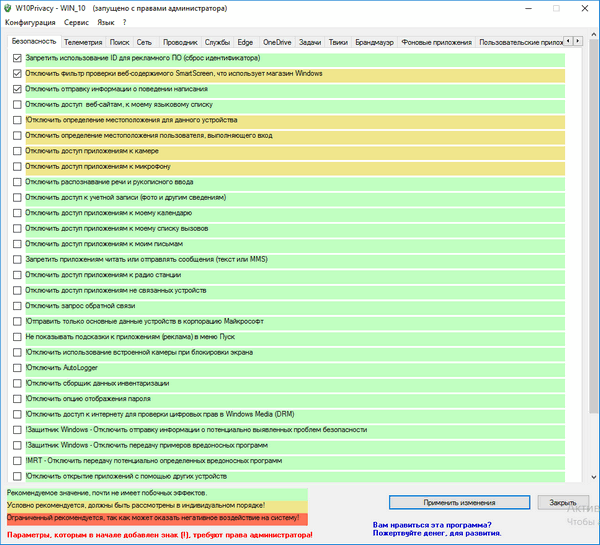
W10Privacy presents its available tweaks in categorized sections, making a large number of Windows settings easier to understand and manage.
The program also uses different risk levels to help users determine how strongly a particular modification could affect system functionality. Some settings are relatively safe, while others should only be changed after understanding their consequences.
Easy Control Over Advanced Windows Settings
One of the biggest advantages of W10Privacy is that it removes the need to manually search through Registry Editor, Group Policy, Windows Settings, and other administrative interfaces.
Users can select individual options and apply only the changes they want.
This selective approach makes the program suitable for both advanced users and people who simply want better control over Windows privacy without applying every available tweak.
Import and Export Configuration
W10Privacy also supports working with saved configurations, which can be useful when maintaining several computers.
This functionality can help technicians and system administrators apply similar privacy settings across multiple Windows installations.
Suitable for Advanced Windows Users
W10Privacy is especially useful for:
- Privacy-conscious Windows users
- System administrators
- PC technicians
- Advanced Windows users
- Users who want to reduce telemetry
- People managing multiple Windows computers
- Users who want more control over Windows background services
Advantages
W10Privacy 6.0.0.0 provides several benefits:
- Free to use
- Supports Windows 10 and Windows 11
- Centralized privacy configuration
- Advanced telemetry controls
- Large number of customizable settings
- Individual tweaks can be selected separately
- Useful for technicians and system administrators
- Helps reduce the need for manual Registry modifications
- Lightweight utility with a small application size
The current release is reported at approximately 2.4 MB, making it a relatively lightweight Windows utility.
Important Considerations
W10Privacy is a powerful configuration utility, so users should avoid enabling or disabling options without understanding what they do.
Some privacy modifications can affect Windows features, applications, network communication, or background services. More aggressive settings may therefore cause compatibility or functionality problems on certain systems.
Creating a System Restore Point or backing up important configuration settings before making extensive changes is recommended.
W10Privacy 6.0.0.0 – Final Overview
W10Privacy 6.0.0.0 is a practical privacy and Windows configuration utility for users who want greater control over telemetry, data collection, applications, services, and other privacy-sensitive features.
Its centralized interface makes advanced Windows settings considerably easier to manage, while its selective configuration system allows users to decide exactly which modifications should be applied.
For Windows 10 and Windows 11 users looking for a lightweight tool focused on privacy, telemetry management, and system customization, W10Privacy remains a useful solution—particularly for experienced users who understand the effects of advanced Windows tweaks.