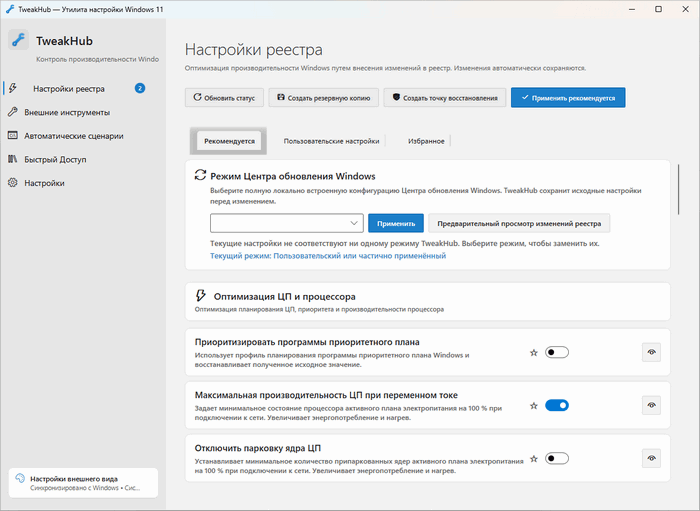
TweakHub 1.4.2 + Portable – Powerful Windows 11 Optimization and Tweaking Toolkit
TweakHub 1.4.2 is a Windows optimization and customization utility designed to bring a wide range of useful system tweaks together in one convenient interface. Instead of manually searching through Windows settings, Registry Editor, PowerShell commands, and separate optimization utilities, TweakHub provides centralized access to commonly used performance and system configuration options.
The program is primarily designed for Windows 11 users, particularly advanced users, technicians, gamers, and PC enthusiasts who frequently configure or maintain computers. TweakHub is also designed with portability in mind, making it suitable for users who want to keep their optimization toolkit on a USB drive and use it across compatible systems.
Main Features of TweakHub 1.4.2
TweakHub focuses on simplifying Windows configuration while providing quick access to useful system tools and optimization options.
Windows Performance Tweaks
The program includes various tweaks intended to improve Windows responsiveness and optimize how system resources are handled. Users can apply selected configurations without manually modifying complicated Windows settings.
Centralized System Management
One of TweakHub’s biggest advantages is its centralized interface. Multiple Windows configuration options are available from one location, reducing the need to navigate through different Control Panel pages, Settings menus, Registry locations, and administrative tools.
Windows 11 Optimization
TweakHub is especially focused on Windows 11, providing adjustments that can help users configure the operating system according to their performance and usability preferences.
Depending on the available options, tweaks may affect areas such as:
- Windows interface behavior
- Performance-related settings
- System responsiveness
- Resource management
- Privacy-related configurations
- Background Windows features
- General system customization
Useful for PC Technicians
Because TweakHub brings several configuration tools together, it can be particularly useful for technicians who regularly install, configure, rebuild, or maintain Windows computers.
Instead of repeating numerous manual configuration steps on every computer, commonly required adjustments can be accessed from one toolkit.
TweakHub Portable Version
The Portable edition of TweakHub is particularly useful for people who work with multiple computers.
A portable version can typically be launched without going through a traditional installation process, allowing the program to be stored on:
- USB flash drives
- Portable SSDs
- External hard drives
- Maintenance toolkits
- Local utility folders
This makes TweakHub a convenient addition to a Windows technician’s portable software collection.
Simple and Practical Interface
TweakHub aims to make Windows tweaking easier by presenting optimization functions through an organized graphical interface.
This approach can be much more convenient than manually executing scripts or searching for individual Registry modifications. Users can quickly locate the adjustment they need and manage multiple system settings from the same application.
Who Should Use TweakHub?
TweakHub 1.4.2 can be useful for several types of users.
PC enthusiasts can use it to customize Windows and experiment with different system configurations.
Gamers may find performance-related adjustments useful when configuring Windows for a cleaner and more responsive gaming environment.
System administrators and technicians can use the portable edition as part of a maintenance USB toolkit.
Advanced Windows users can benefit from having commonly used configuration options available through a single interface instead of modifying settings manually.
Advantages
TweakHub offers several notable benefits:
- Centralized Windows optimization tools
- Designed primarily for Windows 11
- Easy access to advanced system tweaks
- Portable usage support
- Useful for technicians and power users
- Reduces the need for manual Registry modifications
- Convenient interface for managing multiple adjustments
- Suitable for regular PC maintenance
Things to Consider
System tweaking tools should always be used carefully. Some changes can affect Windows behavior, compatibility, security, or performance depending on the computer configuration.
Before applying major modifications, it is recommended to create a System Restore Point or another backup so that changes can be reversed if necessary.
Users should also avoid enabling tweaks they do not understand simply because they are labeled as performance optimizations. The best configuration depends on how the computer is used.
TweakHub 1.4.2 + Portable – Final Overview
TweakHub 1.4.2 is a practical all-in-one Windows tweaking utility for users who want greater control over their operating system without manually navigating through numerous advanced configuration menus.
Its combination of Windows optimization tools, centralized controls, and portable operation makes it especially attractive for power users and PC technicians. For anyone who frequently configures Windows 11 computers or prefers having optimization utilities available from a USB drive, TweakHub 1.4.2 + Portable can provide a convenient and efficient system management solution.