Classroom Spy Pro 5.7.1 – Professional Classroom Monitoring and Management Software
Classroom Spy Pro 5.7.1 is a classroom management and computer monitoring solution designed to help teachers and administrators supervise student computers from a centralized console. It provides real-time screen monitoring, remote computer control, website and application management, communication tools, and several administrative features intended for schools, training centers, computer laboratories, and educational environments.
The software allows authorized teachers to view multiple student screens simultaneously, assist students remotely, share demonstrations, restrict inappropriate computer activity, and manage classroom devices without having to physically visit each workstation.
Classroom Spy Pro 5.7.1 Overview
Classroom Spy Pro works through a teacher console combined with an agent installed on managed student computers. Once configured within an authorized classroom or institutional environment, the teacher can monitor connected computers and perform supported classroom-management actions from one interface.
Version 5.7.1 supports modern Windows environments alongside additional desktop platforms, making it suitable for classrooms containing different types of computers.
Real-Time Student Screen Monitoring
One of the main features of Classroom Spy Pro is its ability to display live images of student computer screens.
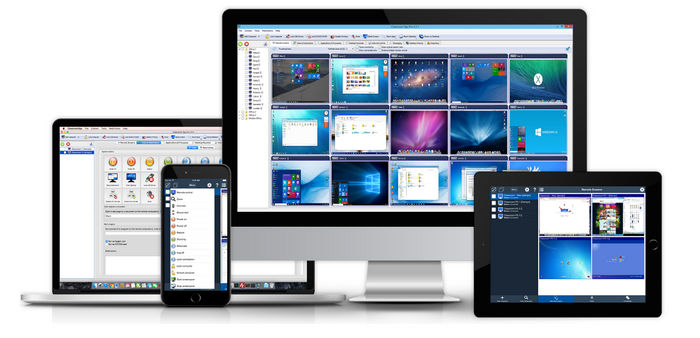
Instead of checking every workstation manually, teachers can view several computers simultaneously as thumbnails from the main console.
A selected screen can also be enlarged when closer observation is required.
This can help instructors identify students who need assistance, verify that classroom activities are being followed, and maintain focus during computer-based lessons.
Remote Computer Control
Classroom Spy Pro allows authorized instructors to remotely interact with managed student computers.
Teachers can control the mouse and keyboard of a selected workstation, which can be useful when helping students solve technical problems or demonstrating how to complete a specific task.
Remote control reduces the need for teachers to move continuously between computers during practical lessons.
Teacher Screen Sharing
The software can display the teacher’s screen to student computers.
This feature is especially useful for demonstrations, tutorials, software training, and step-by-step classroom instructions.
Teachers can present procedures directly on student displays, making it easier for everyone in the classroom to follow the same demonstration.
Website and Application Management
Classroom Spy Pro provides tools for controlling access to selected websites and applications during lessons.
Teachers can use these controls to keep computers focused on educational activities and reduce distractions from unrelated programs or websites.
Such functionality can be useful during exams, training sessions, laboratory exercises, and lessons requiring students to use only specific applications.
Lock Student Computers
Teachers can temporarily lock managed workstations when they need students to focus on an explanation or another classroom activity.
Locking computers can prevent students from continuing to interact with their devices until the teacher decides to restore access.
Remote System Commands
Classroom Spy Pro provides administrative functions for remotely managing classroom computers.
Depending on the configuration and permissions available, authorized instructors can perform actions such as shutting down, restarting, locking, or otherwise managing connected workstations.
This can simplify computer laboratory administration, particularly when many systems need to be managed simultaneously.
Screen Recording
The software includes screen-recording capabilities that allow activity displayed on managed computers to be recorded.
Recording can be useful for reviewing classroom activities, documenting demonstrations, or maintaining records when permitted by institutional policies and applicable privacy requirements.
Messaging Tools
Teachers can communicate with connected students using built-in messaging functionality.
This provides a convenient way to send instructions or communicate with individual students without interrupting the rest of the classroom.
Communication features can also be useful in training centers where participants may be working independently on different tasks.
File Management and Distribution
Classroom Spy Pro includes tools that can assist with transferring or distributing files within a managed classroom environment.
Teachers can provide students with documents, exercises, learning materials, or other necessary files without manually copying them to every computer.
This can simplify preparation for lessons involving multiple workstations.
Organizing Computers into Groups
Large computer classrooms can contain many devices, making them difficult to manage individually.
Classroom Spy Pro allows computers to be organized into groups, helping teachers manage different classes, teams, departments, or laboratory sections more efficiently.
Multiple Monitor Support
For computers equipped with multiple displays, the software provides monitoring capabilities that can help teachers inspect activity across connected monitors.
This is particularly useful in advanced laboratories where students may use multi-monitor workstations.
User and System Information
Teachers can access useful information about connected computers and logged-in users.
This can help administrators identify individual workstations and troubleshoot classroom computer problems more effectively.
Remote Terminal and Administrative Tools
Classroom Spy Pro also offers additional administrative functionality, including remote terminal and system-information tools.
These features are primarily useful for experienced teachers, IT administrators, and technical staff responsible for maintaining classroom computers.
Supported Platforms
Classroom Spy Pro 5.7.1 supports several desktop operating systems, including:
- Windows 11
- Windows 10
- Windows 8 and 8.1
- Windows 7
- 32-bit and 64-bit Windows systems
- macOS 10.13 or later
- Linux systems using X11
- Chrome OS through a Chromebook agent
Teacher console options are also available for supported iOS and Android devices, although mobile devices are not necessarily supported as monitored student endpoints in the same way as desktop computers.
Simple Classroom Management Interface
The software organizes monitored computers in a centralized teacher console.
Student screens can be displayed as thumbnails, allowing teachers to quickly switch between different workstations and management functions.
The number and arrangement of displayed computers can be adjusted depending on the classroom setup.
Main Features
Classroom Spy Pro 5.7.1 provides a broad collection of classroom-management features, including:
- Real-time student screen monitoring
- Multiple computer thumbnail views
- Remote mouse and keyboard control
- Teacher screen broadcasting
- Website access management
- Application control
- Student workstation locking
- Remote shutdown and restart
- Screen recording
- Messaging functionality
- File distribution tools
- Computer grouping
- Multiple monitor support
- Remote terminal functionality
- System information tools
- Cross-platform classroom support
Who Can Benefit from Classroom Spy Pro?
The software is mainly designed for authorized educational and organizational environments, including:
- Schools
- Universities
- Computer laboratories
- Training centers
- Educational institutions
- IT classrooms
- Corporate training environments
It can be particularly useful when an instructor is responsible for supervising a large number of computers simultaneously.
Privacy and Responsible Use
Because Classroom Spy Pro provides powerful monitoring and remote-control capabilities, it should only be deployed on computers where the organization has proper authorization to monitor and manage those devices.
Schools and organizations should clearly inform affected users where required and configure the software according to applicable privacy laws, institutional policies, and data-protection requirements.
The software is designed as an on-premises classroom management solution, meaning the institution deploying it remains responsible for how monitoring data and personal information are handled.
Advantages of Classroom Spy Pro 5.7.1
Classroom Spy Pro offers several benefits for computer-based teaching environments:
- Centralized control of classroom computers
- Real-time visibility of student activity
- Easier remote technical assistance
- Reduced classroom distractions
- Convenient teacher demonstrations
- Remote workstation administration
- Support for large computer laboratories
- Built-in communication features
- Flexible device grouping
- Support for multiple operating systems
Conclusion
Classroom Spy Pro 5.7.1 is a comprehensive classroom monitoring and management application designed to give teachers greater control over computer-based learning environments.
Its combination of live screen monitoring, remote control, teacher screen sharing, workstation locking, website and application management, messaging, recording, and administrative tools makes it suitable for schools, universities, training centers, and computer laboratories.
When deployed transparently and with proper authorization, Classroom Spy Pro can provide educators and IT administrators with an efficient way to manage multiple classroom computers while helping students remain focused on their assigned activities.