FluentCleaner 26.07.05 + FluentCleaner Classic 1.11.112 – Free and Open-Source Windows Cleaning Tool
FluentCleaner 26.07.05 and FluentCleaner Classic 1.11.112 provide a lightweight and transparent way to clean unnecessary files from Windows computers, recover storage space, remove application caches, and manage accumulated temporary data without relying on aggressive registry-cleaning techniques.
Developed by Belim (builtbybel), FluentCleaner is a free and open-source Windows cleanup utility designed as a modern alternative to traditional system cleaners. It combines community-driven cleaning rules with a clear interface, detailed analysis results, customization options, automated cleaning capabilities, and portable operation.
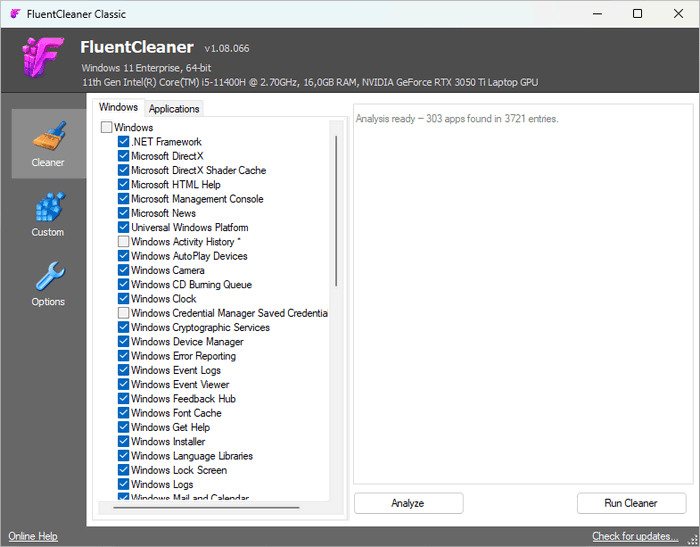
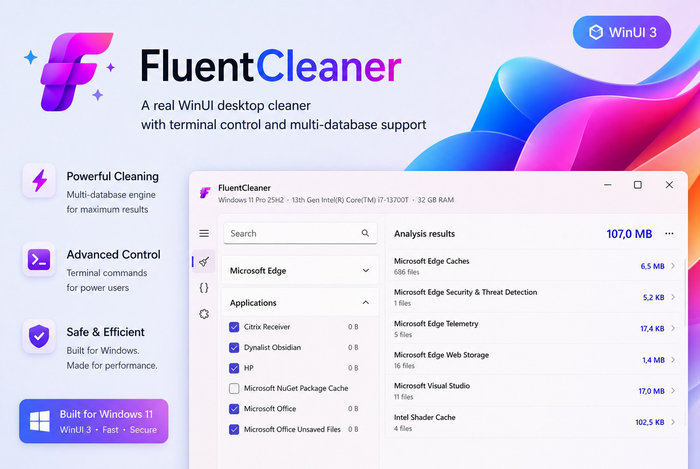
The application is available in two editions: the modern FluentCleaner built with WinUI 3 and the lightweight FluentCleaner Classic based on WinForms and .NET Framework 4.8.
Both editions share the same core cleaning engine but offer different interfaces and runtime requirements.
What Is FluentCleaner?
FluentCleaner is a Windows system-cleaning application designed to identify and remove unnecessary files that accumulate during everyday computer use.
Windows itself, web browsers, development tools, applications, games, installers, updates, and other programs can gradually leave behind temporary files, logs, caches, thumbnails, histories, and other disposable data.
Over time, these files can consume considerable disk space.
FluentCleaner analyzes supported locations and allows users to review potential cleanup targets before removing them.
Unlike many traditional PC optimization suites, FluentCleaner concentrates primarily on cleaning instead of bundling unrelated optimization, advertising, subscription, or registry-repair functions.
Two Editions of FluentCleaner
One of the most interesting aspects of FluentCleaner is that users can choose between two different editions.
FluentCleaner Modern 26.07.05
The Modern edition uses:
- WinUI 3
- Windows App SDK
- Fluent Design principles
- Modern navigation
- Contemporary Windows interface elements
It is primarily intended for users who want the complete FluentCleaner experience with modern functionality and a UI that fits naturally with recent Windows versions.
FluentCleaner Classic 1.11.112
The Classic edition uses:
- WinForms
- .NET Framework 4.8
- Traditional desktop controls
- Compact interface
- Small portable footprint
Classic is designed for users who prefer immediate startup, lower memory consumption, fewer runtime dependencies, and a traditional desktop application experience.
Shared Cleaning Engine
FluentCleaner Modern and FluentCleaner Classic now share the same FluentCleaner.Core cleaning engine.
This means choosing Classic does not necessarily mean using a completely different cleaning technology.
Instead, the major difference is primarily the interface, framework, and feature presentation.
Users can therefore choose the edition that best matches their computer and preferred workflow.
Analyze Before Cleaning
FluentCleaner provides an analysis process that scans supported locations before files are deleted.
The analysis can identify unnecessary data and estimate how much storage space could potentially be recovered.
Results are organized into categories so users can inspect what has been detected.
This approach provides greater transparency than simply deleting files immediately after clicking a cleanup button.
Remove Windows Temporary Files
Windows continuously generates temporary data while applications and system components are running.
FluentCleaner can target supported temporary locations containing files that are no longer required.
Cleaning these areas can help recover storage space, especially on computers that have been running for long periods without maintenance.
Browser Cleaning
Web browsers can accumulate considerable amounts of cached content.
FluentCleaner can detect supported browser-related cleanup entries involving areas such as:
- Browser cache
- Temporary web files
- Download cache
- Session-related data
- Other disposable browser files
Cookie-related cleaning entries are handled more cautiously and remain disabled by default in recent versions.
This reduces the chance of unintentionally removing login sessions or website preferences.
Running Browser Detection
FluentCleaner can detect when a supported browser is still running before attempting to clean entries associated with it.
This is useful because deleting active browser data while the browser is open may lead to incomplete cleanup or conflicts with files currently being used.
The warning allows users to close the browser before proceeding.
Windows Update Leftovers
Windows Update can leave temporary installation and update-related files behind after operating system maintenance.
Depending on available cleaning rules, FluentCleaner can identify supported update leftovers that may no longer be necessary.
This can be particularly useful on computers with limited SSD capacity.
Application Cache Cleaning
FluentCleaner is not limited to Windows itself.
Through its cleaning databases, it can identify cache and temporary locations used by many third-party programs.
Examples may include:
- Productivity applications
- Development tools
- Media software
- Communication programs
- Utilities
- Microsoft applications
- Various third-party desktop programs
Available cleaning entries depend on the currently installed cleaning databases and rules.
Winapp2 Support
An important feature of FluentCleaner is support for the well-known Winapp2 cleaning database format.
Winapp2 contains community-maintained cleaning definitions for Windows and numerous third-party applications.
Using this database dramatically expands the range of programs and temporary locations that FluentCleaner can recognize.
Instead of requiring every cleaning rule to be hard-coded into the application, new and updated definitions can be maintained separately.
Custom Cleaners
Advanced users can create their own cleaning definitions.
Custom Cleaners are useful when an application or folder is not already covered by the default databases.
Users can define specific cleanup operations using supported rule formats.
This makes FluentCleaner particularly attractive to advanced users, developers, technicians, and system administrators who need greater control over exactly what gets cleaned.
PowerShell Cleaning Support
FluentCleaner can integrate PowerShell-based custom cleaners.
PowerShell scripts can provide more flexible cleanup behavior than simple file-location rules.
This functionality makes it possible to build specialized maintenance operations for advanced Windows environments.
Because scripts can perform powerful system operations, users should only run custom scripts they understand and trust.
AI-Assisted Features
Recent FluentCleaner releases include optional AI-assisted functionality.
Depending on edition and configuration, AI can assist with tasks such as:
- Explaining cleaning entries
- Generating Custom Cleaners
- Assisting with PowerShell generation
The Modern edition supports configurable AI providers including services compatible with OpenAI-style APIs.
AI functionality is optional and is separate from the fundamental cleaning engine.
OpenAI-Compatible Providers
FluentCleaner Classic 1.11 expands AI configuration by supporting custom OpenAI-compatible providers.
Users can configure:
- API endpoint
- Model name
- API key
OpenRouter is also available as a preconfigured compatible endpoint.
This provides more flexibility for users who do not want to rely on a single AI provider.
AI Response Caching
The Classic edition improves AI response caching.
Cached responses can distinguish between:
- AI providers
- Custom endpoints
- Models
This prevents responses generated through one provider or model configuration from being incorrectly reused with another configuration.
Scheduled Cleaning
FluentCleaner Modern supports scheduled cleaning.
Users can configure automated maintenance operations using triggers such as:
- Daily cleaning
- Weekly cleaning
- User logon
Scheduled operations use the application’s headless automatic mode, meaning cleanup tasks can be performed without manually opening the full application interface.
Automatic Shutdown
Scheduled cleaning can optionally be followed by a computer shutdown.
This can be useful when maintenance is configured to run at the end of the working day.
For example, a scheduled cleanup can run automatically before the system turns off.
Command-Line Automatic Mode
FluentCleaner supports automated command-line operation through its /AUTO functionality.
This makes the program useful for:
- Scheduled maintenance
- Scripts
- Administrative workflows
- Automated cleanup routines
Users who prefer manual control can continue using the graphical interface normally.
Exclusions
FluentCleaner includes exclusion functionality that allows users to protect particular files, folders, or supported targets from cleaning.
This can be useful if a cleaning database identifies data that the user intentionally wants to preserve.
Recent Classic releases have expanded exclusion support to include compatible registry-based Winapp2 exclusions.
Deep Scan
FluentCleaner Classic includes a Deep Scan feature for finding additional cleanup opportunities.
Deep Scan applies additional targeted cleaning rules beyond the basic scanning process.
Because deeper cleanup operations can reach additional areas of the system, users should review the detected results before removing anything important.
Rule Lab
Rule Lab provides an environment for testing custom cleaning rules.
Rather than immediately using a new rule against the live system, advanced users can evaluate how the rule behaves.
This is especially useful when developing custom cleaning definitions.
Detailed Cleaning Results
FluentCleaner presents cleanup results so users can see what was found during analysis.
Recent updates improve:
- Result summaries
- Scan details
- Progress reporting
- Live analysis feedback
- Cleanup information
Users can also access an Open in folder function for supported results, making it easier to inspect detected locations manually.
Live Progress Information
The cleaning engine includes real-time progress reporting.
During analysis, FluentCleaner can display information such as:
- Scan progress
- Detected cleanup size
- Current operation
- Overall completion percentage
This makes large scans easier to follow than an interface that only displays an indefinite loading animation.
Portable Operation
FluentCleaner is designed to work as a portable utility.
Portable software is especially convenient because users can keep it in a dedicated tools folder or on removable storage without relying on a traditional installation process.
This makes FluentCleaner suitable for:
- PC technicians
- IT administrators
- Portable troubleshooting toolkits
- Advanced users
- Multiple computer maintenance
FluentCleaner Classic also clearly indicates when portable mode is active.
Settings Export and Import
A major addition to FluentCleaner Classic 1.11.112 is the ability to export and import application settings.
Configuration can be stored as portable JSON files.
This makes it easier to:
- Back up FluentCleaner settings
- Transfer configurations between PCs
- Restore settings after reinstalling Windows
- Maintain a standardized configuration
After importing settings, the application refreshes relevant options and can offer a restart when required.
Faster FluentCleaner Classic Startup
Version 1.11 introduces startup optimizations for the Classic edition.
FluentCleaner Classic launches faster while also reducing memory consumption during startup.
This reinforces the purpose of Classic as the lightweight alternative to the full WinUI 3 edition.
Lower Memory Consumption
Because Classic uses traditional WinForms and .NET Framework 4.8 rather than the larger modern Windows App SDK environment, its runtime footprint is significantly smaller.
This can make Classic attractive for:
- Older computers
- Low-memory systems
- Administrative toolkits
- Virtual machines
- Users who simply prefer lightweight applications
Improved Window State Management
FluentCleaner Classic 1.11.112 fixes an interface issue involving maximized windows.
The application can now remember when it was closed while maximized and restore that state during the next launch.
Although relatively small, this improvement makes everyday use more polished.
Localization Support
FluentCleaner continues to expand multilingual support.
FluentCleaner Classic 1.11 adds additional localization including:
- Spanish
- French
Earlier Classic updates also introduced or expanded support for languages including:
- German
- Dutch
- Greek
- Portuguese
- Chinese Simplified
- Chinese Traditional
- Bulgarian
Localization allows FluentCleaner to become more accessible to users outside English-speaking environments.
Modern Fluent Design Interface
The Modern edition is designed around WinUI 3.
It integrates more naturally with the visual style of current Windows systems and provides modern controls, navigation, theme handling, and other interface improvements.
Users who prioritize visual integration with Windows 11 will generally prefer the Modern edition.
Lightweight Classic Interface
Classic takes a different approach.
Rather than recreating the Modern UI, it uses a traditional WinForms layout inspired partly by classic Windows system utilities.
The goal is speed and simplicity rather than advanced visual effects.
Classic is ideal for users who prefer function over visual complexity.
No Aggressive Registry Cleaner
One important difference between FluentCleaner and many older PC optimization suites is its philosophy toward registry cleaning.
FluentCleaner focuses on unnecessary files and known cleanup targets instead of promising unrealistic performance improvements through aggressive registry cleanup.
Removing arbitrary registry entries rarely provides meaningful performance benefits and can create unnecessary risk.
FluentCleaner’s more focused approach therefore provides a more transparent maintenance model.
Open-Source Development
FluentCleaner is an open-source project.
Users and developers can inspect its source code, review development activity, report problems, and contribute improvements.
Open-source development provides an additional degree of transparency compared with closed-source system cleaning utilities.
It also makes it easier for technically experienced users to understand what the program is doing.
Free to Use
FluentCleaner is available without a conventional paid subscription.
There are no premium cleaning tiers required to unlock fundamental system cleanup functionality.
The project is donation-supported.
This makes it attractive to users looking for an alternative to commercial cleaners that continually advertise subscriptions or additional products.
FluentCleaner Modern vs Classic
FluentCleaner Modern 26.07.05
Best for users who want:
- Modern WinUI 3 interface
- Windows App SDK integration
- Complete modern feature set
- Scheduled cleaning
- AI-assisted functionality
- Modern navigation
- Fluent Design appearance
FluentCleaner Classic 1.11.112
Best for users who want:
- Lightweight operation
- Faster startup
- Lower memory usage
- Small portable package
- Traditional desktop interface
- .NET Framework 4.8 compatibility
- Settings export and import
- Custom AI provider configuration
- Familiar Windows application behavior
Both editions use the shared FluentCleaner cleaning core.
System Requirements
FluentCleaner Modern
A practical configuration includes:
- Windows 10 version 2004 or newer
- Windows 11 recommended
- 64-bit Intel or AMD processor
- Windows App SDK components
- At least 4 GB RAM
- Several hundred megabytes of available storage
- Administrator rights for certain cleaning operations
Windows 11 provides the best experience for the modern WinUI interface.
FluentCleaner Classic
The Classic edition is based on:
- Windows
- .NET Framework 4.8
- WinForms
A practical configuration includes:
- Compatible Windows installation
- .NET Framework 4.8
- Intel or AMD processor
- 2 GB RAM or more
- Minimal free storage space
Because it has fewer modern runtime requirements, Classic can be particularly useful on systems where the Modern edition is unnecessary.
Advantages of FluentCleaner
FluentCleaner offers numerous benefits:
- Free and open source
- Modern and Classic editions
- Shared cleaning engine
- Windows temporary-file cleaning
- Browser cache cleaning
- Third-party application cleaning
- Winapp2 database support
- Custom Cleaners
- PowerShell support
- Scheduled cleaning
- Command-line automation
- Exclusion support
- Deep Scan functionality
- Portable operation
- Detailed analysis results
- Live scan progress
- No unnecessary registry cleaner
- No subscription requirement
- Optional AI tools
- Multilingual support
- Lightweight Classic edition
- Modern WinUI 3 edition
Possible Disadvantages
FluentCleaner is primarily a cleaning utility rather than an all-in-one system maintenance suite.
Users looking for integrated antivirus software, disk defragmentation, driver updates, hardware monitoring, or full Windows optimization will need separate tools.
Some advanced functionality also requires technical knowledge.
Custom PowerShell cleaners, external databases, AI providers, and advanced exclusion rules should be configured carefully.
As with every system-cleaning application, removing the wrong data can cause unwanted loss of caches, saved sessions, histories, or application state.
Users should therefore review cleaning selections before proceeding.
Is FluentCleaner Safe?
FluentCleaner is designed around transparent cleaning definitions and allows users to analyze cleanup targets before removal.
Its source code is publicly available, and the project intentionally avoids aggressive registry-cleaning behavior.
Nevertheless, no system cleaner should be used blindly.
Before running a large cleanup, users should:
- Review selected entries
- Close applications being cleaned
- Keep important files backed up
- Avoid unknown third-party cleaning scripts
- Review custom PowerShell scripts before running them
- Download builds only from the legitimate project source
These precautions provide the safest cleaning experience.
Who Should Use FluentCleaner?
FluentCleaner is suitable for:
- Windows 10 users
- Windows 11 users
- PC technicians
- IT administrators
- Developers
- Gamers
- Advanced Windows users
- Laptop users with limited SSD storage
- Users replacing traditional PC cleaners
- Users who prefer open-source software
The Modern edition is ideal for users who want a polished modern interface, while Classic is excellent for users who prioritize speed and a minimal footprint.
FluentCleaner as a CCleaner Alternative
FluentCleaner is frequently compared with classic versions of CCleaner because both applications focus on removing unnecessary Windows and application files.
However, FluentCleaner follows a more transparent and community-oriented model.
It offers Winapp2 compatibility, open-source development, portable operation, no premium subscription requirement, and does not emphasize registry cleaning.
For users who liked the simplicity of traditional PC cleaners before they evolved into larger software suites, FluentCleaner provides an interesting modern alternative.
Which Edition Should You Choose?
Users with a modern Windows 10 or Windows 11 computer who want the complete interface and newer features should generally choose FluentCleaner Modern 26.07.05.
Users who want the smallest possible package, rapid startup, low memory consumption, and a conventional Windows interface may prefer FluentCleaner Classic 1.11.112.
Because both versions share the same core cleaning engine, the choice mainly depends on interface preference and desired functionality.
It is therefore unnecessary to assume that the larger Modern edition automatically performs basic cleaning better than Classic.
Final Verdict
FluentCleaner 26.07.05 and FluentCleaner Classic 1.11.112 provide two different approaches to the same goal: removing unnecessary Windows and application data through a lightweight, transparent, and open-source cleaning engine.
The Modern edition offers WinUI 3 design, scheduled cleaning, automation, AI-assisted functionality, and a richer Windows 11-style experience.
Meanwhile, FluentCleaner Classic provides an impressively lightweight alternative based on WinForms and .NET Framework 4.8, with fast startup, reduced memory usage, portable settings backup, multilingual support, and advanced configuration options.
Support for Winapp2 cleaning databases, custom rules, detailed analysis, exclusions, browser detection, automation, and portable operation makes FluentCleaner useful for both everyday users and experienced technicians.
For anyone looking for a free and open-source Windows cleaner without subscriptions, advertising-heavy extras, or unnecessary registry-cleaning promises, FluentCleaner 26.07.05 and FluentCleaner Classic 1.11.112 offer a powerful combination of modern functionality and classic lightweight performance.