DLNow Video Downloader 1.57.2026.07.04 Review: Download Online Videos, Playlists, Music, and Live Streams
DLNow Video Downloader 1.57.2026.07.04 is a Windows media-downloading application designed to save supported online videos, music, playlists, and live streams for offline use. It provides a simple graphical interface in which users can paste a media link, select the available quality or output type, and download the content to their computers.
The program supports high-resolution video, audio extraction, simultaneous downloads, playlists, subtitles, and live-stream recording across hundreds of compatible websites. The official product website currently advertises compatibility with more than 800 sites, along with Ultra HD 4K, 3D, and 60 FPS video support.
Build 1.57.2026.07.04 is listed by Softpedia under the installer filename dlnow_setup_1.57.2026.07.04.exe. However, a detailed official changelog explaining the exact fixes in this build was not publicly available during verification.
What Is DLNow Video Downloader?
DLNow Video Downloader is a desktop utility for downloading supported video and audio streams from online platforms.
Instead of using browser-development tools or command-line instructions, users can normally copy the address of a video and paste it into the application. DLNow then analyzes the link and presents the available formats, resolutions, audio options, and subtitles.
The program may be useful for saving legally downloadable content such as:
- Videos created and uploaded by the user
- Public-domain recordings
- Royalty-free media
- Educational videos authorized for offline access
- Creative Commons content permitting downloads
- Personal livestream recordings
- Media supplied with the copyright owner’s permission
- Content offering an official download option
Users remain responsible for respecting copyright law, platform terms, regional restrictions, and the rights of content creators.
Main Features of DLNow Video Downloader 1.57
Support for Hundreds of Websites
DLNow is designed to work with a large number of video, music, and social-media websites.
The official website states that more than 800 websites are supported. Older descriptions and independent listings sometimes mention more than 600 sites because compatibility has expanded across different releases.
Supported services may include platforms such as:
- YouTube
- Twitch
- Dailymotion
- Vimeo
- Mixcloud
- SoundCloud
- TikTok
- X or Twitter
- Other compatible media-hosting platforms
Compatibility is not guaranteed permanently. Online services regularly change their website structure, authentication systems, streaming formats, and APIs. A platform that works in one release may temporarily stop working until DLNow receives an update.
Simple Copy-and-Paste Workflow
DLNow is designed to minimize the steps required to save a video.
A typical workflow involves:
- Opening the permitted video in a browser.
- Copying the webpage address.
- Launching DLNow Video Downloader.
- Pasting the link into the application.
- Waiting for the link to be analyzed.
- Selecting the video or audio quality.
- Choosing a destination folder.
- Starting the download.
The program may also recognize compatible links copied to the Windows clipboard, making it faster to add several download tasks.
Drag-and-Drop Link Support
In addition to pasting addresses manually, users may drag supported links into the program interface.
This can be convenient when collecting several authorized videos from browser tabs or documents. Independent descriptions of DLNow highlight both drag-and-drop and copy-and-paste operation as central parts of its beginner-friendly workflow.
Ultra HD 4K Video Downloads
DLNow can download high-resolution video when the source platform provides it.
Available quality choices may include:
- 360p
- 480p
- 720p HD
- 1080p Full HD
- 1440p
- 2160p Ultra HD 4K
- Other source-dependent resolutions
The official product page advertises Ultra HD 4K support. It also mentions 3D and 60 FPS media where those versions are available from the source.
Selecting 4K does not improve a video originally uploaded at a lower resolution. The final quality remains limited by the original media stream.
High-resolution downloads also require more:
- Internet bandwidth
- Storage capacity
- Download time
- Processing power
- Video memory during playback
For most general viewing, 1080p provides a practical balance between quality and file size.
60 FPS Video Support
DLNow can preserve high-frame-rate streams when supported by the original video.
A 60 FPS version can provide smoother movement in:
- Gameplay recordings
- Sports footage
- Action videos
- Software demonstrations
- Camera movement
- High-speed tutorials
High-frame-rate video creates larger files than equivalent 30 FPS content and may require more capable hardware for smooth playback.
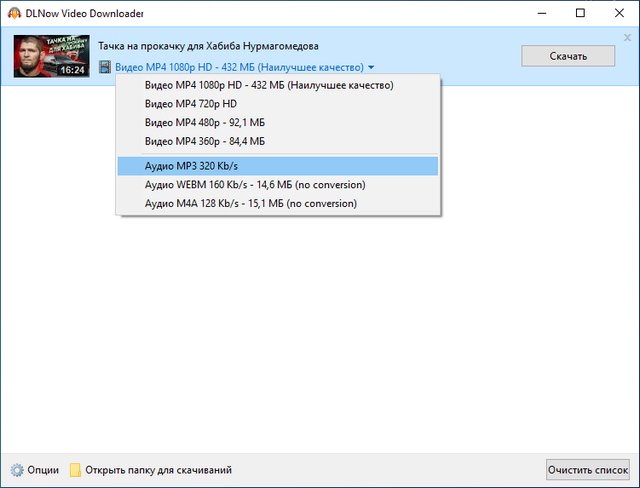
Video and Audio Quality Selection
After analyzing a link, DLNow can display several available versions of the same media.
Users may be able to choose between:
- Different resolutions
- Different frame rates
- Video with audio
- Video-only streams
- Audio-only streams
- Alternative audio qualities
- Different file containers
The available options depend entirely on what the source website provides.
Convert Online Videos to MP3
DLNow can extract audio from supported online videos and save it as an MP3 file.
This feature can be useful for legally permitted content such as:
- Original music
- Personal recordings
- Public-domain speeches
- Authorized lectures
- Language-learning material
- Royalty-free audio
- Podcast-style content
- Recorded interviews owned by the user
The program is commonly described as supporting both video and MP3 downloading.
Converting a low-quality source into a high-bitrate MP3 does not restore missing audio information. Users should select an audio quality that matches the original stream.
Playlist Downloads
DLNow can process compatible video or music playlists.
Instead of adding every item separately, users may paste a playlist link and allow the application to detect its contents.
Playlist downloading is useful for:
- Personal video collections
- Authorized training courses
- Public-domain archives
- Music playlists with download permission
- A series of tutorials
- A creator’s own channel content
The official website specifically lists the ability to download MP3 or video playlists.
Private, premium, age-restricted, region-locked, encrypted, or account-protected playlists may not be accessible.
Download Several Videos Simultaneously
The application can download multiple files at the same time.
This can significantly reduce the time needed to process a collection of authorized media. The official DLNow website lists simultaneous video downloads among its primary features.
The ideal number of simultaneous tasks depends on:
- Internet speed
- Source-server restrictions
- Processor performance
- Storage-drive speed
- Available memory
- Video resolution
- Network stability
Starting too many large downloads may slow every task and affect other internet activity.
Live-Stream Recording
DLNow supports recording compatible live streams and online broadcasts.
This feature may be useful for:
- A user’s own live broadcast
- Authorized online events
- Public-domain streams
- Business presentations
- Educational broadcasts with recording permission
- Personal gaming streams
- Temporary live content that the broadcaster permits users to save
Live-stream support is explicitly promoted on the official website.
Recording should begin before the desired section is broadcast. A downloader cannot always recover portions of a livestream that have already ended unless the platform provides an archived recording.
Live, subscription-based, protected, or encrypted content may not be supported.
Subtitle Downloading
DLNow may detect and download subtitles provided with supported videos.
Available subtitle options can include:
- Original uploaded subtitles
- Automatically generated captions
- Translated caption tracks
- Different language files
Subtitle downloading can be useful for:
- Foreign-language videos
- Accessibility
- Educational content
- Translation projects
- Offline study
- Searchable transcripts
Subtitle availability depends on the source platform and the individual video.
Automatically generated captions may contain transcription errors, particularly when the audio includes background noise, multiple speakers, technical vocabulary, or strong accents.
Batch Downloading
Users can add several separate links to the download list and process them as a batch.
Batch downloading is convenient when working with:
- Multiple personal uploads
- Training libraries
- Research collections
- Public-domain footage
- Authorized social-media exports
- Royalty-free media assets
It is advisable to test one link from a website before adding a large collection. This confirms that the current program version remains compatible with the platform.
Video Format Support
DLNow can save or convert downloaded media into several formats, depending on the source and selected settings.
Frequently associated formats include:
- MP4
- WebM
- FLV
- AVI
- MPEG
- WMV
- MP3
Some independent software descriptions also mention conversion to common containers such as AVI, MPEG, FLV, and WMV.
MP4 is generally the most compatible video format for modern computers, smartphones, televisions, browsers, and media players.
WebM may provide efficient streaming-oriented compression but is not supported by every older device.
Automatic Format Conversion
Some websites provide video and audio as separate streams. DLNow can download the required components and combine or convert them into a usable media file.
Conversion may also be used to make a downloaded video compatible with a specific device or application.
The time required depends on:
- Video duration
- Resolution
- Codec
- Output format
- Processor speed
- Storage performance
Downloading an already compatible format is usually faster than converting it afterward.
Download Speed Management
Download performance is affected by the source website and the user’s network, but DLNow provides a centralized interface for monitoring tasks.
Users can review:
- Current download status
- Progress percentage
- Download speed
- Remaining tasks
- File names
- Output locations
- Completed downloads
- Failed downloads
The application cannot bypass bandwidth limits imposed by the source server, internet provider, local network, or user account.
Pause and Resume Downloads
Download tasks may be paused and resumed when the source server supports partial transfers.
Resume support is valuable for:
- Large 4K videos
- Unstable internet connections
- Limited bandwidth
- Laptop users changing networks
- Long playlists
- Extended livestream recordings
Some websites generate temporary media addresses that expire. In these cases, the original webpage may need to be analyzed again before the download can continue.
Integrated Search and Website Detection
Depending on the release and selected service, DLNow may simplify media discovery and automatically recognize supported website links.
However, users should open private or account-sensitive pages only in a secure browser. Login credentials should never be entered into an unofficial or modified downloader.
Clean Windows Interface
DLNow uses a graphical interface intended to be simpler than command-line downloading tools.
Its main areas generally focus on:
- Adding URLs
- Selecting quality
- Selecting output type
- Viewing active tasks
- Managing completed downloads
- Opening destination folders
- Changing program settings
This makes it suitable for users who do not want to configure scripts, terminal commands, codecs, or complex media-conversion options.
Free Trial and Licensed Edition
DLNow is commonly distributed as trialware. Independent software databases list it as a paid application with a trial version.
The trial edition may restrict:
- The number of downloads
- Playlist processing
- Certain qualities or formats
- Conversion features
- Simultaneous tasks
- Advanced options
The exact trial limitations and license price may change, so users should review the current purchase information inside the official application or on its website.
System Requirements
DLNow Video Downloader 1.57 is designed for Microsoft Windows.
Softpedia currently lists the application as compatible with:
- Windows 11
- Windows 10, 32-bit and 64-bit
It also lists an installer size of approximately 115 MB for the current build.
Practical Minimum Requirements
- Operating system: Windows 10 or Windows 11
- Processor: Standard Intel or AMD processor
- Memory: 2 GB RAM
- Storage: At least 200 MB for installation
- Additional storage: Required for downloaded media
- Internet connection: Required
- Display: Standard Windows-compatible resolution
- Administrator rights: May be needed for installation
- Media player: Required for playing downloaded files
Recommended Requirements
For multiple Full HD or 4K downloads:
- Windows 10 or Windows 11, 64-bit
- Modern multi-core Intel or AMD processor
- 8 GB RAM or more
- SSD or NVMe storage
- Stable broadband internet connection
- Updated network and graphics drivers
- Large secondary drive for video storage
A single 4K video can use several gigabytes of disk space, depending on its duration, codec, bitrate, and frame rate.
How to Use DLNow Video Downloader
A typical authorized download can be completed as follows:
- Install DLNow from its official source.
- Open the application.
- Select the destination folder.
- Open the video in a web browser.
- Copy the media-page URL.
- Paste the URL into DLNow.
- Allow the application to analyze the link.
- Select the preferred resolution.
- Choose video, audio, or subtitle options.
- Start the download.
- Wait for processing to finish.
- Open the destination folder.
- Test the downloaded file.
For a playlist or livestream, users should first test a short or non-critical item before starting a long task.
Choosing the Best Quality
The highest quality is not always necessary.
Choose 720p When:
- Storage is limited
- The video will be viewed on a small screen
- The internet connection is slow
- Fast downloading is more important than maximum detail
Choose 1080p When:
- Good quality is needed for everyday viewing
- The video will be watched on a laptop or television
- File size needs to remain manageable
- The source is available in Full HD
Choose 4K When:
- The original video is genuinely available in 4K
- The display supports 4K playback
- Maximum image detail is required
- Storage and bandwidth are sufficient
Choose MP3 When:
- Only the audio is needed
- The content can legally be extracted
- A smaller file is preferred
- Video images are unnecessary
Advantages
DLNow Video Downloader 1.57.2026.07.04 offers several useful advantages:
- Simple copy-and-paste operation
- Beginner-friendly interface
- Support for more than 800 websites
- Ultra HD 4K downloads
- 3D and 60 FPS support
- Audio extraction to MP3
- Playlist downloading
- Live-stream recording
- Multiple simultaneous downloads
- Subtitle support
- Batch processing
- Several media formats
- Quality-selection controls
- Windows 10 and Windows 11 compatibility
- Suitable for offline access to authorized content
Disadvantages
The program also has several limitations:
- It is primarily designed for Windows.
- The licensed edition requires payment.
- Website compatibility can break after platform updates.
- Some private or protected videos cannot be downloaded.
- High-resolution media requires substantial storage.
- Video conversion can consume processor resources.
- The exact changes in build 1.57.2026.07.04 are not publicly documented.
- Downloading copyrighted material may violate platform rules or applicable law.
- It is not a complete video editor.
- Live-stream recording depends on source compatibility and network stability.
- Trial-edition restrictions may limit regular use.
Legal and Copyright Considerations
Users should download videos only when they have the legal right and platform permission to do so.
Appropriate examples may include:
- The user’s own uploads
- Public-domain material
- Royalty-free media
- Content with an official download button
- Creative Commons media permitting downloads
- Videos with direct permission from the owner
- Internal business content owned by the user’s organization
Users should not use DLNow to copy or redistribute:
- Paid movies
- Subscription television
- Commercial music
- Premium courses
- Protected livestreams
- Another creator’s copyrighted work
- Account-restricted content without authorization
Downloaded files should not be republished, sold, edited, or used commercially unless the applicable license permits those activities.
Installation and Security Recommendations
For a safer experience:
- Obtain the installer from the official DLNow website.
- Avoid cracked, pre-activated, or repacked versions.
- Check the installer’s digital signature when available.
- Scan the installer with updated security software.
- Review every installation screen.
- Decline unrelated bundled applications.
- Verify the version in the About window.
- Keep DLNow updated for website compatibility.
- Avoid entering account passwords into modified software.
- Store downloaded files in an organized folder.
Unofficial modified installers may contain malware, advertising software, browser hijackers, cryptocurrency miners, or credential-stealing components.
DLNow vs Browser Extensions
Browser extensions can provide quick downloads from a limited number of websites, but their permissions may allow them to access browser tabs, website data, and browsing activity.
DLNow operates as a separate desktop program and offers broader features such as:
- Playlist processing
- Live-stream recording
- Quality selection
- MP3 extraction
- Batch downloading
- Simultaneous tasks
- Subtitle downloading
A browser extension may be sufficient for occasional simple downloads. DLNow is more appropriate for users who regularly process multiple authorized videos or need advanced output options.
DLNow vs Command-Line Downloaders
Command-line downloaders can be powerful, frequently updated, and highly customizable. However, they require users to understand commands, parameters, paths, codecs, and error messages.
DLNow provides a graphical interface that simplifies these operations.
It is better suited to users who prefer:
- Buttons instead of commands
- Visual progress indicators
- Simple quality selection
- Centralized download management
- Minimal configuration
Advanced users may still prefer command-line solutions for automation, scripting, detailed format selection, and integration into larger workflows.
Is DLNow Video Downloader 1.57 Worth Using?
DLNow Video Downloader can be useful for Windows users who regularly save legally downloadable videos, audio, playlists, subtitles, or live broadcasts.
Its most valuable features include:
- Broad website compatibility
- High-resolution support
- MP3 extraction
- Playlist processing
- Live-stream recording
- Multiple concurrent downloads
- A straightforward graphical interface
The program may be unnecessary for users who only download occasional files through official platform buttons. It is also not suitable for users who require advanced video trimming, color correction, timeline editing, or professional media production.
Final Verdict
DLNow Video Downloader 1.57.2026.07.04 is a capable Windows utility for downloading supported online videos, audio tracks, playlists, subtitles, and live streams.
Its straightforward copy-and-paste workflow makes it accessible to beginners, while its 4K, 60 FPS, playlist, batch-download, audio-extraction, and livestream features provide enough flexibility for regular media users.
The exact fixes introduced in build 1.57.2026.07.04 were not detailed in an official public changelog during verification, although the installer build is listed by a recognized software directory. Users should verify the installed version, obtain the application from its official source, avoid modified packages, and download only content they own or are legally permitted to save.