Close All Windows 6.0: Quickly Close Multiple Programs with a Single Click
Close All Windows 6.0 is a lightweight Windows utility designed to help users close multiple open applications and windows at the same time. Instead of closing every program manually, the software displays a list of active windows and allows users to select which applications they want to close.
Developed by NTWind Software, Close All Windows is especially useful for people who regularly work with many programs, folders, browser windows, documents, and utilities. It provides a faster and more organized way to clean up a busy desktop without restarting the computer or using Windows Task Manager.
What Is Close All Windows 6.0?
Close All Windows is a productivity tool that sends a standard closing request to selected applications. It does not permanently run in the background and only operates when launched, helping it remain lightweight and consume very few system resources.
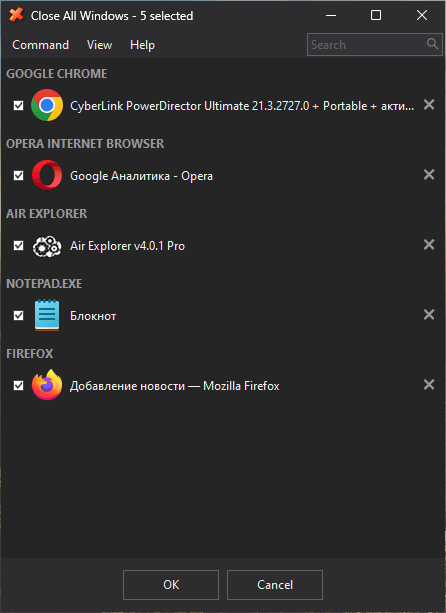
When the program starts, it scans the desktop for open applications and displays them in a clear list. Users can then keep all applications selected, exclude specific programs, or choose only the windows they want to close.
The software is not designed to forcefully terminate every process by default. Instead, it requests that applications close normally, allowing programs with unsaved documents to display their usual save confirmation messages.
Main Features of Close All Windows 6.0
Close Multiple Applications at Once
The primary feature of Close All Windows is its ability to close several running applications with one command. This can save time when many windows are open across the desktop.
Select Which Windows to Close
Users do not have to close everything. The application provides a selection list where specific programs can be unchecked and kept open.
This is useful when you want to close unnecessary applications while keeping an important browser, document editor, communication tool, or media player running.
Grouped Application Windows
Multiple windows belonging to the same application can be grouped together, making the list easier to manage. This can be particularly helpful when several browser windows, File Explorer folders, or document windows are open.
Application Exclusion
Close All Windows can exclude selected applications from the closing process. Programs may be excluded using their executable names, helping users protect frequently used applications from being closed accidentally.
Command-Line Support
The software supports command-line parameters for users who want to automate its behavior. Silent operation can be enabled with the /NOUI parameter, while other supported commands can provide more direct control over how applications are closed.
This makes Close All Windows suitable for shortcuts, scripts, scheduled tasks, and advanced desktop workflows.
Virtual Desktop Support
The program supports Windows virtual desktops, allowing users to manage applications across different desktop environments more efficiently.
Multiple Interface Languages
Close All Windows includes a multilingual interface, making the utility easier to use for people from different regions.
Lightweight Performance
The program does not need to remain active in the background. It runs only when required, performs the selected closing operation, and then exits.
As a result, it has minimal impact on processor performance, memory usage, and system startup time.
How Close All Windows Works
Using the program is straightforward:
- Launch Close All Windows from its desktop or taskbar shortcut.
- Review the list of currently open applications.
- Uncheck any programs that should remain open.
- Confirm the operation to close the selected windows.
- Save any unsaved work when individual applications display a confirmation message.
The program sends a closing request to the selected windows. Applications that contain unsaved work may ask whether the user wants to save or discard the changes.
Silent Closing Mode
Users who want to skip the application selection window can add the /NOUI command to the program shortcut.
A shortcut target may look similar to this:
CloseAll.exe /NOUI
When launched through this shortcut, the utility attempts to close open applications without displaying its main selection interface.
Silent mode should be used carefully because it gives the user less opportunity to review which applications will be affected.
Benefits of Using Close All Windows 6.0
Close All Windows can improve productivity by reducing the time needed to organize a crowded Windows desktop. It is particularly helpful after long work sessions when many folders, documents, browsers, and utilities have been left open.
The software may also be useful before:
- Starting a game or resource-intensive application
- Installing or updating another program
- Shutting down the computer
- Beginning a presentation
- Recording the desktop
- Switching between work sessions
- Freeing the screen from unnecessary windows
Unlike restarting Windows, the program allows users to close selected applications while keeping the operating system and important background services available.
Close All Windows vs. Windows Task Manager
Windows Task Manager is mainly designed for monitoring system performance and managing applications or processes. It is useful when a program freezes or stops responding, but it is not always the fastest option for closing many normal application windows.
Close All Windows provides a simpler workflow focused specifically on closing multiple desktop applications.
Task Manager may terminate a process directly, while Close All Windows normally sends a standard close request. This gives supported applications an opportunity to ask the user to save unsaved files before exiting.
Close All Windows vs. Closing Programs Manually
Closing programs manually can be manageable when only two or three windows are open. However, the process becomes repetitive when dozens of folders, browser windows, documents, and tools are active.
Close All Windows places these applications in one interface, allowing users to review and close them from a single location. This reduces unnecessary clicking and helps prevent important applications from being closed unintentionally.
User Interface
The program features a compact and practical interface focused on speed rather than complicated configuration. Running applications are displayed in a list with their icons and window names.
Users can select or deselect items before confirming the closing operation. The interface also supports different visual themes and can be customized to match the Windows desktop more closely.
System Requirements
Close All Windows is designed for Microsoft Windows computers. Because it is a small desktop utility, it does not require powerful hardware.
General requirements include:
- Microsoft Windows operating system
- Standard desktop or laptop processor
- A small amount of available storage
- Basic system memory
- Permission to run desktop applications
The program is intended for managing traditional Windows desktop applications. Its exact behavior may vary depending on the permissions, protection settings, and closing behavior of each running program.
Is Close All Windows Safe?
Close All Windows is designed to request that applications close rather than deleting files or modifying documents. However, users should always review their open applications before confirming the operation.
Documents containing unsaved changes may display save prompts. Users should respond to these messages carefully to avoid losing unfinished work.
It is also recommended to obtain the program from its official developer or another trusted source.
Advantages
- Closes multiple application windows quickly
- Simple and easy-to-understand interface
- Allows individual programs to be excluded
- Supports command-line operation
- Does not need to run continuously
- Uses minimal system resources
- Supports virtual desktops
- Helps organize crowded workspaces
- Can be added to the desktop or taskbar
- Gives applications an opportunity to save unsaved work
Disadvantages
- Silent mode may close applications unintentionally
- Unsaved work still requires user attention
- Some protected or unresponsive programs may not close normally
- It is available primarily for Windows
- Advanced command-line options may be unnecessary for casual users
Who Should Use Close All Windows 6.0?
The program is suitable for office employees, students, developers, designers, content creators, gamers, and anyone who frequently opens many applications during the day.
It can also be useful for users who want a simple desktop shortcut that clears unnecessary application windows before starting another task.
Final Verdict
Close All Windows 6.0 is a practical productivity utility for managing a crowded Windows desktop. Its main advantage is simplicity: it collects open application windows into one list and allows users to close selected programs with a single operation.
The ability to exclude applications, use command-line parameters, manage virtual desktops, and operate without consuming continuous system resources makes it more flexible than manually closing every window.
Although users must remain careful with unsaved documents, Close All Windows offers a fast and convenient solution for anyone who regularly works with multiple programs and wants to organize their desktop more efficiently.