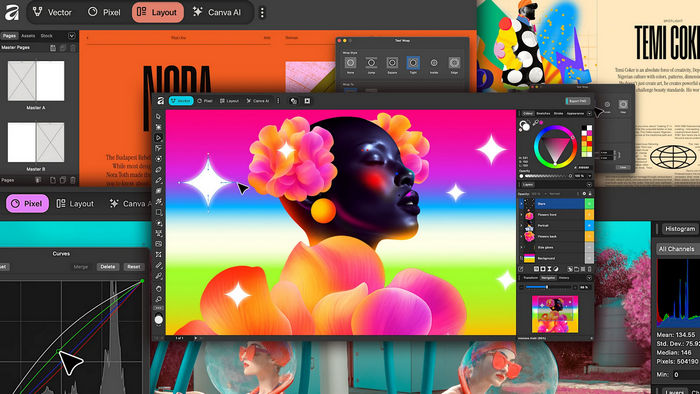
Canva Affinity 3.2.3.4646: Professional Photo Editing, Vector Design, and Page Layout in One Creative Suite
Canva Affinity 3.2.3.4646 is a professional creative application that combines photo editing, vector illustration, graphic design, and page-layout tools within one unified workspace.
Instead of switching between separate applications for image retouching, logo creation, illustration, and publishing, users can complete different stages of a creative project inside the same environment.
The redesigned Affinity platform brings together the capabilities traditionally associated with Affinity Photo, Affinity Designer, and Affinity Publisher. Canva describes the new application as a single high-performance platform for photo, vector, and layout work.
Complete All-in-One Design Environment
Canva Affinity is designed to support a wide range of professional creative tasks, including:
- Photo editing and retouching
- RAW image development
- Vector illustration
- Logo and icon design
- Digital painting
- Social-media graphics
- Advertising materials
- Brand identity projects
- Posters and flyers
- Books and magazines
- Brochures and catalogs
- Multi-page reports
- Print-ready documents
- Website and interface mockups
Combining these tools in one application can simplify complex workflows and reduce the need to export files repeatedly between different programs.
Professional Photo Editing
The photo-editing workspace provides tools for improving photographs, correcting colors, removing unwanted elements, combining images, and creating detailed compositions.
Users can work with adjustment layers, masks, filters, selections, brushes, and blending modes while keeping the original image protected.
Non-destructive editing allows adjustments to remain editable throughout the project instead of permanently changing the original pixels. Affinity also supports GPU acceleration to improve performance when working with complex documents and high-resolution images.
RAW Image Development
Photographers can process RAW files directly inside Affinity.
The RAW development environment can be used to adjust exposure, contrast, white balance, shadows, highlights, sharpness, noise reduction, lens corrections, and color appearance before continuing with advanced editing.
RAW support gives photographers greater control over image quality than editing compressed images alone.
Advanced Retouching Tools
Canva Affinity includes professional tools for portrait editing, product photography, restoration, and creative image manipulation.
Users can remove distractions, repair damaged areas, improve skin appearance, clone image details, correct perspective, and blend multiple photographs.
Selection and masking tools help isolate subjects, backgrounds, hair, objects, and detailed edges for more precise editing.
Vector Design and Illustration
The vector workspace is suitable for creating graphics that can be resized without losing quality.
Designers can create:
- Logos
- Icons
- Symbols
- Illustrations
- Typography artwork
- Infographics
- Interface elements
- Packaging graphics
- Brand assets
- Technical diagrams
Paths, nodes, curves, shapes, fills, outlines, gradients, and Boolean operations provide precise control over vector objects.
The application updates paths and shapes in real time and is designed to remain responsive when navigating large or detailed files.
Vector Brushes and Drawing Tools
Creative professionals can use customizable vector brushes to produce smooth lines, expressive strokes, and scalable artwork.
Vector brushes combine the natural appearance of hand drawing with the flexibility of editable paths. Users can modify nodes, pressure, stroke width, color, and shape after drawing.
These tools are useful for illustration, lettering, comics, logo concepts, and decorative design.
Professional Page Layout
The layout tools allow users to create both short documents and complex multi-page publications.
Projects may include:
- Business brochures
- Product catalogs
- Books
- Magazines
- Annual reports
- Portfolios
- Menus
- Posters
- Marketing documents
- Educational materials
Users can work with master pages, text styles, image frames, linked text, columns, page numbering, tables, and advanced typography.
Images, vector graphics, and text can be edited directly inside the publication without leaving the document.
Advanced Typography
Canva Affinity provides detailed control over fonts and text formatting.
Designers can adjust:
- Font family and style
- Character spacing
- Line spacing
- Paragraph alignment
- Text columns
- OpenType features
- Baseline position
- Text wrapping
- Styles and hierarchy
- Decorative typography
Shared text styles can help maintain consistent formatting throughout long documents and multi-page publications.
Customizable Studios
One of the major strengths of the redesigned Affinity application is its customizable workspace system.
Users can combine tools from the Vector, Pixel, and Layout environments according to the needs of each project.
Panels can be moved, removed, reorganized, and saved as separate studio configurations. Custom studios can also be shared, allowing individuals and teams to create workflows suited to photography, branding, illustration, publishing, or mixed-media design.
Pixel and Vector Tools Together
Many creative projects require both raster and vector editing.
For example, a designer may need to retouch a photograph, draw a scalable logo, add typography, and prepare a multi-page brochure.
Canva Affinity allows these tasks to be completed in the same document. Users can move between pixel, vector, and layout tools without repeatedly exporting and reopening the project in another application.
Non-Destructive Workflow
Non-destructive editing is an important feature for professional design work.
Live filters, adjustment layers, masks, effects, and editable objects can be modified or removed later without permanently damaging the original content.
This workflow makes experimentation safer and allows clients or team members to request changes without forcing the designer to rebuild the entire project.
Layers and Object Management
The Layers panel provides control over images, vector objects, text, groups, masks, adjustments, and effects.
Users can:
- Rename and organize layers
- Create groups
- Lock objects
- Hide elements
- Change opacity
- Apply blending modes
- Use clipping structures
- Add masks
- Reorder content
- Apply effects to specific objects
Organized layer management becomes especially important when working with complex illustrations, interface designs, photo composites, and publications.
Live Filters and Effects
Affinity includes live filters that can be edited after they are applied.
Depending on the document and workflow, users can apply effects such as:
- Blur
- Sharpening
- Noise reduction
- Distortion
- Lighting
- Shadows
- Glows
- Color adjustments
- Perspective changes
- Texture enhancement
Live previews allow users to see changes while adjusting settings.
Canva AI Integration
Eligible Canva premium accounts can access Canva AI tools directly within Affinity through Canva AI Studio.
Available tools may include Generative Fill, Expand and Edit, and background removal. These features are designed to accelerate repetitive editing and content-generation tasks while keeping the main creative workflow inside Affinity.
Access to premium AI features may depend on the user’s Canva plan, account status, internet connection, regional availability, and current service limits.
Exporting Projects to Canva
Affinity projects can be exported to Canva, making it easier to continue collaboration, resize content, publish designs, or prepare assets for broader team use.
This connection can be useful when professional designers create detailed master assets in Affinity and other team members need to adapt them inside Canva for presentations, advertising, or social-media campaigns.
Local File Storage and Privacy
Affinity stores creative projects locally on the user’s device.
Canva states that content created in Affinity is not used to train or develop its AI features. Users remain in control when choosing whether to upload or export their work to Canva.
Local storage is useful for professionals who prefer direct control over their project files or frequently work without an active internet connection.
Wide File-Format Compatibility
Canva Affinity supports several professional and commonly used file formats, including:
- PSD
- SVG
- TIFF
- IDML
- JPEG
- PNG
- GIF
- EPS
- RAW image formats
- Native Affinity documents
Support for PSD, AI, PDF, SVG, TIFF, and IDML makes it easier to open existing design files and exchange projects with clients or professionals using other creative applications.
Compatibility may vary depending on the complexity and features used in the original document.
Print and Export Tools
The program can prepare content for both digital publishing and professional printing.
Users can configure:
- Document dimensions
- Resolution
- Bleed areas
- Margins
- Color profiles
- Crop marks
- PDF export settings
- Image compression
- Page ranges
- Transparent backgrounds
- Print-ready output
These controls make the application suitable for creating commercial printing materials as well as web graphics and digital publications.
High-Performance Editing
Affinity is built around a performance-focused engine designed to provide smooth navigation and real-time previews.
Canva states that the application can handle highly detailed documents, projects containing thousands of layers, and zoom levels reaching up to 10,000,000%.
Actual performance depends on document complexity, image resolution, available memory, processor speed, graphics hardware, and storage performance.
Main Features
- Professional photo editing
- RAW image processing
- Vector illustration and logo design
- Multi-page publishing tools
- Pixel, vector, and layout tools in one application
- Non-destructive adjustments
- Live filters and effects
- Advanced selections and masking
- Professional retouching tools
- Customizable creative studios
- GPU-accelerated performance
- Advanced typography
- Master pages and text styles
- Complex layer management
- Batch-processing capabilities
- Canva AI Studio integration
- Direct exporting to Canva
- Professional print preparation
- Support for major design formats
- Local project storage
- Available for Windows and macOS
Advantages
The greatest advantage of Canva Affinity is its unified workflow.
Users can edit photographs, draw vector graphics, manage typography, and create multi-page layouts without switching between separate applications.
Other advantages include:
- Professional-grade creative tools
- Fast and responsive interface
- Non-destructive editing
- Flexible workspace customization
- Strong vector and pixel integration
- Advanced page-layout capabilities
- Broad file-format support
- Local document storage
- Canva workflow integration
- Free access to the core Affinity application
Canva officially announced that the redesigned professional Affinity application is available free of charge rather than as a reduced trial or limited basic edition.
Possible Disadvantages
The large number of professional tools can make the application difficult for complete beginners.
Users familiar with other design suites may need time to learn the Affinity workspace, shortcuts, panel structure, and terminology.
Other possible limitations include:
- Some Canva AI features require a premium account
- Complex projects require capable hardware
- Certain imported files may not retain every original feature
- Collaboration is not identical to a fully browser-based editor
- Third-party plugins may not offer the same compatibility as other established creative platforms
- Older Affinity tutorials may not perfectly match the redesigned interface
- Large files can consume substantial memory and storage
System Requirements
Exact requirements may vary between releases, but a suitable Windows configuration generally includes:
- A supported 64-bit version of Windows
- Multi-core 64-bit processor
- At least 8 GB of RAM
- More memory for large professional documents
- DirectX-compatible graphics hardware
- Hardware acceleration support for improved performance
- Several gigabytes of free storage
- A display with a modern resolution
- Internet access for downloading, account activation, updates, Canva integration, and AI tools
- A free Canva account for accessing the application
Canva announced Windows and macOS availability for the redesigned Affinity application, while the iPad edition was planned separately.
Who Should Use Canva Affinity?
The program is suitable for:
- Graphic designers
- Photographers
- Digital artists
- Illustrators
- Logo designers
- Publishing professionals
- Marketing teams
- Social-media designers
- Students
- Freelancers
- Small businesses
- Creative agencies
- Content creators
- Print-production specialists
It is particularly useful for users who want professional creative tools without managing separate applications for photo editing, vector design, and page layout.
Responsible Use of AI Tools
AI-generated or AI-edited content should be reviewed before publication.
Users should ensure that generated materials do not violate copyrights, trademarks, privacy rights, client agreements, or platform policies.
AI tools can accelerate repetitive tasks, but professional judgment remains necessary when preparing commercial, editorial, or public-facing designs.
Final Verdict
Canva Affinity 3.2.3.4646 is a powerful all-in-one creative suite that combines photo editing, vector design, illustration, typography, and professional page layout within one responsive application.
Its customizable studios and unified pixel, vector, and layout workflow allow designers to build an environment that matches the requirements of each project.
Non-destructive editing, RAW processing, advanced typography, format compatibility, local storage, professional export controls, and Canva integration make it suitable for both independent creators and professional teams.
For users seeking a capable alternative to subscription-based design suites, Canva Affinity provides an impressive combination of flexibility, performance, and professional creative control.