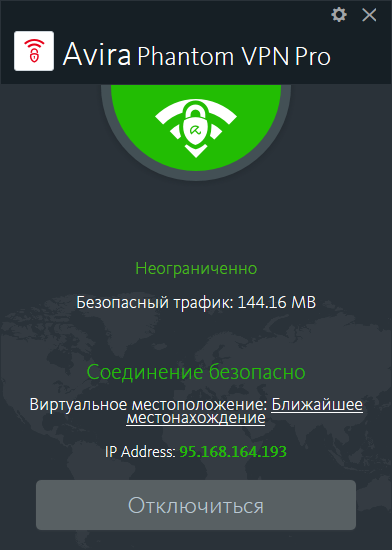
Avira Phantom VPN Pro 2.47.1.24783: Secure, Private, and Unlimited VPN Protection for Windows
Avira Phantom VPN Pro 2.47.1.24783 is a privacy and internet-security application designed to encrypt online traffic, hide the user’s public IP address, and provide safer access to the internet through virtual private network servers.
The software is suitable for users who regularly connect to public Wi-Fi networks, access online services while traveling, share files through supported peer-to-peer networks, or want to reduce the amount of browsing information visible to internet service providers and local network operators.
The Pro edition removes the monthly traffic limit found in the free version and adds premium capabilities such as unlimited VPN data, access to available virtual locations, customer support, and a Windows kill switch.
What Is Avira Phantom VPN Pro?
Avira Phantom VPN Pro creates an encrypted connection between a compatible device and an Avira VPN server.
When the VPN connection is active, internet traffic is routed through the selected server before reaching websites and online services. The destination website sees the VPN server’s public IP address instead of the user’s normal public IP address.
This process can improve privacy on unsecured networks and make it more difficult for people connected to the same public Wi-Fi hotspot to inspect unencrypted traffic.
Avira uses AES-256 encryption for Phantom VPN. AES-256 is a widely adopted encryption standard designed to prevent intercepted network information from being read without the correct encryption key.
Version 2.47.1.24783 Information
The Windows build identified as Avira Phantom VPN Pro 2.47.1.24783 appeared in software listings during July 2026.
However, Avira’s public current-version support page still displayed Phantom VPN 2.45.1 for Windows at the time this article was verified. The official page describes that listed release as containing bug fixes, but it does not yet provide a public changelog for build 2.47.1.24783.
For this reason, version 2.47.1.24783 should be considered a maintenance-oriented Windows build unless Avira publishes a more detailed official changelog. Its primary purpose is expected to be preserving compatibility, stability, and secure VPN connectivity rather than introducing a completely redesigned interface.
Unlimited VPN Traffic
One of the main differences between Phantom VPN Free and Phantom VPN Pro is the available traffic allowance.
The free Windows edition provides a limited amount of monthly data, while the Pro subscription offers unlimited VPN traffic. This makes the premium edition more practical for activities that consume significant bandwidth, including video streaming, large downloads, remote work, cloud access, and extended browsing sessions.
Unlimited traffic does not mean unlimited connection speed. Actual performance depends on the user’s internet connection, selected VPN location, server load, physical distance, network congestion, and restrictions applied by websites or internet providers.
AES-256 Traffic Encryption
Avira Phantom VPN protects supported internet traffic using AES-256 encryption.
When the VPN tunnel is active, network information traveling between the device and VPN server is encrypted. This is especially important when using public networks in hotels, cafés, airports, universities, shopping centers, and shared workplaces.
Without adequate protection, unsecured network connections may expose traffic to local monitoring or man-in-the-middle attacks. Encryption helps make intercepted information unreadable during its journey through the local network.
A VPN does not replace HTTPS, antivirus protection, secure passwords, or careful browsing. It should be treated as one part of a broader online-security strategy.
Public IP Address Protection
Every internet connection normally uses a public IP address that can reveal general information about the connection, including the approximate region and internet service provider.
Avira Phantom VPN replaces the visible public IP address with the address of the connected VPN server. This helps reduce direct exposure of the user’s normal internet connection to websites and online services.
The feature can be useful when users want to reduce location-based tracking, access the internet while traveling, or prevent websites from immediately identifying their regular public IP address.
It is important to understand that hiding an IP address does not make a person completely anonymous. Websites may still identify users through account logins, browser cookies, device characteristics, tracking scripts, and information voluntarily provided online.
No-Log Policy
Avira states that Phantom VPN follows a no-log policy and does not record the websites visited by its users.
This policy is intended to reduce the amount of browsing information retained by the VPN provider.
Avira previously removed access to its VPN services and Indian virtual locations because local regulations would have required VPN providers to retain customer-identifying information for several years. Avira stated that those requirements were incompatible with its no-log policy.
Users should still remember that online platforms, email services, websites, employers, and account providers can maintain their own independent logs.
Windows Kill Switch
Avira Phantom VPN Pro for Windows includes a kill switch.
The kill switch operates as an emergency network safeguard. When the VPN connection unexpectedly drops, it can block internet access to prevent traffic from continuing through the normal unprotected connection.
This helps reduce the risk of exposing the user’s real public IP address during temporary VPN failures, server changes, unstable Wi-Fi connections, or network interruptions.
Avira states that the Windows kill switch works at the operating-system level and is available as a Pro feature.
The kill switch should be enabled before beginning privacy-sensitive activities. Otherwise, normal internet traffic may continue if the VPN tunnel disconnects.
DNS Leak Protection
DNS requests are used to translate website names into network addresses.
A DNS leak can occur when these requests travel outside the protected VPN tunnel, potentially allowing an internet service provider or another network operator to see which domains the device is attempting to access.
Avira Phantom VPN includes DNS leak-prevention technology and supports both IPv4 and IPv6 traffic.
This protection works alongside IP masking and traffic encryption to provide a more complete VPN connection.
Virtual Server Locations
Phantom VPN Pro allows users to select from Avira’s available virtual server locations.
Changing the virtual location can make the internet connection appear to originate from another supported region. This can be useful while traveling, accessing familiar services abroad, testing regional website behavior, or avoiding certain network-level restrictions.
Server availability may change as Avira updates its network infrastructure. Some countries or regions may also be unavailable because of legal, technical, or regulatory restrictions.
A nearby location will often provide better performance than a distant server because network traffic has less physical distance to travel.
Streaming and Online Entertainment
Avira promotes Phantom VPN Pro as suitable for streaming music, shows, sports, and other online content while traveling or using restricted networks.
Users can connect to a supported location and then access compatible streaming platforms through the encrypted VPN connection.
Streaming availability is never guaranteed. Video platforms frequently update their regional restrictions, VPN-detection methods, licensing policies, and server-blocking systems.
Performance also depends on the selected server and internet connection. High-resolution video requires considerably more bandwidth than ordinary browsing.
P2P File Sharing
Avira Phantom VPN supports file sharing through compatible peer-to-peer networks.
The VPN can hide the normal public IP address and route P2P traffic through an Avira server. Avira officially lists P2P sharing among Phantom VPN Pro’s supported use cases.
Users remain responsible for ensuring that any shared or downloaded content is legal and that they have permission to access it.
A VPN does not protect a computer from malicious files. Antivirus protection and careful source verification remain essential when downloading content from unknown users.
Automatic Wi-Fi Protection
A VPN is particularly valuable when connecting to public or unfamiliar wireless networks.
Public Wi-Fi may be convenient, but users often have no control over the router, security configuration, connected devices, or network operator.
Phantom VPN can encrypt internet traffic before it leaves the device, reducing the risk that another person on the same network can read supported communications. Avira specifically recommends VPN protection when using public Wi-Fi hotspots.
Users can configure Phantom VPN to connect automatically in supported network situations, reducing the possibility of forgetting to activate protection before browsing.
Simple One-Click Connection
Avira Phantom VPN uses a straightforward interface designed for users who do not want to manage complex networking settings.
The user can activate the VPN through a simple connection control, allow the application to select a location automatically, or manually choose another available location.
The main interface provides access to connection status, selected region, transferred data, account information, and privacy settings.
This simple design makes the software suitable for beginners while still providing essential features required by more experienced users.
Protection Across Applications
Unlike a browser-only proxy extension, the Windows desktop VPN can route supported internet traffic from multiple applications through the encrypted connection.
This may include:
- Web browsers
- Email applications
- Messaging programs
- Streaming applications
- Cloud-storage clients
- Game launchers
- Download managers
- P2P applications
- Remote-work tools
Application behavior may vary depending on network settings, protocols, firewalls, and software compatibility.
Support for Multiple Platforms
Avira Phantom VPN is available for Windows, macOS, Android, and iOS.
This allows users to apply VPN protection across computers, smartphones, and tablets.
Platform features are not always identical. The Windows edition includes the Pro kill switch, while settings and operating-system integration may differ on macOS and mobile devices.
Users should install the official application designed for each operating system rather than transferring Windows program files between devices.
Lightweight Windows Application
Phantom VPN has relatively modest hardware requirements compared with large security suites.
The official Windows requirements include:
- Microsoft Windows 11 or Windows 10
- Windows 8 or Windows 8.1
- Windows 7 with Service Pack 1 or later
- A 1 GHz processor
- 2 GB of RAM for Windows 10 and Windows 11
- 1 GB of RAM for 32-bit Windows 7 or Windows 8
- 2 GB of RAM for 64-bit Windows 7 or Windows 8
- Approximately 150 MB of available storage
Windows 10 and Windows 11 in S Mode are not supported.
An active internet connection is naturally required to establish the VPN tunnel, activate a Pro subscription, and receive program updates.
Pro Edition Features
Avira Phantom VPN Pro provides several advantages over the free edition:
- Unlimited monthly VPN traffic
- Access to available VPN locations
- AES-256 traffic encryption
- Public IP address masking
- Windows kill switch
- DNS leak prevention
- IPv4 and IPv6 support
- Public Wi-Fi protection
- P2P file-sharing support
- Streaming-oriented server access
- Customer support
- Multi-platform applications
- No advertising-based traffic model
- Simple automatic or manual connection
Feature availability can vary according to operating system, subscription plan, region, and application version.
Main Uses of Avira Phantom VPN Pro
The software can be useful for several everyday activities:
- Protecting traffic on public Wi-Fi
- Hiding the normal public IP address
- Reducing ISP visibility into visited websites
- Accessing online accounts while traveling
- Streaming through supported virtual locations
- Protecting cloud-storage transfers
- Using remote-work services on unfamiliar networks
- Encrypting traffic from multiple Windows applications
- Sharing permitted content through P2P networks
- Preventing accidental IP exposure with the kill switch
Advantages
Avira Phantom VPN Pro offers several practical advantages:
- Clean and beginner-friendly interface
- Unlimited traffic with a Pro subscription
- Strong AES-256 encryption
- Integrated Windows kill switch
- DNS leak protection
- Support for IPv4 and IPv6
- Applications for major desktop and mobile platforms
- Support for public Wi-Fi protection
- Official no-log policy for visited websites
- P2P and streaming support
- Relatively lightweight system requirements
- Integration with the broader Avira security ecosystem
Possible Disadvantages
The software also has some limitations:
- Pro features require a paid subscription
- VPN connections may reduce internet speed
- Streaming services may block some VPN servers
- The Windows kill switch may not be available identically on every platform
- It does not provide complete online anonymity
- Account logins and browser cookies can still identify the user
- It does not replace antivirus protection
- It is not available for use while physically located in India
- Advanced VPN configuration options may be more limited than in specialized enterprise products
- The official public changelog may not immediately document every distributed build
Safe and Responsible Use
A VPN should be used for lawful privacy, security, remote access, and permitted content consumption.
Users should avoid relying on a VPN as permission to violate copyright rules, access unauthorized systems, bypass organizational policies, or perform illegal online activity.
The safest approach is to install Phantom VPN through Avira’s official installer and activate the Pro edition with a genuine subscription. Modified or unofficial packages may contain malware, outdated network drivers, altered security components, or stolen account information.
Who Should Use Avira Phantom VPN Pro?
Avira Phantom VPN Pro is suitable for:
- Home Windows users
- Travelers
- Remote workers
- Students using shared networks
- People who regularly use airport or café Wi-Fi
- Users who want to hide their normal public IP address
- Streaming users who need unlimited VPN traffic
- People transferring files through cloud services
- Users who prefer a simple VPN without complicated configuration
- Existing Avira customers who want integrated privacy protection
Conclusion
Avira Phantom VPN Pro 2.47.1.24783 is a straightforward VPN solution for encrypting internet traffic, masking public IP addresses, protecting public Wi-Fi connections, and accessing Avira’s available virtual locations without a monthly data limit.
Its AES-256 encryption, DNS leak prevention, no-log policy, P2P support, unlimited Pro traffic, and Windows kill switch provide the essential tools required for safer and more private everyday browsing.
The application is particularly suitable for users who prefer an easy one-click VPN experience rather than a complicated networking environment. Although a VPN cannot provide complete anonymity or replace antivirus software, Phantom VPN Pro can add an important security layer when browsing, streaming, working remotely, or connecting through unfamiliar networks.