iTop Data Recovery Pro 6.3.0.955 Review: Powerful File Recovery Software for Windows
iTop Data Recovery Pro 6.3.0.955 is a Windows data recovery software designed to help users restore deleted, lost, formatted, corrupted, or inaccessible files from different storage devices. It is useful for recovering documents, photos, videos, audio files, emails, archives, and other important data after accidental deletion, emptying the Recycle Bin, formatting a drive, system failure, virus damage, or storage device problems.
The program is built for users who need a simple recovery workflow without complicated technical steps. It can scan selected locations, preview recoverable files, and restore data to a safe destination. This makes it useful for home users, office workers, students, technicians, photographers, and anyone who needs to recover important files from a Windows computer.
What Is iTop Data Recovery Pro 6.3.0.955?
iTop Data Recovery Pro is a file recovery tool developed for Windows systems. It is designed to recover lost or deleted data from internal and external storage devices, including hard drives, SSDs, USB flash drives, memory cards, and other supported media.
The official iTop Data Recovery page describes the software as a Windows data recovery tool that can recover lost or deleted files such as photos, videos, PDFs, Excel files, Word documents, and audio files from different devices. The official page also lists version 6.3 for Windows 11, Windows 10, Windows 8, and Windows 7.
The Pro edition is designed to provide enhanced recovery features, deeper scan options, broader recovery support, and better recovery success compared with the basic free version.
Main Features of iTop Data Recovery Pro 6.3.0.955
1. Deleted File Recovery
The main purpose of iTop Data Recovery Pro is to recover deleted files from Windows computers and storage devices. If files were accidentally deleted or removed from the Recycle Bin, the software can scan the drive and try to locate recoverable data.
This is useful for restoring office documents, school files, family photos, videos, music files, compressed archives, and other personal or business data.
2. Recycle Bin Recovery
iTop Data Recovery Pro can help recover files after the Recycle Bin has been emptied. This is one of the most common data loss situations because users often delete files permanently without realizing they still need them.
The software can scan the original storage location and attempt to restore deleted files before they are overwritten by new data.
3. Formatted Drive Recovery
The program can recover files from formatted drives, including formatted partitions, USB drives, memory cards, and external hard disks. This is useful when a storage device is formatted by mistake or when Windows asks the user to format a drive before it can be used.
Formatted drive recovery is one of the most important features for users who lose large amounts of data at once.
4. Recovery from Internal and External Devices
iTop Data Recovery Pro supports recovery from different storage devices, including internal HDDs, SSDs, USB drives, memory cards, and other external storage media. The official product page states that it can recover data from internal and external storage devices such as HDDs, SSDs, and USB drives.
This makes it useful for recovering files from computers, portable drives, camera cards, work USB drives, and backup disks.
5. Support for 1,000+ File Formats
The software supports recovery of many file types, including documents, images, videos, audio files, emails, archives, and more. The official page describes support for more than 1,000 file formats, which makes the software suitable for different recovery situations.
This wide file support is useful when recovering mixed folders that contain different types of data.
6. File Preview Before Recovery
iTop Data Recovery Pro includes a preview feature that allows users to check recoverable files before restoring them. Users can preview documents, photos, videos, and other supported files to confirm whether the data is usable.
The official page describes a free visualization preview for deleted, corrupted, inaccessible, and formatted data, including PDF, Microsoft Office documents, photos, videos, and more.
Previewing files helps users avoid recovering unnecessary or damaged files.
7. File Recovery Status
The software can display file condition information so users can understand whether a file has a good chance of recovery. The official description mentions recoverability status levels such as Excellent, Good, or Poor.
This feature is useful because not every deleted file can be recovered perfectly, especially if new data has already overwritten part of the file.
8. Dual Scan and Deep Scan Options
iTop Data Recovery Pro offers scan options for finding lost files. The Pro comparison on the official page describes enhanced deep scan support in the Pro edition.
A quick scan can be useful for recently deleted files, while a deep scan is better for formatted drives, damaged partitions, or files that are harder to locate. Deep scans may take longer, especially on large disks.
9. Recovery from System Crash or Windows Update Problems
The software can help recover files after system crashes, software failures, or Windows update issues. These situations can sometimes cause missing folders, corrupted files, or inaccessible user data.
iTop’s official page lists recovery scenarios such as system crash recovery and file loss after Windows updates.
10. Built-In Backup Tool
iTop Data Recovery includes backup functionality designed to help protect important files before future data loss happens. The official page describes a built-in backup tool and states that the Pro edition includes smart differential backup.
This makes the software more than a recovery tool, because it also helps users reduce the risk of losing files again.
11. NAS and Cloud-Related Features
The official iTop Data Recovery page lists NAS device recovery and restore-to-cloud features as newer Pro capabilities.
These features can be useful for users who store data on network-attached storage or want more flexible recovery destinations. Availability may depend on the specific edition, license, and current product plan.
12. Offline and Local Recovery
iTop states that the recovery process is completed locally and offline, giving users control over their private data during recovery.
This is important for users recovering sensitive documents, personal photos, work files, or confidential business information.
Why Use iTop Data Recovery Pro 6.3.0.955?
iTop Data Recovery Pro is useful because data loss can happen suddenly. A file may be deleted by mistake, a USB drive may be formatted, a hard drive may become inaccessible, or Windows may fail after an update. Instead of manually searching for lost files, users can scan the affected location and recover files through a guided interface.
It is especially useful for:
Recovering deleted files.
Restoring files after emptying the Recycle Bin.
Recovering formatted drives.
Recovering photos, videos, and documents.
Restoring data from USB drives and memory cards.
Recovering data after system crashes.
Recovering files after Windows update problems.
Previewing files before recovery.
Protecting data with backup tools.
User Interface and Workflow
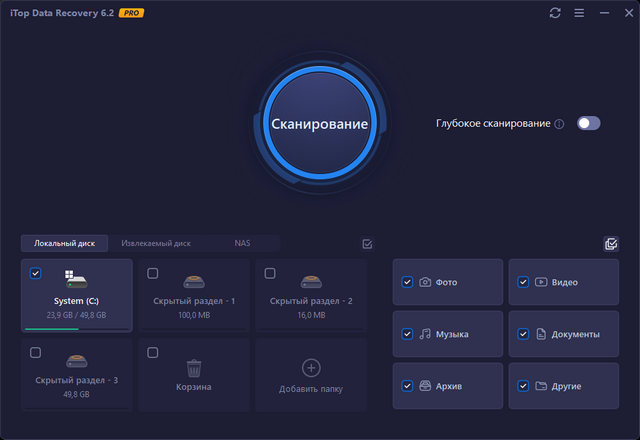
iTop Data Recovery Pro is designed to be easy to use. The recovery process usually follows three main steps: select a location or file type, scan the selected area, preview found files, and recover the needed data.
This simple workflow makes the software suitable for beginners. Users do not need advanced technical knowledge to start a scan or restore files. At the same time, deep scan and preview options give more control for users dealing with serious data loss situations.
Advantages of iTop Data Recovery Pro 6.3.0.955
Easy-to-use recovery interface.
Can recover deleted and lost files.
Supports formatted drive recovery.
Works with internal and external storage devices.
Supports many file types.
Includes preview before recovery.
Shows file recoverability status.
Offers deep scan options in the Pro edition.
Can help with system crash and Windows update data loss.
Includes backup features.
Supports NAS recovery and cloud restore features in the Pro plan.
Suitable for beginners and regular Windows users.
Disadvantages of iTop Data Recovery Pro 6.3.0.955
Recovery is not guaranteed in every case.
Files may be unrecoverable if overwritten.
Deep scans can take a long time on large drives.
Some features require the Pro edition.
Recovered files should not be saved to the same damaged drive.
Physically damaged drives may need professional recovery services.
Users should avoid installing the software on the same drive where files were lost.
System Requirements
iTop Data Recovery Pro 6.3.0.955 is designed for Windows computers. The official product page lists version 6.3 for Windows 11, Windows 10, Windows 8, and Windows 7.
General requirements include:
Windows 11, Windows 10, Windows 8, or Windows 7.
Modern processor.
Enough RAM for scanning and recovery tasks.
Free disk space for installation.
A separate storage device for saving recovered files.
Stable connection if using online activation, cloud features, or NAS-related functions.
For large hard drives, deep scans, or complex recovery tasks, better hardware and more storage space are recommended.
Important Data Recovery Tips
To improve the chance of successful recovery, users should act quickly and avoid writing new data to the affected drive. Deleted files may remain recoverable only until new data overwrites them.
Important tips include:
Stop using the affected drive immediately.
Do not install recovery software on the same drive where data was lost.
Save recovered files to a different disk.
Use preview to confirm file quality before recovery.
Try deep scan if quick scan does not find the needed files.
Avoid formatting the drive again.
Do not copy new files to the damaged storage device.
For clicking, grinding, or physically damaged drives, use a professional recovery service.
Is iTop Data Recovery Pro Good for Beginners?
Yes, iTop Data Recovery Pro is suitable for beginners because it uses a simple scan-and-recover workflow. Users can select the drive or folder, scan for lost files, preview results, and recover data without dealing with complex technical settings.
It is a practical choice for users who need to recover deleted documents, photos, videos, or files from common storage devices.
Is iTop Data Recovery Pro Suitable for Professionals?
iTop Data Recovery Pro can also be useful for technicians and office IT users who need a straightforward file recovery tool. Its support for multiple storage devices, file previews, deep scan, and backup features makes it practical for many everyday recovery cases.
However, for severe physical damage, advanced forensic recovery, or enterprise-level recovery work, specialized professional tools or recovery labs may still be required.
Legal and Safe Usage
iTop Data Recovery Pro should be used only to recover files that belong to the user or files the user is authorized to access. Users should also download the software only from official or trusted sources to avoid unsafe installers or modified packages.
Safe usage includes:
Using a legitimate license.
Recovering only authorized data.
Avoiding unofficial cracked installers.
Scanning downloads with antivirus software.
Keeping backups of important files.
Using the built-in backup tool or another backup solution to prevent future loss.
Final Verdict
iTop Data Recovery Pro 6.3.0.955 is a practical and user-friendly Windows data recovery tool for restoring deleted files, formatted drives, lost documents, photos, videos, audio files, emails, and other important data. It offers useful features such as deep scanning, file preview, recoverability status, support for many file formats, internal and external storage recovery, and built-in backup options.
The software cannot guarantee recovery in every situation, especially if lost files were overwritten or the storage device is physically damaged. However, for common data loss scenarios such as accidental deletion, emptied Recycle Bin, formatting, system crashes, and Windows update problems, it provides a clear and convenient recovery workflow.
Overall, iTop Data Recovery Pro 6.3.0.955 is a strong choice for Windows users who need a simple, fast, and capable file recovery solution with preview, deep scan, and backup features.