NetSpeedTray 2.1.0 Review: Lightweight Network Speed Monitor for the Windows Taskbar
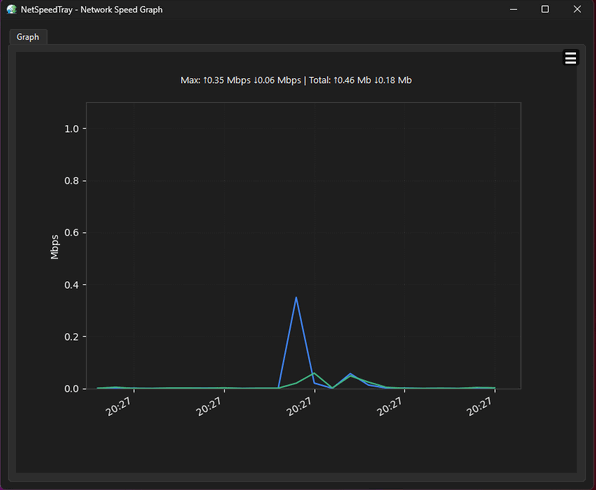
NetSpeedTray 2.1.0 is a lightweight and open-source network monitoring tool designed for Windows users who want to see real-time upload and download speeds directly on the taskbar. It provides a simple way to monitor internet activity without opening Task Manager, network settings, or a separate speed monitoring window.
The program is especially useful for users who want to keep an eye on their internet connection while browsing, downloading files, streaming videos, gaming, using cloud storage, attending online meetings, or troubleshooting network slowdowns.
What Is NetSpeedTray 2.1.0?
NetSpeedTray is a Windows utility that displays live network speed information in the system tray or taskbar area. It is designed to look native on Windows and provide a clean, unobtrusive monitoring experience.
According to the project’s GitHub page, NetSpeedTray is a lightweight, open-source network monitor for Windows that shows live upload and download speeds directly on the taskbar with a native look and feel. The project is released under the GPL-3.0 license, making it a transparent and community-accessible tool.
Main Features of NetSpeedTray 2.1.0
1. Real-Time Upload and Download Speed Display
The main function of NetSpeedTray is showing current upload and download speeds in real time. This lets users instantly know whether the internet connection is active, idle, overloaded, or being used heavily by background applications.
This is useful when downloading large files, uploading backups, streaming content, or checking whether an application is using bandwidth unexpectedly.
2. Windows Taskbar Integration
NetSpeedTray integrates directly with the Windows taskbar, giving it a native and convenient appearance. Instead of floating on top of other windows, it can stay in a familiar location where users can quickly check network activity.
This makes it more practical than traditional desktop widgets that may cover other windows or feel disconnected from the Windows interface.
3. Lightweight and Efficient Performance
NetSpeedTray is designed to be small and efficient. It does not need heavy system resources to display network speeds. This makes it suitable for laptops, office computers, older systems, and users who prefer simple utilities without unnecessary background load.
A lightweight monitor is useful because it can run all day without slowing down normal computer usage.
4. Open-Source Software
One of the biggest advantages of NetSpeedTray is that it is open-source. This gives users more transparency compared to closed-source utilities, because the source code is publicly available for review.
Open-source software is also attractive for users who prefer free tools without ads, hidden installers, or unnecessary bundled software.
5. Network Activity Awareness
NetSpeedTray helps users understand what is happening with their internet connection. If the speed display suddenly shows high upload or download activity, the user can investigate whether a cloud sync app, browser, game launcher, update service, or background process is using the connection.
This makes the tool useful for everyday troubleshooting.
6. Useful for Streaming and Gaming
For streaming and online gaming, stable internet performance is important. NetSpeedTray does not replace a full network analyzer, but it gives users a quick visual indication of bandwidth usage.
Gamers can check whether background downloads are consuming bandwidth, while streamers can monitor upload activity during live broadcasts or video uploads.
7. Helpful for Cloud Sync and Downloads
Users who work with cloud services such as OneDrive, Google Drive, Dropbox, or backup tools can use NetSpeedTray to see whether files are still uploading or downloading.
This is helpful when waiting for large files to finish syncing before shutting down the computer or disconnecting from the internet.
8. Simple Monitoring Without Complexity
NetSpeedTray is not designed to be a complicated enterprise network analysis tool. Its purpose is simple: show internet speed clearly and continuously.
This makes it easy for beginners while still being practical for advanced users who want a quick network indicator.
Why Use NetSpeedTray 2.1.0?
NetSpeedTray is useful because Windows does not always show live network speed clearly in the taskbar. Users often need to open Task Manager or a third-party tool to see real-time traffic. NetSpeedTray solves this by keeping live upload and download information visible at all times.
It is especially useful for:
Monitoring internet activity.
Checking download and upload speed.
Watching cloud sync progress.
Detecting background bandwidth usage.
Troubleshooting slow internet.
Monitoring streaming and gaming connections.
Keeping a clean network indicator on the taskbar.
Using a free and open-source alternative to older speed monitor tools.
User Interface and Workflow
NetSpeedTray is designed to be simple. After installation or launch, the tool displays network speed values on the Windows taskbar. Users can continue working normally while the program updates the speed display in real time.
The workflow is direct: install the program, choose the preferred settings if needed, and monitor network activity from the taskbar. This makes it suitable for users who want immediate results without complex configuration.
Advantages of NetSpeedTray 2.1.0
Lightweight and simple.
Shows live upload and download speeds.
Integrates with the Windows taskbar.
Open-source and transparent.
Useful for monitoring internet activity.
Helps detect background bandwidth usage.
Good for cloud sync, downloads, streaming, and gaming.
Does not require opening Task Manager.
Clean and unobtrusive interface.
Suitable for everyday Windows users.
Disadvantages of NetSpeedTray 2.1.0
It is focused mainly on speed monitoring, not deep network analysis.
It may not replace professional network diagnostic tools.
Advanced users may want more detailed per-application traffic reports.
Taskbar behavior can depend on Windows version and system settings.
Portable or unofficial packages should be downloaded carefully from trusted sources.
System Requirements
NetSpeedTray is designed for Windows computers. It should run well on most modern systems because it is lightweight and does not require powerful hardware.
General requirements include:
Windows operating system.
Standard modern processor.
Enough RAM for normal background utilities.
Active network connection.
Taskbar/system tray access.
Free disk space for installation or portable use.
For best results, users should keep Windows updated and download the program from the official GitHub page or trusted repositories.
Best Uses for NetSpeedTray
NetSpeedTray 2.1.0 can be used for many daily tasks, including:
Watching real-time internet speed.
Monitoring downloads and uploads.
Checking whether cloud sync is active.
Finding unexpected network activity.
Watching bandwidth during streaming.
Monitoring online gaming connection usage.
Keeping track of background updates.
Checking network activity during video calls.
Replacing older network speed tray tools.
Is NetSpeedTray Good for Beginners?
Yes, NetSpeedTray is very suitable for beginners. It has a simple purpose and does not require technical knowledge. Users can install it and immediately start seeing upload and download speeds from the taskbar.
It is a good choice for people who want basic internet monitoring without learning advanced networking tools.
Is NetSpeedTray Suitable for Advanced Users?
NetSpeedTray can also be useful for advanced users who want a clean, always-visible network speed indicator. While it does not provide the same depth as full network analyzers, it works well as a quick monitoring companion.
Advanced users may combine it with tools like Task Manager, Resource Monitor, Wireshark, or router dashboards when deeper troubleshooting is needed.
Final Verdict
NetSpeedTray 2.1.0 is a simple, lightweight, and useful network speed monitor for Windows. It displays real-time upload and download speeds directly on the taskbar, helping users understand their internet activity at a glance.
Its biggest strengths are simplicity, low resource usage, clean taskbar integration, and open-source availability. It is not a full network diagnostics suite, but it does exactly what many users need: continuous and convenient network speed monitoring.
Overall, NetSpeedTray 2.1.0 is a great choice for Windows users who want a free, lightweight, and unobtrusive way to monitor live internet speed from the taskbar.