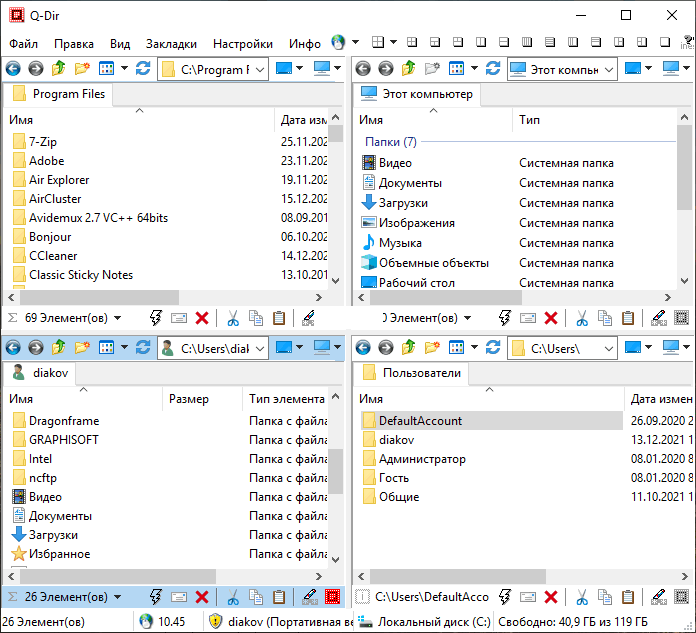
Q-Dir 12.71 Review: A Lightweight Multi-Pane File Manager for Windows
Q-Dir 12.71 is a lightweight file management software designed to make browsing, organizing, copying, and moving files easier on Windows. It is especially useful for users who work with many folders at the same time and want a faster alternative to the standard Windows File Explorer.
The main idea behind Q-Dir is simple: instead of opening several File Explorer windows, users can manage multiple locations inside one interface. This makes daily file organization faster, cleaner, and more productive.
Multi-Pane File Management
The most important feature of Q-Dir 12.71 is its multi-pane layout. The program allows users to view up to four folder windows at the same time. This layout is very helpful when copying, moving, comparing, or organizing files between different drives and folders.
For example, users can open a downloads folder, a documents folder, an external drive, and a backup folder all in one window. This saves time and reduces desktop clutter.
Simple and Familiar Interface
Q-Dir 12.71 keeps the file management experience familiar for Windows users. It works in a way that feels close to Windows File Explorer, but with more flexibility. Users can browse folders, open files, rename items, copy data, delete files, and manage directories easily.
The interface is practical rather than complicated. This makes the software suitable for beginners as well as advanced users who want better control over their files.
Different Layout Options
Q-Dir provides several layout modes, allowing users to choose how the panes are arranged. Users can work with one, two, three, or four panes depending on their needs.
This flexibility is useful for different workflows. A user who only needs to compare two folders can use a dual-pane layout, while someone managing several drives can switch to a four-pane setup.
Drag-and-Drop Support
Q-Dir 12.71 supports drag-and-drop file operations, making it easy to move or copy files between panes. Users can drag files from one folder to another without opening extra windows.
This feature is one of the reasons Q-Dir is useful for people who frequently organize downloads, backups, photos, videos, documents, and work files.
Favorites and Quick Access
The software includes options for favorites and quick access to commonly used folders. Users can save frequently opened locations and return to them quickly.
This is helpful for users who regularly work with the same project folders, network paths, external drives, or backup directories. Instead of navigating manually every time, Q-Dir allows faster access to important locations.
File Preview and Viewing Options
Q-Dir 12.71 offers different viewing modes for files and folders, including details, icons, list view, and thumbnails. This allows users to choose the best display style depending on the type of files they are managing.
For example, thumbnail view is useful for images and videos, while details view is better for checking file size, type, and modification date.
Portable and Lightweight
One of the strong advantages of Q-Dir is that it is very lightweight. It does not require many system resources and can run smoothly on most Windows computers.
Q-Dir is also available in portable form, which means users can run it from a USB drive without a full installation. This is useful for technicians, IT workers, and users who work on multiple computers.
Useful for Power Users
Although Q-Dir is simple enough for normal users, it is also valuable for power users. People who manage large amounts of data, organize backups, compare folders, or work across multiple drives can benefit from its multi-pane system.
It can improve productivity because it reduces the need to constantly switch between separate windows.
Performance and Stability
Q-Dir 12.71 is designed to be fast and responsive. Because it is lightweight, it opens quickly and performs file operations smoothly. It is suitable for everyday file management and does not put heavy pressure on system performance.
The software is especially useful on older or modest computers where heavy file management tools may feel slow.
Advantages of Q-Dir 12.71
Q-Dir 12.71 offers many advantages for Windows users. It provides up to four file panes in one window, supports drag-and-drop operations, offers multiple layout options, includes favorites, supports portable use, and remains lightweight and fast.
It is a practical tool for anyone who wants better file organization without using a large or complicated file manager.
Disadvantages of Q-Dir 12.71
Although Q-Dir is very useful, its interface may look traditional compared to modern Windows applications. Some users may need a little time to get used to the multi-pane layout.
It also focuses mainly on file browsing and organization, so users looking for advanced cloud integration, built-in file synchronization, or deep automation features may need additional software.
Who Should Use Q-Dir 12.71?
Q-Dir 12.71 is suitable for Windows users who frequently copy, move, organize, or compare files. It is also helpful for students, office workers, photographers, video editors, IT technicians, system administrators, and anyone who works with many folders or drives.
It is especially recommended for users who want a simple, free, and lightweight alternative to opening many File Explorer windows.
Final Verdict
Q-Dir 12.71 is a practical and efficient multi-pane file manager for Windows. It improves the way users browse and organize files by allowing multiple folders to be viewed in one window.
With its four-pane layout, drag-and-drop support, favorites, portable version, fast performance, and simple interface, Q-Dir 12.71 is a useful tool for anyone who wants more control and speed when managing files on Windows.