Minimal Firewall 2.8.5: A Lightweight Security Tool for Better Windows Firewall Control
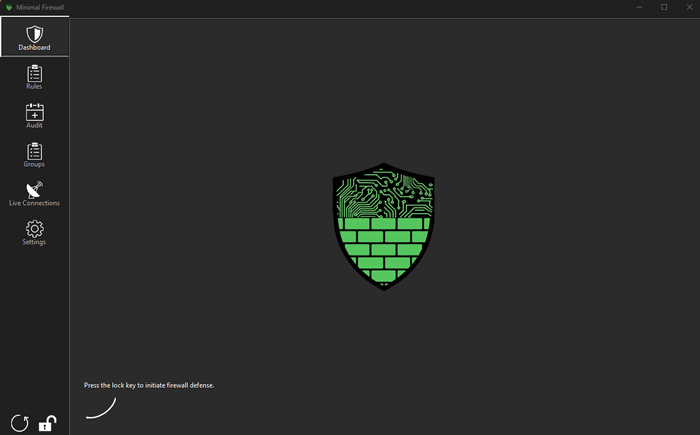
Minimal Firewall 2.8.5 is a lightweight Windows security utility designed to give users better control over outgoing network connections. Instead of replacing the built-in Windows Firewall, the program works alongside it and improves its usability by adding clearer alerts, rule management, lockdown behavior, and better visibility over network activity.
The main idea behind Minimal Firewall is simple: no application should connect to the internet without the user knowing. By default, Windows Firewall is powerful, but its standard interface is not always friendly for users who want direct control over outbound connections. Minimal Firewall fills this gap by offering a cleaner and more practical way to manage which programs are allowed or blocked.
One of the most important features in Minimal Firewall 2.8.5 is its Lockdown Mode. When enabled, unknown outgoing connections are blocked by default. If an application tries to access the internet, the program can alert the user and allow them to decide whether that connection should be permitted or denied. This is useful for stopping unwanted telemetry, preventing suspicious background activity, and reducing the risk of data leaks.
Minimal Firewall is also useful because it does not rely on complicated kernel-level modifications. The project describes itself as a lightweight frontend for Windows Firewall, which means it uses the existing firewall system instead of installing a separate firewall engine. This approach helps keep the system more stable and avoids the risks that can come with deeper network drivers or low-level system hooks.
The program is especially helpful for users who want more transparency. It can show connection activity, help review firewall rules, and make it easier to understand which applications are communicating with the network. This makes it valuable not only for advanced users, but also for anyone who wants a clearer view of what is happening on their Windows PC.
Version 2.8.5 continues the development of the 2.8.x series with improvements focused on stability and rule handling. Recent release notes for the project mention fixes related to Windows Firewall rule behavior, VPN-related networking, DNS cache handling, audit policy checks, and rule conflict prevention. These updates show that the tool is actively maintained and focused on practical firewall reliability.
Another strong point is portability. Minimal Firewall is often described as a portable tool, meaning it can be used without a traditional heavy installation process. This makes it convenient for users who prefer clean utilities that do not leave unnecessary components behind. It is also open-source, giving technical users the ability to review the project and understand how it works.
In daily use, Minimal Firewall can be helpful for many situations. It can stop unknown applications from phoning home, block unnecessary background traffic, and give users more confidence when installing or testing new software. It is also useful for privacy-conscious users who want to reduce unwanted data sharing from apps, launchers, updaters, and background services.
However, Minimal Firewall is not meant to be a full enterprise firewall suite. It does not replace professional network security tools, deep packet inspection systems, or advanced traffic analytics platforms. It is a focused utility built around Windows Firewall control. Its strength comes from being simple, lightweight, and practical rather than overloaded with unnecessary features.
Users should also understand that Minimal Firewall depends on Windows Firewall being active and working correctly. Since it enhances the built-in firewall instead of replacing it, disabling Windows Firewall would reduce the usefulness of the tool. Some applications, VPNs, or special networking setups may also require manual adjustments or custom rules.
Overall, Minimal Firewall 2.8.5 is a practical and efficient tool for Windows users who want stronger outbound connection control without installing a heavy third-party firewall. It improves the built-in Windows Firewall experience by adding real-time awareness, lockdown protection, and easier rule management. For users who care about privacy, security, and control, it is a strong lightweight option.
Key Features
- Works with the built-in Windows Firewall
- Blocks unknown outbound connections by default through Lockdown Mode
- Real-time alerts for application network activity
- Rule management and auditing
- Helps reduce unwanted telemetry and data leaks
- Lightweight and portable design
- Open-source project
- No custom kernel driver required
- Useful for privacy-focused and security-conscious users
- Suitable for Windows users who want more control without complex setup
Pros
Minimal Firewall 2.8.5 is lightweight, practical, and focused on one important job: controlling which applications can access the internet. It improves Windows Firewall without replacing it, offers useful real-time alerts, and provides a more transparent way to manage outbound connections. Its open-source and portable nature also makes it appealing to advanced users.
Cons
The program may be less suitable for beginners who do not understand firewall rules or outbound connection prompts. It also depends on Windows Firewall, so it cannot provide features that the built-in firewall does not support. Some VPNs or special networking tools may require extra configuration.
Conclusion
Minimal Firewall 2.8.5 is a smart choice for users who want more control over their Windows network connections. It is not a heavy security suite, and it does not try to replace the firewall built into Windows. Instead, it makes that firewall easier to use, more transparent, and more protective. With Lockdown Mode, real-time alerts, and lightweight operation, Minimal Firewall gives users a simple but powerful way to stop unwanted connections and improve everyday privacy.