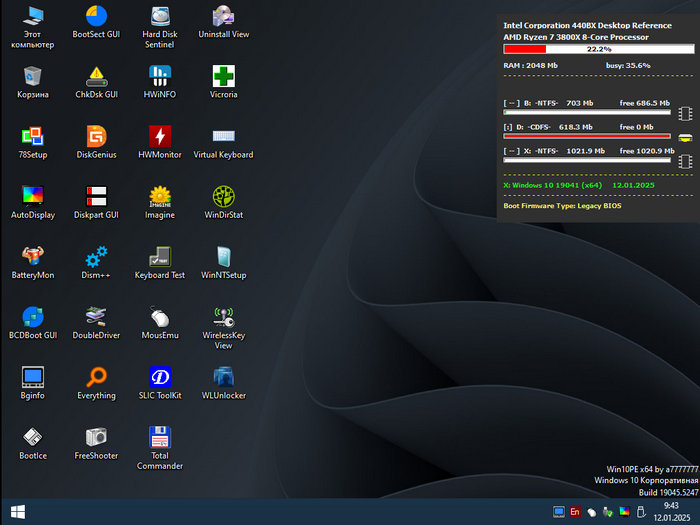
Windows 10 PE 19045.6456 Compact – Lightweight Bootable Recovery Environment for PC Repair and Maintenance
Windows 10 PE 19045.6456 Compact is a lightweight bootable Windows Preinstallation Environment designed for recovery, diagnostics, maintenance, and emergency repair tasks. It is based on the Windows 10 22H2 platform and uses build 19045.6456 as its foundation, giving users a familiar Windows 10-style environment in a smaller and portable format.
Unlike a full Windows 10 installation, Windows PE is not made for daily use. It is designed to run temporarily from a USB flash drive, external drive, or bootable ISO. Its main purpose is to help users access, repair, diagnose, or recover a computer when the installed operating system cannot start normally.
What Is Windows 10 PE Compact?
Windows PE, short for Windows Preinstallation Environment, is a minimal version of Windows used mainly for system deployment, troubleshooting, and recovery. A compact PE edition removes unnecessary components and keeps only the essential tools needed for repair work.
Windows 10 PE 19045.6456 Compact is especially useful for users who want a small, fast, and practical rescue system. It can be carried on a USB drive and used on different computers whenever Windows fails to boot, files need to be recovered, or system maintenance is required.
Main Purpose
The main purpose of Windows 10 PE 19045.6456 Compact is to provide a portable repair workspace. It allows users to boot into a Windows-based environment without depending on the operating system installed on the internal drive.
This makes it very useful in emergency situations such as boot failure, corrupted system files, damaged partitions, malware-related problems, failed updates, blue screen issues, or accidental file loss. Instead of immediately reinstalling Windows, users can boot into Windows PE and try to recover files or repair the system first.
Key Features
Windows 10 PE 19045.6456 Compact offers the most important features needed in a rescue environment. It provides a familiar Windows interface, support for modern hardware, access to internal and external storage devices, and the ability to run many portable maintenance tools.
The compact design helps the system load faster and use fewer resources. This is important when working on older computers or devices with limited memory. Because the environment is smaller than a full Windows installation, it is more focused on repair and recovery tasks.
Another important feature is portability. Users can create a bootable USB drive and use it across multiple computers. This makes it a helpful tool for IT technicians, system administrators, repair shops, and advanced home users.
Common Uses
Windows 10 PE Compact can be used for many different tasks. One of the most common uses is file recovery. When a computer cannot boot into Windows, users can start the PE environment, access the internal drive, and copy important files to an external storage device.
It can also be used for boot repair. If Windows fails to start because of damaged boot files or incorrect boot configuration, Windows PE can help users access recovery tools and attempt to fix the issue.
Another common use is disk and partition management. Users can prepare drives for installation, resize partitions, format disks, check storage health, or clone drives using compatible tools.
Windows 10 PE can also help with system backup, driver backup, registry editing, password recovery operations, offline antivirus scanning, hardware diagnostics, and Windows installation preparation.
Performance and Stability
Because this is a compact build, performance is one of its main advantages. It is designed to boot quickly and operate with fewer background services than a normal Windows installation. This makes it suitable for emergency use, especially when speed is important.
The Windows 10 base also gives it strong compatibility with older and modern computers. Many users still prefer Windows 10 PE environments because they are stable, familiar, and less demanding than newer Windows 11-based PE builds.
However, performance can still depend on the USB drive speed, computer hardware, included drivers, and the tools added to the PE image. Using a good-quality USB 3.0 drive can make the experience much smoother.
Interface and Usability
Windows 10 PE 19045.6456 Compact usually provides a simple Windows-style desktop environment. This makes it easier to use than command-line-only rescue tools. Users can open file managers, launch utilities, browse drives, and perform repair tasks in a familiar way.
For beginners, the familiar interface is helpful for basic tasks such as copying files, checking folders, or running recovery tools. For advanced users, it provides a flexible workspace for deeper system maintenance.
Still, users should be careful when working with partitions, boot files, or system folders. A wrong operation can cause data loss or make a system harder to repair.
Advantages
Windows 10 PE 19045.6456 Compact has several advantages. It is lightweight, portable, and practical for emergency repair. It allows users to access files even when Windows cannot boot, and it provides a useful environment for fixing boot issues, backing up data, and preparing installations.
Its compact size makes it easier to store on a USB drive. It also loads faster than larger rescue systems and can work well on many computers.
Another strong advantage is independence from the installed operating system. Even if the internal Windows installation is damaged, locked, infected, or unstable, the PE environment can still boot from external media and give users access to the machine.
Limitations
Windows 10 PE Compact is not a replacement for a full Windows operating system. It is a temporary environment with limited features. Some regular programs may not work, some services may be missing, and certain drivers may need to be added manually.
It is also important to remember that many PE builds are customized by third-party creators. Users should only download them from trusted sources and scan files before use. Since a bootable PE system can access internal drives and sensitive data, security should always be taken seriously.
Another limitation is that changes made inside the PE environment may not always be saved after reboot, depending on how the image was built. This is normal for many Windows PE systems.
Who Should Use It?
Windows 10 PE 19045.6456 Compact is best suited for computer technicians, IT support workers, system administrators, and advanced users who often repair or maintain Windows computers.
It is also useful for regular users who want an emergency USB drive for file recovery and basic troubleshooting. However, beginners should avoid advanced operations unless they understand the risk or follow a trusted guide.
Recommended Use Cases
This PE environment is ideal for recovering files from a non-booting PC, repairing Windows startup problems, checking hard drives and SSDs, creating backups before reinstalling Windows, managing partitions, testing hardware, and preparing a computer for a clean installation.
It can also be useful in repair shops where technicians need a fast and portable system that can be used on multiple devices without installing anything on the target computer.
Safety Tips
Before using Windows 10 PE Compact, users should back up important data whenever possible. If the internal drive is failing, file recovery should be the first priority before running repair tools or making changes to partitions.
Users should also avoid formatting drives or deleting partitions unless they are completely sure which disk they are working on. In emergency repair situations, taking time to verify the correct drive can prevent serious data loss.
It is also recommended to keep the PE USB drive updated with reliable tools and drivers. A well-prepared rescue USB can save time when dealing with urgent system problems.
Final Verdict
Windows 10 PE 19045.6456 Compact is a useful and practical bootable recovery environment for Windows repair, diagnostics, backup, and maintenance. It offers a familiar Windows 10-based workspace in a lightweight and portable form, making it suitable for emergency use and technical troubleshooting.
It is not intended to replace a normal Windows installation, but it can be extremely valuable when a computer cannot boot or when important files need to be recovered. For technicians and advanced users, it is a strong addition to any repair toolkit. For normal users, it can serve as a reliable emergency USB solution when Windows problems appear unexpectedly.
Overall, Windows 10 PE 19045.6456 Compact is a focused, efficient, and helpful rescue environment for anyone who needs fast access to repair tools outside the main operating system.