NetSpeedTray 2.0.1: A Lightweight Windows Taskbar Network Monitor
NetSpeedTray 2.0.1 is a lightweight, open-source network monitoring utility for Windows that displays real-time upload and download speeds directly on the taskbar. It is designed for users who want a simple way to watch internet activity without opening Task Manager, Resource Monitor, or a heavy network monitoring program.
The tool is especially useful for users who want to check whether downloads are active, streaming is consuming bandwidth, cloud sync is running, or background applications are using the internet. Instead of hiding this information inside system tools, NetSpeedTray places live speed readings where they are always easy to see.
Real-Time Upload and Download Speeds
The main purpose of NetSpeedTray is to show live network speed on the Windows taskbar. It displays upload and download activity in real time, allowing users to quickly understand how much bandwidth is being used.
This is useful during downloads, uploads, online gaming, streaming, cloud backup, video calls, remote work, and general browsing. Users can immediately see if the internet connection is active or if a program is using bandwidth in the background.
Native Taskbar Experience
One of the biggest improvements in the 2.0 release line is the way the widget integrates with the Windows taskbar. According to the official GitHub release notes for NetSpeedTray 2.0.0, the widget was redesigned to behave like a true part of the taskbar instead of acting like a separate always-on-top window. This helps prevent problems where the widget could disappear behind the taskbar, flicker, or vanish when opening the Start menu or system flyouts.
This change makes NetSpeedTray feel more stable and natural on Windows. The speed readout remains visible through normal shell interactions, Explorer restarts, sleep and resume, monitor changes, and taskbar clicks.
Unified Monitor Window
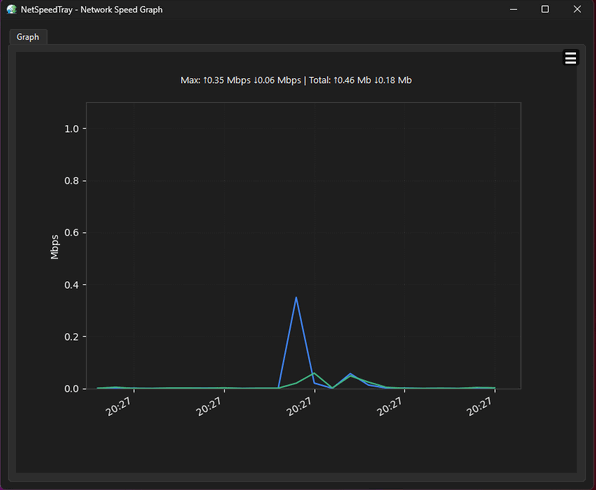
NetSpeedTray also includes a Monitor window that gives users more detailed information beyond the small taskbar readout. In version 2.0, the older separate history graph and app activity windows were replaced by one unified Monitor with three tabs: Overview, Network, and Hardware.
The Overview tab provides quick tiles and sparklines for system activity. The Network tab shows history graphs and network-related information. The Hardware tab can display CPU, GPU, RAM, and VRAM activity when enabled. This makes NetSpeedTray more than just a small speed indicator; it becomes a compact monitoring dashboard.
Data Usage Tracking
NetSpeedTray 2.0 includes data usage tracking features. Users can view daily, weekly, and monthly totals, making it easier to understand how much data has been used over time.
This is especially helpful for users with limited internet plans, mobile hotspots, shared connections, or data caps. The tool can also support monthly cap tracking with a billing reset day and optional alerts, helping users avoid unexpected overuse.
Network Latency Monitoring
Another useful feature in the 2.0 release line is network latency monitoring. The tool can provide a simple indication of connection quality, helping users understand whether the connection feels good, slow, or unstable.
Latency monitoring is useful for online gaming, video calls, remote desktop sessions, streaming, and cloud services. Speed alone does not always explain internet problems, so latency information gives users a better picture of connection quality.
Hardware Monitoring Options
NetSpeedTray can also show hardware information such as CPU, GPU, RAM, and VRAM usage. The official release notes mention hardware monitoring support and optional temperature and power readouts, depending on available sensor sources.
This makes the tool useful for users who want a small taskbar-based system monitor, not only a network monitor. Gamers, laptop users, streamers, and productivity users can quickly check whether the system is under heavy load.
Customizable Widget Display
NetSpeedTray provides several customization options for the taskbar widget. Users can adjust how information appears, choose different arrow styles, configure click actions, switch between metrics, and customize the display to match their workflow.
The program is designed to feel like part of Windows 11, with a clean visual style, dark mode support, rounded corners in the Monitor window, and a taskbar-friendly appearance.
Open-Source and Lightweight
NetSpeedTray is open source and available through GitHub. The official project page describes it as a lightweight, open-source network monitor for Windows that displays live upload and download speeds directly on the taskbar with a native look and feel.
Because it is open source, users and developers can inspect the project, follow updates, report issues, and contribute improvements. This is useful for people who prefer transparent utilities instead of closed, unknown background tools.
Installation and Portable Options
The official GitHub page lists installation through WinGet using the command winget install --id erez-c137.NetSpeedTray. It also mentions that users can download the latest Setup.exe or Portable.zip directly from the releases page. The project page states that official releases are digitally signed and that the tool supports Windows 10 and Windows 11 64-bit systems.
This gives users flexibility. They can install the program normally, use a portable version, or manage installation through Windows Package Manager.
Version 2.0.1 Notes
NetSpeedTray 2.0.1 appears to be a maintenance build after the major 2.0 release. The changelog around the 2.0 series mentions fixes related to settings controls, Monitor display behavior, RAM and VRAM toggle behavior, and clearer guidance for CPU/GPU temperature and power readings.
Because the major changes came with version 2.0.0, NetSpeedTray 2.0.1 is best understood as a refinement update that improves the new 2.0 experience rather than a completely separate feature release.
Who Should Use NetSpeedTray?
NetSpeedTray 2.0.1 is useful for Windows users who want to monitor internet speed directly from the taskbar. It is suitable for gamers, streamers, remote workers, students, IT users, laptop users, and anyone who wants a quick view of bandwidth activity.
It is also helpful for users who suspect background apps are consuming data, people with limited internet plans, and anyone who wants a cleaner alternative to bulky monitoring software.
Pros
NetSpeedTray 2.0.1 is lightweight, open source, taskbar-friendly, and easy to use. It shows real-time upload and download speeds, supports detailed monitoring through the Monitor window, includes data usage tracking, offers latency information, supports hardware monitoring options, and provides installer and portable versions.
Cons
The tool is designed mainly for Windows 10 and Windows 11 64-bit systems, so it is not useful for older or non-Windows platforms. Some hardware readings such as temperature and power may require optional sensor support and may not work on every PC. Also, users who need enterprise-level network analysis may need more advanced tools with packet inspection, firewall logs, or full traffic auditing.
Conclusion
NetSpeedTray 2.0.1 is a practical and modern network speed monitor for Windows. It places live upload and download speeds directly on the taskbar, giving users a simple way to watch bandwidth activity at all times. With the 2.0 release line, the widget became more deeply integrated with the taskbar and gained a more complete Monitor window for network and hardware information.
For users who want a clean, lightweight, open-source tool to monitor internet speed, data usage, latency, and basic system activity, NetSpeedTray 2.0.1 is a strong and convenient choice. It is especially useful for Windows users who want useful live information without opening heavy monitoring apps or cluttering the desktop.