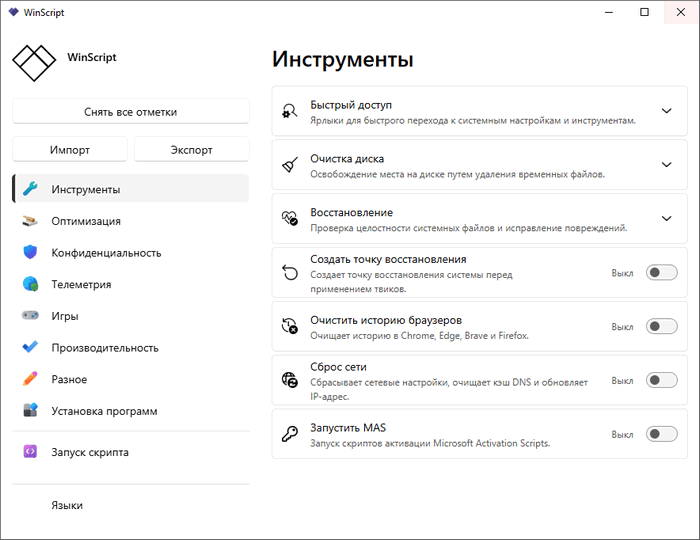
WinScript 2.20.2: Build Custom Windows Optimization Scripts with Ease
WinScript 2.20.2 is a lightweight open-source Windows customization and optimization tool designed to help users build their own Windows scripts from scratch. Instead of manually searching for registry tweaks, privacy settings, debloat commands, and performance adjustments, WinScript provides a clean interface where users can select the changes they want and generate a script that applies them.
The program is mainly aimed at Windows 10 and Windows 11 users who want more control over their system. It can help remove unwanted built-in apps, improve privacy, disable telemetry, adjust performance settings, install useful applications, and create a more personalized Windows experience.
Open-Source Windows Customization Tool
One of the most important advantages of WinScript is that it is open source. The official project describes it as a tool for building Windows scripts from scratch, with features for debloat, privacy, performance, and app installation scripts. This makes it more transparent than many closed-source tweaking utilities, because users can review the project and understand what the tool is designed to do.
Open-source software can be especially attractive for advanced users, technicians, and privacy-focused users who prefer tools that are easier to inspect and verify.
Build Your Own Windows Script
WinScript is not just a normal “one-click optimizer.” Its main idea is to let users choose exactly what they want to change, then generate a custom Windows script based on those selections.
This approach gives users more control. Instead of applying a full preset with unknown changes, users can review available options and decide which tweaks are suitable for their computer. This makes WinScript useful for people who want a cleaner and more controlled Windows setup.
Debloat Windows
A major feature of WinScript is Windows debloating. Many Windows installations include preinstalled apps, services, and background components that some users do not need. WinScript can help create scripts to remove or disable selected unwanted items.
This can be useful for users who want a cleaner Start menu, fewer background apps, and a lighter system. However, users should choose debloat options carefully, because removing certain Windows components may affect features they later need.
Privacy and Telemetry Tweaks
WinScript includes privacy-focused options that can help reduce tracking, telemetry, and unnecessary data collection behavior in Windows. These tweaks are useful for users who want more control over background communication and system privacy settings.
Privacy adjustments may include disabling certain telemetry-related services, limiting tracking features, adjusting app permissions, or changing Windows settings that are difficult to find manually. This makes the program helpful for users who want a more private Windows environment without manually editing system policies or registry entries.
Performance Optimization
WinScript also includes performance-related scripts. These may help reduce unnecessary background activity, adjust system behavior, clean temporary files, enable useful Windows performance settings, or apply tweaks designed to make the system feel faster and more responsive.
The official website presents WinScript as a tool that includes performance scripts in addition to debloat, privacy, and app installation features.
Performance improvements can vary depending on the computer. Users with older PCs, heavy Windows installations, or many background services may notice more benefits than users with already clean and powerful systems.
App Installation Scripts
Another useful part of WinScript is app installation support. Users can build scripts that install selected applications, which can save time when setting up a new PC or reinstalling Windows.
This is useful for technicians, gamers, students, office users, and anyone who frequently installs the same programs after a fresh Windows setup. Instead of downloading each app manually, users can prepare a custom script and automate part of the setup process.
Useful for Fresh Windows Installations
WinScript is especially practical after installing Windows 10 or Windows 11. After a fresh installation, users often need to remove unwanted apps, change privacy settings, install essential software, adjust performance options, and personalize the system.
WinScript brings many of these tasks into one workflow. This can make PC setup faster and more consistent, especially for users who frequently format computers or manage multiple machines.
Lightweight and Easy to Use
WinScript is designed to be lightweight and straightforward. It focuses on building and applying scripts rather than becoming a heavy system suite. According to software listings and the official project description, it is designed as a simple tool for customizing Windows 10 and Windows 11 through generated scripts.
This lightweight design makes it suitable for users who want practical Windows customization without installing a large optimization package.
Better Control Than Random Tweaks
Many Windows optimization guides recommend copying random commands from the internet. This can be risky because users may not fully understand what each command does. WinScript provides a more organized way to choose tweaks and generate a script based on visible options.
This does not mean every tweak is suitable for every user, but it does make the process easier to review compared with blindly running unknown scripts from random sources.
Important Safety Notes
Because WinScript can change Windows settings, remove apps, and adjust system behavior, users should use it carefully. It is recommended to create a system restore point or backup important data before applying major changes.
Users should also read the selected options before generating or running a script. Some debloat or privacy tweaks may disable features that certain users depend on, such as Microsoft services, built-in apps, Xbox components, OneDrive, Copilot, or other Windows integrations.
Who Should Use WinScript 2.20.2?
WinScript 2.20.2 is suitable for Windows users who want a cleaner, more private, and more optimized system. It is useful for PC enthusiasts, gamers, technicians, students, privacy-focused users, and people who frequently reinstall or configure Windows.
It is also helpful for users who want to learn more about Windows customization because it shows many common tweaks in one organized place.
Pros
WinScript 2.20.2 is open source, lightweight, easy to use, and focused on custom script generation. It includes tools for Windows debloating, privacy improvement, performance optimization, and app installation. It is especially useful after a fresh Windows installation and gives users more control than many one-click optimizer tools.
Cons
WinScript should be used carefully because some tweaks can change important Windows behavior. Beginners may need time to understand which options are safe for their needs. Performance gains are not guaranteed on every PC, and aggressive debloating may remove features that some users later want to use. Since it generates scripts that modify the system, creating a restore point before use is strongly recommended.
Conclusion
WinScript 2.20.2 is a practical open-source tool for users who want to customize and optimize Windows 10 or Windows 11 through clear, selectable scripts. It combines debloat options, privacy tweaks, performance settings, and app installation tools in one lightweight interface.
For users who regularly set up Windows, remove unwanted components, improve privacy, or apply system tweaks, WinScript can save time and make the process more organized. When used carefully, it provides a flexible and transparent way to make Windows cleaner, faster, and more personal.