WinScript 2.20.1: A Lightweight Tool to Customize and Optimize Windows
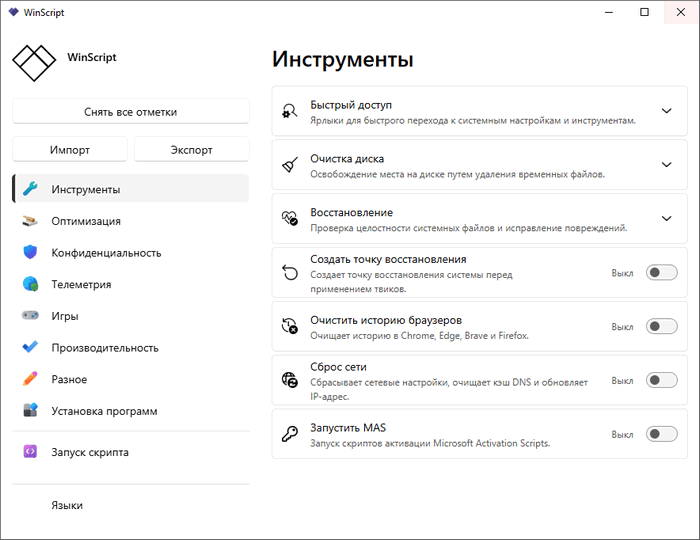
WinScript 2.20.1 is a lightweight open-source Windows customization tool designed for users who want more control over their system without manually writing complex PowerShell scripts. Instead of applying hidden changes in the background, WinScript allows users to build a custom Windows script from scratch, review what will be changed, and then run the script based on their needs.
The main purpose of WinScript is to make Windows cleaner, faster, and more private. It includes options for removing unnecessary pre-installed apps, disabling telemetry, improving system performance, adjusting privacy settings, and installing useful applications in bulk. This makes it a practical choice for users who want to set up a fresh Windows installation or improve an existing one.
One of the strongest points of WinScript is its transparent approach. Many optimization tools apply changes without clearly showing what they are doing, but WinScript focuses on script generation. This means users can see the actions before running them, which gives more confidence and control, especially when changing sensitive Windows settings.
WinScript 2.20.1 is mainly a maintenance update. The key fix in this version addresses an invalid app certificate issue. Although this update does not introduce major new features, it improves reliability and helps ensure a smoother experience for users downloading or running the application.
The tool includes several useful categories. The debloat section helps remove unwanted Windows components and apps that many users do not need. The privacy section focuses on reducing tracking, telemetry, and unnecessary data collection. The performance options help adjust Windows behavior to make the system feel lighter and more responsive. There are also app installation features that allow users to install multiple programs more easily.
WinScript can be especially useful after installing Windows 10 or Windows 11. Instead of spending a long time changing settings manually, users can select the options they want and generate a ready-to-run script. This saves time and helps create a cleaner setup from the beginning.
However, users should be careful when using any tool that modifies Windows settings. Some options may remove features that certain users still need, such as OneDrive, Microsoft Store components, or other built-in services. For that reason, it is always better to review the selected options before running the generated script and avoid applying changes without understanding their purpose.
Another important note is that security software may sometimes flag WinScript or its generated scripts. This can happen because the tool creates scripts that modify system settings. This does not automatically mean the program is dangerous, but users should always download it from official sources and review the script before execution.
Overall, WinScript 2.20.1 is a useful update for a powerful Windows customization tool. It is not just a simple cleaner; it is a script-building utility that gives users more control over privacy, performance, debloating, and software setup. For advanced users, it offers flexibility and transparency. For normal users, it provides an easier way to optimize Windows without writing commands manually.
WinScript 2.20.1 is a good choice for anyone who wants to make Windows cleaner, more private, and more personalized while still keeping control over every change before applying it.