FontExpert 2026 21.0 Release 1: A Complete Font Management Solution for Windows
Introduction
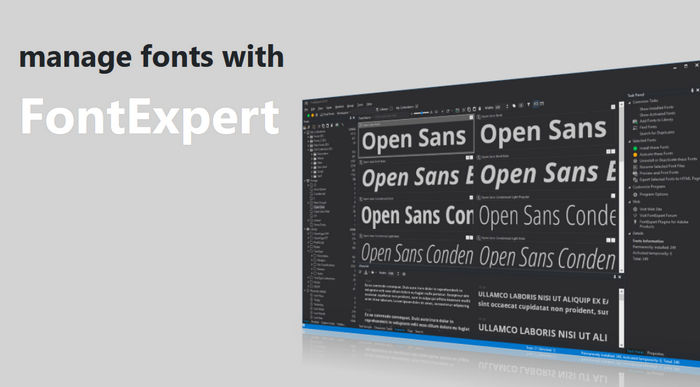
FontExpert 2026 21.0 Release 1 is a professional font management program developed for Windows users who work with large font collections. It is designed to help designers, publishers, typographers, web designers, printing specialists, and creative professionals organize, preview, activate, deactivate, search, and maintain fonts in a more controlled and efficient way.
Managing fonts manually can become difficult when a computer contains hundreds or thousands of typefaces. Designers often need to test different styles, compare fonts, organize them by project, remove duplicates, detect corrupted files, or activate only the fonts required for a specific workflow. FontExpert 2026 provides a complete environment for all these tasks, making it more than a simple font viewer. It works as a full font library manager, preview tool, organizer, diagnostic utility, and productivity assistant.
With Version 21.0 Release 1, FontExpert 2026 introduces useful improvements for modern typography workflows, including support for WOFF2 fonts, new font-type filters in the main view, Japanese interface support, better scaling behavior on high-DPI display settings, and improved Unicode character handling in the text sample editor.
What Is FontExpert 2026?
FontExpert 2026 is a font manager for OpenType, TrueType, Adobe PostScript, and other supported font formats. It allows users to view both installed and uninstalled fonts, organize fonts into libraries and groups, attach external font folders, search through font collections, and examine the system for font-related problems.
The program is especially useful for users who constantly switch between different projects. Instead of keeping all fonts installed all the time, users can activate only the fonts they need and deactivate the rest. This helps keep the Windows font environment cleaner and makes it easier to avoid font conflicts or confusion.
FontExpert also helps users preview fonts before using them. Fonts can be displayed as sample text, character maps, waterfall views, or detailed property reports. This makes it easier to choose the right font for branding, print design, web design, packaging, editorial layouts, UI design, or any typography-based project.
What’s New in FontExpert 2026 21.0 Release 1?
FontExpert 2026 Version 21.0 Release 1 brings several important updates that improve usability and compatibility.
One of the most notable additions is font filtering by font type in the main view. This feature allows users to narrow down their font list based on font format or type, making it easier to find exactly what they need inside a large collection.
The release also adds support for WOFF2 fonts. WOFF2 is widely used in web typography because it offers compressed font files suitable for websites and digital projects. This addition makes FontExpert more useful for web designers and developers who manage both desktop and web font libraries.
Another new feature is support for the Japanese user interface language. This expands accessibility for Japanese-speaking users and makes the program more convenient for international users and multilingual design environments.
The update also fixes scaling problems that could appear when the operating system text size setting was higher than 100%. This improvement affects areas such as the Characters Map, Text Sample, and Waterfall views, helping the interface display more correctly on systems using larger text or high-resolution screens.
In addition, the text sample edit box now uses Tahoma instead of Segoe UI as its default font family. This change improves support for more Unicode characters inside the edit box, which is useful for users working with multilingual text, symbols, special characters, or non-Latin scripts.
Main Features
Font Previewing
FontExpert 2026 allows users to preview fonts before installing or activating them. This is one of its most important functions because it lets designers inspect fonts visually without changing the system font environment.
Users can preview fonts as paragraphs, custom sample text, character maps, and size-based views. This helps compare different typefaces and understand how they look in real-world usage. Designers can test headlines, branding text, body copy, numbers, punctuation, symbols, and special characters before choosing a font for a project.
The ability to preview uninstalled fonts is especially useful. Many designers keep font archives on external drives, network folders, or separate storage locations. FontExpert can browse and preview these fonts without requiring the user to install them first.
Font Library Management
FontExpert includes a library system that helps users organize their font collections logically. Instead of keeping files scattered across different folders, users can create a structured font library and manage fonts more easily.
The Library feature allows users to view fonts as organized groups without necessarily changing the original file locations. This is helpful for users who want a clean structure inside the program while keeping their font files stored in their original folders.
Users can create font sets, project collections, client-specific groups, style-based folders, or any other organizational structure that fits their workflow. For example, a designer can create separate groups for logo fonts, magazine fonts, web fonts, Arabic fonts, handwritten fonts, display fonts, or corporate identity projects.
Groups and Collections
FontExpert supports font groups, which are logical sets of fonts that can be activated or deactivated together. This is very useful for project-based workflows.
For example, if a designer is working on a branding project, they can create a group containing all fonts used for that brand. When the project starts, the designer can activate the group. When the project is finished, the group can be deactivated to keep the system clean.
This approach saves time and prevents unnecessary font clutter. It also helps teams and individuals maintain consistency across multiple projects.
Tags, Keywords, Ratings, and Categories
FontExpert allows users to assign keywords, ratings, categories, and captions to fonts. This makes it easier to search and classify large collections.
A designer may tag fonts as modern, classic, serif, sans-serif, handwritten, logo, web, luxury, bold, minimal, Arabic, decorative, or any other custom category. Ratings can also help mark favorite fonts or high-quality typefaces.
This feature is useful when users have thousands of fonts and need a practical way to find the right option quickly. Instead of remembering exact file names, users can search based on descriptions, categories, or visual style.
Search and Database Tools
FontExpert includes database search features that allow users to find fonts by name, tags, ratings, categories, and other properties. It also includes quick search options for faster navigation.
The program can search local disks, removable drives, network drives, and attached folders. This is useful for users who store fonts in many locations and need one central tool to locate them.
For professionals who deal with large font libraries, the search system can save a lot of time. Instead of browsing folders manually, users can quickly locate specific fonts or filter the collection based on useful criteria.
Duplicate and Corrupted Font Detection
One of the most useful maintenance features in FontExpert 2026 is the ability to detect duplicate and corrupted fonts. Large font collections often contain repeated files, incomplete fonts, damaged files, or conflicting versions of the same typeface.
FontExpert can help identify these problems so users can clean their font library and avoid issues inside design applications. Removing duplicates can reduce confusion, while detecting corrupted fonts can prevent crashes, display errors, or printing problems.
This feature is especially valuable for designers who download, buy, transfer, or archive fonts from different sources over many years.
Font Activation and Deactivation
FontExpert makes it easy to activate or deactivate fonts. This is important because installing too many fonts permanently can make font menus crowded and harder to manage.
By activating only the fonts needed for a specific project, users can keep their system more organized. FontExpert also allows users to manage fonts located in standard Windows font folders and other font storage locations.
This gives users more control over their typography environment and reduces the need for manual font installation and removal.
Advanced Font Properties
FontExpert displays detailed information about selected fonts. This can include font foundry information, copyright data, TrueType tables, kerning pairs, Panose attributes, Windows font metrics, and other technical details.
This information is useful for advanced users, typographers, font developers, printing specialists, and designers who need to inspect font quality or verify font metadata.
For example, a user may want to check the version of a font, understand its technical structure, or confirm whether it includes certain character sets.
Printing and Exporting Font Samples
FontExpert can print selected fonts and create reports such as character maps, waterfall samples, and font face name reports. This is useful for design presentations, client reviews, typography catalogs, and internal documentation.
The program can also export selected fonts as an HTML web album and create image previews in formats such as GIF, JPG, PNG, TIFF, and BMP. This helps users create visual font catalogs that can be shared, archived, or reviewed outside the program.
Adobe InDesign and Illustrator Integration
FontExpert includes Missing Fonts Loader plug-ins for Adobe InDesign and Adobe Illustrator. These plug-ins help connect Adobe applications with FontExpert and activate missing fonts in documents.
This is highly useful for designers who open old files, client projects, or shared documents that require specific fonts. Instead of manually searching for missing fonts, the plug-in can help locate and activate them through FontExpert.
For professional design studios, publishing teams, and print workflows, this integration can reduce delays and improve productivity.
Windows Shell Extensions
FontExpert also adds useful commands to the Windows Explorer context menu. These commands can include opening, printing, and installing fonts directly from the file browser.
This makes font management faster because users can interact with font files without always opening the full program first. It also adds detailed font property information for supported font files, giving users easier access to technical font details.
Supported Font Types
FontExpert supports common professional font formats, including TrueType, OpenType, Adobe Type 1 PostScript fonts, TrueType Font Collections, and raster fonts. The 2026 Release 1 update also adds support for WOFF2 fonts, which is important for web typography.
This wide format support makes FontExpert useful for both traditional desktop publishing and modern web design workflows.
System Requirements
FontExpert 2026 is designed for Windows. The supported operating systems include Windows 11, Windows 10, Windows 8.1, Windows 8, and Windows 7.
This makes the program compatible with a wide range of Windows machines, from older workstations to modern design PCs.
Who Should Use FontExpert 2026?
FontExpert 2026 is suitable for anyone who works seriously with fonts. Graphic designers can use it to organize typefaces for branding, posters, packaging, and visual identity projects. Web designers can benefit from WOFF2 support and font previewing tools. Publishers and editors can manage fonts for books, magazines, and print layouts. Printing companies can use the software to detect font problems and maintain cleaner workflows.
It is also useful for font collectors who have large archives and need a better way to browse, classify, preview, and maintain their collections.
Even casual users can benefit from FontExpert if they frequently install fonts, test typography, or work with creative software.
Advantages
FontExpert 2026 offers a strong set of professional font management tools in one program. It allows users to preview installed and uninstalled fonts, organize fonts into libraries and groups, search by tags and properties, detect duplicates and corrupted files, print font reports, export font previews, and activate or deactivate fonts when needed.
The addition of WOFF2 support makes the 2026 release more relevant for web designers. The new font-type filters improve navigation in large libraries, and the scaling fix makes the interface more comfortable on modern display settings.
The Adobe plug-in support is also a major advantage for users working with InDesign and Illustrator documents.
Disadvantages
FontExpert 2026 is a specialized program, so beginners may need some time to understand all its tools. Users who only install a few fonts occasionally may not need such an advanced solution.
The interface is focused on productivity and professional font management rather than a modern simplified consumer-style experience. For some users, this may feel more technical at first.
Also, since the program is designed for Windows, users on macOS need to look for alternative font management solutions.
Final Verdict
FontExpert 2026 21.0 Release 1 is a powerful and reliable font management solution for Windows users. It is especially valuable for designers, typographers, publishers, web designers, and creative professionals who need full control over large font collections.
The program combines previewing, organization, tagging, searching, activation, duplicate detection, problem scanning, printing, exporting, and Adobe workflow support in one complete package. The 2026 update improves the program further with WOFF2 support, font-type filters, Japanese interface support, better scaling behavior, and improved Unicode handling in the text sample editor.
For users who work with fonts every day, FontExpert 2026 is more than a font viewer. It is a complete font management environment that helps keep typography assets organized, accessible, and ready for professional use.