WinScript 2.18.4 Review: A Lightweight Tool to Customize and Optimize Windows
WinScript 2.18.4 is a lightweight open-source utility designed to help users customize, optimize, and clean up their Windows experience through ready-made scripts and simple configuration options. Instead of manually changing system settings one by one, WinScript allows users to build a custom Windows script that can remove unwanted components, improve privacy, adjust performance settings, and install essential applications more efficiently.
This version is not a major feature update, but it is still an important maintenance release for users who rely on WinScript as part of their Windows setup or optimization routine.
What Is WinScript?
WinScript is an open-source Windows customization tool that helps users create scripts for Windows 10 and Windows 11. It is mainly built for people who want more control over their operating system without manually editing registry entries, running many separate commands, or searching through different Windows settings.
The tool focuses on four main areas: debloating, privacy, performance, and app installation. This makes it useful for users who want to remove unnecessary Windows components, reduce background activity, disable certain tracking options, and set up a clean system faster after installing Windows.
What’s New in WinScript 2.18.4?
WinScript 2.18.4 is mainly a bug-fix release. The key change in this version is related to the update system. If the fallback update process fails, WinScript now redirects users to the GitHub releases page. This makes it easier for users to find the latest available version manually instead of being left without a clear update path.
Although this is a small change, it improves the overall user experience. Update-related fixes are important for tools like WinScript because users need to stay on newer versions to benefit from the latest scripts, improvements, and compatibility fixes.
Main Features of WinScript
1. Windows Debloat Tools
WinScript allows users to remove or disable unnecessary Windows components. This can include pre-installed apps, unwanted services, and features that many users do not need. Debloating can help make Windows cleaner and more focused, especially after a fresh installation.
2. Privacy Enhancements
One of the strongest parts of WinScript is its privacy-focused options. The tool can help reduce telemetry, disable certain tracking-related settings, and limit background data collection. This is useful for users who want more control over what runs in the background on their computer.
3. Performance Tweaks
WinScript includes performance-related tweaks that can help optimize Windows behavior. These tweaks may include disabling unnecessary services, adjusting power settings, reducing delays, and improving general system responsiveness. The results can vary depending on the computer, but the tool gives users a convenient way to apply common optimization settings.
4. App Installation Support
WinScript can help users install multiple applications more quickly. This is especially helpful after reinstalling Windows or setting up a new PC. Instead of downloading every program manually, users can select the apps they need and generate a script to install them using supported package managers.
5. Script-Based Customization
The main idea behind WinScript is script generation. Users can choose the settings and actions they want, then create a custom script that applies those changes. This gives more flexibility than a traditional one-click optimizer because users can decide exactly what they want to change.
User Interface and Ease of Use
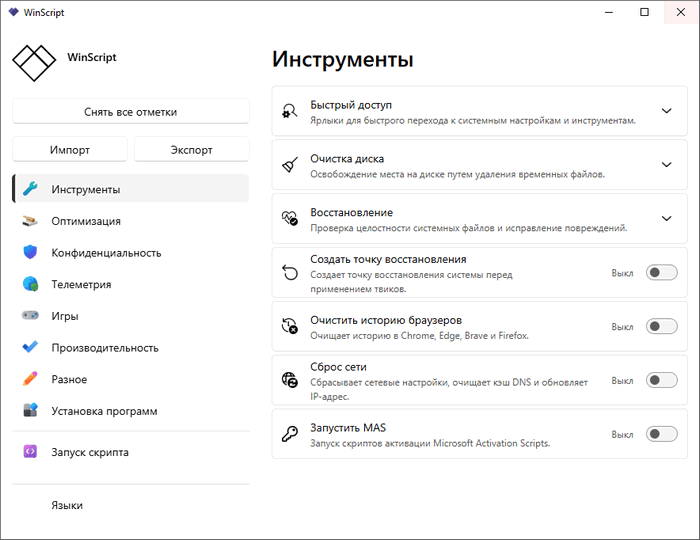
WinScript is designed to be simple and practical. It gives users a clear interface where different optimization and customization options are grouped into categories. This makes it easier to understand what each section does before applying changes.
However, users should still be careful. Since WinScript can change system settings, remove components, and modify Windows behavior, it is important to review selected options before running any generated script. Beginners should avoid enabling every option blindly and should only apply tweaks they understand.
Is WinScript 2.18.4 Safe to Use?
WinScript is open-source, which means its code can be reviewed publicly. This gives users more transparency compared to closed-source optimization tools. However, because WinScript creates scripts that modify Windows settings, security software may sometimes flag it or its generated scripts as suspicious.
This does not automatically mean the program is dangerous. Tools that change system settings, remove apps, or run PowerShell commands can trigger security warnings because of the type of actions they perform. The safest approach is to download WinScript from its official source, review the selected tweaks, and avoid running scripts from unknown sources.
Who Should Use WinScript?
WinScript is best suited for users who want a cleaner and more customized Windows setup. It is especially useful for advanced users, gamers, technicians, and people who frequently reinstall Windows and want a faster setup process.
It can also be helpful for regular users, but they should use it carefully. Some tweaks may change Windows behavior in ways that are not ideal for everyone. For example, removing certain components or disabling services may affect features that some users still need.
Pros and Cons
Pros
WinScript is lightweight, open-source, and flexible. It allows users to customize Windows, remove unnecessary components, improve privacy settings, apply performance tweaks, and install multiple apps more efficiently. Version 2.18.4 also improves the update experience by redirecting users to the GitHub releases page if the fallback update process fails.
Cons
WinScript is not a traditional beginner-friendly cleaner where every option is safe for everyone. Some settings can significantly change Windows behavior, so users need to understand what they are applying. It may also be flagged by Windows Defender or other security tools because of its script-based system modification features.
Conclusion
WinScript 2.18.4 is a practical maintenance release for a powerful Windows customization tool. While it does not introduce major new features, it improves the update process and keeps the program more reliable for users who depend on it.
For anyone who wants to debloat Windows, improve privacy, apply performance tweaks, or automate app installation, WinScript remains a useful and flexible option. The best way to use it is carefully: choose only the tweaks you need, understand what each option does, and always download the tool from the official project source.
Overall, WinScript 2.18.4 is a solid update for users who want more control over Windows and prefer an open-source tool that focuses on customization, transparency, and practical system optimization.