With Ashampoo Snap Pro 26, creating screenshots and videos is easier than ever! Capture anything that appears on your screen in seconds. The image editor lets you edit, annotate, save, and instantly share your shots. New: With Live Edit, you can even mark up content directly on your desktop before taking a screenshot. Snap Pro 26 also enhances your screenshots with graphical elements like automatic numbering, comments, stickers, and more. Whether you’re working from home, explaining something quickly, or creating detailed tutorials, Snap Pro 26 helps you get the job done faster.

Live Edit. Take notes directly on your desktop.
Live Edit overlays a transparent layer on your screen, similar to a sheet of glass. On this layer, you can draw arrows, add text, or highlight areas directly on top of the content you want to explain. Unlike traditional screenshot tools, the screen doesn’t freeze during the process. You can return to the desktop at any time to rearrange windows, edit content, or continue playing a video, and then continue working on your notes. This way, the final screenshot is created gradually, without having to restart the process.
Prepare and create screenshots faster.
With Live Edit, you can prepare and create multiple screenshots in a single workflow. Notes remain visible while you continue working on your desktop and can be modified at any time. Live Edit provides ample screen space for clearly organizing content, especially in large workspaces or multi-monitor setups. The final screenshot is created directly from Live Edit mode—what you see is what you get!
Improved performance, stability, and resource efficiency:
The new Ashampoo Snap is built on a completely redesigned technical foundation. The program launches faster, responds more quickly, and runs more smoothly overall. At the same time, memory usage and background process activity have been significantly reduced, ensuring Snap remains responsive and stable even during long sessions. This new foundation improves everyday performance and prepares Snap for future enhancements and new features.
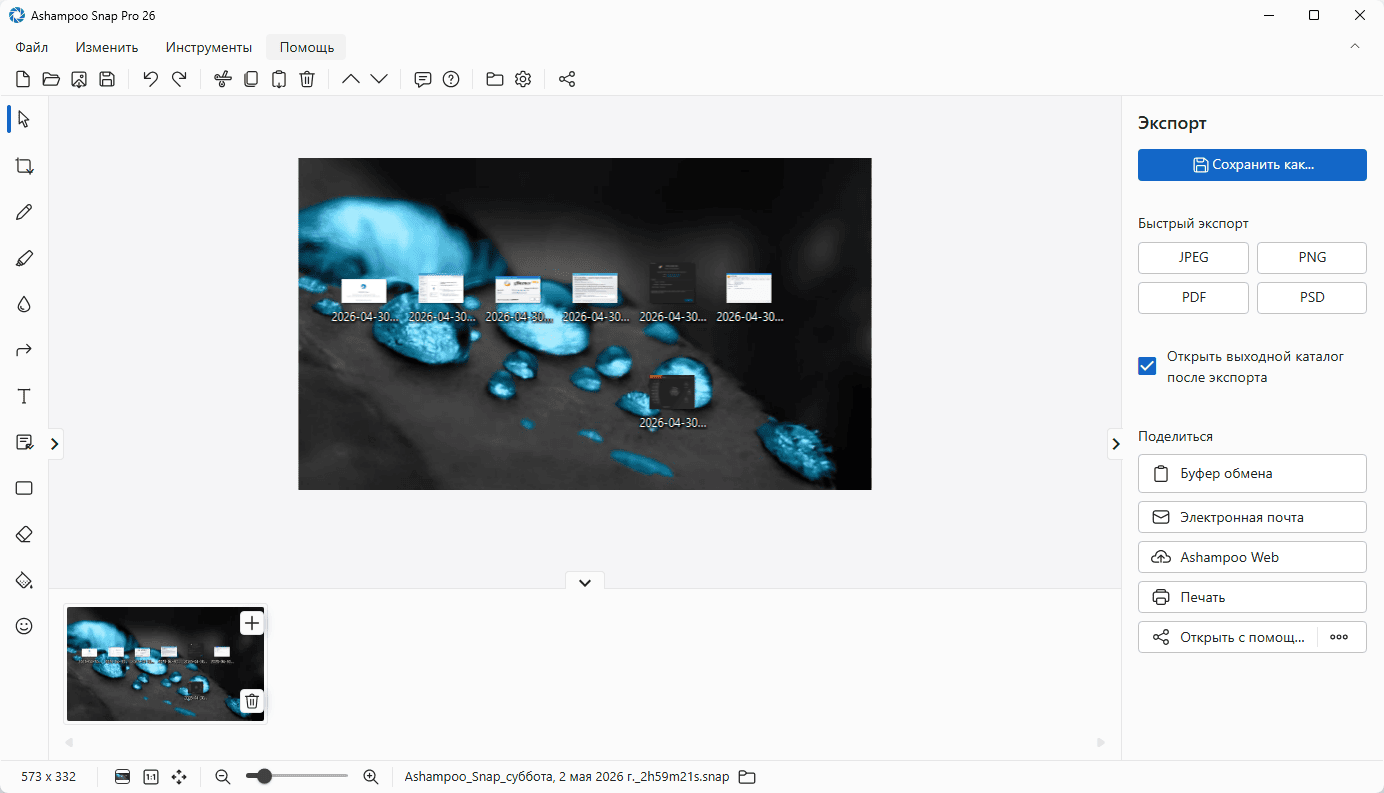
Improved Workflow and a Modernized Interface
We’ve also improved numerous details for your everyday work with Snap. The image editor toolbar is now smarter and better supports your workflow. The Properties panel has been redesigned to provide a cleaner and more consistent user interface. A refreshed color scheme improves readability and makes long work sessions less tiring. With the Quick Scroll feature, you also get intelligent thumbnail previews that automatically appear when needed, helping you navigate large photos more easily.
More Practical Improvements:
Many already useful features have been further enhanced. Clip art now supports drag-and-drop, and image importing is more convenient. Tools like the arrow provide greater precision, and additional output formats are available for emailing images. The Print dialog has also been updated and now supports setting margins in centimeters. Additionally, video export now supports quality settings to save disk space or speed up export.
Smart desktop capture and sharing
Once activated, Snap’s magic eye automatically detects elements under your mouse pointer (browser windows, program menus, images, etc.) and offers instant, pixel-perfect capture with a single click. But it doesn’t stop there: Snap can also capture custom rectangular or freeform areas and even supports scrolling content! Naturally, the program supports all possible sharing options, including email and Ashampoo Webspace!
Optical character recognition (OCR) for your screenshots
Snap now recognizes not just 7, but 180 languages! Our new OCR engine uses Windows language packs and delivers better results faster. You likely won’t need all 180 languages at once, so for simplicity, we’ve limited the number of initially available languages to those currently installed on your computer. You can easily add new languages using the “Add a language” menu item.
Quick and easy video editing
Not every video is an instant success. Ads, unnecessary transitions, and pauses are common nuisances. The same applies to screen recordings. Save the important parts and get rid of the unnecessary with Ashampoo Snap! Remove ads, interruptions, or unnecessary scenes, and split your video into individual episodes. Whether you’re simply recording, creating a sophisticated webinar, or a high-quality presentation: with Ashampoo Snap, any captured video will be a success!
Create videos for any purpose.
Creating video tutorials or guides is incredibly easy with Ashampoo Snap. Recordings can be annotated in real time with text, drawings, and voice narration, and refined with visualized mouse clicks. Take it to the next level and add a live stream from your webcam with just one click. This is your ticket to engaging tutorials, webinar prep materials, and a way to show exactly what’s important to you, of course!
Ideal for different resolutions and multi-monitor systems.
Ashampoo Snap fully supports multi-monitor systems, even those with different resolutions and DPIs, such as Full HD and 4K. Each monitor is captured at its own resolution for maximum clarity, and the results can be edited immediately. And once you’re in the editor, everything is simple and intuitive for both beginners and professionals!
Create GIFs from any video.
It’s impossible to imagine the internet without a multitude of stunning GIFs. But they can also be used in tutorials or demonstrations for greater impact. Ashampoo Snap can turn any part of a video into a GIF. Simply set the start and end positions, launch the built-in converter, and you’re done!
More than just a cutting tool:
Ashampoo Snap’s advanced, convenient features take a lot of the hard work off your plate. Automatic numbering or delayed capture help you tailor your captures to your exact specifications. Annotate text and images, or use fills. Add highlights to specific areas, blur sensitive data, or use a highlighter to stylishly draw attention!
Capture desktop content and save videos or images from the internet.
The internet is full of captivating images, text, and videos. Ashampoo Snap makes it easy to capture what you love! Save images and videos, edit them on the fly, and personalize them to your liking! Everything you see on your screen or hear through your sound card can be captured with Snap!
