Room Arranger is a program for developing and adjusting room and interior design. Are you planning to rearrange your apartment and are unsure where to put everything? Are you planning to redesign the layout and move walls? Then Room Arranger is for you! It will help you not only move but also rotate, change colors and sizes, and create furniture elements you don’t have or maybe haven’t even thought of yet. Move furniture around the apartment with a single click. Specify the room and furniture dimensions, wall thickness, and then simply arrange everything. The program includes standard sizes for cabinets, appliances, lamps, outlets, switches, and more.
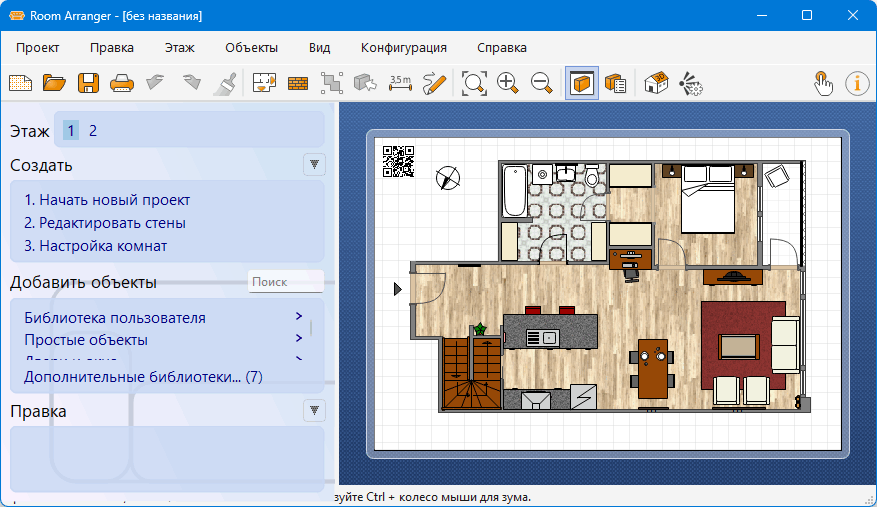
With Room Arranger, you can create and edit any interior element, moving, rotating, resizing, and repositioning them. The program features a comprehensive library of interior design elements, and you can also access an additional free image library by visiting the program’s official website.
Move furniture around your apartment with a click of the mouse. Specify the room and furniture dimensions, as well as the wall thickness, and then simply arrange everything. The program includes standard sizes for cabinets, appliances, lamps, sockets, switches, and more. To fill your rooms, you can use ready-made models of any size from the library, create your own models, and build your own library from the models you use most often.
The program offers a convenient option for publishing interactive drawings and navigating your project in 3D mode. Like other CAD applications, Room Arranger can print your project at any scale. To view your project in 3D, use a VRML plugin (Cortona3D Viewer, BS Contact, etc.).
Program features:
• Small distribution size and easy to learn and use.
• Library of objects and items.
• Navigate through the project in 3D mode.
• Possibility to save projects in VRML format, which makes it possible to publish interactive 3D scenes on the Internet.
• Print the created project at the desired scale, observing standard aspect ratios.
• Tool for measuring the available space between objects.
• Export the finished project to a graphic file: PNG or BMP.
• Multilingual interface with support for the Russian language.

OS: Windows 10 / Windows 11 – 64bit Download Room Arranger 11.0.1.779 (43 MB):
| | | |