FluentCleaner 26.08.03 – Modern and Lightweight Windows Cleaning Tool
FluentCleaner 26.08.03 is a modern system cleaning and maintenance utility designed to help Windows users remove unnecessary files, browser caches, temporary data, application leftovers, and other digital clutter that can accumulate over time. The program focuses on providing a fast, transparent, and lightweight cleaning experience without the unnecessary extras commonly found in many traditional PC optimization tools.
Built with a modern WinUI 3 interface, FluentCleaner integrates naturally with the visual style of Windows 11 while keeping its controls simple and easy to understand. The software is open source and is designed around privacy, allowing users to see what is being analyzed and decide exactly which items should be removed before starting the cleaning process.
Modern System Cleaning for Windows
FluentCleaner scans various locations where unnecessary files commonly accumulate, including Windows temporary folders, browser caches, application caches, logs, shader caches, and other leftover data.
Instead of trying to modify every part of the operating system, FluentCleaner concentrates primarily on removing files that are no longer required. This approach makes it useful for users who want to recover disk space while avoiding aggressive system optimization techniques.
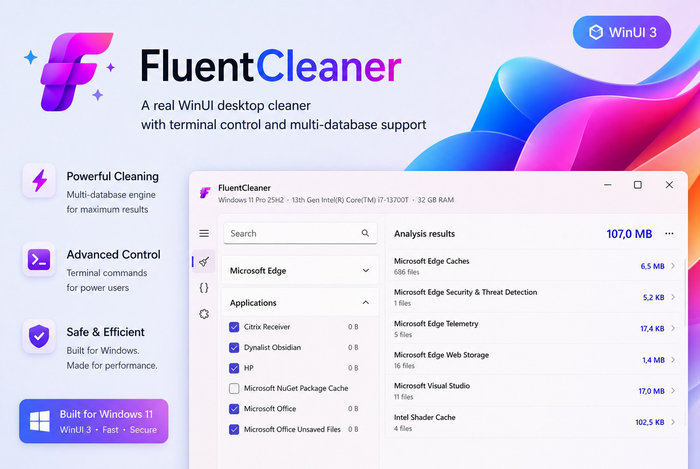
The program can analyze the system before cleaning and display the detected items, allowing users to review the results and choose what they want to remove.
Clean and Modern WinUI 3 Interface
One of the most noticeable aspects of FluentCleaner is its modern user interface. The Modern edition is developed using WinUI 3 and follows Microsoft’s Fluent Design language, giving it an appearance that fits naturally with Windows 11.
The interface focuses on simplicity, with cleaning categories organized in an accessible way so users can quickly scan their computers without navigating through complicated menus.
Version 26.08.03 also improves the Settings interface by separating available options into clearer sections, making configuration and navigation easier than in previous releases.
Powerful winapp2.ini Support
FluentCleaner supports the well-known winapp2.ini cleaning database format, giving the program access to a large ecosystem of community-maintained cleaning rules.
These rules allow the application to recognize temporary files and caches created by a wide variety of Windows applications and services. It also makes the cleaning engine more flexible because additional compatible cleaning definitions can be added without redesigning the entire application.
This approach is inspired by the community-driven cleaning ecosystem associated with classic versions of CCleaner while presenting it through a much more modern Windows interface.
New Cookie Manager
One of the biggest improvements introduced in FluentCleaner 26.08.03 is the new Cookie Manager.
The feature allows users to inspect and manage cookies from several popular web browsers, including Microsoft Edge, Google Chrome, Chromium-based browsers, Brave, Vivaldi, Opera, Opera GX, and Mozilla Firefox.
More importantly, users can protect cookies belonging to selected websites. This means important login cookies can remain available even after performing regular browser cleaning, helping users avoid being automatically signed out of websites they frequently use.
Individual cookies can also be removed directly from the Cookie Manager, while detected and protected cookies can be searched quickly from within the interface.
Import and Export Cookie Keep-Lists
FluentCleaner 26.08.03 also provides useful options for users migrating from other cleaning utilities.
Existing cookie keep-lists exported from CCleaner in TXT format can be imported into FluentCleaner, making it easier to transfer existing preferences instead of configuring protected websites again manually.
Protected cookie lists can also be exported to portable TXT files, making them easier to back up or move between computers.
Smarter Browser Cleaning
Browser cleaning has also been improved in this release.
Instead of removing an entire cookie database when cleaning browser data, FluentCleaner can preserve selected protected cookies. This allows users to clean unnecessary browser information while keeping login sessions and cookies belonging to websites they trust.
It provides a more controlled approach to browser maintenance compared with simply deleting every cookie stored on the computer.
Temporary Files and Application Cache Cleaning
Windows and installed applications continuously generate temporary files during normal operation. Over time, these files can consume a noticeable amount of storage space.
FluentCleaner analyzes common temporary directories and application cache locations to identify data that can potentially be removed.
It can also target browser cache files and various application leftovers, helping users periodically clean accumulated data and recover storage space without manually searching through Windows folders.
GPU Shader Cache Cleaning
PC gaming and graphics applications can generate shader cache files from technologies and graphics drivers installed on the system.
FluentCleaner can detect supported shader cache locations, including caches associated with graphics environments such as NVIDIA and Intel, allowing users to remove old cached data when necessary.
This can be particularly useful for systems used regularly for gaming or graphics-intensive applications where shader caches may gradually consume additional storage.
Privacy-Focused Design
FluentCleaner is designed around a relatively straightforward philosophy: clean unnecessary files without adding advertisements, subscription prompts, or unnecessary tracking.
The project is distributed as open-source software under the MIT License, allowing its source code and cleaning behavior to be inspected publicly.
The official project also emphasizes that FluentCleaner does not rely on telemetry or advertising systems and avoids the aggressive upselling commonly associated with some commercial system-cleaning applications.
Modern and Classic Editions
FluentCleaner is available in two separate editions built around the same general cleaning concept.
The Modern edition uses WinUI 3 and Windows App SDK technologies to provide an interface optimized for newer versions of Windows, particularly Windows 11.
A Classic edition is also available for users who prefer a smaller and more traditional Windows application based on WinForms and .NET Framework.
Both editions share many of the core cleaning capabilities, while allowing users to choose the interface and runtime environment that best suits their system.
Lightweight and Easy to Use
FluentCleaner does not require users to understand complicated Windows maintenance procedures.
The general workflow consists of launching the program, analyzing the system, reviewing the detected cleaning categories, selecting the items that should be removed, and starting the cleanup.
This makes the application suitable for both experienced Windows users and people simply looking for a convenient way to remove accumulated junk files.
Open-Source Alternative to Traditional PC Cleaners
Many PC optimization applications have gradually expanded into large software suites containing subscription services, advertisements, registry tools, driver updaters, and other features that users may not necessarily need.
FluentCleaner takes a different approach by concentrating primarily on cleaning.
Its combination of open-source development, winapp2.ini compatibility, a modern interface, and user-controlled cleaning makes it an interesting alternative for users who prefer lightweight utilities rather than large optimization suites.
What’s New in FluentCleaner 26.08.03
FluentCleaner 26.08.03 represents an important update primarily because of its new Cookie Manager.
Users can now detect cookies across major Chromium and Firefox-based browsers, protect selected website cookies, remove individual cookies, search through detected cookies, and import or export cookie keep-lists.
The Modern edition also receives a redesigned Settings navigation system, while browser cleaning has been improved so protected cookies can remain untouched during normal cleanup operations.
These changes provide users with significantly more control over browser privacy and cleaning behavior than earlier versions of the application.
System Compatibility
FluentCleaner is primarily designed for modern Windows computers, with the WinUI 3 edition particularly suited to Windows 11.
Windows 10 support may also be possible when the required Windows App SDK components are available, while the separate Classic edition provides another lightweight option for compatible Windows installations.
The Modern 26.08.03 package is distributed for 64-bit Windows systems.
Conclusion
FluentCleaner 26.08.03 is a lightweight and modern Windows cleaning utility aimed at users who want to remove unnecessary files without installing a large system optimization suite.
Its WinUI 3 interface, support for community-maintained winapp2.ini cleaning definitions, temporary and cache file cleaning, browser maintenance tools, open-source development model, and privacy-oriented philosophy make it a strong alternative to traditional PC cleaners.
The addition of the Cookie Manager in version 26.08.03 makes the program even more useful by giving users detailed control over browser cookies while allowing important website logins to survive routine cleaning.
For Windows users looking for a simple, transparent, and modern utility for cleaning accumulated system and browser data, FluentCleaner 26.08.03 offers a practical solution with an emphasis on control, simplicity, and privacy.