Close All Windows 6.1 – Quickly Close Multiple Applications with One Click
Close All Windows 6.1, also known as CloseAll, is a lightweight Windows productivity utility developed by NTWind Software that allows users to close multiple running applications and open windows quickly from a single interface.
Instead of manually closing every program one by one, CloseAll displays the currently running applications in a convenient task list where users can choose exactly which windows they want to close.
The application is especially useful for people who frequently work with many programs simultaneously and want a faster way to clean up their desktop and start a new workflow.
Close All Windows 6.1 was officially released on September 4, 2026. This version is primarily a maintenance release focused on digital signing, compatibility with older Windows versions, and general reliability improvements.
Close Multiple Windows at Once
The primary function of Close All Windows is extremely simple: close multiple applications with only a few clicks.
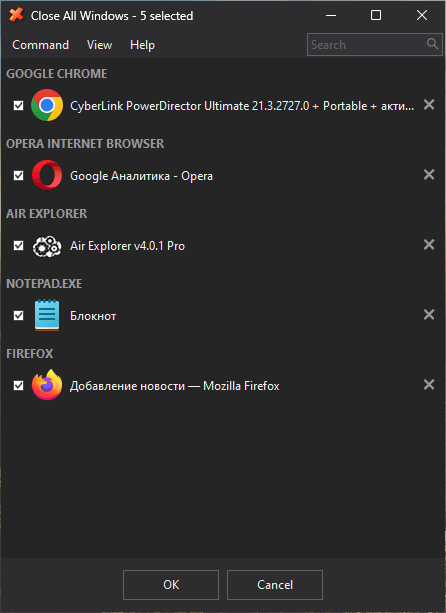
When launched, the program displays a list of currently open applications. Users can select or deselect individual programs using check boxes and then close all selected windows together.
This can save considerable time compared with manually switching between applications and pressing the close button on every window.
The utility sends a standard close signal to selected applications rather than remaining permanently active in the background. Once its job is complete, CloseAll exits and does not continue consuming system resources.
Simple and Lightweight Interface
CloseAll is designed around simplicity.
Its interface provides a straightforward list of currently running applications together with check boxes that determine which windows will be closed.
Rather than filling the screen with complicated system-management features, the program focuses specifically on window management.
This minimal approach makes CloseAll very easy to use even for users who have never worked with dedicated task-management utilities before.
Simply launch the application, select the windows you want to close, and confirm the operation.
Select Exactly Which Applications to Close
Although the program is called Close All Windows, users are not required to close absolutely everything.
Every detected application can be individually selected or excluded.
For example, you might have a web browser, media player, File Explorer windows, text editor, image editor, and several other applications running.
You can select all of them while leaving an important application open.
This selective approach makes CloseAll significantly more useful than a simple command that automatically closes every application without giving the user any control.
Search Running Applications Instantly
When many applications are running at the same time, locating a particular window manually can become inconvenient.
CloseAll includes a search and filtering system that allows users to start typing part of an application’s name or window title.
The displayed list is filtered automatically, helping users quickly locate the programs they want to close.
This can be particularly useful on productivity systems where dozens of windows may be open simultaneously.
Sort and Group Running Windows
Close All Windows provides sorting and grouping options for its task list.
Applications can be organized more efficiently, making large numbers of open windows easier to manage.
Windows belonging to the same application can also be grouped together.
Users can double-click a group to select or deselect the entire group, making it easy to manage multiple windows belonging to one application.
For example, users with multiple browser windows or several instances of another application can quickly select the entire group instead of manually checking every entry.
Close Applications Individually
CloseAll is not limited to bulk operations.
Individual close buttons are available for applications displayed in the task list, allowing users to close one program without affecting the others.
This makes the program useful as both a bulk window-closing utility and a lightweight graphical task management tool.
Users can therefore manage running applications from one centralized interface rather than constantly switching between different windows.
Silent Mode with /NOUI
Advanced users can operate CloseAll without displaying its normal interface.
The program supports the /NOUI command-line switch, which allows CloseAll to run silently and close windows without requiring interaction with the graphical user interface.
This feature is particularly useful when creating custom shortcuts, scripts, automation tasks, or productivity workflows.
For example, a dedicated desktop shortcut can be configured to close open applications immediately without first displaying the CloseAll application window.
Useful for Desktop Cleanup
Windows users frequently accumulate many open applications during long work sessions.
After working for several hours, the desktop may contain multiple browsers, File Explorer windows, text editors, communication applications, utilities, and other programs.
Closing all of them manually can become repetitive.
CloseAll provides an efficient way to clean the workspace before starting another task, shutting down the computer, launching a game, beginning a presentation, or freeing the desktop from unnecessary windows.
Does Not Continuously Run in the Background
One of the advantages of CloseAll is its lightweight operating model.
The program does not need to remain active continuously.
It launches when the user needs it, identifies the open applications, performs the requested closing operation, and then exits.
According to NTWind, the program does not consume system resources after completing its task because it is not designed as a permanently running background service.
This makes it particularly suitable for users who prefer small utilities that perform one specific function without adding unnecessary background processes.
Modern Light and Dark Themes
CloseAll provides multiple visual themes, including support for Light and Dark modes.
On modern Windows systems, the program can automatically switch between Light and Dark themes according to the Windows configuration.
It also supports High Contrast accessibility mode on Windows 10 and Windows 11.
These interface improvements help the application integrate more naturally with modern Windows desktop environments while remaining straightforward and lightweight.
Windows 11 Integration
Although CloseAll has existed for many years, NTWind has continued updating the program to maintain compatibility with newer Windows releases.
Its interface includes improvements designed for Windows 10 and Windows 11, including theme-aware window elements, improved application icons, and better handling of modern UWP applications.
This makes it capable of managing a combination of traditional Win32 desktop software and many modern Windows applications.
Improved Application and UWP Icons
CloseAll 6.0 introduced caching for application icons and UWP logos.
Instead of repeatedly extracting icons whenever the task list is generated, the application can use cached icon information, contributing to faster and more efficient window enumeration.
The underlying window and process enumeration algorithms were also optimized in that release, with further performance and stability improvements included by NTWind.
These improvements remain part of the functionality available in version 6.1.
Multilingual User Interface
Close All Windows supports multiple interface languages.
NTWind significantly expanded language support in recent versions, with version 6.0 adding more than ten new translations while refining existing translations.
Installer strings were also translated to provide a more consistent experience during both installation and everyday use.
This makes the software easier to use for Windows users in different regions and languages.
Native 32-bit and 64-bit Support
CloseAll is available for both 32-bit and 64-bit Windows environments.
The installation package includes the native 64-bit edition, which is installed automatically when running on an appropriate 64-bit system.
Native support allows the utility to work efficiently with modern Windows installations while retaining compatibility with older systems.
Support for Windows Vista Through Windows 11
NTWind states that CloseAll supports Windows versions ranging from Windows Vista through Windows 11.
Version 6.1 specifically addresses compatibility problems affecting Windows 7 and Windows 8 that had been caused by compiler changes in the previous build.
This is particularly important for users maintaining older computers where compatibility with legacy Windows releases is still required.
Improved Windows 7 and Windows 8 Compatibility
One of the primary changes in Close All Windows 6.1 concerns older Windows systems.
NTWind identified compatibility problems with Windows 7 and Windows 8 caused by the compiler used for previous executable builds.
Version 6.1 fixes these issues, restoring proper compatibility with these operating systems.
While most modern users will likely run CloseAll on Windows 10 or Windows 11, continued Windows 7 and Windows 8 support is useful for legacy machines and specialized environments.
New Digital Signature
Close All Windows 6.1 also introduces updated executable signing.
The executables are now double-signed using NTWind’s new OV certificate.
Digital signatures help Windows verify the publisher and integrity of executable files, making this an important maintenance improvement even though it does not directly change the application’s visible functionality.
Fast Window Enumeration
An application such as CloseAll needs to quickly identify the programs and windows currently running on the desktop.
NTWind has optimized the window and process enumeration algorithms across recent releases.
These improvements are intended to make application detection faster and more efficient, particularly on computers running a large number of programs simultaneously.
Combined with application icon caching, this helps keep the interface responsive even when the Windows desktop is heavily populated.
Ideal for Heavy Multitasking
CloseAll becomes particularly useful for users who frequently multitask.
Developers, designers, office workers, content creators, system administrators, and power users may regularly have dozens of applications and windows open simultaneously.
Instead of manually closing every application when changing projects or finishing a work session, CloseAll provides a centralized list where everything can be managed quickly.
Users can keep important applications running while closing unnecessary windows in one operation.
Useful Before Gaming
CloseAll can also be convenient for gamers.
Before launching a demanding game, users may want to close browsers, productivity software, launchers, editors, and other unnecessary applications.
Rather than searching through the Taskbar or Task Manager manually, CloseAll provides a quick overview of running applications and allows unwanted windows to be selected and closed together.
This can make preparing the desktop for a gaming session considerably easier.
Useful Before Shutting Down Windows
Another practical use for CloseAll is preparing the system for shutdown or restart.
Users sometimes have many applications open and Windows may prompt them individually to save documents or confirm closing.
Running CloseAll beforehand provides an opportunity to close the applications in a more controlled manner.
Programs containing unsaved data can still display their normal save or confirmation dialogs because CloseAll sends them a standard request to close rather than simply killing their processes.
Different from Force-Terminating Processes
CloseAll should not be confused with an aggressive process termination utility.
Its standard behavior is to send applications the normal Windows close message.
This means properly designed programs can respond normally and ask users whether they want to save unsaved documents before exiting.
This approach is safer for everyday productivity workflows than immediately terminating processes and potentially losing unsaved information.
Small Installation Size
Close All Windows is a very small application compared with large Windows optimization or system-management suites.
The installer is only around a few megabytes in size, making the program quick to install and easy to keep available as a lightweight desktop utility.
Its focused functionality also means users do not need to install an entire system-management suite simply to gain better control over open windows.
Lifetime License Model
CloseAll is distributed commercially by NTWind Software.
The developer currently advertises a lifetime license rather than a recurring subscription, with free updates included for the lifetime of the license.
This licensing approach may appeal to users who prefer purchasing desktop software once instead of maintaining another subscription.
What’s New in Close All Windows 6.1?
Close All Windows 6.1 is primarily a maintenance release rather than a major feature update.
The official changelog for version 6.1 includes:
- Double-signed executable files using NTWind’s new OV signature.
- Fixed Windows 7 and Windows 8 compatibility issues caused by the compiler.
- Additional minor improvements and bug fixes.
The update was officially released on September 4, 2026.
The previous version 6.0 introduced larger underlying improvements, including application icon and UWP logo caching, optimized process and window enumeration, more than ten additional interface translations, installer translation updates, and various performance and stability improvements.
As a result, version 6.1 combines those improvements with additional compatibility and reliability fixes.
Conclusion
Close All Windows 6.1 is a simple but extremely practical utility for Windows users who regularly work with multiple applications.
Its ability to display running programs in one centralized list, selectively close multiple windows, search applications, manage groups, close programs individually, and operate silently through command-line options makes it much more efficient than manually closing windows one at a time.
The application is also extremely lightweight and does not need to remain running in the background.
Version 6.1 focuses primarily on maintenance, introducing updated executable signing, restoring reliable Windows 7 and Windows 8 compatibility, and providing additional bug fixes while retaining the performance improvements introduced in version 6.0.
For users who frequently accumulate many open applications and want a fast, lightweight, and straightforward method for cleaning up their Windows desktop, Close All Windows 6.1 provides an effective solution without unnecessary complexity.