SearchMyFiles v3.36 – Advanced File Search Utility for Windows
SearchMyFiles v3.36 is a lightweight and powerful file-search utility for Windows developed by NirSoft. It provides an alternative to the standard Windows search feature, giving users more detailed filters and greater control when searching for files and folders across local drives, removable storage, and selected directories.
The program is especially useful for users who need to locate files based on specific properties such as creation date, modification date, file size, attributes, file extensions, or text patterns.
What Is SearchMyFiles?
SearchMyFiles is designed to make advanced file searching easier and more flexible. Unlike the regular Windows search tool, it allows users to combine multiple search conditions and quickly narrow down large numbers of files.
It can be useful for everyday file management as well as more advanced administrative and technical tasks.
Main Features of SearchMyFiles v3.36
Advanced File Search
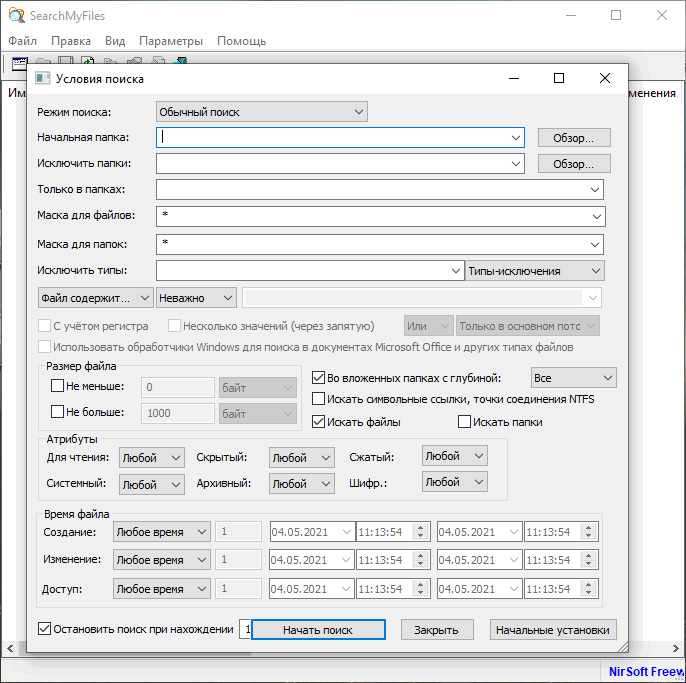
SearchMyFiles provides a wide range of search filters that can help locate specific files more accurately.
Users can search according to criteria such as:
- File name
- File extension
- Folder location
- File size
- Creation date
- Modification date
- Last access date
- File attributes
- Wildcards
- Selected date ranges
These options make it easier to find files even when the exact filename is unknown.
Duplicate File Search
One of the useful features of SearchMyFiles is the ability to search for duplicate files.
This can help users identify files that may be occupying unnecessary storage space and make it easier to organize large collections of documents, media, backups, or downloaded files.
Non-Duplicate Search
The program can also help identify files that do not have matching duplicates. This feature can be useful when comparing folders, backups, or large collections of files.
Detailed Search Results
SearchMyFiles displays detailed information about every matching item.
The results can include information such as:
- Filename
- Full path
- File size
- Creation time
- Modification time
- Last access time
- File attributes
- Extension
- Additional file properties
This detailed view makes it useful for advanced file management and troubleshooting.
Portable and Lightweight Design
SearchMyFiles does not require a complicated installation process and is designed as a lightweight portable utility.
It can be stored on a USB flash drive or portable storage device and launched when needed, making it particularly convenient for:
- PC technicians
- System administrators
- IT support teams
- Advanced Windows users
- Portable maintenance toolkits
Its small size also means that it consumes very few system resources.
Search Specific Folders or Drives
Users can define exactly where SearchMyFiles should perform its search.
For example, it can scan:
- Entire hard drives
- SSDs
- USB drives
- External storage
- Individual folders
- Selected directory trees
This allows users to avoid unnecessary system-wide scans when they already know the approximate location of a file.
Date and Time Filters
SearchMyFiles includes detailed date-based filtering options.
Users can search for files created, modified, or accessed during a particular period. This can be especially useful when trying to locate recently changed documents or files created during a specific project.
File Size Filtering
The program also allows searches based on file size.
For example, users can locate unusually large files that may be consuming disk space or search for files within a specific size range.
This functionality can be useful during storage cleanup and disk management.
Exporting Search Results
Search results can be saved or exported for later reference.
This makes SearchMyFiles useful for administrative reports, troubleshooting, inventory management, or documenting the contents of drives and folders.
Simple Interface
Despite offering many advanced search options, SearchMyFiles maintains a straightforward interface.
The search window presents the available filters in an organized way, while the results are displayed in a detailed list that can be sorted according to different columns.
Who Should Use SearchMyFiles?
SearchMyFiles v3.36 is suitable for a wide range of users, including:
- Regular Windows users
- PC technicians
- IT professionals
- System administrators
- Users managing large file collections
- People searching for duplicate files
- Users who frequently work with external drives and backups
Advantages
SearchMyFiles offers several important advantages:
- Lightweight and fast
- Portable operation
- No complicated installation
- Advanced filename filtering
- Search by file size and date
- Duplicate file detection
- Detailed search results
- Low system resource usage
- Useful for troubleshooting and file management
- Suitable for both basic and advanced users
SearchMyFiles v3.36 – Final Overview
SearchMyFiles v3.36 is a practical alternative to the built-in Windows file-search system. Its advanced filtering options, detailed results, duplicate-file capabilities, and portable design make it particularly useful for users who frequently need to locate and organize files.
Whether you are searching for an old document, identifying duplicate files, locating recently modified data, or managing thousands of files across multiple drives, SearchMyFiles provides a fast and flexible way to perform detailed searches without relying entirely on Windows Explorer.