FxSound 1.2.11.0 – Powerful Audio Enhancer and Equalizer for Windows
FxSound 1.2.11.0 is a lightweight audio enhancement application designed to improve sound quality on Windows computers. It provides a customizable equalizer, audio effects, volume enhancement, presets, and output-device management tools that can improve the listening experience for music, movies, games, streaming platforms, and everyday desktop audio.
The application works at the system level, allowing its sound-processing features to affect audio produced by different Windows applications without requiring individual configuration for every media player or game.
FxSound 1.2.11.0 Overview
FxSound is designed to make computer audio clearer, louder, and more balanced while giving users greater control over how different frequencies are reproduced.
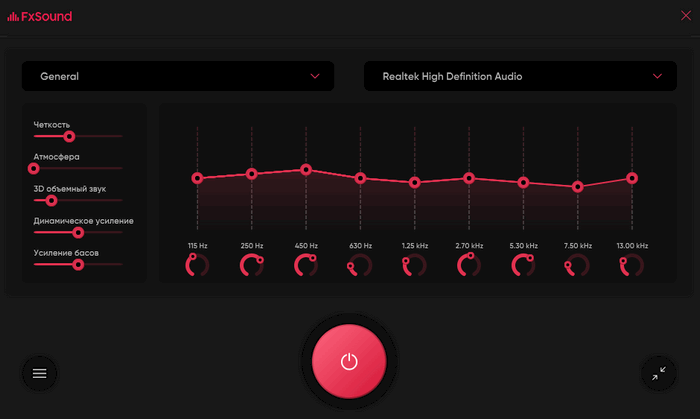
Its interface combines an equalizer with several audio-processing effects and predefined sound profiles, making it accessible to beginners while still providing enough customization for users who prefer manual audio tuning.
FxSound is available for Windows systems using Intel/AMD processors as well as Windows on ARM64 devices.
Advanced Audio Equalizer
One of the most important features of FxSound is its built-in equalizer.
The equalizer allows users to adjust individual frequency ranges to change the overall character of their audio.
For example, users can:
- Increase low frequencies for stronger bass
- Improve midrange frequencies for clearer dialogue
- Adjust high frequencies for additional detail
- Reduce frequencies that sound harsh or excessive
- Create customized profiles for different headphones or speakers
The equalizer provides a practical way to compensate for the limitations of inexpensive speakers, laptop audio systems, or certain headphones.
Audio Enhancement Effects
FxSound includes several processing effects designed to modify and improve the listening experience.
These controls can help users increase perceived clarity, improve bass response, enhance dynamic range, and make quieter audio easier to hear.
Depending on the selected settings, FxSound can be useful for music playback, video streaming, voice content, games, and general Windows audio.
Volume Enhancement
Some laptops, monitors, headphones, and compact speakers may produce lower volume levels than users would prefer.
FxSound includes audio-processing features that can increase perceived loudness while maintaining a more balanced sound profile.
Recent development also introduced volume-leveling controls designed to provide more consistent playback levels.
Built-In Audio Presets
FxSound includes predefined presets for different types of content.
Instead of manually adjusting every equalizer band, users can select a preset that better matches what they are currently listening to.
Typical use cases include:
- Music
- Movies
- Gaming
- Voice
- Streaming
- General multimedia playback
Users can also modify existing settings and create personalized configurations.
Output Device Management
Modern computers often use several audio devices, including headphones, USB sound devices, Bluetooth speakers, monitors, and external audio interfaces.
FxSound provides tools for managing these output devices directly from the application.
Recent FxSound versions added the ability to define device priority and associate preferred presets with specific output devices. When a selected device changes, FxSound can automatically apply the preset assigned to that device.
This can be particularly convenient for users who regularly switch between headphones and external speakers.
Automatic Preset Handling
FxSound can automatically preserve changes made to equalizer and effect settings.
This improves usability because users do not need to repeatedly save every small modification manually.
The application also provides options for restoring factory defaults when users want to return to the original configuration.
Support for Hotkeys
FxSound provides keyboard shortcut functionality for faster audio management.
Users can perform supported actions without constantly opening the main program window.
Recent versions have also improved hotkey management, including options for disabling individual shortcuts and fixing device-switching issues associated with hotkeys.
Command-Line Features
More advanced users can control several FxSound functions through command-line options.
Supported functionality includes commands related to equalizer bands, gain values, effects, presets, output devices, and application status.
Command-line support can be useful for automation, scripts, specialized desktop setups, or integration with other Windows workflows.
System Tray Operation
FxSound can operate conveniently from the Windows system tray.
Recent releases added additional options for launching the application minimized to the tray, reducing desktop clutter while keeping audio enhancement active in the background.
Light and Dark Interface Options
FxSound provides different interface appearance options, including light-theme support.
Users can select the interface appearance that better matches their Windows configuration or personal preference.
The application can also remember window positioning, which is useful for multi-monitor desktop setups.
Bluetooth and External Audio Devices
FxSound can work with a variety of Windows audio output devices, including Bluetooth equipment.
Recent releases include improvements to device detection and Bluetooth-device handling, helping the program respond more reliably when audio hardware is connected, disconnected, or removed from the device settings.
Gaming Audio Enhancement
FxSound can also be useful while playing games.
By adjusting equalizer frequencies and processing effects, users can customize game audio for stronger environmental sound, clearer dialogue, heavier bass, or more noticeable sound effects.
Because FxSound processes Windows audio system-wide, users generally do not need dedicated integration with individual games.
Music and Streaming
Music listeners can use FxSound to customize audio according to their headphones, speakers, or preferred musical style.
Streaming audio from browsers and compatible desktop applications can also benefit from the same system-wide equalizer and enhancement settings.
This makes FxSound useful for users who regularly switch between local music, streaming services, online videos, and other multimedia applications.
Simple User Interface
FxSound uses a straightforward interface that keeps the most important audio controls accessible from the main window.
Users can quickly:
- Select an output device.
- Choose an audio preset.
- Adjust equalizer bands.
- Modify enhancement effects.
- Save or restore settings.
- Switch between different sound configurations.
This simple workflow makes FxSound suitable for users who have little experience with professional audio-processing software.
Main Features of FxSound 1.2.11.0
FxSound provides a useful collection of audio-enhancement capabilities, including:
- System-wide Windows audio enhancement
- Customizable equalizer
- Bass and clarity adjustment
- Audio effects
- Volume enhancement
- Audio presets
- Custom preset configurations
- Output-device selection
- Device priority management
- Device-specific presets
- Bluetooth device support
- Keyboard shortcuts
- Command-line controls
- System tray operation
- Light interface theme
- Automatic preset handling
- Intel/AMD Windows support
- ARM64 Windows support
System Requirements
FxSound is primarily designed for Microsoft Windows.
Current builds are offered for conventional Intel/AMD Windows PCs and ARM64 Windows devices. The official download page provides separate installers for these architectures.
Typical compatibility includes:
- Windows 11
- Windows 10
- Windows 8/8.1
- Windows 7 compatibility in supported builds
- Intel or AMD processors
- ARM64 processors through the dedicated version
- Windows-compatible audio hardware
FxSound developers previously addressed Windows 7 compatibility issues in the 1.2.x release series, although newer Windows versions provide the most appropriate environment for current installations.
Advantages of FxSound
FxSound offers several advantages for Windows users:
- Easy audio customization
- System-wide sound processing
- Lightweight interface
- Useful equalizer controls
- Multiple sound presets
- Better management of different audio devices
- Convenient system-tray operation
- Support for headphones and external speakers
- Useful features for music, games, and movies
- Automation options through command-line controls
- ARM64 support
Who Should Use FxSound?
FxSound 1.2.11.0 can be useful for many types of Windows users, including:
- Music listeners
- Gamers
- Movie and streaming enthusiasts
- Laptop users with weak built-in speakers
- Headphone users
- Users with Bluetooth speakers
- Content consumers who need clearer dialogue
- Users who frequently switch between audio devices
It can also be helpful for people who want more control over Windows audio without using complicated professional sound-production software.
Conclusion
FxSound 1.2.11.0 is a practical Windows audio enhancer that combines an equalizer, sound-processing effects, presets, volume improvement, device management, and advanced customization options within a simple interface.
Its system-wide audio processing makes it useful across music applications, browsers, streaming platforms, games, and other Windows software. Features such as device-specific presets, output-device priorities, command-line controls, hotkeys, and ARM64 support also make modern FxSound releases increasingly flexible for different desktop configurations.
For users who want to improve the sound of their headphones, speakers, or laptop audio without dealing with complicated professional audio tools, FxSound provides a straightforward and customizable solution.