Display Hot Keys 4.0.3 Portable – Quickly Switch Display Settings with Keyboard Shortcuts
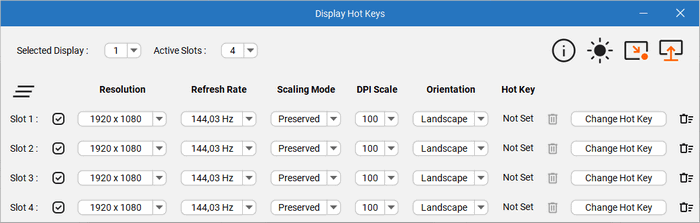
Display Hot Keys 4.0.3 Portable is a lightweight Windows utility designed to make changing monitor settings faster and more convenient. Instead of repeatedly opening Windows display settings whenever you need to modify resolution, refresh rate, scaling, or other screen parameters, the program allows you to create custom display profiles and activate them instantly using keyboard shortcuts.
The application is especially useful for gamers, professionals, multi-monitor users, content creators, and anyone who regularly switches between different display configurations. Version 4.0.3 is available for Windows 10 and Windows 11 systems, and portable builds can be used without a traditional installation process.
Display Hot Keys 4.0.3 Overview
Display Hot Keys focuses on one simple idea: making monitor configuration changes accessible through hotkeys.
Windows already provides extensive display-management options, but changing between different combinations of resolution, refresh rate, DPI scaling, and color depth can require navigating through several menus.
Display Hot Keys simplifies this process by allowing users to configure multiple display modes in advance and assign a keyboard shortcut to each one. Once configured, switching between display profiles can be performed almost instantly.
Custom Display Hotkeys
The main feature of Display Hot Keys is the ability to associate custom keyboard shortcuts with different display configurations.
Users can prepare several screen profiles for different activities and switch between them whenever required.
For example, you could create one profile for everyday desktop work, another for gaming at a high refresh rate, and another for video playback or productivity.
This eliminates the need to manually adjust display settings every time your usage scenario changes.
Change Screen Resolution Instantly
Display Hot Keys can be used to switch between different screen resolutions.
This can be useful when certain games, applications, remote desktop environments, or older programs perform better at a specific resolution.
Instead of opening Windows Settings and manually choosing a resolution, users can assign the desired resolution to a shortcut and activate it directly from the keyboard.
Refresh Rate Switching
Modern gaming monitors frequently support several refresh rates, such as 60 Hz, 120 Hz, 144 Hz, 165 Hz, or higher.
Display Hot Keys allows supported refresh-rate configurations to be included in display profiles.
A user might therefore keep the monitor at a standard refresh rate during everyday desktop use and instantly switch to a higher refresh rate before launching a game.
This feature can be particularly useful for users who prefer different refresh rates depending on performance, power consumption, or application compatibility.
DPI and Display Scaling Control
Display scaling is an important consideration on high-resolution monitors.
Small interface elements can sometimes become difficult to read when using high-resolution displays, especially on laptops and compact 4K screens.
Display Hot Keys allows display profiles to include DPI and scaling configurations, enabling users to quickly move between different scaling levels without repeatedly navigating through Windows display menus.
Color Depth Configuration
Display profiles can also include supported color-depth settings.
This can be helpful for users working with older applications, specialized display configurations, virtual environments, or software that requires particular display modes.
Combined with resolution and refresh-rate controls, this gives users greater flexibility when creating customized screen configurations.
Multiple Profiles per Monitor
Display Hot Keys supports multiple shortcut slots for individual displays.
According to available documentation for the software, users can configure up to 12 hotkey slots for each monitor, with each slot containing its own customizable display mode.
Each profile can include parameters such as:
- Screen resolution
- Refresh rate
- Color depth
- Display scaling
- DPI configuration
This makes it possible to create several specialized configurations without continuously modifying the same settings.
Multi-Monitor Support
Display Hot Keys is particularly useful for computers equipped with more than one monitor.
Users can configure different display profiles for individual screens and manage display modes across multi-monitor setups.
This can be valuable for professional workstations where different displays may be used for gaming, productivity, media playback, development, editing, or presentations.
For example, one monitor might require a high refresh rate while another is configured primarily for high-resolution productivity work.
Useful for Gaming
Gamers are among the users who can benefit most from Display Hot Keys.
Different games may perform best with different combinations of resolution and refresh rate.
A high-resolution desktop configuration may be ideal for normal Windows use, while a lower resolution may provide better gaming performance on demanding titles.
With Display Hot Keys, users can create dedicated gaming profiles and activate them before launching specific games.
Once gaming is finished, another shortcut can restore the preferred desktop configuration.
Useful for Video and Multimedia
Some users prefer different display configurations when watching videos or movies.
A particular refresh rate may better match video content, while different resolution or scaling settings may improve usability depending on the display being used.
Display Hot Keys makes moving between these setups significantly faster.
Productivity and Professional Work
The program can also be useful for professional environments.
Designers, developers, analysts, editors, and users working with multiple displays may frequently need to change scaling or resolution settings depending on the application currently being used.
Rather than manually configuring each monitor, predefined hotkeys can provide quick access to frequently used display modes.
Portable Edition
Display Hot Keys 4.0.3 is also distributed in portable form.
Portable software generally offers several practical advantages:
- No conventional installation process
- Easy execution from a dedicated folder
- Convenient use on different Windows computers
- Reduced installation-related system changes
- Easier backup and transfer of application files
This makes the portable edition particularly attractive to technicians and users who prefer standalone utilities.
Simple and Focused Interface
Display Hot Keys does not attempt to become a complete system optimization suite.
Instead, the application focuses specifically on managing monitor modes and making those configurations accessible through keyboard shortcuts.
Its specialized design helps keep the workflow straightforward: create the display configuration you need, assign a hotkey, and activate it whenever required.
Main Features of Display Hot Keys 4.0.3
Display Hot Keys provides several useful display-management capabilities, including:
- Custom keyboard shortcuts for display settings
- Fast resolution switching
- Refresh-rate switching
- DPI configuration
- Display scaling control
- Color-depth configuration
- Multiple profiles for individual monitors
- Up to 12 hotkey slots per monitor
- Multi-monitor support
- Quick switching between different display modes
- Portable edition availability
- Windows 10 compatibility
- Windows 11 compatibility
The combination of these features makes it particularly useful for users who regularly change monitor configurations.
System Requirements
Display Hot Keys 4.0.3 is intended for modern Windows computers.
Current listings indicate support for:
- Windows 11
- Windows 10
- 64-bit Windows environments
- One or more compatible monitors
- Keyboard access for custom shortcuts
The software is listed as an open-source application and is available in both installer and portable formats through supported distribution sources.
Advantages of Display Hot Keys
The application offers several practical advantages:
- Saves time when changing monitor settings
- Reduces repeated navigation through Windows Settings
- Useful for gaming configurations
- Helpful for high-refresh-rate monitors
- Convenient for multi-monitor workstations
- Supports custom display profiles
- Allows quick DPI and scaling changes
- Lightweight and focused functionality
- Portable version available
- Suitable for both casual and advanced users
Who Should Use Display Hot Keys?
Display Hot Keys 4.0.3 Portable can be useful for:
- Gamers
- Multi-monitor users
- Laptop users
- Graphic designers
- Video editors
- Developers
- IT technicians
- Streamers
- Content creators
- Users with high-refresh-rate monitors
- Users who frequently change Windows scaling
- Professionals working across different display configurations
The application is particularly valuable when the same monitor needs to operate under several different settings throughout the day.
Conclusion
Display Hot Keys 4.0.3 Portable is a practical Windows utility that simplifies one of the more repetitive aspects of monitor management.
By allowing users to configure display profiles and activate them through keyboard shortcuts, it provides a much faster alternative to manually changing resolution, refresh rate, DPI scaling, and other monitor parameters through Windows Settings.
Its multi-monitor support, multiple hotkey slots, portable edition, and straightforward approach make it especially useful for gamers and professionals who regularly switch between different display configurations.
For users who want quick and convenient control over their monitor settings without navigating through multiple Windows menus, Display Hot Keys 4.0.3 offers a focused and efficient solution.