Advanced SystemCare Pro 19.5.0.231 – PC Optimization, Cleanup, and Performance Management
Advanced SystemCare Pro 19.5.0.231 is a comprehensive Windows optimization and maintenance utility developed to help users clean unnecessary files, improve system responsiveness, manage startup applications, strengthen privacy, and monitor overall PC health from a single interface.
The program combines automated maintenance tools with more advanced optimization options, making it suitable for users who want a convenient way to keep their Windows computer organized and running efficiently.
About Advanced SystemCare Pro 19.5.0.231
Advanced SystemCare Pro is the premium edition of IObit’s system maintenance software. It brings together multiple utilities that would otherwise require separate programs, including junk cleaning, startup management, privacy protection, system optimization, performance monitoring, and browser-related cleanup.
Version 19.5.0.231 continues the software’s focus on automated PC maintenance while providing users with greater control over individual optimization tasks.
One-Click PC Maintenance
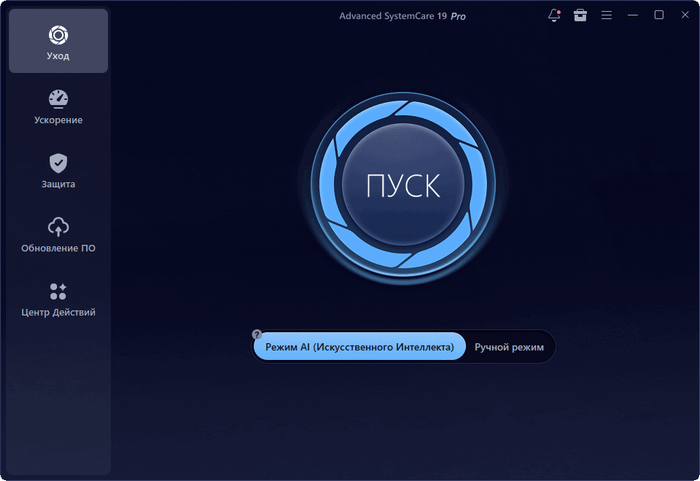
One of the main features of Advanced SystemCare Pro is its centralized scanning system.
Users can perform a system scan that checks several areas of Windows and identifies items that may benefit from cleanup or optimization.
Depending on the selected options, the scan can examine areas such as:
- Temporary files
- Unnecessary system data
- Browser traces
- Invalid shortcuts
- Startup items
- Privacy-related traces
- Registry-related issues
- Performance settings
This approach helps simplify routine PC maintenance.
Junk File Cleaning
Windows and installed applications can accumulate temporary and unnecessary files over time.
Advanced SystemCare Pro includes cleanup tools designed to remove data that is no longer required, helping free storage space and reduce clutter.
Common targets may include:
- Temporary Windows files
- Application cache
- Browser cache
- Old log files
- Recycle Bin contents
- Leftover installation data
- Temporary internet files
Users should always review cleanup selections when important browser or application data needs to be preserved.
Startup Optimization
Too many applications configured to launch with Windows can increase startup time and consume system resources.
The startup manager allows users to review programs and services that automatically run when Windows starts.
Users can disable unnecessary startup entries while keeping important applications active.
This can help improve boot performance and reduce background resource usage.
Real-Time System Optimization
Advanced SystemCare Pro includes tools intended to monitor system resources and optimize performance while the computer is running.
The software can help manage background processes and unnecessary services depending on the configured optimization settings.
This can be especially useful on older computers or systems with limited RAM and processing power.
Performance Monitor
A built-in performance monitor provides information about current system resource usage.
Users can view details related to:
- CPU usage
- RAM consumption
- Disk activity
- Network activity
- Running processes
Monitoring these resources can help identify applications that are consuming unusually high amounts of system performance.
Privacy Protection
Privacy-related tools are designed to remove traces generated by normal computer and browser activity.
These may include:
- Browser history
- Recently opened files
- Application usage traces
- Temporary internet data
- Cached information
- Other activity records
This feature can be useful on shared computers or systems where users prefer to minimize stored activity information.
Browser Optimization
Advanced SystemCare Pro can help manage browser-related data and settings.
Depending on the installed browser and selected features, users may be able to clean temporary browser files, remove unnecessary traces, and improve browser responsiveness.
Regular browser maintenance can also help reduce storage usage caused by accumulated cached data.
Registry Cleaning
The program includes tools for scanning certain Windows Registry entries.
These tools may detect invalid references, obsolete entries, or remnants associated with removed software.
Because the Windows Registry is an important system component, users should avoid aggressive modifications and create backups before making significant changes.
Registry cleaning should not be considered a guaranteed method for improving PC speed.
Software Health Management
Advanced SystemCare Pro may include tools that help users review installed software and identify applications requiring attention.
This can make it easier to maintain frequently used programs and remove unnecessary software from the system.
Keeping software organized can improve system management and reduce unnecessary background processes.
Internet Optimization
The program provides network-related optimization features intended to adjust certain Windows settings for different types of internet connections.
Results may vary depending on the computer, network hardware, internet service provider, and current Windows configuration.
These tools are best used carefully rather than assuming every automatic adjustment will improve connection speed.
Security and Protection Tools
Advanced SystemCare Pro includes several features aimed at improving general system protection and privacy.
Depending on the installed edition and configuration, these may help protect against suspicious changes, unwanted tracking, or potentially risky browser activity.
However, the program should generally be viewed as a maintenance utility rather than a complete replacement for dedicated antivirus and security software.
Automatic Maintenance
Users who do not want to perform system maintenance manually can configure automated optimization features.
Automatic maintenance can help keep temporary files, unnecessary traces, and other routine issues under control without requiring frequent manual scans.
This is particularly convenient for users who prefer a more hands-off approach.
Turbo Boost
Turbo Boost is designed to temporarily reduce unnecessary background activity in order to make more resources available for demanding applications.
This can be useful during activities such as:
- Gaming
- Video editing
- Multimedia processing
- Large software projects
- Resource-intensive applications
The actual performance improvement depends on the programs and services running on the computer.
System Information
Advanced SystemCare Pro can provide information about the computer’s hardware and operating system.
This may include details related to:
- Processor
- Memory
- Graphics hardware
- Storage devices
- Windows version
- Network configuration
- System components
Having this information available in one location can be helpful when troubleshooting or evaluating upgrade options.
User Interface
The software uses a modern interface that groups maintenance features into clearly defined sections.
The primary scan function is designed for beginners, while individual utilities provide additional control for experienced users.
This balance makes Advanced SystemCare Pro accessible without completely hiding more advanced system-management functions.
Advantages
Advanced SystemCare Pro 19.5.0.231 offers several useful advantages:
- One-click system scanning
- Junk file cleanup
- Startup management
- Real-time optimization tools
- Performance monitoring
- Privacy cleanup
- Browser maintenance
- Registry scanning
- Automatic maintenance
- Turbo Boost mode
- System information tools
- Centralized Windows maintenance interface
- Suitable for both beginners and advanced users
Limitations
Users should keep several points in mind.
System optimization software cannot compensate for severely outdated hardware, failing storage devices, insufficient memory, malware infections, or damaged Windows installations.
Some optimization features may also provide limited improvements on modern computers that are already properly configured.
Advanced cleanup and Registry-related options should be used carefully, particularly on business or production systems where stability is more important than aggressive optimization.
Who Should Use Advanced SystemCare Pro?
The program may be useful for:
- Users who regularly clean temporary files
- Computers with many startup applications
- Older Windows PCs
- Users who prefer automated maintenance
- People who want multiple optimization utilities in one application
- Shared computers requiring privacy cleanup
- Users who monitor CPU and RAM usage
- Systems that accumulate large amounts of temporary data
System Requirements
A typical Windows computer capable of running modern desktop applications should be sufficient.
Recommended specifications include:
- Operating System: Compatible Windows 10 or Windows 11 version
- Processor: Modern Intel or AMD processor
- RAM: 4 GB minimum, with 8 GB or more recommended
- Storage: Sufficient free space for installation and temporary operations
- Display: Standard desktop resolution or higher
- Internet Connection: Recommended for updates and online features
The program itself does not require high-end hardware, although system maintenance operations can temporarily increase disk and CPU activity.
Performance and Usability
Advanced SystemCare Pro is designed to simplify routine maintenance by grouping many utilities into a single dashboard.
Beginners can rely primarily on automated scanning, while experienced users can choose specific optimization tools depending on what they want to manage.
For the best results, users should review recommendations before applying major system changes instead of enabling every optimization option automatically.
Overall Experience
Advanced SystemCare Pro 19.5.0.231 provides a convenient collection of Windows maintenance, cleanup, monitoring, and performance-management tools.
Its strongest advantage is the ability to centralize many common PC maintenance tasks in one application, reducing the need to install several separate utilities.
Conclusion
Advanced SystemCare Pro 19.5.0.231 is a versatile Windows optimization suite designed to simplify system cleanup, startup management, privacy maintenance, resource monitoring, and general PC optimization.
With one-click maintenance, automatic cleanup, performance monitoring, Turbo Boost, browser tools, startup control, and additional system utilities, it provides a practical environment for users who want to manage Windows performance from a single interface.
Used carefully, it can be a useful maintenance companion for keeping a Windows computer organized, reducing unnecessary files, and managing background activity more efficiently.