Advanced SystemCare Pro 19.5.0.226 – Complete PC Cleaning and Optimization Software
Overview
Advanced SystemCare Pro 19.5.0.226 is a comprehensive Windows maintenance and optimization program developed by IObit. It provides an integrated collection of tools for cleaning unnecessary files, improving computer performance, managing startup applications, protecting user privacy, and resolving common system problems.
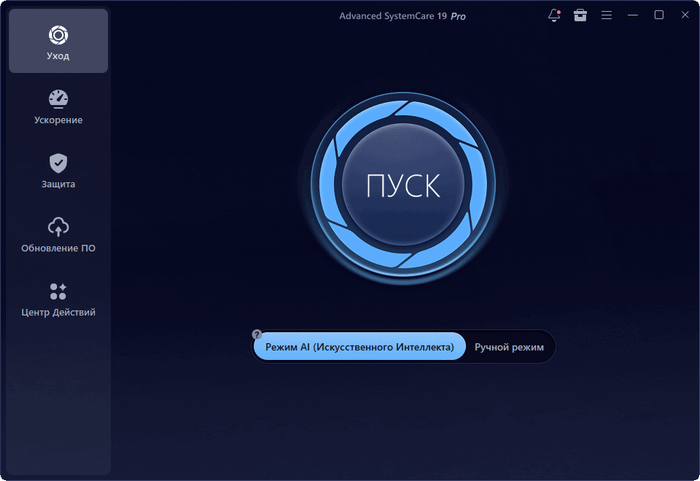
The software is designed for users who want to maintain their computers without manually configuring numerous Windows settings. Its central dashboard can scan multiple areas of the system and apply selected repairs through a simple one-click process.
Advanced SystemCare 19 also introduces enhanced optimization technologies and protective features, including AI-assisted cleaning, real-time performance monitoring, improved privacy tools, and Safe Folder protection for important personal files.
Intelligent AI Mode
The AI Mode analyzes the condition of the computer and creates a customized optimization plan based on system performance and user habits.
Instead of applying the same cleaning process to every device, it attempts to identify unnecessary logs, temporary data, application caches, browser files, and other items that can be safely removed.
This feature makes the program suitable for less-experienced users who may not know which maintenance options should be selected manually.
One-Click PC Care
The main Care section combines several maintenance functions into one scan. Depending on the selected settings, it can check for:
- Junk and temporary files
- Invalid registry entries
- Privacy traces
- Unnecessary startup programs
- Broken shortcuts
- Internet configuration issues
- Security weaknesses
- Outdated software
- System performance problems
Users can review the detected items before allowing the program to clean or optimize the computer.
Deep System Cleaning
Advanced SystemCare Pro can remove temporary Windows files, browser caches, application leftovers, system logs, obsolete installation data, and other unnecessary content.
Removing these files may recover storage space and reduce the amount of unused information accumulated over time. The Pro edition offers deeper cleaning capabilities than the free edition and can perform maintenance automatically according to a schedule.
The registry-cleaning module can also detect obsolete or invalid entries. However, users should always create a restore point or backup important information before applying extensive registry changes.
Real-Time System Optimization
The Real-Time TuneUp feature monitors computer resource usage and helps prevent unnecessary background applications from consuming excessive memory or processor capacity.
It can automatically stop inactive processes, release RAM, and prioritize available resources for active programs. This may help improve responsiveness when running demanding applications, opening several browser tabs, or playing computer games.
The Performance Monitor provides quick access to information about processor, memory, disk, and network activity.
Faster Windows Startup
The Startup Optimizer identifies applications, scheduled tasks, browser services, and Windows components that begin automatically when the computer starts.
Users can disable unnecessary startup items to reduce boot time and minimize background resource consumption. Recommendations are displayed to help distinguish between essential system components and optional third-party applications.
IObit states that Advanced SystemCare 19 can provide significantly faster startup performance by managing programs that launch automatically. Actual results will depend on the device, installed applications, storage type, and existing system condition.
Internet Booster
Internet Booster analyzes selected Windows networking settings and adjusts them according to the connection type.
It is intended to improve browsing responsiveness, downloads, streaming, and online gaming by optimizing network-related parameters. The software does not increase the maximum speed provided by an internet service provider, but it may help correct inefficient local configurations.
Privacy Protection
Advanced SystemCare Pro includes several tools for removing activity traces and reducing unauthorized tracking.
It can clean browser history, cookies, cached data, recently opened file lists, saved form information, and traces created by supported applications. Privacy Shield can also help prevent untrusted programs from accessing sensitive personal information.
Additional browser protection features are designed to identify suspicious homepage or search-engine modifications.
Safe Folder Protection
Safe Folder is one of the major security additions introduced with Advanced SystemCare 19. It helps protect selected files and folders from unauthorized access or modification.
The feature can be used to secure personal documents, photographs, work files, and other valuable information. It is particularly useful as an additional protective layer against applications that attempt to alter important files without permission.
Software Updater
Outdated applications can contain security weaknesses, compatibility problems, and performance issues. The integrated Software Updater scans supported programs and displays available updates.
Users can update multiple applications from one interface instead of visiting each developer’s website separately. The Pro edition provides more extensive automatic updating options to help keep commonly used software current.
Health Checker
Health Checker performs a simplified examination of the computer and presents an overview of its general condition.
It can identify optimization opportunities, security concerns, outdated applications, and maintenance tasks that may require attention. This gives users a convenient way to understand the condition of their system without opening every individual tool.
Toolbox Utilities
Advanced SystemCare Pro includes a collection of additional utilities for specialized maintenance tasks. Available tools may include:
- Large File Finder
- Empty Folder Scanner
- Duplicate File Scanner
- File Shredder
- Undelete utility
- Shortcut Fixer
- Registry Cleaner
- Registry Defragmenter
- Disk Cleaner
- Startup Manager
- Process Manager
- System Information
- Internet Booster
- Program Deactivator
These utilities allow users to perform targeted operations that are not included in the standard one-click scan.
Modern and Accessible Interface
The program uses a modern interface with clearly separated sections for system care, performance acceleration, protection, software updating, and additional utilities.
Most essential functions can be accessed from the main dashboard, while experienced users can customize scanning options and choose which areas should be ignored.
The interface also provides different themes and visual monitoring elements for users who prefer a personalized workspace.
Automatic Maintenance
The Pro edition can perform selected maintenance operations automatically when the computer is idle or according to a configured schedule.
Automatic Care can scan and clean the system without requiring the user to begin every operation manually. Auto RAM Clean can release memory when resource usage reaches a particular level.
These features are useful for users who want continuous maintenance with minimal interaction.
Main Features
- One-click system cleaning and optimization
- AI-powered personalized maintenance
- Deep removal of junk and temporary files
- Registry cleaning and optimization
- Real-time performance monitoring
- Automatic RAM cleaning
- Startup application management
- Internet configuration optimization
- Privacy trace removal
- Browser tracking protection
- Safe Folder file protection
- Automatic system maintenance
- Software update management
- Large and duplicate file detection
- Secure file deletion
- System health checking
- Multiple additional maintenance utilities
- Support for modern and older Windows editions
Advantages
Advanced SystemCare Pro combines many maintenance tools within one accessible interface. This eliminates the need to install separate applications for basic cleaning, startup management, privacy removal, and performance monitoring.
The one-click workflow is convenient for beginners, while the individual modules provide additional control for experienced users.
Automatic maintenance, RAM optimization, deeper cleaning, software updating, and privacy features make the Pro edition more comprehensive than the free version.
Limitations
Some optimization claims may vary significantly depending on the condition and hardware of the computer. A well-maintained system equipped with a fast solid-state drive may show fewer noticeable improvements than an older computer containing excessive startup applications and temporary files.
Registry cleaning should be used carefully because removing an incorrect entry can potentially cause application or system problems.
Advanced SystemCare Pro also includes promotional recommendations for other IObit products, which some users may consider unnecessary.
The standard Pro edition provides system security and privacy tools, but it should not automatically be considered a complete replacement for dedicated antivirus software. Advanced SystemCare Ultimate is the separate edition that includes expanded antivirus protection.
System Requirements
- Windows 11
- Windows 10
- Windows 8.1
- Windows 8
- Windows 7
- Windows Vista
- Windows XP
- Approximately 300 MB of available disk space
- Screen resolution of 1024 × 768 or higher
- Internet connection for activation, updates, and online services
The program officially supports a wide range of Windows editions, although using a currently supported version of Windows is recommended for improved security and software compatibility.
Pro Edition Benefits
Compared with the free edition, Advanced SystemCare Pro provides additional capabilities such as:
- Deeper system and registry cleaning
- Automatic computer maintenance
- Automatic RAM optimization
- Real-time system condition monitoring
- Enhanced startup acceleration
- Expanded internet optimization
- Stronger privacy protection
- Automatic software updates
- Additional performance tools
- Priority technical support
A legitimate paid license is required to activate and use the complete Pro functionality.
Conclusion
Advanced SystemCare Pro 19.5.0.226 is a practical all-in-one maintenance solution for cleaning, optimizing, and monitoring Windows computers.
Its AI-assisted cleaning, one-click maintenance, startup management, automatic RAM optimization, privacy protection, Safe Folder, software updater, and collection of additional utilities provide a convenient way to manage common computer-performance tasks.
It is particularly suitable for users who prefer automated maintenance and a unified interface instead of using several separate Windows utilities. Although performance improvements depend on the condition of each device, the program offers a broad and accessible toolkit for keeping a Windows computer organized, responsive, and properly maintained.