Windows System Control Center 10.0.4.0 Portable: Manage Windows Utilities from One Professional Interface
Windows System Control Center 10.0.4.0, commonly known as WSCC, is a powerful system-utility management application designed for Windows administrators, technicians, IT professionals, advanced users, and computer-maintenance specialists.
The program provides one organized interface for installing, updating, launching, searching, and managing utilities from several popular system-tool collections. Instead of downloading and organizing every diagnostic or maintenance utility separately, users can access supported applications through a centralized workspace.
WSCC is available in both installed and portable modes. The portable edition can run without a traditional installation, making it particularly useful for USB drives, external storage devices, repair toolkits, and computers where permanent software installation is not preferred. The official website currently provides version 10.0.4.0 in separate 32-bit and 64-bit packages.
What Is Windows System Control Center?
Windows System Control Center is a management platform for independent Windows utilities. It is not a replacement for the operating system’s Control Panel or Settings application. Instead, it acts as a unified launcher, downloader, updater, and organizer for specialized system-administration tools.
WSCC supports utilities covering areas such as:
- System information
- Process management
- Network monitoring
- File and disk administration
- Windows services
- Security analysis
- Web-browser information
- Scheduled tasks
- Registry inspection
- Active Directory diagnostics
- Remote administration
- Troubleshooting and maintenance
The software maintains an organized catalog that contains application names, descriptions, categories, available architectures, version information, and download sources.
What Is New in WSCC 10.0.4.0?
Windows System Control Center 10.0.4.0 was released on July 10, 2026. This update focuses on compatibility, interface scaling, and general stability rather than introducing a completely redesigned working environment.
The official version history lists the following changes:
- The installer now supports Windows on Arm
- Incorrect scaling of large icons has been fixed
- Additional minor problems have been corrected
Windows on Arm support in this release specifically applies to the installer. Users should still consider the architecture and compatibility of each third-party utility they intend to run.
The previous 10.0.3.8 release also introduced visible update progress on the Windows taskbar and corrected an issue affecting the Update dialog. These improvements remain part of the current 10.0.4.0 generation.
Centralized Utility Management
The primary advantage of WSCC is its ability to bring a large number of independent tools into one manageable interface.
System utilities are usually distributed as separate applications, each with its own download page, archive, executable file, and update schedule. Managing a large collection manually can quickly become difficult, especially for technicians who need access to many diagnostic tools.
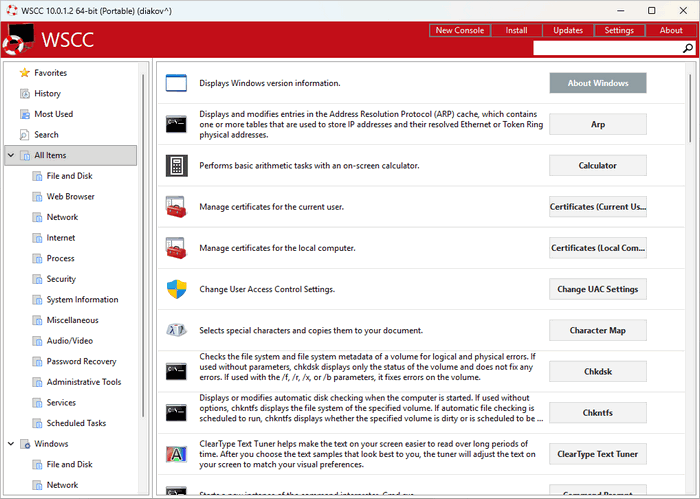
WSCC simplifies this process by presenting supported applications inside categorized groups. Users can browse available tools, inspect their descriptions, install selected utilities, launch existing applications, and check for updated versions without maintaining a large collection of browser bookmarks.
Support for Popular Utility Collections
WSCC provides access to utilities from well-known developers and software collections, including Microsoft Sysinternals, NirSoft, MiTeC, and other supported sources.
Microsoft Sysinternals includes advanced Windows administration and troubleshooting applications for examining processes, services, network activity, disks, startup entries, security information, and system behavior. The WSCC application catalog includes tools such as RAMMap, PsPing, PsService, PsShutdown, PsList, DiskMon, FindLinks, and many others.
NirSoft provides a broad collection of lightweight Windows utilities covering networks, browsers, files, disks, processes, event logs, system information, and other technical areas. WSCC lists separate 32-bit and 64-bit downloads where both architectures are available.
The catalog also contains supported MiTeC utilities for network scanning, hardware information, image viewing, system inspection, and related administrative tasks.
Availability may change when an external developer updates, removes, replaces, or discontinues a utility.
Integrated Update Manager
The built-in Update Manager is one of the most important components of Windows System Control Center.
It can check the versions of installed utilities, identify missing applications, download available releases, and install supported updates. This reduces the need to visit the website of every individual developer manually.
The Update Manager can handle several common situations:
- Installing a missing utility
- Updating an outdated application
- Reinstalling an existing tool
- Selecting the preferred application architecture
- Checking for updates when WSCC starts
- Processing scheduled updates
- Installing utilities only when requested
- Displaying update progress on the Windows taskbar
The official feature page confirms that Update Manager can detect newer versions, download missing items, and install them from within WSCC.
Install Applications Only When Needed
Users do not necessarily have to download the complete collection of supported tools immediately.
WSCC can be configured to install applications on demand. When the user selects a utility that is not currently stored on the computer, the program can download and prepare it at that time.
This approach helps reduce storage usage and keeps the local toolkit focused on applications that are actually needed. On-demand installation was added as an official option in the WSCC 10 generation.
Users who regularly work without an internet connection can instead download their required utilities in advance.
Secure Application Downloads
WSCC includes several mechanisms intended to improve the security of its application-management process.
According to the official feature documentation:
- Updates and applications are downloaded through HTTPS
- Update Manager uses 4096-bit RSA keys for signing and verification
- Applications must pass basic security checks before being downloaded
- Update checks are processed locally on the user’s device
- WSCC does not collect personal information or application-usage statistics
These measures help verify supported packages and protect the update workflow from unauthorized modification.
Users should still obtain WSCC from its official source and keep Windows security software enabled. Some administration utilities perform advanced system operations and may trigger security warnings because of their technical capabilities.
Portable Mode
Windows System Control Center 10.0.4.0 can operate in portable mode without a standard installation.
The portable edition can be stored on:
- A USB flash drive
- An external hard drive
- A technician’s recovery drive
- A shared maintenance folder
- A separate disk partition
- A portable troubleshooting toolkit
Portable operation makes it possible to carry the WSCC interface, configuration, and downloaded utilities between compatible Windows computers.
The official feature page states that WSCC can be installed normally or used in portable mode and that the supported third-party applications are portable.
Some individual utilities may still require administrator privileges to access protected system information or perform changes.
Simple and Organized User Interface
WSCC provides an organized interface designed to make large software collections easier to navigate.
Applications are grouped according to their purpose, allowing users to locate relevant tools without memorizing every program name. Categories can cover processes, security, networks, files, disks, browsers, system information, and other administrative areas.
Different display modes make it possible to browse applications using icons or detailed information. Depending on the selected view, WSCC can display details such as:
- Application name
- Description
- Local version
- Available version
- Architecture
- Installation status
- Category
- Update information
- Custom execution settings
The interface also supports modern Windows display features, including dark-mode behavior and high-DPI scaling improvements introduced across earlier releases.
Fast Application Search
The integrated search function helps users find utilities by name, category, description, or purpose.
For example, a technician looking for a process-analysis tool can search for terms related to processes instead of browsing the entire catalog. Network utilities, disk tools, event-log viewers, and service managers can be located in the same way.
This is especially useful because WSCC can manage hundreds of small applications with different names and functions.
Built-In Console
Some system utilities operate through a command-line interface rather than a traditional graphical window.
WSCC includes a Console designed to execute supported command-line applications from within the program. This gives users one environment for launching both graphical and console-based tools.
Depending on the utility, users may be able to configure custom parameters, working directories, execution privileges, and console behavior.
The Console is useful for tools that perform operations such as:
- Displaying process information
- Testing network connections
- Managing Windows services
- Examining active sessions
- Inspecting open files
- Running remote commands
- Collecting system reports
- Controlling local or remote computers
Run Applications as Administrator
Many diagnostic utilities can run with standard user permissions, but certain operations require administrative privileges.
WSCC provides options for launching selected applications as an administrator. This is useful for tools that need access to protected processes, services, system files, network settings, or security information.
Applications configured for elevated execution can be identified through the interface, reducing the need to select the elevation option manually every time.
Administrative utilities should be used carefully because some of them can stop processes, modify services, remove files, or change operating-system settings.
Custom Applications and Software Collections
In addition to the predefined supported catalog, WSCC can be used to organize custom applications.
Users can create personalized software collections containing internal tools, third-party utilities, scripts, command-line programs, or frequently used portable applications.
This allows administrators to turn WSCC into a customized technical toolkit rather than limiting it to the default catalog.
Custom collections can be particularly useful for:
- IT support departments
- Computer-repair businesses
- Corporate administrators
- Network technicians
- Security teams
- Software-testing environments
- Personal troubleshooting toolkits
Scheduled Updates
WSCC can automate parts of the utility-maintenance process through scheduled update checks.
Instead of opening every program and checking its version manually, users can configure WSCC to check supported applications periodically. Previous releases also added an option to perform update checks automatically when the application starts.
Scheduled updates are useful for maintaining a portable toolkit that contains many separate utilities with different release schedules.
An internet connection is required when checking for or downloading updated applications.
32-Bit and 64-Bit Editions
Windows System Control Center 10.0.4.0 is officially available in separate 32-bit and 64-bit packages.
The official download page lists:
- WSCC 32-bit with a package size of approximately 6.1 MB
- WSCC 64-bit with a package size of approximately 6.8 MB
- Setup and portable options for Windows
The small program package makes WSCC easy to store and transport, although the total required storage will increase as additional utility collections are downloaded.
Where a supported third-party utility provides both architectures, WSCC can manage the appropriate edition according to the user’s preferences and system compatibility.
Windows on Arm Installer Support
Version 10.0.4.0 adds Windows on Arm support to the WSCC installer.
This improvement allows the installation package to operate in more Windows environments. However, it does not automatically guarantee native Arm support for every application listed in the WSCC catalog.
Each external utility has its own architecture requirements. Some programs may run through Windows compatibility technology, while others may require x86 or x64 hardware.
Privacy-Focused Operation
WSCC is designed to perform update checks locally and does not require a cloud-based account for managing the application catalog.
The developer states that the software does not collect personal information or application statistics. This can be beneficial for technicians and organizations that prefer local system-management tools without mandatory telemetry.
Internet access remains necessary for downloading the WSCC catalog, obtaining utilities, and checking for updated versions.
Main Features of Windows System Control Center 10.0.4.0
- Centralized Windows utility management
- Support for Microsoft Sysinternals tools
- Support for NirSoft utilities
- Support for MiTeC and other compatible applications
- Automatic application installation
- Integrated Update Manager
- Scheduled update checking
- On-demand utility downloads
- Portable operation without installation
- Separate 32-bit and 64-bit packages
- Windows on Arm installer support
- HTTPS application downloads
- 4096-bit RSA file verification
- Local update checks
- No personal telemetry collection
- Organized application categories
- Fast search functionality
- Graphical and detailed display modes
- Integrated command-line Console
- Administrator execution options
- Custom application support
- Personalized software collections
- Dark-mode compatibility
- High-DPI display support
- Taskbar update-progress display
- Lightweight main application package
System Requirements
The official WSCC documentation confirms compatibility with all editions of Windows 10 and Windows 11.
General requirements include:
- Windows 10 or Windows 11
- Compatible 32-bit, 64-bit, or supported Windows on Arm environment
- Internet connection for downloading utilities and checking for updates
- Available storage for WSCC and selected applications
- Administrator privileges for utilities that perform protected operations
- A suitable display resolution for the selected interface mode
Hardware requirements depend mainly on the utilities being used. WSCC itself is lightweight, but individual diagnostic, scanning, monitoring, or recovery tools may consume additional processor, memory, or storage resources.
Advantages
Windows System Control Center offers several practical advantages:
- Combines many system utilities in one interface
- Reduces manual downloading and update management
- Supports installed and portable workflows
- Organizes tools by purpose and category
- Downloads selected utilities only when needed
- Provides secure package-verification features
- Supports both graphical and command-line programs
- Allows custom application collections
- Works well as part of a USB repair toolkit
- Requires relatively little storage before utilities are downloaded
- Does not require a cloud account
- Does not collect application-usage statistics according to the developer
Possible Disadvantages
WSCC also has several limitations:
- It does not replace the utilities that it manages
- Most tools must be downloaded separately
- Internet access is needed for updates and initial downloads
- Some applications require administrator privileges
- Certain utilities may be detected by security products because of their administrative functions
- Application availability depends on external developers
- Some utilities may not support every Windows architecture
- The large number of available tools may be confusing for inexperienced users
- Incorrect use of advanced utilities can affect system stability
Who Should Use WSCC?
Windows System Control Center is especially suitable for:
- Windows system administrators
- IT support technicians
- Computer-repair specialists
- Network administrators
- Cybersecurity professionals
- Software testers
- Advanced Windows users
- Help-desk teams
- Technical consultants
- Users maintaining portable repair drives
Beginners can also use the program, but they should understand the purpose of a utility before running it or changing system settings.
Conclusion
Windows System Control Center 10.0.4.0 Portable is a professional and lightweight solution for organizing, installing, updating, and launching Windows administration utilities from one centralized interface.
Its support for well-known collections such as Microsoft Sysinternals, NirSoft, and MiTeC makes it particularly useful for troubleshooting, maintenance, system analysis, network diagnostics, and technical support.
Version 10.0.4.0 improves compatibility by adding Windows on Arm support to the installer, corrects large-icon scaling, and includes additional reliability fixes. Combined with portable operation, secure HTTPS downloads, RSA verification, automatic updates, command-line support, custom collections, and privacy-focused local processing, WSCC provides an efficient way to build and maintain a complete Windows utility toolkit.