Windows 10 Digital Activation Program v1.5.5.6: Features, Activation Methods, Risks, and Legal Alternatives
Windows 10 Digital Activation Program v1.5.5.6 is an unofficial Windows activation utility designed to change the activation status of Microsoft Windows without requiring users to enter a traditional retail product key. The program is commonly associated with digital-license activation methods that attempt to link Windows activation to the computer’s hardware identity.
The tool is often promoted as a lightweight and portable utility for activating Windows 10 and Windows 11. However, it is not developed, authorized, or supported by Microsoft. Using unofficial activation software may violate Microsoft’s licensing terms and can expose the computer to security, privacy, and system-stability risks.
What Is Windows 10 Digital Activation Program?
Windows 10 Digital Activation Program, sometimes known as W10 Digital Activation, is an unofficial system utility commonly attributed to the developer Ratiborus. It is advertised as a tool that can activate different editions of Windows using digital-license or KMS-based methods.
Unlike Microsoft’s official activation process, which requires a valid product key, digital entitlement, or organizational license, this program attempts to modify or bypass parts of the Windows licensing mechanism.
The application is usually distributed as a small portable executable, meaning that it may run without a traditional installation process. This portability is frequently presented as one of its main advantages, although portable activation tools can still make important changes to system licensing components.
Main Features of Version 1.5.5.6
Windows 10 Digital Activation Program v1.5.5.6 is commonly advertised with the following features:
- Digital-license activation for Windows 10 and Windows 11
- Support for multiple Windows editions
- HWID-based activation methods
- KMS38 activation options in some releases
- Portable operation without a full installation
- Automatic detection of the installed Windows edition
- Replacement or removal of some existing KMS license configurations
- A simple interface designed for one-click operation
- Activation that may remain after restarting or reinstalling Windows on the same hardware
Some unofficial sources claim that the program supports Home, Professional, Education, Enterprise, Workstation, N, Single Language, and IoT editions. However, actual compatibility can differ depending on the Windows build, edition, system configuration, and the specific copy of the program being used.
How Digital License Activation Works
Microsoft’s legitimate digital-license system associates an activated Windows installation with the device’s hardware configuration. When a computer has a valid digital license, Windows can normally reactivate automatically after reinstallation, provided that the correct edition is installed and the device has not undergone major hardware changes.
Unofficial activation utilities attempt to imitate, manipulate, or exploit this process. They may generate or register activation-related information that causes Windows to appear digitally activated.
This should not be confused with purchasing a genuine digital license. An activated status displayed in Windows Settings does not necessarily prove that the device has a legally obtained Microsoft license.
What Is HWID Activation?
HWID stands for Hardware Identification. It refers to a digital fingerprint generated from important computer components, particularly the motherboard and other core hardware.
A legitimate Windows digital license can be associated with this hardware identity. If Windows is reinstalled on the same computer, Microsoft’s activation servers may recognize the device and reactivate it automatically.
Unofficial HWID activation tools attempt to create or register a similar activation state without a legitimately purchased license. Several sources describing Windows 10 Digital Activation Program state that HWID-based activation is one of its primary methods.
Major hardware changes, especially replacing the motherboard, may affect activation because the device may be recognized as a different computer.
What Is KMS38 Activation?
Some versions of the program are also associated with a method known as KMS38.
Traditional Key Management Service activation is intended for organizations that activate large numbers of computers through an authorized KMS server. Standard KMS clients normally need to contact the organization’s activation server periodically.
KMS38 is an unofficial modification that attempts to extend the activation period until the year 2038. It is not an official Microsoft licensing option and should not be confused with a legitimate corporate volume license.
Supported Windows Editions
Unofficial descriptions of version 1.5.5.6 commonly claim support for various editions of Windows 10 and Windows 11, including:
- Windows Home
- Windows Home N
- Windows Home Single Language
- Windows Professional
- Windows Professional N
- Windows Professional Education
- Windows Professional for Workstations
- Windows Education
- Windows Enterprise
- Windows Enterprise N
- Windows IoT Enterprise
Support is not guaranteed. Compatibility may vary according to the Windows version, architecture, security updates, licensing channel, and system configuration.
Users should also be cautious of websites claiming that the tool activates older Windows versions, Microsoft Office, or every Microsoft product. Such claims may refer to repackaged or modified releases containing additional scripts that are unrelated to the original utility.
User Interface and Ease of Use
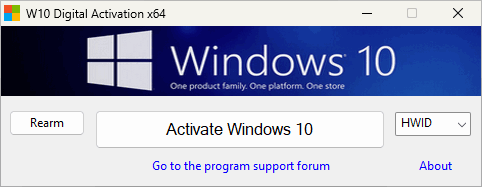
The program is generally described as having a minimal interface that displays information about the installed operating system and its current activation status.
Its simple design is intended to make the activation process accessible to inexperienced users. In many unofficial releases, the interface contains a central activation button and a limited number of advanced options.
Although the interface may look simple, activation tools can modify licensing services, system files, scheduled tasks, registry values, certificates, and activation tokens. A one-click interface does not mean that the underlying operation is harmless.
Is Windows 10 Digital Activation Program Safe?
There is no reliable guarantee that unofficial activation software is safe.
Activation tools are frequently detected by antivirus programs because they modify protected licensing components or use behaviors similar to hacking utilities. In some cases, the detection may be related to the activation technique itself. In other cases, the downloaded file may have been modified to include malware.
Potential threats include:
- Password-stealing malware
- Cryptocurrency miners
- Remote-access tools
- Browser hijackers
- Advertising software
- Hidden scheduled tasks
- Modified Windows security settings
- Disabled antivirus protection
- Corrupted system files
- Unauthorized network connections
- Collection of personal or hardware information
The greatest risk often comes from unofficial download websites. Different websites may distribute completely different files under the same program name and version number.
Claims such as “completely safe,” “no antivirus detection,” or “100% clean” should not be accepted without independent verification. Some distribution pages acknowledge that activation utilities may trigger antivirus warnings because of their behavior.
Legal and Licensing Considerations
Windows 10 Digital Activation Program is not an official Microsoft product. Using it to activate Windows without owning a valid license may violate Microsoft’s software license terms and may constitute unauthorized software use.
Businesses, schools, government organizations, and professional environments face additional risks. Unlicensed software may cause problems during security audits, software asset reviews, compliance checks, insurance assessments, or customer certification procedures.
A computer displaying the message “Windows is activated” is not necessarily legally licensed. Legal licensing depends on how the license was obtained and whether the user or organization has valid proof of entitlement.
Possible Effects on Windows Updates
An unofficially activated system may continue receiving Windows updates, but this does not make the activation method legitimate or safe.
Future Windows updates may:
- Detect modified activation components
- Restore original licensing files
- Remove unauthorized activation states
- Display activation notifications again
- Cause compatibility problems with altered services
- Prevent certain security or system features from working correctly
Users may also experience problems when performing major feature upgrades, resetting Windows, changing editions, replacing hardware, or signing in with a Microsoft account.
Advantages Commonly Claimed by Unofficial Sources
Supporters of the program commonly mention the following advantages:
- Small file size
- Portable design
- Simple interface
- Fast activation process
- Support for several Windows editions
- No need to enter a product key
- Activation that may survive system restarts
- Possible reactivation after reinstalling Windows on unchanged hardware
These are promotional claims rather than guarantees. They should be considered alongside the legal, security, and reliability risks.
Disadvantages and Risks
The program also has several important disadvantages:
- It is not authorized by Microsoft
- It may violate software licensing agreements
- Downloaded copies may contain malware
- Antivirus applications may block or remove it
- Activation may stop working after an update
- It may modify sensitive system components
- It does not provide proof of license ownership
- It is unsuitable for professional or commercial compliance
- Technical support is not available from Microsoft
- Repacked versions may behave differently from the original release
For most users, these risks outweigh the convenience of unofficial activation.
Legitimate Ways to Activate Windows
The safest method is to activate Windows through Microsoft’s official licensing system.
Users can activate Windows by:
- Entering a genuine retail product key
- Purchasing a digital license through Microsoft or an authorized retailer
- Signing in with the Microsoft account linked to an existing digital license
- Using an original equipment manufacturer license supplied with the computer
- Using a valid organizational volume license
- Running the Windows Activation Troubleshooter after hardware changes
- Contacting Microsoft Support when a genuine license fails to activate
Before purchasing another license, users should check whether their computer already contains an embedded OEM product key or an existing digital entitlement.
How to Check the Official Activation Status
The current Windows activation status can be checked through the operating system settings.
On Windows 10, open:
Settings > Update & Security > Activation
On Windows 11, open:
Settings > System > Activation
The activation page normally indicates whether Windows is activated, whether it uses a digital license, and whether that license is linked to a Microsoft account.
Users should keep invoices, product-key cards, retailer emails, device documentation, or organizational licensing records as evidence of legitimate ownership.
System Requirements
Because it is designed as a Windows activation utility, unofficial sources generally list requirements such as:
- A compatible edition of Windows 10 or Windows 11
- Administrator privileges
- Internet access for some digital-license methods
- Standard x86 or x64 Windows hardware
- Access to Windows licensing and activation services
Actual requirements may vary between releases and repackaged copies.
Final Verdict
Windows 10 Digital Activation Program v1.5.5.6 is an unofficial activation utility promoted as a simple way to activate Windows through HWID, digital-license, or KMS38 techniques. Its compact interface and portable design may appear convenient, but the program operates outside Microsoft’s authorized licensing system.
Using unofficial activation software may create legal, security, privacy, and system-stability problems. It may also expose users to modified downloads containing malicious code.
For a reliable and secure experience, users should activate Windows with a genuine product key, an authorized digital license, an OEM entitlement, or a legitimate organizational license. Official activation provides better long-term stability, access to Microsoft support, and clear proof of software ownership.