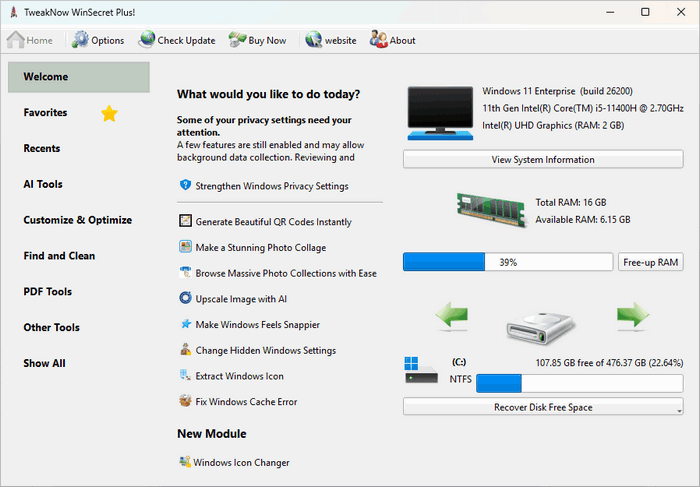
TweakNow WinSecret Plus 9.8.1: Complete Windows Customization, Optimization, and Utility Suite
TweakNow WinSecret Plus 9.8.1 is a comprehensive Windows customization and maintenance suite designed to help users unlock hidden system settings, manage files, protect privacy, monitor hardware, clean the registry, and simplify everyday computer tasks.
Rather than focusing on a single optimization function, the program combines 34 specialized tools inside one central interface. These tools cover Windows tweaking, system information, PDF management, image conversion, duplicate-file detection, secure deletion, process management, QR code creation, taskbar customization, and many other practical functions.
Version 9.8.1 was officially released on July 10, 2026. Its main improvement is enhanced Blue Screen of Death reporting inside the System Information module.
What Is TweakNow WinSecret Plus?
TweakNow WinSecret Plus is an all-in-one utility for Windows 10 and Windows 11. It provides access to settings and functions that may otherwise require editing the Windows Registry, opening several administrative tools, or installing multiple separate applications.
The program is suitable for users who want to:
- Customize hidden Windows settings
- Improve desktop and taskbar behavior
- Clean unused registry entries
- Remove activity traces
- Analyze disk usage
- Find duplicate files and photos
- Monitor running processes
- Convert and manage images
- Create and edit PDF-related content
- Generate QR codes
- View detailed system information
- Troubleshoot common Windows problems
The application is designed for both regular users and experienced Windows enthusiasts. Its graphical interface makes advanced options easier to access without manually navigating complex registry locations.
What Is New in Version 9.8.1?
The most important addition in TweakNow WinSecret Plus 9.8.1 is improved Blue Screen reporting.
The System Information module can now display more detailed information about the most recent Windows system crash, including:
- Date and time of the latest Blue Screen
- Stop-code description
- Bugcheck code
- Related crash-dump file information
This improvement can make it easier to identify when a system crash occurred and collect technical information before troubleshooting drivers, hardware, or Windows components.
The update builds upon version 9.8.0, which expanded the Photo Gallery module with support for common audio formats, audio previews, file properties, and technical stream information.
Windows Secret Module
Windows Secret is one of the program’s main features. It provides access to more than one hundred hidden Windows settings and registry-based adjustments through an organized graphical interface.
Available customization categories may include:
- Desktop behavior
- File Explorer
- Taskbar settings
- Start menu options
- Windows appearance
- Privacy settings
- User account behavior
- System features
- Network options
- Application settings
- Context menus
- Windows security preferences
These options allow users to change how Windows behaves without manually editing the Registry.
Examples of possible tweaks include disabling unwanted interface elements, changing File Explorer behavior, adjusting taskbar options, modifying desktop settings, and controlling selected privacy-related features.
Users should review each setting carefully because some changes may require restarting File Explorer, signing out, or restarting Windows.
Faster Folder Loading
A recent program update introduced a Speed Up Folder Loading tweak for File Explorer.
This option disables Windows automatic folder-type discovery. Normally, Windows analyzes folder contents and attempts to decide whether the folder contains images, music, videos, documents, or mixed files.
Disabling this behavior may help large or mixed-content folders open more quickly. However, Windows will then use a general-purpose folder layout instead of automatically optimizing each folder for its content type.
System Information
The System Information module provides detailed information about the computer’s hardware, operating system, storage, memory, and installed components.
It can display information such as:
- Windows edition and version
- Processor model
- Installed memory
- Motherboard details
- Graphics hardware
- Storage devices
- Display information
- Network adapters
- Windows installation data
- Running system configuration
- Blue Screen crash details
The expanded BSOD reporting in version 9.8.1 is especially useful for users investigating unexpected shutdowns and system crashes.
Although the program can display crash information, determining the exact cause may still require driver updates, memory testing, storage diagnostics, or analysis of crash-dump files.
Registry Cleaner
TweakNow WinSecret Plus includes a Registry Cleaner that scans for unused or obsolete Registry items.
It may detect:
- Invalid application paths
- Obsolete software entries
- Missing shared files
- Invalid file associations
- Unused uninstall records
- Broken startup references
- Old application settings
Registry cleaning may help remove leftovers from previously uninstalled software, but it should not be expected to create dramatic performance improvements.
Users should create a restore point or backup before applying extensive Registry changes. Important or unfamiliar entries should not be removed without review.
Track Cleaner
Track Cleaner is a privacy-oriented module that removes traces created during everyday computer use.
It may clean:
- Browser histories
- Temporary internet files
- Windows activity records
- Recently opened document lists
- Application histories
- Search records
- Cache files
- Cookies
- Temporary system data
This can be useful on shared computers or when users want to reduce locally stored activity information.
Deleting cookies may sign users out of websites, while removing recent-item records may erase useful shortcuts. The selected categories should therefore be checked before cleaning.
Folder Size Analyzer
The Folder Size Analyzer helps users discover which folders and files consume the most disk space.
It can be useful for identifying:
- Large video collections
- Old downloads
- Backup folders
- Disk images
- Virtual machines
- Temporary project files
- Application data
- Oversized archives
The program presents storage usage in a more understandable format than manually checking every folder.
Large files should always be reviewed before deletion because file size alone does not determine whether a file is unnecessary.
Duplicate File Finder
The Find Duplicate module searches for identical files stored in multiple locations.
Duplicate files may appear after:
- Repeated downloads
- Manual backups
- Copying photos between folders
- Synchronizing devices
- Exporting the same documents several times
- Moving files without deleting the originals
Removing duplicates can free storage space, especially in large photo, video, music, or document collections.
Users should avoid deleting every duplicate automatically. Some applications and backup systems intentionally maintain identical files in separate folders.
Duplicate Image Finder
The Find Duplicate Image module focuses specifically on duplicate photographs and image files.
It can help users organize large picture collections and locate repeated copies created by messaging applications, cloud synchronization, editing software, or phone backups.
The results should be reviewed carefully to ensure that different edited versions, resolutions, or important backup copies are preserved.
Secure Delete
Secure Delete is designed to permanently remove sensitive files from a storage device.
Standard deletion usually removes the file reference but may leave recoverable data behind. Secure deletion attempts to overwrite selected files before removing them.
This feature may be useful for:
- Financial records
- Personal documents
- Confidential business files
- Private photographs
- Account exports
- Sensitive project data
Secure deletion behaves differently on solid-state drives because of internal wear-leveling and storage-management technologies. Full-disk encryption and the manufacturer’s secure-erase process may offer stronger protection when retiring an SSD.
Process Manager
The Process Manager displays detailed information about active applications and background processes.
Users can review:
- Process names
- Resource usage
- Executable locations
- Running application details
- Process priority levels
The module also allows selected process priorities to be changed.
Increasing a process priority can allocate more processor attention to an application, but it does not increase the physical speed of the CPU. Setting programs to an excessively high priority may reduce system responsiveness or interfere with other applications.
Apps and Games Launcher
The Apps and Games Launcher can create shortcuts that start programs with a selected priority level.
Available priority options include:
- Low
- Below normal
- Normal
- Above normal
- High
This feature may help users quickly launch a demanding application or game with a preferred priority setting.
Performance improvements are not guaranteed and depend on the computer hardware, background processes, and the application itself.
Smart Shortcut
Smart Shortcut allows users to assign a preferred process-priority level to commonly used applications.
Instead of manually changing the priority through Task Manager every time, the program can automate the selected behavior when the application is launched.
This can be useful for creative software, games, media encoders, or other demanding programs, although priority adjustments should be used carefully.
Auto Dark Mode
The Auto Dark Mode module automatically switches Windows and supported application themes between light and dark modes.
Users can configure theme changes according to a schedule, making the interface brighter during daytime and darker during evening hours.
This provides more flexibility than manually switching themes through Windows Settings.
Auto Wallpaper Changer
Auto Wallpaper Changer can update the desktop background automatically.
The module can use images from sources such as:
- Bing
- NASA
- Selected local images
Wallpaper changes can be configured to occur hourly or daily. This is useful for users who want a regularly changing desktop without manually downloading and applying new backgrounds.
Transparent Taskbar
The Transparent Taskbar module changes the appearance of the Windows taskbar by making it transparent.
This can create a cleaner and more modern desktop appearance, particularly when combined with customized wallpapers and icon layouts.
The effect is mainly visual and does not significantly improve computer performance.
Stay Awake
Stay Awake prevents the computer from entering sleep or hibernation mode temporarily.
This can be useful during:
- Large downloads
- File transfers
- Long video rendering jobs
- Presentations
- Remote access sessions
- Software installations
- Backup operations
The feature can help prevent Windows power-saving settings from interrupting an active task.
Troubleshooter
The Troubleshooter module provides quick access to repairs for common Windows problems.
Supported repair categories may include:
- Internet connectivity
- Icon display issues
- Thumbnail cache problems
- Microsoft Store errors
These repair tools may help resolve minor configuration and cache-related issues. More serious problems may still require Windows repair commands, driver updates, system restoration, or professional diagnosis.
Bulk Image Converter
Bulk Image Converter allows several image files to be converted at the same time.
Supported formats include:
- GIF
- HEIC
- HEIF
- JPG
- PNG
- TIFF
- WebP
The module can also combine multiple images into a single PDF document.
Recent versions added configuration-profile management, allowing users to save and reload preferred conversion settings for repeated batch jobs.
Photo Gallery
Photo Gallery provides an integrated environment for browsing image and media files.
Version 9.8.0 added support for common audio formats. Users can now:
- Browse audio files
- Preview tracks
- View file properties
- Inspect technical stream information
- Manage audio alongside image assets
The module also includes image-resizing options based on percentage, width, or height.
Photo Collage Maker
Photo Collage Maker combines multiple images into a single collage.
Users can select up to ten photographs and choose from different layouts to create:
- Family collages
- Social-media graphics
- Promotional images
- Event memories
- Presentation visuals
- Personal photo collections
The tool provides a simple alternative to installing a full professional image editor for basic collage creation.
PDF Tools
TweakNow WinSecret Plus includes several offline PDF utilities.
Available functions include:
- Convert images into PDF files
- Convert PDF pages into images
- Split PDF documents
- Merge supported PDF content
- Select specific page ranges
- Improve compression during page extraction
The PDF Splitter includes convenient page-boundary selection and improved compression for extracted documents.
Because processing takes place locally, users do not need to upload private documents to an online conversion service.
QR Code Creator
The QR Code Creator can generate QR codes for different types of information, including:
- Plain text
- Website links
- Email addresses
- WhatsApp information
- SMS messages
- Phone calls
- Wi-Fi credentials
This is useful for sharing network access, contact information, web pages, or short messages with smartphones and tablets.
Windows Icon Tools
The program provides multiple tools for working with Windows icons.
Windows Icon Extractor
This module can extract icons from:
- Windows libraries
- Executable files
- System resources
- DLL files
It is useful for designers, software developers, and users creating custom shortcuts.
Windows Icon Generator
Windows Icon Generator converts PNG or JPG images into Windows icon files.
This allows users to create personalized icons for applications, folders, documents, or desktop shortcuts.
My Tray Icon
My Tray Icon adds a convenient icon to the Windows notification area.
It provides faster access to selected Windows settings and program tools without opening the full application every time.
This may simplify common administrative and customization tasks.
Shortcut Keys
The Shortcut Keys module allows users to create custom keyboard shortcuts for:
- Applications
- Folders
- Websites
- Frequently used tools
Keyboard shortcuts can improve productivity by reducing the need to navigate through menus and desktop icons.
User Interface
TweakNow WinSecret Plus organizes its tools into categories, making the large collection of modules easier to navigate.
The application focuses on giving users direct access to each function without requiring command-line knowledge.
Its interface is suitable for beginners, but some system-tweaking and Registry options still require careful judgment.
Users should avoid applying large numbers of unfamiliar changes at once. Making a few adjustments and testing the system afterward makes troubleshooting easier.
Windows Compatibility
TweakNow WinSecret Plus is designed primarily for:
- Windows 11
- Windows 10
Version 9.5.2 introduced initial compatibility for the upcoming Windows 11 2026 Update, version 26H2 and build 26300.
Some modules and settings may behave differently depending on the installed Windows edition, build number, security configuration, and user permissions.
Administrator privileges may be required for Registry cleaning, system tweaks, secure deletion, and other protected operations.
Microsoft Store Edition
TweakNow WinSecret Plus is available in the Microsoft Store under the name WinOptimizer Pro.
However, the Microsoft Store edition does not include the following modules because of restrictions involving access to Windows system APIs:
- Windows Secret
- Registry Cleaner
- Smart Shortcut
Users who require these functions should verify which edition they are installing.
License Options
The official edition is commercial software with a seven-day trial.
The developer currently offers:
- Single User License for one PC
- Home License for household computers
- Office License for computers in one office
The licenses are sold as one-time purchases rather than recurring subscriptions. Prices and license conditions may change, so users should verify current information before purchasing.
Is TweakNow WinSecret Plus Safe?
The official version downloaded from the TweakNow website is a legitimate Windows utility.
However, system-tweaking tools can affect Windows stability when settings are changed incorrectly. Users should create a restore point before applying advanced tweaks or Registry changes.
Recommended precautions include:
- Download the installer from the official developer
- Create a Windows restore point
- Back up important files
- Review every tweak before applying it
- Avoid changing unknown process priorities
- Do not delete duplicate files automatically
- Keep antivirus protection active
- Avoid cracked, repacked, or preactivated versions
- Restart Windows after major configuration changes
- Test changes gradually
Unofficial packages may contain modified executables, unwanted software, malware, or unstable licensing modifications.
Advantages
TweakNow WinSecret Plus 9.8.1 offers several advantages:
- Includes 34 integrated utility modules
- Provides access to more than 100 hidden Windows settings
- Supports Windows 10 and Windows 11
- Improved BSOD reporting
- Registry cleaning and privacy tools
- Duplicate-file and duplicate-image detection
- Folder-size analysis
- Offline PDF utilities
- Image conversion and collage creation
- QR code generation
- Process-priority management
- Automatic wallpaper and theme controls
- Secure file deletion
- Transparent taskbar customization
- One-time license options
- Simple centralized interface
Disadvantages
The program also has some limitations:
- The full edition requires a paid license
- Advanced tweaks may cause unexpected system behavior
- Registry cleaning provides limited performance improvement
- Process-priority changes do not guarantee faster applications
- Duplicate-file removal requires careful review
- Some tools duplicate functions already available in Windows
- The Microsoft Store edition excludes important modules
- Major Windows updates may affect certain tweaks
- Beginners may find the number of available tools overwhelming
- Incorrect secure deletion cannot be undone
Who Should Use TweakNow WinSecret Plus?
The program may be suitable for:
- Windows users who enjoy system customization
- Users who want hidden settings in one interface
- People managing large file collections
- Users who frequently convert images and PDFs
- Computer technicians
- Content creators
- Users who need quick access to system information
- People troubleshooting Windows crashes
- Users who want several utilities without installing separate programs
Users who only need basic Windows cleanup may not require the complete suite.
Final Verdict
TweakNow WinSecret Plus 9.8.1 is a versatile Windows toolkit that combines system customization, maintenance, privacy, file management, media conversion, PDF tools, and productivity utilities in one program.
Its most important version-specific improvement is the enhanced Blue Screen reporting system, which provides detailed information about the latest Windows crash, including the stop-code description, bugcheck code, time, and related dump file.
The software stands out because it offers much more than basic Windows tweaking. Its 34 modules include Registry cleaning, duplicate-file detection, PDF processing, image conversion, QR code creation, system monitoring, process management, secure deletion, taskbar customization, and troubleshooting tools.
When downloaded from the official developer and used carefully, TweakNow WinSecret Plus 9.8.1 can provide a practical way to customize Windows, investigate system problems, manage files, and simplify many routine computer tasks.