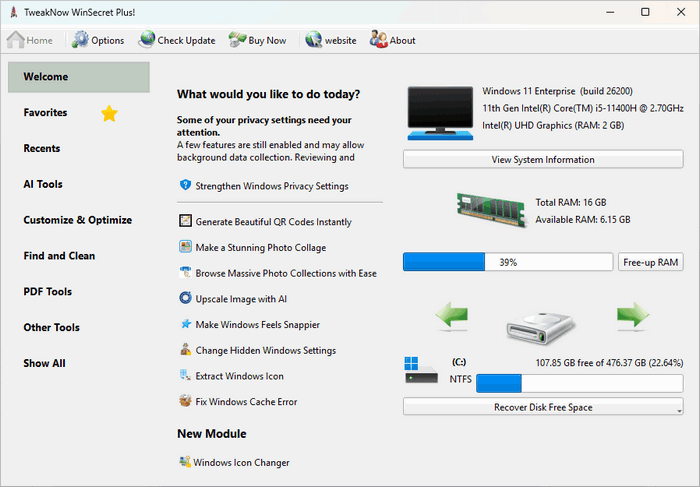
TweakNow WinSecret Plus 9.8.0 Review
TweakNow WinSecret Plus 9.8.0 is a powerful Windows customization and optimization tool designed for users who want deeper control over hidden system settings. It allows users to modify many Windows options that are not normally available through the standard Settings app or Control Panel.
The program is especially useful for Windows 10 and Windows 11 users who want to personalize the desktop, improve privacy, adjust system behavior, optimize performance, view system information, and manage advanced tweaks from one organized interface.
What Is TweakNow WinSecret Plus 9.8.0?
TweakNow WinSecret Plus 9.8.0 is an advanced system tweaking utility from TweakNow. It is designed to unlock hidden Windows settings and make them easier to manage without manually editing the Windows Registry.
Windows stores many advanced options inside the registry, but editing the registry directly can be risky for inexperienced users. TweakNow WinSecret Plus provides a safer and more user-friendly way to access these options through clear menus and organized categories. The official TweakNow page describes WinSecret Plus as a tool for personalizing hidden Windows 11 and Windows 10 settings, including taskbar, desktop, privacy, and system preferences.
Main Features
TweakNow WinSecret Plus 9.8.0 includes a wide range of tools for customization, system information, performance improvement, privacy control, and Windows behavior management. It helps users modify appearance settings, adjust File Explorer behavior, control desktop options, customize the taskbar, manage privacy-related settings, and access useful system tools.
The program is designed for users who want more control than Windows normally provides, but who do not want to manually search for registry keys or use complicated command-line methods.
Hidden Windows Tweaks
One of the most important features of TweakNow WinSecret Plus is its ability to access hidden Windows tweaks. Many Windows settings exist inside the system but are not shown in normal menus. These settings may control interface behavior, system restrictions, privacy options, taskbar behavior, File Explorer behavior, desktop appearance, and other advanced functions.
TweakNow’s official WinSecret page explains that the Windows Secret module can safely access more than 100 registry tweaks, helping users change hidden Windows options without manually editing the registry.
Windows 11 and Windows 10 Customization
TweakNow WinSecret Plus 9.8.0 is mainly focused on modern Windows systems. It is useful for users who want to customize Windows 11 or Windows 10 beyond the default options.
Users can adjust elements related to the taskbar, desktop, Start menu behavior, File Explorer, system appearance, and privacy settings. This makes the program useful for people who want Windows to look and behave closer to their personal workflow.
Taskbar and Desktop Tweaks
The taskbar and desktop are among the most used parts of Windows. TweakNow WinSecret Plus gives users access to several options that can change how these areas behave.
Users can adjust taskbar-related settings, desktop behavior, icon display options, visual preferences, and other interface details. These changes can make Windows feel cleaner, faster, or more comfortable depending on the user’s needs.
File Explorer Customization
File Explorer is another important area where TweakNow WinSecret Plus can help. The program may provide options for changing how folders, files, shortcuts, thumbnails, and system items are displayed.
These tweaks are useful for advanced users who want File Explorer to be more practical, less cluttered, or more suitable for productivity. For example, some users prefer to show hidden file extensions, change navigation behavior, or remove unnecessary interface elements.
Privacy and Security Options
TweakNow WinSecret Plus 9.8.0 includes privacy-related tweaks that help users control some Windows behaviors more easily. Windows includes many background features, notifications, suggestions, tracking-related options, and system services that users may want to adjust.
The program allows users to review and change privacy preferences from a simpler interface instead of searching through many Windows settings pages. This can help users create a more private and less distracting Windows experience.
System Information Module
TweakNow WinSecret Plus also includes a system information module. This tool helps users quickly view important details about their computer, including hardware, operating system information, memory, processor, storage, and other system components.
The official WinSecret Plus page highlights its System Information module as a lightweight way to view detailed information about PC performance and components.
This feature is useful for troubleshooting, checking hardware details, preparing for upgrades, or understanding the current system configuration.
Performance and Optimization Tools
TweakNow WinSecret Plus 9.8.0 includes tools designed to improve the overall Windows experience. These may include optimization options, cleanup tools, startup-related controls, and performance-focused settings.
While no tweaking tool can magically transform weak hardware into a high-end PC, proper system adjustments can help reduce unnecessary behavior, improve usability, and make Windows feel more responsive in some cases.
Desktop Widgets and Monitoring
Recent TweakNow WinSecret Plus updates have also included improvements to desktop widgets and system monitoring. The official “What’s New” page mentions updates such as CPU and RAM statistic widget improvements and swap file usage tracking, which provide deeper insight into system memory usage.
These monitoring features are useful for users who want to keep an eye on system performance without opening heavier monitoring software.
Registry Tweaks Made Easier
The Windows Registry is powerful but sensitive. A wrong registry edit can cause system problems, application errors, or unwanted behavior. TweakNow WinSecret Plus makes registry-based customization easier by presenting options in a more understandable way.
This does not mean users should change every setting randomly. It is still important to understand what each tweak does before applying it. However, compared with manual registry editing, the program offers a more organized and safer workflow.
Useful for Advanced Users
TweakNow WinSecret Plus 9.8.0 is best suited for users who enjoy customizing Windows and improving their workflow. It is useful for power users, technicians, system administrators, PC enthusiasts, and anyone who wants deeper control over Windows behavior.
It can also help users who frequently set up new computers and want to apply the same Windows preferences quickly.
Easy-to-Use Interface
Although the program includes advanced tweaks, it is designed with a user-friendly interface. Settings are grouped into categories, making it easier to find the required option without searching through the registry manually.
This makes the program suitable not only for experts, but also for normal users who want to customize Windows carefully.
Advantages
TweakNow WinSecret Plus 9.8.0 has many advantages. It gives users access to hidden Windows settings, supports Windows 10 and Windows 11 customization, offers privacy and interface tweaks, includes system information tools, provides performance-related options, and makes registry-based changes easier to manage.
It is also lightweight compared with many larger system utility suites, and it focuses on practical Windows customization rather than unnecessary extra features.
Disadvantages
The main disadvantage is that advanced system tweaking always requires caution. Some settings may affect how Windows behaves, and changing too many options without understanding them can create confusion or system issues.
Also, users looking for automatic PC repair or one-click miracle performance improvement may misunderstand the purpose of the program. TweakNow WinSecret Plus is mainly a customization and tweaking tool, not a complete replacement for maintenance, antivirus, backup, or professional troubleshooting software.
Who Should Use TweakNow WinSecret Plus 9.8.0?
TweakNow WinSecret Plus 9.8.0 is ideal for Windows 10 and Windows 11 users who want to unlock hidden settings and customize their system more deeply. It is suitable for advanced users, PC enthusiasts, technicians, and anyone who wants better control over the taskbar, desktop, File Explorer, privacy settings, system behavior, and performance-related options.
It is also useful for users who prefer a clean and organized interface instead of editing registry keys manually.
Final Verdict
TweakNow WinSecret Plus 9.8.0 is a practical and powerful Windows tweaking tool for users who want more control over hidden system settings. It brings many customization, privacy, system information, and optimization options into one easy-to-use interface.
For Windows users who like to personalize their PC and fine-tune system behavior, TweakNow WinSecret Plus 9.8.0 is a valuable utility. It should be used carefully, especially when applying registry-related changes, but it can make Windows customization much easier and more convenient than manual tweaking.