TweakHub 1.0.0 Portable – Optimize, Customize, and Manage Windows 11
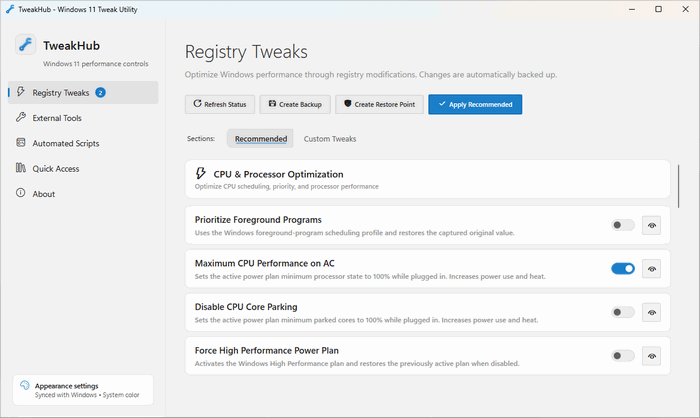
TweakHub 1.0.0 Portable is a free Windows optimization utility designed to bring system tweaks, maintenance tools, privacy settings, and performance options together in one organized interface.
Instead of manually editing the Windows Registry, searching for individual optimization scripts, or installing several separate utilities, users can access a wide collection of Windows adjustments from a single control center.
TweakHub is primarily intended for Windows 11 users, advanced PC owners, technicians, system builders, and enthusiasts who regularly configure or maintain computers. The project describes itself as a modern command center that collects useful optimization tools and advanced Windows tweaks in one place.
The portable edition can be launched without a traditional installation process, making it convenient for use from a USB drive or external storage device.
What Is TweakHub?
TweakHub is an all-in-one Windows tweaking and optimization application. It provides shortcuts, scripts, Registry modifications, system controls, and recommended utilities that can help users adjust the behavior of Windows 11.
The program is not limited to basic temporary-file cleaning. Its main purpose is to provide centralized access to system-level settings that are normally spread across Windows Settings, Control Panel, Registry Editor, PowerShell, Group Policy, and third-party utilities.
TweakHub may be useful for tasks such as:
- Adjusting Windows performance settings
- Changing privacy-related options
- Managing visual effects
- Reducing unnecessary background activity
- Configuring Windows Update behavior
- Controlling system services
- Removing unwanted Windows components
- Applying Registry-based tweaks
- Accessing troubleshooting utilities
- Launching recommended optimization tools
The software is presented as a free and open-source project for Windows 11.
Centralized Windows Control Panel
One of TweakHub’s main advantages is its centralized interface.
Windows contains many useful configuration options, but they are distributed across different menus and administrative tools. Some advanced settings are only available through commands or Registry modifications.
TweakHub organizes these controls into a cleaner dashboard, allowing users to find related options without navigating through several Windows menus.
This can save time when preparing a new computer, reinstalling Windows, configuring multiple machines, or restoring preferred settings after a system reset.
Windows Performance Optimization
TweakHub includes or provides access to adjustments intended to improve Windows responsiveness and reduce unnecessary resource usage.
Depending on the selected options, performance tweaks may involve:
- Reducing visual animations
- Disabling unnecessary background processes
- Adjusting power settings
- Limiting unwanted startup behavior
- Changing telemetry-related services
- Optimizing interface responsiveness
- Reducing system delays
- Managing scheduled tasks
- Adjusting network-related settings
- Removing unnecessary applications
The actual improvement depends on the computer’s hardware and current Windows configuration. A modern high-performance computer may show only small differences, while older or heavily configured systems may benefit more noticeably.
Users should avoid applying every available tweak automatically. Some Windows services and background components may be required by specific applications, devices, or business environments.
Privacy Controls
Windows 11 contains several features that communicate with Microsoft services for diagnostics, recommendations, cloud functionality, advertising personalization, synchronization, and online experiences.
TweakHub can simplify access to privacy-related settings so users can review and adjust them from one location.
Privacy controls may include options related to:
- Diagnostic data
- Advertising identification
- Activity tracking
- Application permissions
- Location access
- Search suggestions
- Personalized recommendations
- Background application activity
- Telemetry services
- Cloud-connected features
Disabling certain online components may improve privacy, but it can also affect synchronization, Microsoft Store functionality, search results, widgets, cloud services, or other Windows features.
Registry Tweaks
Many advanced Windows adjustments are stored inside the Registry. Editing these settings manually can be difficult and risky, especially for inexperienced users.
TweakHub provides a more accessible way to apply selected Registry modifications without locating every Registry key manually.
Registry-based tweaks may change:
- File Explorer behavior
- Taskbar settings
- Context menus
- Desktop options
- Windows animations
- Application launch behavior
- System responsiveness
- Privacy controls
- Network settings
- Power-management options
Even when a tool automates Registry changes, users should create a system restore point or Registry backup before applying major modifications.
Windows Debloating
Windows 11 may include preinstalled applications, promoted content, optional services, and features that some users do not need.
TweakHub can help users access debloating tools or scripts for removing selected components and simplifying the operating system.
Debloating may help:
- Reduce Start menu clutter
- Remove unused applications
- Limit background processes
- Reduce unwanted notifications
- Free some storage space
- Create a cleaner Windows environment
- Simplify newly installed systems
However, aggressive removal can damage Windows functionality or prevent certain applications from working correctly. Users should carefully review every selected component before removing it.
Important elements such as Microsoft Store dependencies, Windows Security, servicing components, frameworks, and hardware-related services should not be removed without understanding their purpose.
Access to Optimization Utilities
TweakHub can act as a launcher or organized directory for useful Windows optimization applications and advanced tools.
Rather than replacing every utility with its own built-in feature, it can help users discover and access specialized programs for system maintenance, privacy, troubleshooting, application installation, and Windows customization.
Independent descriptions of the software present it as a control panel that brings multiple common Windows enhancements together instead of forcing users to locate individual tools manually.
This approach makes TweakHub particularly useful for technicians who already use several optimization tools and want a central place from which to manage them.
Automated Scripts
Some Windows optimization tasks require multiple PowerShell commands or Registry changes. TweakHub can simplify these procedures by providing automated scripts.
Scripts may perform operations such as:
- Adjusting system policies
- Disabling selected services
- Applying multiple Registry settings
- Cleaning temporary components
- Configuring Windows applications
- Modifying interface behavior
- Restoring recommended settings
- Launching maintenance commands
Automated scripts save time, but users should understand what a script changes before executing it with administrator privileges.
Scripts obtained from unknown or modified packages should be treated carefully because administrative scripts can make significant system changes.
Portable Edition
TweakHub 1.0.0 Portable is designed to run without a conventional installation process.
A portable version can usually be extracted to a folder and launched directly. It may also be stored on a USB flash drive for use across multiple computers.
Benefits of the portable edition include:
- No full installation process
- Easy transfer between computers
- Convenient use by PC technicians
- Reduced Start menu clutter
- Simple removal by deleting its folder
- Suitable for USB maintenance toolkits
- Useful after reinstalling Windows
- Easy backup of the program files
Some system modifications may still require administrator privileges because the program changes protected Windows settings.
Portability applies to the application itself, not necessarily to every downloaded tool or system change launched through it.
Clean and Modern Interface
TweakHub uses a modern interface intended to make advanced Windows adjustments easier to understand.
Features and tools are grouped into categories rather than presented as unrelated commands. This design helps users locate performance, privacy, maintenance, and customization options more quickly.
The interface is useful for beginners, although many of the available operations remain advanced and should be applied carefully.
Open-Source Development
TweakHub is available as an open-source project. This allows developers and technically experienced users to inspect its source code, review changes, report problems, and contribute improvements.
Open-source availability also provides greater transparency than closed utilities that apply undocumented Registry changes or execute hidden scripts.
However, users should still obtain the software from trusted project pages or reputable download providers. Third-party repackaged portable editions may contain modifications that are not part of the original project.
Administrator Privileges
Many TweakHub functions require administrator permissions because they modify system-wide Windows settings.
Administrative access may be necessary when:
- Editing protected Registry locations
- Changing Windows services
- Removing system applications
- Running PowerShell scripts
- Adjusting security policies
- Modifying scheduled tasks
- Changing Windows Update settings
- Installing or launching additional utilities
Users should review each action before approving an administrator prompt.
Main Features
- Centralized Windows 11 tweaking dashboard
- Performance optimization options
- Privacy controls
- Registry-based system adjustments
- Windows debloating features
- Automated maintenance scripts
- Access to useful third-party tools
- System customization settings
- Portable operation
- Modern and organized interface
- Open-source development
- Suitable for technicians and advanced users
- Reduces the need for manual Registry editing
- Helps configure newly installed Windows systems
- Provides multiple tweaks from one location
Advantages
- Free and open-source
- Combines many Windows adjustments in one interface
- Saves time when configuring a new computer
- Portable edition requires no traditional installation
- Useful for USB maintenance toolkits
- Simplifies access to hidden Windows settings
- Helps reduce unnecessary applications and services
- Suitable for advanced Windows customization
- Can improve privacy and system responsiveness
- Reduces repetitive manual commands
- Useful for managing multiple computers
Disadvantages
- Primarily intended for Windows 11
- Some tweaks require administrator privileges
- Incorrect settings may reduce system stability
- Aggressive debloating can break Windows features
- Performance improvements vary between computers
- Some tools may need to be downloaded separately
- Beginners may not understand every available option
- Antivirus programs may flag certain scripts or system modifications
- Portable third-party packages may differ from the original release
System Requirements
TweakHub is primarily designed for Windows 11.
General requirements may include:
- Microsoft Windows 11
- A 64-bit processor
- Administrator privileges for advanced changes
- At least 4 GB of RAM
- A small amount of free storage space
- An internet connection for downloading external tools
- Microsoft .NET components required by the application
- Windows PowerShell for script-based functions
- A current Windows installation with recent updates
One software listing reports that the program runs on Windows 11 and has a package size of approximately 59 MB, although the exact size may vary between installed and portable distributions.
Recommended Safety Steps
Before using TweakHub, users should:
- Create a Windows restore point.
- Back up important personal files.
- Export important Registry sections when necessary.
- Apply one group of changes at a time.
- Read the description of every tweak.
- Avoid removing unknown system components.
- Restart Windows after major changes.
- Test essential applications and devices.
- Keep Windows recovery media available.
- Obtain the application from a trusted source.
Making several changes simultaneously can make troubleshooting difficult. Applying tweaks gradually makes it easier to identify and reverse a problematic setting.
Who Should Use TweakHub?
TweakHub is suitable for:
- Advanced Windows users
- PC technicians
- System builders
- Gamers optimizing Windows
- Privacy-conscious users
- IT support professionals
- Users reinstalling Windows
- Enthusiasts who frequently test system tweaks
- Users managing several Windows 11 computers
- People building portable maintenance collections
Beginners can also use it, but they should avoid changing options they do not understand.
Is TweakHub Safe?
The original TweakHub project is open source, allowing its code and development activity to be reviewed publicly. However, safety also depends on where the program is downloaded and which changes the user applies.
System-tweaking tools are inherently more sensitive than ordinary desktop applications because they can modify the Registry, services, scheduled tasks, applications, and Windows policies.
For safer use:
- Download from the original project or a reputable provider.
- Scan portable archives before opening them.
- Review scripts before running them.
- Avoid unofficial modified editions.
- Create a restore point.
- Do not disable essential security services.
- Keep Microsoft Defender or another trusted security solution enabled.
Final Verdict
TweakHub 1.0.0 Portable is a practical Windows 11 optimization and customization toolkit that centralizes system tweaks, privacy settings, scripts, debloating controls, and external utilities in one interface.
Its portable design makes it especially useful for technicians, system builders, and users who frequently configure multiple computers. It can also save considerable time after reinstalling Windows by reducing the need to repeat commands and Registry changes manually.
The program should still be used carefully. Not every Windows service or preinstalled component is unnecessary, and applying aggressive tweaks without understanding them can cause compatibility or stability problems.
For experienced Windows users who want an organized, open-source control center for optimizing and customizing Windows 11, TweakHub 1.0.0 Portable offers a convenient and flexible solution.