RegCool 3.1.0.2 Portable: Advanced Windows Registry Editor and Management Tool
Introduction
RegCool 3.1.0.2 is a powerful and lightweight registry editor designed for Windows users who need more advanced capabilities than those available in the standard Microsoft Registry Editor.
The program provides a familiar Explorer-style interface while adding professional tools for searching, replacing, comparing, backing up, restoring, and editing registry data. It can also work with offline registry hives, remote computers, protected registry keys, snapshots, and multiple registry windows.
RegCool is available as both an installable application and a portable edition. The portable version can be extracted and launched without completing a traditional installation, making it suitable for USB drives, technical toolkits, system-repair environments, and computers where users prefer not to install additional software.
What Is RegCool?
RegCool is an advanced Windows Registry editor developed by Kurt Zimmermann. It offers the essential functionality of Windows Regedit while providing additional tools intended for system administrators, technicians, advanced users, software testers, and troubleshooting specialists.
The Windows Registry is a central database that stores configuration settings for the operating system, installed software, hardware devices, user accounts, services, and many other Windows components.
Although Windows includes its own Registry Editor, it lacks several productivity and safety features required for complex registry operations. RegCool addresses these limitations by offering faster search tools, multiple undo and redo levels, offline editing, registry comparison, snapshots, backup and restore, and remote registry access.
What Is New in RegCool 3.1.0.2?
RegCool 3.1.0.2 focuses mainly on improving accessibility, display compatibility, stability, and the general user experience.
Improved Access to Restricted Registry Keys
This release improves the way RegCool opens registry keys with restricted access permissions.
Some registry locations are protected because they contain critical Windows settings or security-related data. These locations may not be accessible through an ordinary Registry Editor session, even when the user belongs to the administrators group.
RegCool provides several startup privilege levels, allowing it to run with standard, administrator, or system-level permissions. The improvements in version 3.1.0.2 make operations involving protected registry locations more reliable.
Users should exercise extreme caution when working with system-level access because incorrect changes to protected keys may prevent Windows or installed programs from operating correctly.
Improved DPI Support
Version 3.1.0.2 introduces improvements to high-DPI display support.
DPI scaling is used by Windows to make interface elements readable on high-resolution monitors. Applications without good scaling support may display blurry text, incorrectly sized controls, overlapping buttons, or clipped menus.
The improved DPI handling helps RegCool display more consistently on modern laptops, 4K monitors, and systems using custom Windows scaling percentages.
Minor Bug Fixes
The update resolves a number of minor issues found in earlier versions.
Although these corrections may not introduce major new functions, they help improve the reliability of everyday registry browsing, editing, and navigation tasks.
Minor Graphical Interface Improvements
RegCool 3.1.0.2 also includes minor improvements to the graphical user interface.
These refinements are intended to make controls clearer, improve visual consistency, and provide a more polished experience without changing the familiar layout used by existing RegCool users.
Explorer-Style Registry Interface
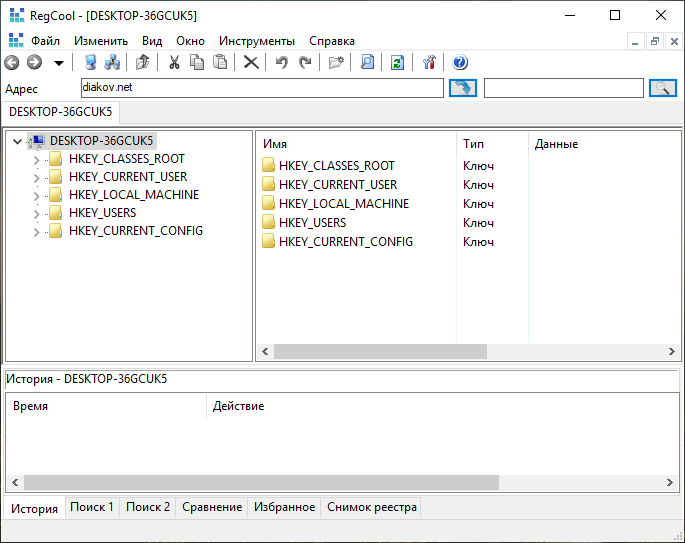
RegCool uses a layout similar to Windows File Explorer and the built-in Registry Editor.
Registry hives and keys are displayed in a tree structure on the left side of the application. Values associated with the selected key appear in the main panel.
This familiar design reduces the learning curve for users who already understand Regedit while providing easier access to advanced commands through toolbars, menus, tabs, and context menus.
Users can browse important registry sections such as:
- HKEY_CLASSES_ROOT
- HKEY_CURRENT_USER
- HKEY_LOCAL_MACHINE
- HKEY_USERS
- HKEY_CURRENT_CONFIG
The program allows users to create, rename, modify, move, copy, export, and delete registry keys and values.
Advanced Search and Replace
One of RegCool’s most useful features is its high-speed search and replace system.
The built-in Windows Registry Editor can search for keys, values, and data, but locating multiple results or applying repetitive changes can be time-consuming.
RegCool provides a more flexible search environment that can locate:
- Registry key names
- Value names
- String data
- Numeric data
- Specific expressions
- Multiple matching entries
The search engine also supports wildcards and regular expressions, allowing advanced users to create more precise searches.
Search results are presented in an organized list, making it easier to review matches and navigate directly to the corresponding registry locations.
The replace function can modify multiple matching entries, which is useful during system migrations, software testing, path corrections, and large configuration changes.
Bulk replacement operations should always be preceded by a registry backup or snapshot.
Multiple Local Registry Windows
RegCool can open multiple local registry windows simultaneously.
This allows users to inspect different registry locations without repeatedly navigating between them. Separate windows can be used to compare keys, copy information, or work on several configuration areas at the same time.
This capability can significantly improve productivity during complex troubleshooting and configuration work.
Remote Registry Editing
The program supports working with registries on remote Windows computers.
Remote editing can be useful for administrators who manage multiple systems across a local or organizational network. It allows them to inspect or modify supported registry settings without physically accessing each computer.
Remote registry access generally depends on:
- Network connectivity
- Windows permissions
- Administrative credentials
- Firewall configuration
- Required Windows services
- Security policies
Organizations should use remote editing only through trusted and properly secured networks.
Offline Registry Editing
RegCool can load and modify registry hive files outside the currently active Windows Registry.
Offline registry editing is valuable when repairing a Windows installation that cannot start normally. A technician can connect the affected drive to another computer, load its registry hives, and correct damaged or incorrect settings.
This feature may also be used to:
- Repair startup problems
- Modify another Windows installation
- Prepare customized Windows images
- Examine registry data from a backup
- Perform technical investigations
- Troubleshoot damaged user profiles
- Change system settings from a recovery environment
Offline editing reduces the risk of interference from active Windows services and applications.
Editing REG and HIVE Files
RegCool can open and edit .REG and registry hive files in offline mode.
REG files contain registry entries that can be imported into Windows. RegCool allows users to inspect and modify their contents before applying them to a system.
Hive files contain structured registry databases used by Windows. Editing them directly is an advanced operation that can be useful during deployment, recovery, and system maintenance.
Users should create backup copies before modifying any offline registry file.
Multiple Undo and Redo
The standard Windows Registry Editor does not provide a convenient multi-level undo system.
RegCool includes multiple undo and redo capabilities, allowing users to reverse supported changes made during an editing session.
The undo history can also be saved to disk and reloaded when the program starts again. This can provide an additional safety layer during extended troubleshooting or configuration sessions.
Undo functionality should not be considered a replacement for a complete backup. Some external changes or system-level operations may not be reversible through the application’s history.
Backup and Restore
RegCool includes tools for backing up and restoring registry data.
Backups are essential when changing system settings because a single incorrect value can affect Windows startup, user accounts, hardware, services, networking, or installed applications.
Users can create backups before performing important operations and restore them if an unwanted result occurs.
For greater protection, users should also consider creating a Windows restore point or full system backup before making extensive changes.
Registry Snapshots
The RegShot-style snapshot feature allows users to capture the current state of the Registry and compare it with a later state.
A typical workflow involves taking the first snapshot, performing an action, and then taking a second snapshot.
The program can compare the two snapshots and identify registry entries that were:
- Added
- Removed
- Modified
- Renamed
- Updated with different data
This is useful for determining what changes are made when installing software, changing a Windows setting, connecting hardware, applying a policy, or running a configuration tool.
Registry Comparison
RegCool can compare registry data from different sources or computers.
Comparison tools help users identify differences between systems, backups, snapshots, or configuration states.
This can be helpful in situations such as:
- Diagnosing why two computers behave differently
- Comparing settings before and after an update
- Detecting changes made by software
- Verifying configuration consistency
- Troubleshooting enterprise deployments
- Examining registry modifications
The comparison feature reduces the need to inspect large numbers of keys manually.
Favorites and Bookmark Management
Registry locations can be deeply nested and difficult to find repeatedly.
RegCool includes a favorites and bookmark system that allows frequently used keys to be saved for quick access.
Users can highlight keys and attach short notes to bookmarks. Notes can explain the purpose of a registry location, document a required value, or record why a modification was made.
This is useful for administrators and technicians who regularly return to specific configuration areas.
Cut, Copy, Paste, and Drag-and-Drop
RegCool provides convenient editing controls similar to those found in file-management applications.
Users can cut, copy, and paste supported keys and values. Drag-and-drop operations can also simplify moving or duplicating registry information.
These features make registry editing more intuitive, but users should verify the destination carefully before moving important data.
Protected and Hidden Registry Keys
Some registry keys are hidden or protected by strict Windows permissions.
RegCool can access additional protected locations when launched with administrator or system privileges.
The program offers configurable startup behavior with several privilege modes:
- Standard user privileges
- Administrator privileges
- System-level privileges
System-level access can expose registry locations that are normally unavailable, but it also increases the potential consequences of an incorrect change.
Users should select the lowest privilege level required for the intended task.
Registry Defragmentation
RegCool includes a registry defragmentation function.
Over time, the physical registry files may contain unused space after keys and values are removed. The defragmentation tool scans the registry and attempts to reduce gaps and wasted space.
A computer restart may be required to complete the process.
Registry defragmentation should not be confused with registry cleaning. Defragmentation reorganizes registry database files, while cleaning attempts to identify and remove entries considered unnecessary.
Modern Windows systems may not experience a noticeable performance improvement after registry defragmentation, so the feature should be used only when there is a clear reason.
Import and Export Tools
RegCool can import and export registry data.
Exporting allows users to save selected keys and values as files for backup, documentation, transfer, or later restoration.
Importing allows supported registry information to be added to the active or selected registry environment.
Users should inspect imported files carefully because registry scripts can modify critical system settings.
Address Bar and Fast Navigation
The application includes navigation tools that allow users to move directly to a specific registry path.
Instead of expanding multiple levels of the registry tree manually, users can enter or paste a complete path.
This is especially useful when following technical documentation or troubleshooting instructions that reference a precise registry location.
Portable Edition
RegCool 3.1.0.2 Portable can run without a traditional Windows installation.
The portable package can be extracted to a folder and launched directly through the main executable file.
It can be stored on:
- A USB flash drive
- An external SSD
- A secondary drive
- A network technician folder
- A system-recovery toolkit
- A local portable applications directory
The portable edition is useful for technicians who work on several computers and need access to the same registry management tools without installing the application on every system.
Advantages of RegCool Portable
The portable edition offers several benefits:
- No conventional installation is required
- It can run from removable storage
- It is useful for computer repair toolkits
- It leaves fewer installation-related files on the host computer
- Multiple versions can be stored separately
- It can be removed by deleting its folder
- Settings can remain with the portable package
- It is suitable for testing and troubleshooting environments
Administrator privileges may still be required for advanced registry operations, even when using the portable version.
Portable Version Limitations
The portable edition also has several limitations.
Running from a slow USB drive may increase startup and loading times. The user must also have permission to write data to the selected folder if the program needs to store settings, logs, backups, or undo history.
Portable software does not automatically make registry changes portable. Any changes made to the Windows Registry still affect the computer being edited.
Users should also remember that:
- Removing a USB drive while the program is running may corrupt files
- Stored backups may contain sensitive system information
- Administrative access is still required for protected keys
- Remote editing still depends on Windows network permissions
- Portable settings can be lost if the storage device is damaged
User Interface
RegCool uses a practical interface focused on functionality rather than decorative visual effects.
The interface includes:
- Registry tree navigation
- Registry value lists
- Multiple tabs or windows
- Search result panels
- Toolbars
- Context menus
- Address and search fields
- Comparison tools
- Backup and snapshot controls
Although the interface may appear technical to beginners, experienced Registry Editor users should find the general layout familiar.
The improved DPI support in version 3.1.0.2 also makes the application more comfortable to use on high-resolution screens.
Performance and Resource Usage
RegCool is a lightweight application with modest storage and memory requirements.
Its optimized search functions are designed to process large registry databases quickly. Actual search speed depends on the size of the registry, storage performance, processor speed, selected search options, and the number of matching entries.
The application is suitable for both modern workstations and many older Windows computers.
System Requirements
General requirements for running RegCool include:
- A supported Microsoft Windows operating system
- A 32-bit or 64-bit processor matching the selected package
- Administrator privileges for protected operations
- A small amount of available storage space
- Sufficient permissions to access the Registry
- Network access for remote registry operations
The portable version requires a writable folder or removable storage device when settings and history need to be saved.
Safety Recommendations
Editing the Windows Registry can be dangerous when performed without sufficient knowledge.
Incorrect changes may cause:
- Windows startup failures
- Application errors
- Missing hardware functionality
- Network problems
- Damaged user profiles
- Security issues
- Service failures
- Data loss
Before making changes, users should:
- Create a registry backup
- Create a Windows restore point
- Export the key being modified
- Record original values
- Close unnecessary applications
- Verify the registry path carefully
- Avoid deleting unknown entries
- Use system privileges only when necessary
RegCool provides safety features such as undo history, snapshots, backup, restore, and comparison, but these tools cannot eliminate every possible risk.
Who Should Use RegCool?
RegCool is suitable for:
- Windows system administrators
- IT support technicians
- Advanced computer users
- Software developers
- System-repair specialists
- Technical investigators
- Windows deployment professionals
- Users troubleshooting registry problems
- People comparing system configurations
- Technicians repairing offline Windows installations
It is not recommended for beginners who do not understand registry keys, values, permissions, and data types.
Advantages
RegCool 3.1.0.2 provides several important advantages:
- More advanced than Windows Regedit
- Fast registry search and replace
- Wildcard and regular-expression support
- Multiple undo and redo levels
- Persistent undo history
- Registry backup and restore
- Snapshot comparison
- Local and remote registry editing
- Offline hive editing
- REG and HIVE file support
- Multiple registry windows
- Favorites with notes
- Protected key access
- Registry comparison tools
- Portable and installable editions
- Lightweight resource usage
- Free to use
- Improved high-DPI support
Disadvantages
The program also has some disadvantages:
- Registry editing remains dangerous for inexperienced users
- The interface may appear complex or outdated
- Advanced operations require administrator privileges
- System-level access can increase the risk of serious mistakes
- Remote editing requires additional Windows configuration
- Registry defragmentation may provide limited benefits on modern systems
- Portable use does not prevent changes to the host computer
- There is no guarantee that every registry modification can be undone
Is RegCool 3.1.0.2 Worth Using?
RegCool 3.1.0.2 is an excellent choice for experienced Windows users who frequently inspect or modify the Registry.
It retains the familiar organization of Microsoft Regedit while adding many features that improve efficiency and safety. Fast search and replace, offline hive support, multiple windows, registry snapshots, comparison tools, bookmarks, backups, and multi-level undo make it significantly more capable than the standard Windows tool.
Version 3.1.0.2 is primarily a refinement release. Improved handling of restricted registry keys, better DPI compatibility, minor interface enhancements, and bug fixes make the program more reliable on modern Windows systems.
The portable edition is particularly valuable for IT technicians and system administrators because it can be carried in a maintenance toolkit and launched without a normal installation.
Final Verdict
RegCool 3.1.0.2 Portable is a comprehensive and lightweight Registry management tool for Windows.
It provides the complete foundation expected from a registry editor while adding advanced search, replacement, comparison, snapshot, backup, recovery, offline editing, remote access, favorites, and undo functionality.
The program is especially useful for professionals who need to troubleshoot Windows systems, compare configurations, examine software changes, repair offline installations, or manage protected registry locations.
Its portable package adds flexibility and makes it easy to include RegCool in a technical support or system-recovery toolkit.
Users must still proceed carefully because modifying the Registry can affect the stability and security of Windows. When used by experienced users with proper backups, RegCool 3.1.0.2 is a powerful and practical alternative to the built-in Windows Registry Editor.