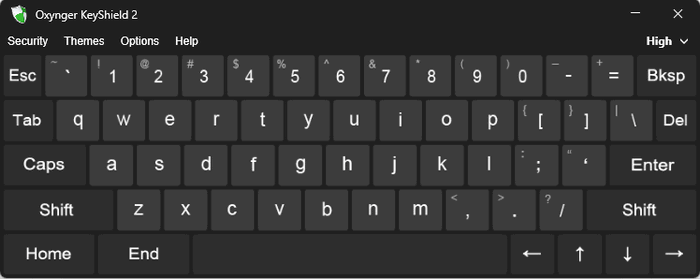
Oxynger KeyShield Premium 2.6.0 Review: Secure Virtual Keyboard for Protecting Passwords
Oxynger KeyShield Premium 2.6.0 is a lightweight Windows security utility designed to protect passwords, PINs, recovery codes, financial details, and other confidential information while users enter them on a computer. Instead of typing sensitive data through a physical keyboard, users can enter it through a protected on-screen keyboard.
The program is primarily intended to reduce the risk of information theft caused by keyloggers, screen-recording malware, mouse-click monitoring, clipboard loggers, and people observing the screen.
Oxynger Technologies currently presents Oxynger KeyShield 2.5 on its official website. Although version 2.6.0 appears on some third-party download listings, users should verify the exact build in the program’s About window and obtain installers only from a trusted or official source.
What Is Oxynger KeyShield Premium?
Oxynger KeyShield is a secure virtual keyboard for Windows. It allows users to click characters on the screen instead of entering them through a standard hardware keyboard.
A normal Windows virtual keyboard may still generate keyboard events that certain monitoring applications can intercept. Oxynger states that KeyShield uses a protected communication method rather than sending input through ordinary keyboard-event mechanisms.
The software is designed for entering sensitive information such as:
- Password-manager master passwords
- Online-banking credentials
- Cryptocurrency-wallet passwords
- Credit-card information
- Account recovery codes
- Email passwords
- Security answers
- Private encryption passwords
- Administrative credentials
The Premium edition adds important protection mechanisms that are unavailable in the free Basic edition.
Protection Against Keystroke Logging
A keylogger is a monitoring tool that records keyboard input. It may be used legitimately in certain controlled environments, but malicious keyloggers are commonly associated with credential theft and spyware.
Because KeyShield allows users to click characters on a virtual keyboard, the sensitive text is not entered through normal physical keystrokes.
According to the developer, KeyShield is designed to resist several categories of keylogging, including:
- Hook-based keyloggers
- API-based keyloggers
- Kernel or driver-based keyloggers
- Hardware keyloggers
The developer also claims that the program avoids the ordinary keyboard-event methods used by many standard virtual keyboards. These are vendor claims rather than a guarantee that every possible threat can be defeated. No single utility should be considered a complete replacement for antivirus protection, system updates, secure browsing habits, and account-based security controls.
Screen-Capture Protection
Some advanced monitoring tools do more than record physical keyboard input. They may take screenshots or record the screen while a user clicks characters on a virtual keyboard.
The Premium edition includes screen-capture protection intended to prevent supported screenshot and video-recording tools from capturing the KeyShield keyboard. A captured image may therefore fail to reveal the displayed key arrangement.
This feature can be particularly useful when entering:
- Banking passwords
- Cryptocurrency credentials
- Password-manager master passwords
- Encryption keys
- Private account information
Screen-capture protection applies specifically to the protected keyboard. Users should not assume that every other application, password field, or part of the desktop is hidden from monitoring software.
Mouse-Logging Protection
A mouse logger records the coordinates of mouse clicks. When a virtual keyboard always uses the same standard QWERTY layout, malware could theoretically match each recorded coordinate with the corresponding character.
Oxynger KeyShield Premium addresses this problem by offering randomized key arrangements. When mouse-logging protection is enabled, the keys are not positioned in a predictable standard layout.
Even when click coordinates are recorded, determining the selected characters becomes more difficult because the keyboard arrangement may be different. The developer identifies mouse-logging protection as a Premium-only feature.
Randomized Keyboard Layout
The randomized layout is one of KeyShield’s most important security features. Rather than presenting characters in the same position every time, it can change their arrangement.
This is designed to make several forms of monitoring less useful:
- Recorded mouse coordinates
- Repeated screenshot comparisons
- Remote observation
- Automated position mapping
- Predictable click-pattern analysis
The disadvantage is that users cannot rely entirely on typing familiarity. They must locate each character before clicking it, making password entry slower than using a physical keyboard.
This inconvenience is intentional because predictable layouts are easier to monitor.
Shoulder-Surfing Protection
Shoulder surfing occurs when someone watches a user enter a password or other sensitive information. It can happen in offices, cafés, airports, classrooms, shared homes, or public computing environments.
KeyShield offers several options intended to make visual observation more difficult, including:
- Removing hover highlights
- Disabling visible click highlights
- Displaying smaller keys
- Replacing the normal pointer with a small dot
- Using randomized key positions
When key highlighting is disabled, an observer may find it more difficult to identify which characters are selected.
This feature reduces casual visual exposure but cannot completely prevent a nearby person or physical camera from observing the screen.
Clipboard-Logging Protection
Copying and pasting a password is not always safer than typing it. Clipboard-monitoring malware may read copied text before it is pasted into an application.
A secure virtual keyboard provides an alternative that does not require storing the full password in the Windows clipboard.
This may be especially useful when a password manager does not provide secure autofill for a particular application. However, password-manager autofill is often safer and more convenient when it is officially supported by the application or browser.
Support for Browsers and Applications
Oxynger states that KeyShield supports major web browsers and works with the password fields of most Windows applications.
Potential use cases include:
- Website login pages
- Banking websites
- Password managers
- Email clients
- Desktop applications
- Encryption programs
- Cloud-storage applications
- Cryptocurrency-wallet software
- Administrative login dialogs
Compatibility may vary depending on how an application implements its input fields. Some protected, elevated, sandboxed, remote, or custom-designed interfaces may not accept virtual-keyboard input in the same way as standard Windows applications.
Premium Edition Features
Oxynger KeyShield is distributed in Basic and Premium editions.
The official comparison page lists the following Premium capabilities:
- Keystroke-logging protection
- Shoulder-surfing protection
- Screen-capture protection
- Mouse-logging protection
- Ten visual themes
- Installer and portable editions
- A perpetual license
- Home use on up to five computers
The free Basic edition includes keystroke and shoulder-surfing protection but does not include the Premium screen-capture and mouse-logging protections. It also provides fewer themes.
Basic vs Premium Edition
Oxynger KeyShield Basic
The Basic edition is suitable for users who need a simple protected virtual keyboard without paying for additional features.
It generally provides:
- Secure virtual-keyboard input
- Protection against keystroke logging
- Shoulder-surfing options
- One visual theme
- Installer and portable availability
Oxynger KeyShield Premium
The Premium edition adds:
- Screen-capture protection
- Mouse-logging protection
- Randomized defensive layouts
- Additional themes
- A perpetual commercial license
- Support for multiple home computers
The Premium edition is the more appropriate option for users who regularly enter high-value credentials and want protection beyond basic keystroke logging.
Portable Version
Oxynger KeyShield is available in a portable form as well as a conventional installer.
The portable edition can run without a traditional installation and may be stored on:
- A USB flash drive
- An external drive
- An encrypted portable workspace
- A local utility folder
This can be convenient for technicians or users who work on several trusted computers.
However, running a portable security tool on an unknown or already compromised public computer does not make that computer fully safe. Malware may still monitor browser sessions, steal authentication cookies, modify webpages, capture the entire desktop, or intercept information after it reaches the destination application.
A personal and properly secured device is always preferable for banking, cryptocurrency management, or other sensitive activity.
Privacy-Focused Design
The official features page states that the application:
- Does not contain an internet-connectivity component
- Does not require an account
- Does not use in-app behavioral analytics
This reduces the amount of information that needs to leave the computer during normal use.
Users should still review the privacy policy and licensing terms associated with the exact installer they obtain.
Lightweight Performance
KeyShield is a small security utility rather than a complete antivirus package. It does not need to perform constant full-disk scans or run a large background protection engine.
Its compact design makes it suitable for:
- Older computers
- Low-resource systems
- Portable utility collections
- Occasional password entry
- Security-conscious workstations
The keyboard can be opened when sensitive information needs to be entered and closed afterward.
Themes and Interface Customization
The Premium edition includes several visual themes. Users can choose an appearance that matches their desktop or makes the keys easier to identify.
Interface options may include:
- Light and dark appearances
- Keyboard resizing
- Small-key display
- Cursor customization
- Highlight controls
- Random-layout generation
- Security-level adjustments
Customization should not reduce security. For example, returning to a fixed and predictable layout may be more convenient but could weaken protection against mouse-coordinate monitoring.
Recommended Uses
Oxynger KeyShield Premium may be useful for entering particularly important credentials.
Password Managers
A password manager protects many accounts behind one master password. If that master password is stolen, an attacker may gain access to the entire password vault.
Using a protected virtual keyboard may provide an additional input layer when entering the master password.
Online Banking
Banking credentials are valuable targets for spyware. KeyShield can help reduce exposure when entering usernames, passwords, PINs, or security answers.
Users should also enable multifactor authentication, transaction notifications, and account alerts.
Cryptocurrency Wallets
Wallet passwords and exchange credentials can protect assets that may be difficult or impossible to recover after theft.
KeyShield may help protect a wallet password, but seed phrases and private keys should ideally remain offline and should never be entered into untrusted software or websites.
Encryption Software
The utility may be used when unlocking encrypted files, containers, archives, or storage volumes.
Shared Environments
Shoulder-surfing controls can be useful in offices, classrooms, shared homes, and other environments where people may be able to see the display.
Security Limitations
Oxynger KeyShield provides a specialized layer of input protection, but it cannot secure an already compromised computer against every attack.
It may not prevent:
- Malware from stealing browser cookies
- Fake login pages
- Remote-access trojans
- Malicious browser extensions
- Memory-scraping attacks
- Information theft after text reaches an application
- Full-desktop recording through external hardware
- Physical cameras pointed at the display
- Account recovery attacks
- Phishing
- Session hijacking
- Weak or reused passwords
Vendor statements claiming complete protection should therefore be interpreted cautiously.
The program should be combined with:
- Updated antivirus or endpoint protection
- Current Windows security updates
- A reputable password manager
- Multifactor authentication
- Unique passwords
- Secure browsers
- Regular malware scans
- Careful verification of website addresses
- Limited administrator access
System Compatibility
The official website lists support for:
- Windows 7
- Windows 8
- Windows 8.1
- Windows 10
- Windows 11
It also states that the software supports major browsers and most application password fields.
Older independent listings mention Microsoft .NET Framework 3.5 as a requirement, particularly for previous program generations. Users should confirm whether it is required by the exact 2.6.0 package they are installing.
Practical System Requirements
- Operating system: Windows 7, 8, 8.1, 10, or 11
- Processor: Standard Intel or AMD processor
- Memory: 1 GB RAM or more
- Storage: A small amount of free disk space
- Input device: Mouse, touchpad, or compatible pointing device
- Display: Standard Windows-compatible resolution
- Additional component: .NET Framework may be required
- Internet connection: Not required for the core keyboard after installation
Because Windows 7 and Windows 8 are no longer modern, fully supported operating environments, using them for sensitive transactions is not recommended even when KeyShield itself remains compatible.
Installation Guidelines
For a safer installation:
- Download KeyShield from the official developer website.
- Avoid repacked or unofficially activated editions.
- Scan the installer with an updated antivirus program.
- Verify the file’s digital signature when available.
- Create a system restore point.
- Install the program using a standard Windows account.
- Restart Windows if requested.
- Test the keyboard using non-sensitive text first.
- Confirm that the target application receives characters correctly.
- Enable Premium security options before entering real credentials.
Users of the portable edition should store it on a trusted and malware-free drive.
How to Use Oxynger KeyShield
The usual workflow is straightforward:
- Open the website or application containing the password field.
- Select the field where the sensitive text should be entered.
- Launch Oxynger KeyShield.
- Enable the required protection options.
- Generate a randomized layout when appropriate.
- Click each character using the mouse.
- Confirm that the password field receives the input.
- Submit the login form.
- Close KeyShield after use.
Users should keep the destination password field selected while clicking the virtual keyboard.
Advantages
Oxynger KeyShield Premium provides several useful benefits:
- Protected virtual-keyboard input
- Resistance to common keylogging techniques
- Screen-capture protection
- Randomized key layouts
- Mouse-logging protection
- Shoulder-surfing controls
- No need to copy passwords through the clipboard
- Installer and portable versions
- Lightweight system-resource usage
- Compatibility with major browsers
- Support for most application password fields
- No required user account
- No built-in internet connectivity, according to the developer
- Multiple interface themes
- Perpetual Premium licensing
Disadvantages
The software also has limitations:
- Clicking randomized keys is slower than normal typing.
- It does not replace antivirus or endpoint security.
- It cannot stop all forms of malware or credential theft.
- Application compatibility may vary.
- Physical cameras can still record the display.
- It is available only for Windows.
- Older Windows support does not make those systems safe.
- The exact 2.6.0 release could not be confirmed on the current official product page.
- Some protection claims are provided by the developer and should not be treated as independent guarantees.
- The Premium edition requires a paid license.
Is Oxynger KeyShield Premium 2.6.0 Safe?
The legitimate application is intended to improve input security. However, safety also depends on where the installer comes from.
Users should avoid:
- Cracked Premium packages
- Repacked installers
- License-bypass tools
- Unknown download portals
- Password-protected archives from unverified sources
- Installers that request disabling antivirus protection
A modified security application is especially risky because it may be used to capture the same passwords it claims to protect.
The official website should be the preferred download source, and the exact version number should be verified after installation.
Is Oxynger KeyShield Premium Worth Using?
Oxynger KeyShield Premium can be valuable for users who regularly enter highly sensitive passwords and want an extra defensive layer against keyboard, mouse, screen, and clipboard monitoring.
It is particularly relevant for:
- Password-manager users
- Online-banking customers
- Cryptocurrency users
- Security professionals
- Privacy-conscious home users
- People working in shared environments
It is less necessary for ordinary, low-risk login activity when a trusted password manager already fills credentials securely and the computer is properly protected.
The strongest approach is to use KeyShield as one part of a broader security strategy rather than relying on it as the only protection.
Final Verdict
Oxynger KeyShield Premium 2.6.0 is a specialized Windows security utility that provides a protected virtual keyboard for entering passwords and other confidential information.
Its main strengths include protection against keystroke logging, screen capture, mouse-coordinate monitoring, clipboard exposure, and casual shoulder surfing. The randomized layout, portable version, low resource usage, and privacy-focused design make it a practical additional tool for high-value credentials.
However, it cannot make an infected or untrusted computer completely secure. Users should continue using antivirus protection, Windows updates, unique passwords, multifactor authentication, a reputable password manager, and careful anti-phishing practices.
The developer’s public website currently highlights version 2.5 rather than 2.6.0. Anyone installing a package labeled 2.6.0 should verify its authenticity, exact build information, digital signature, and source before entering sensitive data through it.