Master Cleaner 1.2.0 Portable: Lightweight Windows Cleanup and System Optimization Tool
Master Cleaner 1.2.0 is a lightweight system-cleaning and maintenance utility designed to help Windows users remove unnecessary files, clear temporary data, improve storage organization, and maintain smoother computer performance.
The application provides a straightforward way to scan the system for junk files generated by Windows, installed applications, and web browsers. It is intended for users who want a simple cleanup tool without the complicated menus and resource-heavy components found in some larger system-optimization suites.
Master Cleaner 1.2.0 is also available in a portable edition, allowing users to run the program without completing a traditional installation process. This makes it suitable for USB drives, maintenance toolkits, and computers where permanent software installation is not preferred.
What Is Master Cleaner 1.2.0?
Master Cleaner is a Windows maintenance application focused primarily on deleting temporary and unnecessary files. Available descriptions identify it as a free, open-source utility for cleaning, optimizing, and maintaining Windows systems.
Over time, Windows and installed programs can create temporary files, browser caches, application logs, update remnants, thumbnails, crash reports, and other data that may no longer be required.
Although these files do not always cause performance problems, they can consume storage space and make system maintenance more difficult. Master Cleaner helps locate selected categories of unnecessary data and allows the user to remove them from one organized interface.
Clean and Simple User Interface
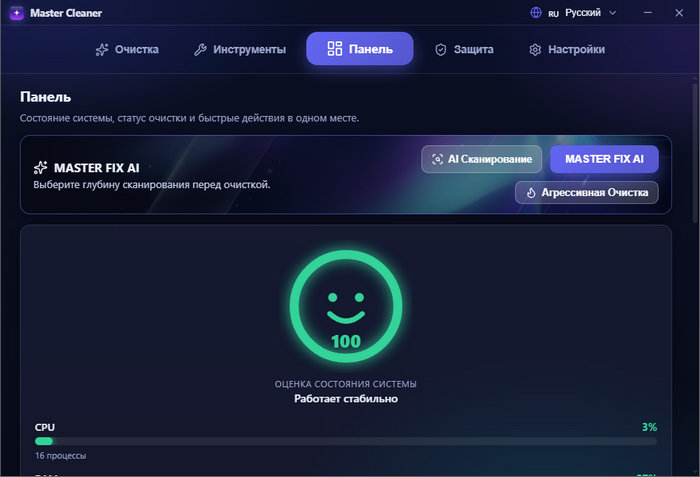
Master Cleaner 1.2.0 offers a clean interface designed to keep the cleanup process easy to understand.
Instead of presenting users with dozens of advanced settings, the application organizes its main tools into clear sections. Users can choose the areas they want to analyze, start a system scan, review the detected data, and begin cleaning.
The interface is suitable for beginners who may not have experience with advanced Windows maintenance software. At the same time, experienced users can select individual cleanup categories rather than deleting everything automatically.
Windows Temporary File Cleanup
One of the main functions of Master Cleaner is removing temporary files created by Windows.
Temporary system data may include:
- Windows temporary files
- Application cache files
- Installation remnants
- Update leftovers
- System log files
- Error-reporting data
- Thumbnail caches
- Memory dump files
- Temporary internet data
- Recycle Bin contents
Deleting unnecessary temporary files can help recover storage space, particularly on systems that have been used for a long time without regular maintenance.
The amount of recoverable space will depend on how frequently the computer is used, the installed applications, and the time since the previous cleanup.
Browser Cache Cleaning
Web browsers store cached images, website files, cookies, history records, and other temporary data to improve page-loading performance.
Master Cleaner can help remove selected browser-related data. Available descriptions of version 1.2.0 specifically mention the removal of browser and application cache files.
Browser cleaning may help users:
- Recover storage space
- Remove outdated cached resources
- Clear browsing traces
- Resolve certain website display problems
- Remove corrupted temporary browser files
Users should review the selected options carefully before cleaning. Removing cookies and session data may sign users out of websites, while deleting saved form information may remove useful browser data.
Application Cache Removal
Installed desktop applications often create cached content, logs, temporary working files, and diagnostic information.
Master Cleaner can scan supported application locations and identify data that may no longer be required. Removing old cache files may be useful for applications that generate large amounts of temporary content.
However, users should avoid deleting application data while the related program is running. Closing active applications before starting the cleanup process can reduce the possibility of errors or incomplete cleaning.
Storage Space Recovery
The primary practical benefit of Master Cleaner 1.2.0 is recovering disk space.
Computers with smaller solid-state drives can quickly accumulate temporary files, browser caches, old logs, and abandoned installation data. Removing these files may free valuable space for documents, programs, games, and Windows updates.
The program may be particularly useful for:
- Budget laptops with limited storage
- Older computers with small system drives
- Virtual machines
- Shared family computers
- Office workstations
- Frequently used web-browsing systems
- Computers used for software testing
Users should remember that system cleaning does not increase the physical capacity of a drive. It only removes selected files that are no longer needed.
Selective Cleaning
Automatic one-click cleaning can be convenient, but reviewing detected items is generally safer.
Master Cleaner allows users to select the categories they want to analyze and clean. Selective cleaning helps prevent the removal of useful browser data, troubleshooting logs, or temporary files that are still needed by an active application.
Before deleting files, users should review:
- Detected categories
- Total file size
- Browser data
- Recycle Bin contents
- Application caches
- System logs
- Download-related temporary files
Important personal folders should never be included in a cleanup task unless the user has confirmed their contents.
Scan Before Cleaning
The scanning process allows Master Cleaner to inspect supported Windows, browser, and application locations.
After the scan is complete, the program displays the amount of data that can potentially be removed. Users can then decide whether to clean all selected categories or exclude particular items.
Scanning does not necessarily mean that every detected file is harmful. Many temporary files are harmless and may even be recreated automatically after deletion.
The main purpose of scanning is to identify optional data that can be removed to recover storage space.
Lightweight System Maintenance
Master Cleaner is intended to provide basic maintenance without running numerous background services.
Lightweight utilities can be useful for users who do not want a large optimization suite continuously monitoring their system. Master Cleaner can be launched when needed, used to perform a scan and cleanup, and then closed.
This approach may reduce unnecessary background resource consumption compared with applications that include real-time monitoring, promotional notifications, or multiple startup components.
Portable Edition
Master Cleaner 1.2.0 Portable can be launched without a standard installation procedure.
A portable application usually stores its required files inside its own folder rather than placing a complete installation across multiple Windows directories.
The portable edition can be useful because it:
- Runs without traditional installation
- Can be stored on a USB flash drive
- Is easier to move between compatible computers
- Can be included in a technician’s maintenance toolkit
- Leaves fewer installation-related files behind
- Does not need to remain permanently installed
- Can be removed by deleting its program folder
Some settings or temporary components may still be created by Windows while the application is running. Therefore, portable does not always mean that absolutely no traces are left on the system.
Portable Version for Computer Technicians
The portable edition is especially practical for computer technicians and advanced users who maintain multiple systems.
Instead of installing a separate cleaning application on every computer, the technician can keep Master Cleaner on a portable drive and run it when required.
It may be used during routine maintenance tasks such as:
- Cleaning temporary files
- Recovering storage space
- Removing browser caches
- Preparing computers for software updates
- Maintaining shared workstations
- Cleaning virtual machines
- Troubleshooting storage-related issues
Administrative permissions may be required to clean protected Windows folders or data belonging to other user accounts.
Open-Source Availability
Master Cleaner has been described as an open-source Windows cleaning utility.
Open-source software can provide greater transparency because its code may be available for inspection, modification, and community contribution.
However, users should still confirm that they are downloading the original project or a trusted build. A program being open source does not automatically guarantee that every third-party repackaged copy is safe.
System Optimization Expectations
Master Cleaner is commonly described as a cleanup and optimization utility, but users should maintain realistic expectations.
Deleting junk files may:
- Recover disk space
- Reduce storage clutter
- Remove corrupted cache files
- Make maintenance easier
- Improve performance when the system drive is nearly full
However, cleaning temporary files will not normally produce a dramatic speed increase on a healthy modern computer.
System performance is also influenced by:
- Processor speed
- Installed memory
- Storage type and condition
- Background applications
- Startup programs
- Malware
- Driver problems
- Windows configuration
- Available free disk space
Master Cleaner should be treated as a maintenance tool rather than a guaranteed solution for every performance issue.
Safe Cleaning Practices
Users should follow several precautions when using any system-cleaning application.
Before starting a major cleanup:
- Save all active work.
- Close web browsers and desktop applications.
- Review the selected cleaning categories.
- Empty the Recycle Bin only after checking its contents.
- Keep backups of important personal files.
- Avoid deleting unfamiliar system locations manually.
- Create a system restore point when making major changes.
- Download the program from a trustworthy source.
Selective cleaning is safer than removing every detected item without inspection.
Does Master Cleaner Delete Personal Files?
A properly configured cleanup tool should focus on temporary system and application data rather than personal documents.
However, users remain responsible for reviewing the selected categories. Downloads, browser information, Recycle Bin contents, and application caches may contain files the user still wants.
Master Cleaner should not be directed toward personal folders such as Documents, Pictures, Videos, Desktop, or project directories unless the contents have been checked carefully.
Cleaning Browser Data Safely
Browser cleanup requires particular attention because different data categories have different effects.
Browser Cache
Usually contains temporary copies of website resources. It can generally be removed safely, although websites may load more slowly the first time they are reopened.
Cookies
May store login sessions and website preferences. Removing cookies can sign the user out of websites.
Browsing History
Contains a list of previously visited pages. Removing it affects browsing records but does not delete downloaded files.
Saved Passwords
These should not be removed unless the user has backed them up or intentionally wants to delete them.
Form Data
May contain saved names, addresses, or other information used to complete website forms.
Users should inspect browser-related options before starting the cleanup process.
Benefits for SSD Users
Solid-state drives provide fast performance, but smaller models may have limited storage capacity.
Master Cleaner can help SSD users recover space by removing unnecessary caches and temporary files. Maintaining sufficient free space is important because Windows needs available storage for updates, temporary operations, virtual memory, and application installations.
Users should not run aggressive cleaning procedures excessively. Regular moderate maintenance is generally more appropriate than repeatedly deleting every cache immediately after it is created.
Possible WebView Runtime Requirement
Some user reports associated with the version 1.2.0 listing indicate that the application may request the Microsoft WebView Runtime when launched.
Microsoft Edge WebView2 Runtime allows desktop applications to display web-based interface components using Microsoft Edge technologies.
On modern Windows installations, WebView2 may already be available. When it is missing, the application may ask the user to install the runtime before the interface can open correctly.
Users should obtain required Microsoft components only through trusted Microsoft or Windows Update sources.
Master Cleaner 1.2.0 System Requirements
Complete official hardware requirements are not clearly documented in the available public listings.
Based on the application’s purpose, Master Cleaner is intended for Microsoft Windows systems. A typical compatible configuration is likely to require:
- A supported Windows operating system
- A standard 32-bit or 64-bit processor
- Sufficient memory to run Windows comfortably
- A small amount of storage for the program
- Administrative permissions for protected cleaning tasks
- Microsoft WebView2 Runtime when required
Because reliable official documentation for version 1.2.0 is limited, users should confirm compatibility before running it on production or business-critical computers.
Installation Version vs. Portable Version
Master Cleaner 1.2.0 may be distributed in both standard and portable formats.
Standard Version
The standard edition is installed on Windows and may create shortcuts, uninstall information, configuration files, and other system entries.
It is more suitable for users who plan to use the program regularly on one computer.
Portable Version
The portable edition runs from its extracted folder and does not require a traditional installation.
It is more suitable for occasional maintenance, USB drives, testing environments, and technicians working across multiple computers.
Both editions are expected to provide similar core cleaning functions, although settings storage and update behavior may differ.
Advantages of Master Cleaner 1.2.0
Master Cleaner offers several useful advantages:
- Simple and beginner-friendly interface
- Temporary Windows file cleanup
- Browser cache removal
- Application cache cleaning
- Potential storage-space recovery
- Selective scanning and cleaning
- Lightweight operation
- Portable edition available
- Useful for computers with limited storage
- Suitable for maintenance toolkits
- No permanent installation required for the portable version
- Reported as free and open source
Disadvantages of Master Cleaner 1.2.0
The program also has some potential limitations:
- Limited reliable official documentation
- Cleaning results may vary between computers
- Some cached files will be recreated automatically
- Browser cleaning can remove login sessions
- Administrative permissions may be required
- It cannot repair hardware-related performance problems
- It does not replace antivirus software
- It may require Microsoft WebView2 Runtime
- Third-party portable packages may create security concerns
- Incorrect selections can remove useful temporary data
- System optimization benefits may be modest on healthy computers
Is Master Cleaner an Antivirus?
Master Cleaner is not a replacement for antivirus or anti-malware software.
Its main purpose is to remove unnecessary files and perform basic system maintenance. It does not provide the same real-time threat detection, malicious file scanning, firewall protection, or behavioral monitoring included in security applications.
Users should continue using an updated and reputable security solution alongside any cleanup utility.
Is Master Cleaner Safe to Use?
The program can be used safely when obtained from a trusted source and operated carefully.
The main risks are associated with unofficial modified builds, aggressive cleaning selections, and third-party portable packages. Repacked applications can contain unwanted software or malicious modifications.
For greater safety:
- Verify the download source
- Scan the downloaded archive
- Avoid cracked or modified packages
- Review all cleaning selections
- Create backups of important files
- Do not disable security software unnecessarily
- Avoid granting administrative access to untrusted builds
Users should also remember that the term “portable” describes how the application runs. It does not confirm that the package itself is official or secure.
Who Should Use Master Cleaner?
Master Cleaner 1.2.0 may be suitable for:
- Windows users with limited free storage
- Users seeking a simple cleanup utility
- Computer technicians
- Users maintaining multiple computers
- People who prefer portable applications
- Virtual-machine users
- Office workstation administrators
- Users who want to clear browser and application caches
- People who prefer lightweight maintenance tools
Users who need advanced startup management, driver updates, malware protection, hardware diagnostics, or automated performance monitoring may require additional specialized software.
Tips for Better Windows Performance
Cleaning unnecessary files is only one part of proper system maintenance.
For better long-term performance, users should also:
- Keep Windows updated
- Remove unused applications
- Disable unnecessary startup programs
- Maintain sufficient free storage space
- Update important hardware drivers
- Scan regularly for malware
- Avoid installing unknown optimization tools
- Restart the computer periodically
- Back up important files
- Check storage health when performance declines
Combining sensible maintenance practices with occasional cleanup is more effective than relying entirely on one-click optimization tools.
Final Verdict
Master Cleaner 1.2.0 is a lightweight Windows cleanup utility designed to remove temporary files, clear supported browser and application caches, and recover storage space.
Its simple interface makes it accessible to beginners, while the portable edition is useful for technicians and users who want to run the application without traditional installation.
The program can be helpful for routine cleanup, especially on computers with limited disk space. However, users should not expect file cleaning alone to transform the performance of a healthy computer.
Reliable official documentation for this exact release appears limited, so extra care should be taken when choosing a download source. Users should avoid suspicious repackaged copies, scan downloaded files, review cleaning selections, and back up important data before performing major maintenance.
For users who need a straightforward and portable Windows cleaning tool, Master Cleaner 1.2.0 provides a practical set of basic maintenance features without the complexity of a large optimization suite.