IObit Software Updater Pro 9.0.0.6: Automatically Update and Secure Your Windows Applications
IObit Software Updater Pro 9.0.0.6 is a software-management utility designed to detect outdated applications, download their latest available versions, and install updates automatically on Windows computers.
Instead of manually opening every installed program or visiting multiple developer websites, users can scan the computer and manage supported software updates from one centralized interface.
The Pro edition adds unrestricted one-click updating, automatic scheduled updates, silent installation, restore-point creation, and additional management options intended to simplify regular PC maintenance.
Keep Installed Programs Up to Date
Outdated software can contain security vulnerabilities, compatibility problems, performance issues, and previously discovered bugs.
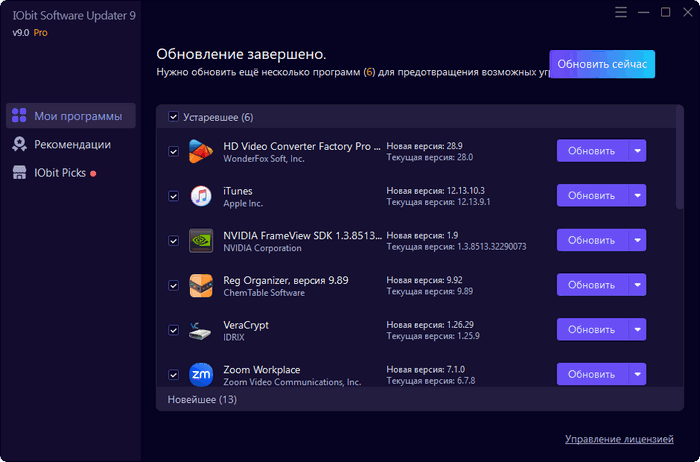
IObit Software Updater scans installed applications and compares their versions with the releases available in its online database. Programs requiring attention are displayed in an organized list, allowing users to review and update them individually or together.
The application supports more than 1,000 popular programs, although availability can differ depending on the software, region, architecture, and current database coverage.
One-Click Software Updates
One of the main advantages of the Pro edition is its ability to update multiple outdated programs with one click.
After completing a scan, users can select all supported applications and start the update process without opening every installer separately.
The program downloads the required installation packages and processes them through a unified workflow, reducing the time and effort normally required to maintain a large software collection.
Automatic Update Monitoring
IObit Software Updater Pro can automatically check for new application versions and install available updates according to the selected configuration.
Users may configure updates to run on a schedule or allow the program to respond when supported updates become available.
Automatic monitoring is particularly useful for users who regularly work with browsers, communication tools, media players, productivity applications, security utilities, and other frequently updated software.
Silent Installation
Supported applications can be updated silently without repeatedly displaying installation windows, browser pages, confirmation dialogs, or setup wizards.
Silent installation helps reduce interruptions and makes it easier to update several programs during the same maintenance session.
The availability of silent updates depends on whether the selected application and its installer support automated deployment.
Safer Software Downloads
Downloading updates manually from search results or third-party websites can expose users to misleading download buttons, modified installers, advertising bundles, and potentially unwanted applications.
IObit Software Updater is designed to provide verified update packages through its managed software database.
Users should still review update details and obtain sensitive business or security software directly from the original developer when maximum source verification is required.
Automatic Restore-Point Creation
Before installing supported updates, the Pro edition can automatically create a Windows restore point.
A restore point provides a recovery option if an updated application causes compatibility issues, instability, or unexpected system behavior.
This safety feature is especially useful when updating several programs simultaneously or maintaining an older Windows installation.
Restore points should not be treated as a replacement for complete backups of important documents and system data.
Install Popular Windows Applications
In addition to updating existing programs, IObit Software Updater includes a software library containing commonly used Windows applications.
Users can browse available categories and install selected programs without searching for each official installer separately.
Available categories may include:
- Web browsers
- Security applications
- Communication tools
- Multimedia players
- Office and productivity software
- File-management utilities
- Compression tools
- Image-editing applications
- Developer utilities
- Runtime components
- Remote-work applications
The exact software selection can change as the database is updated.
Bulk Application Installation
Users setting up a new computer can select multiple programs and install them through one workflow.
This function can save time after reinstalling Windows, replacing a computer, configuring a family PC, or preparing a standard collection of applications.
Technicians may also find it helpful when installing common tools on several computers, although organizations should confirm that each application’s license permits the intended type of deployment.
Update History
The application maintains information about completed software updates.
Users can review which programs were updated and identify recent changes when troubleshooting compatibility or performance problems.
An organized update history is useful when several applications have been upgraded during the same session.
Ignore Selected Applications
Not every application needs to be updated immediately.
Some users may depend on an older version because of plugin compatibility, specialized workflows, hardware limitations, or organizational requirements.
IObit Software Updater allows selected programs or versions to be ignored, preventing them from appearing repeatedly in the normal update list.
Users should understand that intentionally keeping an older version may leave known security vulnerabilities unresolved.
Clean Up Installation Files
Software installers downloaded during the update process can consume unnecessary storage after installation is complete.
The Pro edition can automatically remove unneeded setup files after successful updates.
This helps prevent temporary installation packages from accumulating on the system drive.
Simple and Organized Interface
IObit Software Updater uses a straightforward interface designed for users with different levels of technical experience.
The main screen presents outdated programs, available updates, current software, recommendations, and installation options in clearly separated sections.
Users can review version information and select which applications should be updated before beginning the process.
Main Features
- Scan Windows for outdated applications
- Detect available software updates
- Update multiple programs with one click
- Unlimited one-click updates in the Pro edition
- Automatic scheduled or real-time updating
- Silent software installation
- Support for more than 1,000 applications
- Install popular Windows programs
- Bulk application installation
- Automatically create Windows restore points
- Remove unnecessary setup files
- Ignore selected applications or versions
- Display update history
- Organize installed software
- Reduce repeated installer dialogs
- Clean and beginner-friendly interface
- Support for modern and older Windows versions
- Valid license activation for Pro features
Free Edition and Pro Edition
The Free edition provides basic software scanning and updating capabilities but may apply daily limits to one-click updates and restrict access to advanced automation features.
The Pro edition is designed for users who want:
- Unlimited software updates
- Automatic update scheduling
- Real-time update management
- Silent installations
- Automatic restore-point creation
- Automatic deletion of setup files
- Fewer promotional interruptions
- Faster management of multiple outdated applications
Feature availability and licensing conditions may change between releases.
How to Use IObit Software Updater Pro
Install and launch the application with administrator privileges.
Allow the program to scan the computer for installed applications. When the scan is complete, review the list of outdated programs and the available version information.
Select individual applications or choose all supported updates. Create a restore point when appropriate, then begin the installation process.
After the updates are completed, restart the affected applications or Windows if required.
Users should save open work before performing several updates because some installers may close running applications or request a system restart.
Advantages
IObit Software Updater Pro simplifies the process of maintaining applications installed on a Windows computer.
Its main advantages include:
- Centralized application updating
- Reduced manual searching
- Fast one-click operation
- Support for a large software database
- Scheduled automatic maintenance
- Silent installation capabilities
- Restore-point protection
- Convenient application installation
- Cleaner removal of temporary setup files
- Simple operation for inexperienced users
The program can be particularly useful on computers containing many third-party applications that release updates frequently.
Possible Disadvantages
No third-party updater can guarantee support for every Windows application.
Programs that use specialized installers, portable formats, custom enterprise versions, beta releases, or private update systems may not be detected correctly.
Other possible limitations include:
- Some applications may not support silent installation
- Database information may occasionally be delayed
- Automatic updates can introduce compatibility problems
- Large update sessions can consume significant bandwidth
- Some installers may require manual confirmation
- Free-edition update limits may be restrictive
- Promotional recommendations may not be relevant to every user
- Business software may require administrator approval before updating
Users should review critical updates rather than enabling unrestricted automation for every professional application.
Security Considerations
Keeping software updated is an important part of maintaining computer security, but automatic updating should be used carefully.
Applications involved in finance, databases, business operations, development, hardware management, or security may require compatibility testing before deployment.
Users should verify major version changes, create backups, and close important projects before updating essential programs.
IObit Software Updater should not replace Windows Update, antivirus protection, firewall software, or proper data backups.
System Requirements
The official user manual lists the following general requirements:
- Windows 11
- Windows 10
- Windows 8 or 8.1
- Windows 7
- Windows Vista
- Windows XP
- Approximately 300 MB of free disk space
- Screen resolution of 1024 × 768 or higher
- Internet connection for scanning and downloading updates
- Administrator privileges for software installation
- A valid license code for Pro activation
Although older Windows systems may be listed as compatible, using a currently supported version of Windows is strongly recommended for security and reliability.
Additional storage space may be required for downloaded installers and application updates.
Who Should Use IObit Software Updater Pro?
The program is suitable for:
- Home Windows users
- Users with many installed applications
- Beginners who prefer automated maintenance
- Computer technicians
- Small-office environments
- Users reinstalling Windows
- People managing frequently updated applications
- Users who want scheduled software updates
- Anyone seeking a centralized update interface
Enterprise environments may prefer dedicated patch-management platforms that provide centralized policies, deployment reporting, testing groups, and administrative controls.
Best Practices
Users should create a system restore point before large update sessions and maintain separate backups of important files.
Critical applications should be updated individually so that compatibility problems can be identified more easily.
It is also recommended to:
- Close running applications before updating
- Review major version changes
- Avoid interrupting installations
- Restart Windows when requested
- Download the updater from an official source
- Activate Pro only with a legitimate license
- Check installed applications after large updates
- Avoid installing optional software that is not needed
Final Verdict
IObit Software Updater Pro 9.0.0.6 is a practical Windows utility for detecting outdated applications and managing their updates through one organized interface.
Its unlimited one-click updates, automatic monitoring, scheduled installation, software database, restore-point creation, and silent update capabilities can significantly reduce the effort required to maintain a Windows computer.
The application is most useful for home users and technicians managing many common programs. However, important business applications should still be reviewed and tested before updates are installed automatically.
For users who want a convenient way to keep supported Windows software current, IObit Software Updater Pro provides an accessible and time-saving maintenance solution.