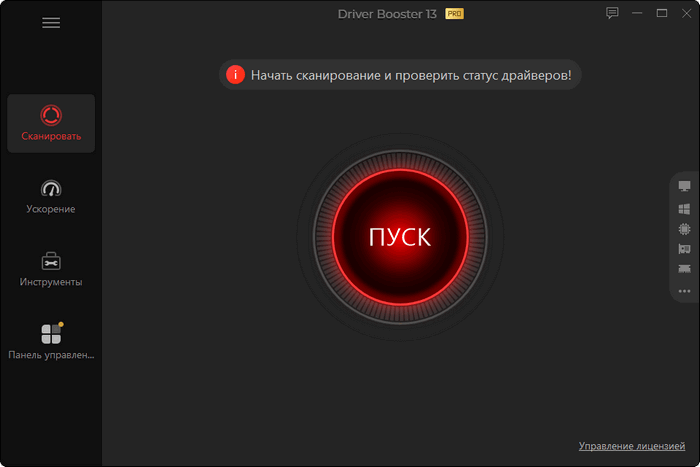
IObit Driver Booster Pro 13.5.1.400 – Update Windows Drivers Easily and Safely
IObit Driver Booster Pro 13.5.1.400 is a powerful driver management utility designed to detect outdated, missing, faulty, or incompatible device drivers on Windows computers. Instead of manually searching through hardware manufacturers’ websites, the program scans the entire system and recommends compatible driver updates through a simple, user-friendly interface.
The software is particularly useful for users experiencing hardware problems such as missing audio, unstable network connections, incorrect screen resolution, device recognition errors, game crashes, or reduced graphics performance. Driver Booster Pro aims to simplify driver maintenance while improving system stability and hardware compatibility.
Automatic Driver Detection
Driver Booster Pro performs a detailed scan of the computer to identify installed hardware and compare its drivers with available versions in its online database. According to IObit, Driver Booster 13 provides access to more than 18 million verified drivers from over 1,200 hardware brands.
After completing the scan, the application organizes detected updates into clear categories. Users can review each driver individually or install multiple recommended updates with one click.
Large Driver Database
One of the main advantages of Driver Booster Pro is its extensive driver library. It supports drivers for many types of hardware, including:
- Graphics cards
- Sound devices
- Network adapters
- Motherboards and chipsets
- USB devices
- Printers and scanners
- Keyboards and mice
- Bluetooth components
- Storage controllers
- Gaming accessories
This broad hardware support can be especially helpful when Windows cannot automatically locate a suitable driver for an older or less common device.
Automatic Updates in the Background
The Pro edition can automatically download and install driver updates while the computer is idle. This reduces interruptions and helps users maintain their systems without repeatedly checking for new versions manually.
Automatic updates can also be configured according to the user’s preferences, providing greater control over when drivers are downloaded and installed.
Driver Backup and Restore
Updating a hardware driver may occasionally cause compatibility or stability problems. To reduce this risk, Driver Booster Pro can automatically create backups of existing drivers before installing replacements.
Users can restore a previous driver version when a newly installed update does not work correctly. This backup and recovery feature provides an additional layer of protection and makes driver maintenance safer for less experienced users.
Offline Driver Updater
Driver Booster Pro includes an offline driver update feature for computers with limited or unavailable internet access. Users can collect the required hardware information, obtain the appropriate driver packages from another connected computer, and then transfer them to the offline system.
This feature is useful after reinstalling Windows when essential network or Wi-Fi drivers have not yet been installed.
Tools for Fixing Common Device Problems
The program includes several troubleshooting utilities designed to address common Windows hardware problems. These tools can help repair issues involving sound, network connections, screen resolution, device errors, and invalid device information.
Driver Booster Pro is promoted as being capable of fixing more than 35 common device-related errors, helping users resolve certain hardware problems without performing complicated manual repairs.
Gaming Performance Improvements
Driver Booster Pro can detect updates for graphics drivers and gaming-related components. Keeping NVIDIA, AMD, and Intel graphics drivers current may improve compatibility with recently released games, resolve visual problems, and provide access to manufacturer optimizations.
The software also supports Game Ready drivers and important gaming components, making it useful for players who want a convenient way to maintain the software required by their games.
However, the actual performance improvement will depend on the installed hardware, the previous driver version, and the optimizations included in the new driver.
Support for Windows ARM64 Devices
Driver Booster 13 introduced expanded support for Windows 10 and Windows 11 computers using ARM64 processors. IObit states that the software supports more than 100,000 ARM drivers, allowing compatible laptops and tablets to benefit from its automated driver management features.
Simple and Modern Interface
The application uses a clean interface centered around a large scanning button. Important options are divided into accessible sections for driver updates, troubleshooting tools, backups, system information, and program settings.
This straightforward design makes Driver Booster Pro suitable for beginners, while advanced users can still inspect driver details and control which updates are installed.
Main Features
- Scans for outdated, missing, damaged, and incompatible drivers
- Provides access to millions of verified driver packages
- Updates multiple drivers with one click
- Automatically downloads and installs updates
- Creates driver backups before installation
- Restores previous driver versions
- Supports offline driver updating
- Detects graphics and Game Ready drivers
- Updates important gaming components
- Fixes common sound, network, display, and device errors
- Cleans invalid or disconnected device information
- Supports traditional Windows computers and ARM64 devices
- Includes detailed system and hardware information
Advantages
Driver Booster Pro offers a convenient solution for users who do not want to search for every hardware driver manually. Its large database, automated scanning, backup system, and built-in repair tools make the driver update process faster and easier.
The software is particularly helpful after installing Windows, replacing hardware, troubleshooting unknown devices, or preparing a gaming computer for newer titles.
Disadvantages
Although automatic driver updaters are convenient, installing every available update is not always necessary. A computer that is already stable may not benefit noticeably from replacing all its drivers.
Users should review important updates before installing them, especially drivers related to chipsets, storage controllers, or specialized hardware. Creating a Windows restore point and keeping driver backups is recommended before applying major changes.
Some advanced features are also limited to the paid Pro edition.
Supported Operating Systems
Driver Booster 13 is primarily designed for Microsoft Windows computers. Official IObit pages list support for Windows 11, Windows 10, Windows 8 and 8.1, Windows 7, Windows Vista, and Windows XP, although feature availability and driver manufacturer support may differ between operating systems.
Modern Windows 10 and Windows 11 systems are likely to receive the broadest support for current hardware and recently released drivers.
Free Edition vs. Pro Edition
The free edition provides essential scanning and driver update capabilities. Driver Booster Pro adds a larger driver database, faster downloads, automatic updates, driver backups, offline updating, gaming optimizations, and access to additional troubleshooting features.
The Pro edition is therefore better suited to users who manage several devices, frequently reinstall Windows, play modern PC games, or want automated driver maintenance.
Final Verdict
IObit Driver Booster Pro 13.5.1.400 is a practical Windows driver updater that combines automatic hardware detection, a large driver database, backup and restoration tools, offline updating, and device troubleshooting features.
Its one-click workflow makes it accessible to beginners, while its recovery and configuration options provide useful safeguards for more experienced users. Although driver updates should always be installed carefully, Driver Booster Pro can significantly reduce the time and effort required to locate and manage compatible hardware drivers.
For users looking for an organized way to maintain drivers, solve common device problems, and improve hardware compatibility, Driver Booster Pro remains a comprehensive and easy-to-use solution.