FluentCleaner 26.07.04: A Modern Open-Source Windows Cleaning and Privacy Tool
FluentCleaner 26.07.04 is a modern, lightweight system-cleaning utility designed to remove unnecessary files, application leftovers, browser traces, temporary data, and other digital clutter from Windows computers.
Built with a modern interface inspired by Microsoft’s Fluent Design language, the program provides a cleaner and more native-looking experience than many traditional PC maintenance tools. It is particularly suitable for Windows 11 users who want a simple, transparent, and open-source alternative to commercial cleaning applications.
FluentCleaner focuses on essential cleaning and privacy features without advertisements, subscriptions, unnecessary background services, or bundled software. It is distributed as a portable application, allowing users to run it without completing a traditional installation process.
What Is FluentCleaner 26.07.04?
FluentCleaner is an open-source Windows maintenance utility developed to help users identify and remove files that are no longer needed.
Over time, Windows and installed applications can accumulate temporary files, cache data, logs, browser history, update leftovers, crash reports, and other unnecessary information. Although many of these files are harmless, they can consume storage space and leave traces of previous computer activity.
FluentCleaner scans supported Windows locations and applications, displays the available cleaning categories, and allows users to decide what should be removed.
Unlike aggressive optimization suites, the program mainly concentrates on system cleaning, application data, browser traces, and privacy-related files.
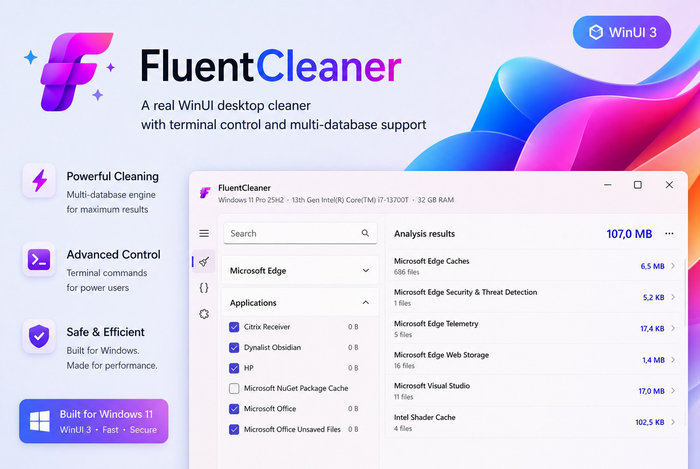
Modern Windows 11 Interface
One of the most noticeable features of FluentCleaner is its modern user interface.
The application uses WinUI technology to provide a design that closely matches the appearance of Windows 11. Navigation elements, buttons, icons, spacing, and menus feel consistent with Microsoft’s modern operating system.
The interface is divided into organized categories, making it easier to inspect cleaning options without navigating through complicated menus.
This modern design makes FluentCleaner suitable for beginners while still providing useful options for advanced users.
Main Features of FluentCleaner 26.07.04
System Junk Cleaning
FluentCleaner can scan common Windows locations where unnecessary files frequently accumulate.
These locations may contain:
- Temporary Windows files
- System cache data
- Error reports
- Log files
- Thumbnail cache
- Recycle Bin contents
- Recent file traces
- Update leftovers
- Explorer history
- Diagnostic information
Removing unnecessary system files can help recover storage space and maintain a cleaner operating environment.
Application Cleaning
Many installed programs create temporary files, logs, caches, usage histories, and other data that may remain on the computer even when it is no longer useful.
FluentCleaner can detect supported applications and provide cleaning options for their stored data. Depending on the selected rules, the program may clean traces created by media players, communication tools, utilities, productivity software, launchers, and other desktop applications.
Users remain in control of the process and can select the applications they want to clean.
Browser Privacy Cleaning
Web browsers store significant amounts of information during everyday use.
This information may include:
- Browsing history
- Download history
- Cookies
- Cached images and files
- Saved form information
- Session data
- Temporary internet files
- Website storage
- Crash reports
- Browser logs
FluentCleaner can remove selected browser traces from supported browsers, helping users protect their privacy and reduce accumulated browser data.
Users should review browser cleaning options carefully because removing cookies or session information may sign them out of websites.
Winapp2.ini Support
FluentCleaner is powered by the winapp2.ini cleaning ecosystem.
Winapp2.ini is a community-maintained collection of cleaning definitions that identifies files and locations created by many Windows programs. These definitions allow compatible cleaning applications to support a broader range of third-party software.
This system helps FluentCleaner detect additional caches, logs, temporary files, histories, and application leftovers beyond the basic Windows cleaning categories.
Custom Cleaning Packs
The program supports custom cleaning packs that can expand its functionality.
Custom packs may contain additional rules for applications or system locations that are not included in the default configuration. Users can place supported custom definitions in the appropriate program folder and access them through FluentCleaner.
This feature makes the software flexible and suitable for users who need more specialized cleaning options.
Scan Before Cleaning
FluentCleaner allows users to analyze selected categories before removing files.
The scanning process helps identify available cleaning items and gives users an opportunity to review the results. This is safer than immediately deleting everything without knowing which categories are affected.
Users can adjust their selections before starting the final cleaning operation.
Selective Cleaning
The program does not require users to clean every detected category.
Individual items and groups can be enabled or disabled according to the user’s preferences. For example, users may clean temporary system files while keeping browser cookies, saved sessions, or application histories.
Selective cleaning provides greater control and reduces the risk of deleting useful information.
Command-Line Automation
FluentCleaner includes command-line support for advanced users.
Automation options can be useful for scripts, administrative workflows, scheduled maintenance, or shortcuts. The application can perform a cleaning operation using the currently saved selection and exit automatically.
A supported automated command may follow a format similar to:
FluentCleaner.exe /AUTO
Command-line options should be tested carefully before being used in scheduled tasks because automated cleaning may remove data without displaying the full graphical interface.
Portable Operation
FluentCleaner is available as a portable application.
Instead of using a traditional installer, users can download the compressed package, extract its contents, and launch the executable file directly.
Portable operation offers several benefits:
- No complicated installation process
- Easy removal
- Fewer permanent system modifications
- Ability to store the application in a custom folder
- Convenient use from external storage
- Easier testing before regular use
The program should remain inside its extracted folder so that its supporting files and custom definitions remain available.
Open-Source Development
FluentCleaner is open-source software.
Its source code is publicly available, allowing developers and security-conscious users to inspect how the application works. Open-source development also makes it possible for users to report problems, suggest improvements, and follow new releases.
This transparency is an important advantage compared with closed cleaning utilities that do not reveal how their scanning and deletion rules operate.
How to Use FluentCleaner 26.07.04
Using FluentCleaner is relatively simple:
- Download the portable application package.
- Extract all files to a dedicated folder.
- Launch the FluentCleaner executable.
- Review the available Windows and application categories.
- Select the items you want to analyze.
- Start the scanning process.
- Review the detected files and cleaning categories.
- Disable any item you want to keep.
- Begin the cleaning operation.
- Restart affected applications when necessary.
Users should close web browsers and other applications before cleaning their data. An active program may lock some files and prevent them from being removed.
Why Use FluentCleaner?
Windows already includes basic storage and temporary-file management tools. However, FluentCleaner provides more detailed control over application traces, browser information, and third-party cleaning definitions.
The program can be useful when:
- The system drive is running low on space
- Temporary files have accumulated
- Browser caches have become large
- Application logs are no longer required
- Privacy traces need to be removed
- A portable cleaner is preferred
- The user wants an open-source alternative
- Commercial cleaners contain too many advertisements
- More detailed cleaning categories are required
FluentCleaner is designed for users who want a focused maintenance utility rather than a large optimization suite containing unrelated features.
FluentCleaner vs. Windows Storage Cleanup
Windows Storage settings can remove common temporary files, update leftovers, Recycle Bin contents, and other system data.
FluentCleaner expands the cleaning process by supporting additional applications and community-maintained definitions. It may detect program-specific caches and histories that Windows does not normally display in its standard cleanup interface.
Windows Storage Cleanup is suitable for basic maintenance, while FluentCleaner offers more detailed and customizable cleaning options.
FluentCleaner vs. CCleaner
FluentCleaner and CCleaner share the general purpose of removing unnecessary Windows and application data. However, their approach and presentation are different.
FluentCleaner emphasizes:
- Open-source development
- A modern Windows 11 interface
- Portable operation
- Community cleaning definitions
- No subscription requirement
- No bundled utilities
- No continuous background service
- A focused cleaning experience
CCleaner may provide additional commercial features depending on its edition, while FluentCleaner concentrates on transparent and customizable cleaning.
Users who prefer a lightweight and open-source tool may find FluentCleaner more suitable for their needs.
Privacy Benefits
Cleaning temporary and historical data can reduce the amount of personal activity stored locally on a computer.
FluentCleaner may help remove traces such as:
- Recently opened file records
- Browser histories
- Download histories
- Cached website content
- Temporary application data
- Search records
- System logs
- Crash reports
- Usage histories
- Old session information
Cleaning these items does not make a user completely anonymous or prevent online tracking. It mainly removes selected information stored locally on the Windows device.
Performance and Storage Benefits
Removing temporary files can recover storage space, particularly on systems that have been used for a long time without maintenance.
Browser caches, application logs, update leftovers, and temporary installation files can sometimes consume significant disk space.
However, users should not expect every cleaning operation to produce a dramatic performance improvement. FluentCleaner is primarily a storage-management and privacy tool rather than a guaranteed system-speed booster.
The amount of recovered space depends on the applications installed, the selected categories, and how long the computer has been used.
Safety Recommendations
System-cleaning utilities should always be used carefully.
Before starting a cleaning operation:
- Review every selected category
- Save important work
- Close running applications
- Avoid deleting unfamiliar data
- Keep backups of important files
- Create a restore point when making major changes
- Download the program from its official repository
- Scan downloaded files with trusted security software
- Avoid unofficial modified versions
Users should pay particular attention to cookies, browser sessions, saved form data, application settings, and recent-file histories.
Removing these items may reset preferences or sign users out of applications and websites.
Advantages of FluentCleaner 26.07.04
- Free and open-source
- Modern Windows 11-style interface
- Portable and easy to run
- No traditional installation required
- Supports Windows and application cleaning
- Cleans supported browser traces
- Uses winapp2.ini definitions
- Supports custom cleaning packs
- Provides selective cleaning controls
- Includes scanning before deletion
- Supports command-line automation
- Contains no advertising or subscription prompts
- Lightweight and focused
- Suitable for privacy maintenance
- Can recover wasted storage space
Disadvantages of FluentCleaner 26.07.04
- Primarily designed for modern Windows systems
- Some cleaning categories may confuse beginners
- Removing cookies may sign users out of websites
- Aggressive selections may delete useful histories
- Portable packages require manual extraction
- Some files cannot be removed while applications are running
- Cleaning does not guarantee a major performance increase
- Custom definitions may require technical knowledge
- Users must carefully review third-party cleaning rules
System Requirements
The general requirements for running FluentCleaner include:
- Windows 10 or Windows 11
- A 64-bit compatible processor
- Standard system memory
- Available storage space for the portable package
- Permission to run desktop applications
- Administrator privileges for certain protected locations
- A modern Windows environment supporting the required runtime components
Windows 11 is recommended for the most visually consistent interface experience.
Is FluentCleaner Safe?
FluentCleaner is generally designed to clean files defined by its built-in and community-supported rules. Its open-source nature allows the software and its behavior to be reviewed publicly.
However, no cleaning tool should be used without checking the selected items.
The greatest risk usually comes from deleting data the user still needs, such as browser cookies, application histories, saved sessions, diagnostic logs, or temporary files used by active applications.
FluentCleaner is safest when users scan first, review the results, and clean only categories they understand.
Who Should Use FluentCleaner?
FluentCleaner is suitable for:
- Windows 11 users
- Privacy-conscious users
- Owners of devices with limited storage
- Users who prefer portable software
- People seeking an open-source cleaner
- Advanced users managing custom cleaning rules
- Technicians maintaining multiple computers
- Users dissatisfied with commercial cleaning utilities
- Anyone wanting to remove browser and application traces
Beginners can use the default categories, while experienced users can explore custom definitions and automation options.
Final Verdict
FluentCleaner 26.07.04 is a modern and practical Windows cleaning tool that combines an attractive Fluent Design interface with flexible system, browser, and application cleaning features.
Its portable format, open-source development, winapp2.ini support, custom cleaning packs, and selective scanning system make it a strong alternative to traditional commercial PC cleaners.
The program is especially appealing to Windows 11 users who want a lightweight maintenance utility without advertisements, subscriptions, bundled software, or unnecessary background processes.
Although users should carefully review cleaning selections to avoid removing useful information, FluentCleaner provides a transparent and convenient solution for freeing storage space, reducing local privacy traces, and keeping Windows systems more organized.