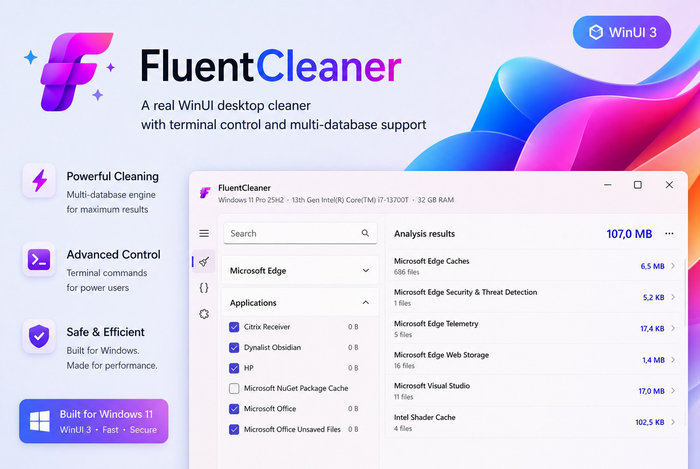
FluentCleaner 26.07.02: Free Open-Source Windows Cleaner with a Modern WinUI Interface
FluentCleaner 26.07.02 is a lightweight, open-source system-cleaning utility designed to remove temporary files, browser caches, application leftovers, logs, and other unnecessary data from Windows computers.
The program provides a modern alternative to traditional PC-cleaning applications. Instead of including aggressive registry modifications, misleading optimization claims, advertising bundles, or unnecessary background services, FluentCleaner focuses on transparent disk cleanup and user-controlled maintenance.
Built with Microsoft’s WinUI 3 framework, the application offers a clean interface that integrates naturally with the appearance of Windows 10 and Windows 11.
Modern Windows Cleaning Utility
FluentCleaner is designed to help users identify files that are no longer required by Windows, installed applications, browsers, development tools, graphics drivers, and other supported software.
Over time, applications can create temporary files, logs, cached data, update packages, thumbnails, crash reports, and leftover configuration files.
Although many of these files are harmless, they can gradually consume a significant amount of storage space.
FluentCleaner analyzes supported locations and displays the detected items before deletion, allowing users to review what the program intends to remove.
Clean Temporary Windows Files
Windows regularly creates temporary data while installing updates, running applications, generating previews, processing downloads, and completing maintenance tasks.
Some temporary files are deleted automatically, while others may remain on the system drive for long periods.
FluentCleaner can detect supported categories of Windows junk, including:
- Temporary system files
- Application caches
- Windows log files
- Crash reports
- Thumbnail caches
- Update leftovers
- Error-reporting files
- Recent-item traces
- Temporary installation data
- Recycle Bin content
- Clipboard-related data
- Other supported Windows caches
The exact categories available depend on the loaded cleaning database and the applications installed on the computer.
Browser Cache and Privacy Cleanup
Web browsers store large amounts of temporary information to improve loading speed and preserve user sessions.
FluentCleaner can identify supported browser data from applications such as:
- Microsoft Edge
- Google Chrome
- Mozilla Firefox
- Chromium-based browsers
- Other supported web browsers
Depending on the selected rules, the program may detect:
- Browser cache
- Cookies
- Download history
- Browsing history
- Session information
- Saved form data
- Telemetry files
- Website storage
- Crash reports
- Temporary browser files
- Shader and graphics caches
Users should review browser-related selections carefully because deleting cookies, sessions, or saved data may sign them out of websites or remove useful browsing information.
Powered by Winapp2.ini
FluentCleaner uses the community-maintained Winapp2.ini ecosystem to identify files and registry locations associated with Windows and third-party applications.
Winapp2.ini contains thousands of cleaning definitions for popular programs, system components, browsers, utilities, and development tools.
Using human-readable cleaning rules provides several advantages:
- Users can inspect what each rule targets
- The database can be updated independently
- Community members can contribute new definitions
- Custom rules can be added
- Cleaning behavior is more transparent
- Supported applications can expand over time
FluentCleaner supports thousands of community-created entries instead of relying entirely on a closed proprietary database.
Support for Multiple Cleaning Databases
The application can load more than one Winapp2-compatible database.
This makes it possible to use the standard database together with custom or experimental cleaning definitions.
Multiple database support can be useful for advanced users who want to:
- Add rules for unsupported applications
- Maintain private cleaning configurations
- Test community-created definitions
- Separate standard and aggressive cleaning rules
- Create specialized workstation profiles
- Extend the program for business or technical environments
FluentCleaner can also handle duplicate entries when multiple databases contain similar rules.
Optional Winappx Database
Advanced users can enable optional Winappx-related cleaning definitions.
These rules may target data associated with packaged Windows applications, AppX components, and selected preinstalled software.
Because these areas can be more sensitive than normal cache folders, users should review each rule before cleaning.
Removing data associated with packaged applications may reset settings, delete cached content, or require an application to rebuild its local files.
Analyze Before Cleaning
FluentCleaner separates analysis from deletion.
Users can scan the selected categories and review the estimated amount of recoverable storage before starting the cleanup process.
Analysis results may display:
- Detected files
- File locations
- Registry targets
- Number of items
- Estimated storage usage
- Associated applications
- Cleaning categories
This preview-based workflow reduces the risk of deleting data without understanding what has been selected.
Detailed Cleaning Results
The application can display detailed information about detected items.
Users can inspect individual entries and identify which files or locations contribute to the total amount of detected junk.
This can be especially useful when a particular browser, development tool, game, or application has accumulated a large cache.
Detailed results also make troubleshooting easier if users want to exclude a specific location.
Category-Based Cleaning
FluentCleaner organizes cleaning rules into categories instead of presenting one long unstructured list.
Categories may include:
- Windows system files
- Web browsers
- Multimedia applications
- Productivity software
- Development tools
- Graphics drivers
- Communication programs
- Utility applications
- Microsoft Store applications
- User-created cleaning entries
Users can enable complete categories or select individual entries according to their requirements.
Clean Application Leftovers
Applications frequently leave temporary files and cached data behind after updates, crashes, or removal.
FluentCleaner can identify supported leftovers created by common Windows programs.
These may include:
- Application logs
- Installer caches
- Update downloads
- Diagnostic files
- Temporary exports
- Thumbnail databases
- Old configuration backups
- Crash dumps
- Web-based application caches
- Package-management caches
The program does not promise to uninstall applications or remove every trace automatically. It focuses mainly on files defined by the active cleaning databases.
Development Tool Cleanup
Software-development environments can generate large caches and package repositories.
FluentCleaner may detect supported data created by:
- Microsoft Visual Studio
- NuGet
- Development frameworks
- Compiler caches
- Package managers
- Code editors
- Build systems
- Debugging tools
Deleting these caches can recover storage, but future builds or package installations may take longer because required files must be downloaded or generated again.
Developers should review these categories before cleaning an active development workstation.
Graphics and Shader Cache Cleanup
Graphics drivers and applications may store compiled shader data to improve performance.
FluentCleaner can identify supported caches from components such as Intel, NVIDIA, AMD, Windows, and selected games or creative applications.
Deleting shader caches can free storage and may help resolve corrupted-cache problems.
However, applications and games may temporarily load more slowly after cleanup while their shader data is recreated.
Fast Scanning Engine
FluentCleaner is designed to analyze supported cleaning locations quickly.
The scanning duration depends on:
- Storage speed
- Number of installed applications
- Size of browser profiles
- Number of enabled database entries
- Quantity of files on the system
- Use of internal or external drives
- Antivirus real-time scanning
Systems with large browser caches or development environments may require more time to analyze.
Terminal Control
The program includes terminal-based controls for users who prefer command-oriented system maintenance.
The integrated terminal can provide access to supported commands and operational functions without requiring every action to be performed through graphical buttons.
Terminal controls can be useful for:
- Advanced maintenance
- Repeated cleanup tasks
- Script-oriented workflows
- Technical troubleshooting
- Learning available application commands
- Managing saved configurations
Users should consult the available help commands before running unfamiliar terminal operations.
Command-Line Automatic Cleaning
FluentCleaner supports command-line functionality for automated or unattended cleaning.
Advanced users may create shortcuts or scripts that run the program with predefined selections.
Potential use cases include:
- Scheduled maintenance
- Startup or shutdown scripts
- Technician toolkits
- Shared-computer cleanup
- Laboratory or classroom maintenance
- Automated workstation preparation
Automatic cleaning should only be enabled after the selected rules have been tested manually.
Silent Cleaning
Supported command-line operations can perform cleanup without requiring continuous interaction.
Silent operation is useful for experienced users who already know which categories are safe for their systems.
However, silent cleanup removes the opportunity to review every analysis result immediately before deletion.
For this reason, new rules and database updates should be tested in normal interactive mode first.
Automatic Shutdown After Cleaning
FluentCleaner may provide an option to shut down the computer automatically after a cleanup operation.
This can be helpful when processing a large system late in the day or running maintenance before leaving the computer unattended.
Users should save all open work before enabling automatic shutdown.
Extensions Support
FluentCleaner includes an extension system that can provide access to additional maintenance tools, scripts, and utilities from within the application.
Extensions can expand the program beyond basic file cleaning and may include functions related to:
- Windows maintenance
- Application management
- Interface repair
- Debloating scripts
- System configuration
- Diagnostic utilities
- Community-created tools
Extensions should be reviewed carefully before use because they may perform more substantial system changes than standard cache cleaning.
Only trusted extensions from reputable sources should be installed.
Portable Operation
FluentCleaner is distributed as a portable application.
Users can extract the downloaded archive and launch the executable without completing a traditional Windows installation.
Portable operation provides several benefits:
- No complicated setup process
- Easy removal
- Suitable for USB drives
- Useful for computer technicians
- Can be stored with maintenance tools
- Minimal changes to the operating system
- Easy testing before regular use
Settings and downloaded databases may still be stored in application or user-data folders depending on the program configuration.
Open-Source Development
FluentCleaner is released as open-source software under the MIT license.
The source code is publicly available, allowing developers and security researchers to inspect how the application works.
Open-source availability provides several potential advantages:
- Transparent development
- Community review
- Public issue tracking
- Independent security inspection
- Community contributions
- No hidden subscription requirement
- Ability to study or modify the source under the license terms
Users should still download compiled releases from the official project repository or another trusted source.
No Registry Optimization Claims
FluentCleaner avoids presenting registry cleaning as a guaranteed way to make a computer significantly faster.
Modern Windows systems generally do not require aggressive registry cleaning as part of routine maintenance.
Deleting incorrect registry entries can create application errors, broken file associations, startup failures, or other system problems.
Although some Winapp2 rules may include specific registry targets related to application history or caches, FluentCleaner does not rely on vague mass registry scanning or fake error counts.
No Advertising or Upselling
The project is designed without subscription prompts, aggressive advertisements, bundled products, scareware messages, or paid optimization upgrades.
Users are not encouraged to purchase additional tools after every scan.
This focused approach helps keep the program lightweight and avoids many of the distractions found in commercial system-maintenance suites.
Automatic Update Checks
FluentCleaner can check for newer versions from its Settings page.
Automatic update checking helps users receive:
- Bug fixes
- Interface improvements
- Compatibility updates
- New cleaning features
- Database-related changes
- Stability improvements
Updating is important because Windows and third-party applications frequently change their cache locations and file structures.
Main Features
- Free and open-source Windows cleaner
- Modern WinUI 3 interface
- Temporary-file cleanup
- Browser cache cleaning
- Application-leftover removal
- Windows log and crash-report cleanup
- Winapp2.ini database support
- Thousands of community-maintained rules
- Custom cleaning databases
- Multiple database loading
- Optional Winappx support
- Category-based selections
- Analysis before deletion
- Detailed file and registry results
- Explorer integration
- Portable operation
- Terminal controls
- Command-line automation
- Silent cleaning
- Optional shutdown after cleanup
- Extension support
- Automatic update checking
- No advertisements
- No subscription
- No bundled software
- No aggressive registry optimization
- Support for Windows 10 and Windows 11
How to Use FluentCleaner
Download the official archive and extract it to a normal folder.
Launch the FluentCleaner executable and allow the program to load its cleaning database.
Review the available categories and disable any entries containing data you want to preserve.
Select Analyze to scan the computer without deleting files.
Review the detected file count, storage size, applications, and detailed paths.
When satisfied with the selections, start the cleaning process.
Close browsers and other applications before cleaning because open programs may lock files or immediately recreate cache data.
Safe Cleaning Recommendations
Users should begin with basic cache and temporary-file categories.
Before selecting aggressive or experimental rules, it is recommended to:
- Create a backup of important files
- Close running applications
- Review every selected category
- Avoid deleting browser sessions when needed
- Preserve saved passwords and autofill data
- Check the Downloads folder separately
- Test custom databases carefully
- Avoid unknown extensions
- Create a Windows restore point
- Keep important application settings backed up
Cleaning tools should not be used as a replacement for proper storage management or regular data backups.
Advantages
FluentCleaner offers several advantages over heavier system-maintenance suites:
- Completely free
- Open-source code
- Modern Windows interface
- Lightweight portable design
- Transparent cleaning rules
- Large community-maintained database
- No paid upgrade pressure
- No advertising bundles
- Detailed analysis results
- Flexible category selection
- Support for custom databases
- Command-line automation
- Useful extension architecture
- No misleading performance claims
It is particularly suitable for users who want direct control over what gets deleted.
Possible Disadvantages
FluentCleaner is a relatively advanced utility and may initially present too many cleaning entries for inexperienced users.
Other possible limitations include:
- Incorrect selections can remove useful application data
- Browser cleaning may sign users out of websites
- Deleted caches may temporarily slow applications
- Experimental databases may be more aggressive
- Extensions can make significant system changes
- Portable applications may trigger security warnings
- Not every installed application is supported
- Cleaning does not guarantee major performance improvements
- Some files may remain locked while applications are running
- Community rules may occasionally require updates
Users should not select every available option without reviewing its purpose.
System Requirements
FluentCleaner officially supports Windows 10 version 2004, build 19041, and later, as well as Windows 11. It does not require Windows 11 exclusively.
General requirements include:
- Windows 10 build 19041 or later
- Windows 11
- 64-bit Windows recommended
- Modern multi-core processor
- At least 4 GB of RAM
- Sufficient storage for analysis and temporary operations
- Administrator privileges for protected system locations
- Internet access for updates and database downloads
- A display compatible with modern WinUI applications
- Microsoft Windows App Runtime components when required
Older Windows releases may not support the WinUI 3 framework used by the application.
Who Should Use FluentCleaner?
FluentCleaner is suitable for:
- Windows home users
- Computer technicians
- Advanced PC users
- Developers
- Gamers with large caches
- Privacy-conscious users
- Users with limited system-drive space
- People seeking an open-source cleaner
- Users avoiding subscription-based utilities
- Anyone who wants detailed control over cleanup tasks
Beginners can also use the program safely by selecting only clearly understood temporary-file categories.
FluentCleaner vs. Windows Storage Cleanup
Windows includes built-in storage-management features that can remove temporary files, update leftovers, and Recycle Bin content.
The built-in Windows tools are sufficient for many users and are generally the safest option for basic maintenance.
FluentCleaner can scan additional application-specific locations through its Winapp2 database and may identify more browser, software, driver, and development-tool caches.
This deeper coverage also means that FluentCleaner requires more careful review before deletion.
FluentCleaner vs. Traditional PC Cleaners
Unlike many commercial PC-cleaning suites, FluentCleaner does not attempt to combine antivirus tools, driver updates, software subscriptions, registry optimization, VPN services, and system boosting into one large package.
It concentrates on transparent cleanup rules and optional extensions.
This makes it more suitable for users who prefer a focused utility instead of a complete optimization suite.
Final Verdict
FluentCleaner 26.07.02 is a modern and transparent Windows cleaning utility that combines a native-looking WinUI 3 interface with the extensive community-maintained Winapp2.ini database.
Its support for detailed analysis, custom databases, multiple cleaning sources, terminal commands, automation, extensions, and portable operation makes it considerably more flexible than a basic temporary-file remover.
The absence of advertising, subscriptions, bundled software, scareware messages, and exaggerated registry optimization claims is one of its strongest advantages.
Users should still examine cleaning selections carefully, especially when enabling browser data removal, experimental databases, AppX rules, custom entries, or third-party extensions.
For Windows users seeking a free, lightweight, and open-source alternative to traditional system cleaners, FluentCleaner provides a capable maintenance solution with strong transparency and user control.