Elcomsoft Advanced Office Password Recovery Forensic 7.21.2682: Professional Office Document Password Recovery
Introduction
Elcomsoft Advanced Office Password Recovery Forensic 7.21.2682 is a professional Windows application developed for recovering access to password-protected office documents. It is primarily intended for digital forensic specialists, law-enforcement laboratories, corporate security teams, IT administrators, and authorized users who need to regain access to their own encrypted files.
The program supports documents created by multiple generations of Microsoft Office and several alternative office suites. It combines optimized password-recovery methods with hardware acceleration to improve performance when processing complex or strongly encrypted documents.
Version 7.21.2682 is officially listed as the current Forensic Edition build on Elcomsoft’s product page.
What Is Elcomsoft Advanced Office Password Recovery?
Advanced Office Password Recovery, also known as AOPR, is a specialized utility for recovering passwords and removing certain types of access restrictions from office documents.
It can be used when an authorized user has forgotten a document password, when an organization needs access to archived business files, or when digital evidence must be examined as part of a legally approved forensic investigation.
The software is designed to work with documents produced by Microsoft Office as well as selected files created by OpenDocument-compatible applications and other office suites.
Legal and Responsible Use
Password-recovery software must only be used on files that you own or are legally authorized to examine.
Appropriate uses include:
- Recovering passwords for personal documents
- Restoring access to company-owned files
- Processing evidence under a valid legal authorization
- Performing approved digital-forensic investigations
- Recovering documents belonging to clients who granted permission
- Auditing password strength within an authorized environment
Using the software to access another person’s documents without permission may violate privacy, computer-access, and data-protection laws.
Supported Microsoft Office Applications
Advanced Office Password Recovery supports password-protected files associated with a wide range of Microsoft applications, including:
- Microsoft Word
- Microsoft Excel
- Microsoft PowerPoint
- Microsoft Access
- Microsoft Outlook
- Microsoft Project
- Microsoft Money
- Microsoft Visio
- Microsoft Publisher
- Microsoft OneNote
Elcomsoft states that the program supports documents created with Microsoft Office versions ranging from early Office releases to current Microsoft 365 builds.
Support for Alternative Office Formats
In addition to Microsoft Office files, the program can process selected formats from other productivity suites.
Supported document families may include:
- OpenDocument formats
- OpenOffice and compatible application files
- WordPerfect Office documents
- Lotus SmartSuite files
- Hangul Office documents
- Selected Apple iWork formats
Exact recovery capabilities depend on the document format, encryption method, application version, and type of password protection.
Main Features
Password Recovery for Office Documents
The application attempts to recover passwords that prevent users from opening encrypted office files.
Recovery difficulty depends heavily on:
- Password length
- Character complexity
- Document format
- Encryption type
- Available hardware
- Information already known about the password
Older file formats may use weaker protection, while modern Microsoft Office documents can use significantly stronger encryption.
Access to Legacy Office Documents
One of the program’s important features is its support for older Word and Excel formats.
Some legacy files use outdated encryption schemes that can be processed much faster than modern document formats. Elcomsoft advertises guaranteed recovery for certain older Word and Excel documents protected with 40-bit encryption.
GPU Acceleration
Advanced Office Password Recovery can use compatible graphics processors to accelerate supported password-recovery operations.
Modern GPUs are capable of performing many calculations in parallel, which may provide substantially higher performance than relying exclusively on a computer’s main processor.
The software supports using multiple compatible graphics cards in one workstation. Actual performance depends on the GPU model, document encryption, selected recovery method, thermal limits, and system configuration.
Intel Arc GPU Support
The 7.21 release introduced GPU acceleration support for compatible Intel Arc graphics hardware. This expands the available acceleration options beyond previously supported GPU platforms.
Microsoft OneNote Support
Version 7.21 added support for password-protected documents created with newer Microsoft OneNote builds included with Microsoft 365.
This makes the software useful when authorized investigators or organizations need to examine encrypted OneNote data from current Office environments.
Multiple Recovery Methods
The program includes several configurable password-recovery approaches. These allow users to narrow the search when partial information about a forgotten password is available.
For example, an authorized user may remember:
- The approximate password length
- Some characters or words
- Whether uppercase letters were used
- Whether the password contained numbers
- A common prefix or suffix
- A likely date, name, or phrase pattern
Providing accurate information can reduce unnecessary processing and improve recovery efficiency.
Dictionary-Based Recovery
The application can test words and password candidates from selected dictionaries.
This method may be effective when a password is based on a recognizable word, name, phrase, or commonly used variation.
Strong random passwords are considerably more resistant to dictionary-based recovery.
Mask-Based Recovery
Mask-based recovery allows investigators to define known or suspected parts of a password.
This is useful when the document owner remembers the general password structure but not the exact characters.
For example, the owner may know that the password begins with several letters and ends with a year. Restricting the unknown positions can greatly reduce the number of possible candidates.
Combined Recovery Workflows
Different password-recovery methods can be combined into an organized workflow.
This enables forensic specialists to begin with the most likely candidates before moving to broader and more computationally demanding methods.
Elcomsoft describes the product as supporting dictionary, brute-force, and advanced combined recovery approaches.
Document Restriction Removal
Some office documents are not fully encrypted but contain restrictions that prevent editing, printing, copying, or modifying their content.
Depending on the document format and protection type, Advanced Office Password Recovery may be able to remove or bypass these restrictions without recovering a complex file-opening password.
Opening-password encryption and document-editing restrictions are not always the same security mechanism.
Automatic Document Analysis
The program can inspect a selected file and determine its format and protection type.
This helps users identify whether the document uses:
- File-opening encryption
- Modification protection
- Worksheet or workbook protection
- VBA project protection
- Application-specific restrictions
- Legacy or modern encryption
Available recovery options are then determined according to the detected protection.
What Is the Forensic Edition?
The Forensic Edition is designed for professional investigative and evidentiary workflows.
It is intended for environments such as:
- Digital-forensic laboratories
- Law-enforcement agencies
- Government organizations
- Corporate investigation departments
- Incident-response teams
- Legal discovery operations
- Regulated security environments
Compared with editions intended for ordinary password recovery, forensic licensing is generally positioned for professional investigative use and formal evidence-processing environments.
The official product listing identifies version 7.21.2682 as a Forensic Edition.
Typical Use Cases
Recovering Business Documents
Organizations may have important Word, Excel, or Access files whose passwords were forgotten after an employee left the company or after archived data was restored.
When the organization legally owns the documents, AOPR can assist in restoring access.
Digital-Forensic Investigations
Authorized investigators may encounter encrypted office documents while examining computers, storage devices, or forensic images.
The software can help determine whether access can be recovered within the available investigation time.
Electronic Discovery
Legal teams may need to examine protected office documents collected during litigation, regulatory investigations, or internal reviews.
Any recovery process should follow applicable authorization, evidence-handling, and documentation procedures.
Historical Archive Recovery
Companies often retain documents created with old versions of Word, Excel, Access, or other office applications.
Legacy encryption may be incompatible with modern software or protected by passwords that are no longer known.
Incident Response
Security teams investigating data theft, fraud, malware, or unauthorized activity may need access to encrypted office documents found on affected systems.
Password Policy Assessment
Organizations can use approved recovery testing to evaluate whether employees are protecting sensitive documents with sufficiently strong passwords.
Such testing must be conducted under a clearly defined security policy and with proper authorization.
Performance Considerations
Password-recovery speed varies significantly between documents.
Important factors include:
Encryption Algorithm
Modern Microsoft Office encryption is generally much stronger than protection used in older document formats.
Password Complexity
Long passwords containing random characters are much harder to recover than short dictionary-based passwords.
Graphics Hardware
Compatible modern GPUs may accelerate supported operations substantially.
Number of GPUs
Multiple graphics cards can increase processing performance when the selected document format supports parallel GPU acceleration.
Recovery Configuration
Using realistic password information can dramatically reduce the search space.
System Cooling
Extended recovery operations can place a sustained load on the processor and graphics cards. Adequate cooling and stable power delivery are important for forensic workstations.
User Interface
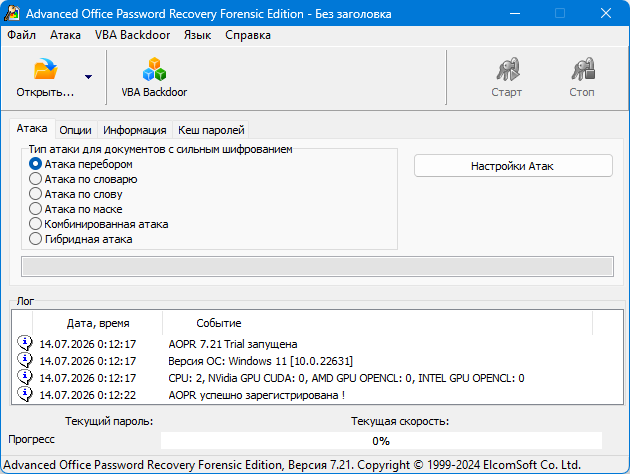
Advanced Office Password Recovery provides a structured Windows interface for selecting files, reviewing detected protection, and configuring authorized recovery tasks.
The workflow typically includes:
- Selecting the protected document
- Allowing the program to analyze its encryption
- Choosing an appropriate recovery approach
- Defining known password characteristics
- Selecting available CPU or GPU resources
- Starting and monitoring the recovery process
- Recording the result in the investigation report
The application is intended to make complex recovery settings accessible through a centralized interface rather than requiring users to create custom command-line tools.
Recovery Time
There is no guaranteed recovery time for every encrypted document.
Recovery may complete quickly when:
- The password is short
- The password is based on a dictionary word
- Most of the password is already known
- The file uses legacy encryption
- A recoverable document weakness is available
- Suitable GPU hardware is installed
Recovery may be impractical when:
- The password is long and random
- Modern strong encryption is used
- Very little is known about the password
- Limited computing hardware is available
- The possible password range is extremely large
The software cannot magically recover every strong password. Modern encryption is specifically designed to resist password guessing when users choose strong credentials.
Installation and Activation
Elcomsoft Advanced Office Password Recovery is commercial software for Windows.
The normal deployment process includes installing the official package, activating the appropriate license, and configuring supported processing hardware.
Forensic organizations should preserve:
- License information
- Software version details
- Installation records
- Case authorization
- Evidence identifiers
- Recovery settings
- Generated reports
- Chain-of-custody documentation
Using unofficial modified or cracked copies can introduce malware, compromise evidence integrity, and invalidate forensic findings.
System Requirements
Exact requirements can change with software updates and selected GPU drivers, but a suitable professional configuration generally includes:
- Microsoft Windows
- Modern multi-core Intel or AMD processor
- Sufficient system memory
- Free storage for documents and case data
- Compatible GPU for accelerated operations
- Current graphics drivers
- Administrative permissions for installation
- Valid commercial or forensic license
A dedicated forensic workstation with strong cooling and reliable power is recommended for long-running recovery operations.
Advantages
- Supports many Microsoft Office applications
- Works with legacy and modern office document formats
- Supports alternative office suites
- Includes GPU acceleration
- Can use multiple compatible graphics cards
- Supports Intel Arc acceleration in version 7.21
- Handles modern Microsoft OneNote documents
- Offers several configurable recovery methods
- Can process certain document restrictions quickly
- Suitable for professional forensic environments
- Useful for business archive recovery
- Provides optimized low-level processing
- Can recover some weak legacy encryption efficiently
Disadvantages
- Commercial software with a relatively expensive forensic license
- Intended mainly for professional Windows environments
- Recovery is not guaranteed for strong modern passwords
- High-performance recovery may require expensive GPU hardware
- Long operations can consume substantial electricity
- Hardware acceleration depends on file format and encryption type
- Incorrect recovery settings can waste significant processing time
- Requires technical knowledge for optimal results
- Legal authorization is essential
- It does not replace a complete digital-forensic platform
Security Limitations
A matching or recovered password provides access to a document, but it does not prove who originally created the password or document.
Investigators must consider:
- File metadata
- Storage location
- User-account information
- Document history
- System logs
- Email records
- Cloud synchronization data
- Chain of custody
- Other supporting evidence
Password recovery should be treated as one part of a broader forensic examination.
Evidence Integrity Recommendations
Professional investigators should avoid working directly on original evidence.
A proper forensic workflow normally includes:
- Creating a verified forensic copy
- Calculating hashes of the source evidence
- Recording all recovery settings
- Preserving original timestamps where possible
- Documenting software and hardware versions
- Keeping detailed investigator notes
- Storing recovered information securely
- Restricting access to authorized personnel
- Verifying results independently when necessary
These practices help preserve reliability and accountability during legal or internal investigations.
Is It Suitable for Regular Users?
The program can be used by individuals who need to recover their own office documents, but the Forensic Edition is primarily aimed at professional organizations.
Regular users with a single forgotten document password should first check:
- Password managers
- Secure notes
- Older document copies
- Cloud version history
- Email attachments
- Backup drives
- Colleagues who may know the password
- Organization recovery procedures
These options may restore access without requiring extensive computational processing.
Advanced Office Password Recovery vs Standard Office Repair Tools
Microsoft Office repair tools are designed to fix damaged program installations or corrupted documents. They do not normally recover forgotten file-opening passwords.
Advanced Office Password Recovery focuses specifically on encrypted and restricted documents.
It should not be confused with:
- Office installation repair
- File corruption repair
- Deleted-file recovery
- Antivirus scanning
- General Windows password recovery
- Archive password recovery
- Cloud account password reset
Each of these tasks requires a different type of application.
Responsible Password Protection
The capabilities of forensic recovery tools demonstrate why important documents should use strong passwords.
A secure document password should:
- Be long
- Be unique
- Avoid personal information
- Avoid common words and predictable patterns
- Contain several unrelated words or random characters
- Be stored in a trusted password manager
- Never be reused across multiple documents or accounts
Organizations should also maintain secure recovery procedures so that important files do not become permanently inaccessible when an employee forgets a password.
Final Verdict
Elcomsoft Advanced Office Password Recovery Forensic 7.21.2682 is a specialized and powerful solution for authorized recovery of password-protected office documents.
It supports numerous Microsoft Office applications, alternative office formats, legacy encryption, modern OneNote files, and GPU-accelerated recovery. Version 7.21 also expands hardware compatibility by introducing acceleration support for Intel Arc graphics processors.
The software is especially valuable for digital-forensic laboratories, corporate investigators, incident-response teams, and organizations that need to regain access to legitimately owned documents.
However, successful recovery depends on the encryption format, password strength, available information, and processing hardware. Strong modern passwords may remain impractical to recover even with powerful equipment.
When used with proper legal authorization, evidence-handling procedures, and realistic expectations, Elcomsoft Advanced Office Password Recovery Forensic can be an effective component of a professional office-document investigation and recovery workflow.