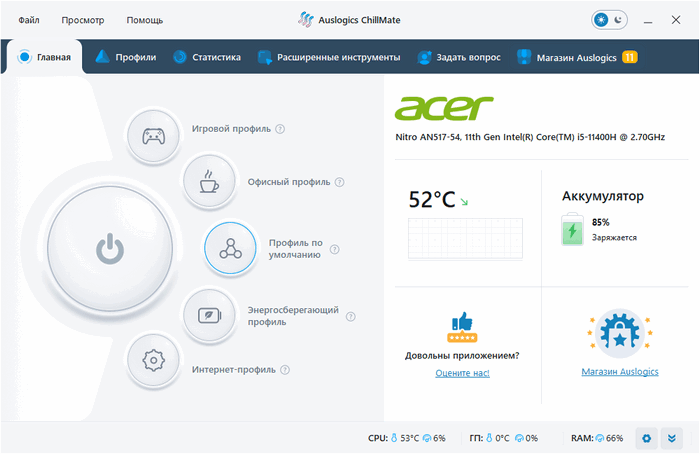
Auslogics ChillMate 1.1.0.6: Keep Your PC Cool, Quiet, and Optimized
Auslogics ChillMate 1.1.0.6 is a Windows utility designed to help users monitor computer temperature, reduce overheating, optimize system performance, and improve battery efficiency. Developed by Auslogics, the program focuses on keeping laptops and PCs cooler, quieter, and more stable during daily use, gaming, work, browsing, and other demanding tasks.
Overheating is one of the most common problems that can affect laptops and desktop computers. High temperatures may cause slow performance, loud fan noise, unexpected shutdowns, battery drain, and long-term hardware wear. Auslogics ChillMate helps users understand what is happening inside their system and apply smart optimization profiles to reduce heat and improve efficiency.
Real-Time Temperature Monitoring
One of the main features of Auslogics ChillMate is real-time temperature monitoring. The program allows users to track important system information such as CPU temperature, GPU temperature, CPU load, GPU load, RAM usage, battery status, storage activity, and other performance indicators.
This live monitoring helps users detect overheating problems early. Instead of waiting until the computer becomes slow or the fan becomes very loud, users can check the system condition and take action before the problem becomes more serious.
Prevent Laptop Overheating
Auslogics ChillMate is designed especially for overheating prevention. It helps reduce unnecessary system strain by adjusting performance behavior and improving resource efficiency. This can help keep temperatures under control during heavy workloads such as gaming, video calls, web browsing with many tabs, office work, media streaming, or creative tasks.
By keeping the system cooler, ChillMate may help reduce thermal throttling. Thermal throttling happens when the CPU or GPU slows down automatically to protect the hardware from heat. Reducing heat can therefore help maintain smoother and more stable performance.
Smart Optimization Profiles
The program includes optimization profiles that allow users to choose the best mode for their current activity. Depending on the available version, profiles may include options for gaming, office work, browsing, outdoor use, or default balanced operation.
These profiles help users balance performance, temperature, and battery usage. For example, a gaming profile may focus on stronger performance while still managing heat, while an office or browsing profile may focus more on lower temperature, quieter operation, and better battery life.
Reduce Fan Noise
When a laptop becomes hot, its cooling fan often becomes louder. This can be annoying during work, studying, meetings, or media playback. Auslogics ChillMate helps reduce unnecessary heat buildup, which may also reduce fan activity.
The result can be a quieter and more comfortable computer experience, especially for users who work in quiet environments or use their laptop for long hours.
Battery Usage Optimization
Auslogics ChillMate is also useful for laptop users who want better battery efficiency. By controlling unnecessary background load and helping the system work more efficiently, the program can help reduce power consumption during normal tasks.
This is especially helpful for users who work away from a charger, travel frequently, attend classes, or use their laptop outdoors. Better power management can make the device more practical for mobile use.
Processor and Memory Optimization
ChillMate includes optimization tools designed to improve CPU and memory efficiency. By reducing unnecessary load and improving resource usage, the program can help the system feel smoother during daily tasks.
This does not replace hardware upgrades, but it can help users get better performance from their existing computer. It is especially useful for laptops that become hot or slow when many programs are open at the same time.
Storage and SSD Optimization
Depending on the available edition and license, Auslogics ChillMate may include SSD optimization features. These tools are designed to help maintain storage performance and improve overall system responsiveness.
For modern laptops with SSDs, proper optimization can support smoother startup, faster application response, and better day-to-day performance.
Simple and Lightweight Interface
Auslogics ChillMate is designed to be easy to use. The interface presents temperature, load, battery, and performance information in a clear way, making it suitable for both beginners and advanced users.
Users do not need to manually search through complicated Windows settings. The program collects monitoring and optimization tools in one place, making it easier to control heat, performance, and battery behavior.
Useful for Gamers, Students, and Professionals
Auslogics ChillMate 1.1.0.6 can be useful for many types of users. Gamers can use it to monitor heat and maintain smoother performance during long sessions. Students can use it to keep laptops cooler during online classes or study sessions. Office users can reduce fan noise during meetings. Professionals can benefit from better stability during heavy workloads.
It is also useful for older laptops that heat up quickly or devices used in warm environments where cooling is more difficult.
Pros
Auslogics ChillMate 1.1.0.6 offers real-time temperature monitoring, overheating prevention, optimization profiles, battery usage optimization, fan noise reduction, CPU and memory optimization, and a simple interface. It is especially useful for laptop users who want a cooler, quieter, and more stable system.
Cons
Some advanced features may require a paid license. The final results also depend on the computer’s hardware, cooling system, dust condition, room temperature, and current workload. If a laptop has serious cooling problems, blocked vents, old thermal paste, or hardware damage, software optimization alone may not fully solve the issue.
Users should understand that ChillMate helps manage heat and performance, but it cannot physically repair a damaged fan, clean dust, or replace proper hardware maintenance.
Conclusion
Auslogics ChillMate 1.1.0.6 is a practical Windows utility for users who want to prevent overheating, reduce fan noise, monitor system temperature, improve battery efficiency, and keep their PC running more smoothly. It combines real-time monitoring with smart optimization profiles, making it useful for everyday users, gamers, students, remote workers, and professionals.
For laptop users who often experience heat, loud fans, slowdowns, or battery drain, Auslogics ChillMate provides a simple and helpful way to control system behavior and maintain a more comfortable computing experience. It is not a replacement for physical maintenance, but it is a strong software solution for improving temperature management and overall system efficiency.