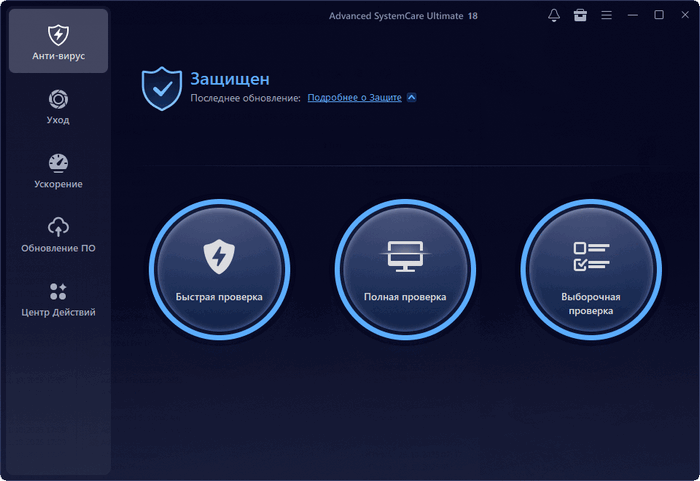
Advanced SystemCare Ultimate 18.4.0.114 – Complete PC Optimization and Antivirus Protection
Advanced SystemCare Ultimate 18.4.0.114 is an all-in-one Windows security, cleaning, and performance optimization suite developed by IObit. It combines real-time antivirus protection with advanced tools for removing junk files, improving startup speed, protecting privacy, fixing system problems, and maintaining overall computer performance.
Unlike traditional antivirus software that focuses mainly on malware detection, Advanced SystemCare Ultimate brings security and system maintenance together in a single interface. The program is designed for users who want to protect their computers while also improving speed, stability, storage management, and everyday responsiveness.
The official version 18.4.0 supports Windows XP, Vista, 7, 8, 8.1, 10, and Windows 11, with an installation size of approximately 150 MB.
What Is Advanced SystemCare Ultimate?
Advanced SystemCare Ultimate is the security-focused edition of IObit’s popular PC optimization software. It includes the cleaning and performance tools available in Advanced SystemCare while adding real-time antivirus technology powered by Bitdefender.
The software continuously monitors the system for viruses, spyware, ransomware, suspicious applications, malicious files, and other digital threats. At the same time, it can scan the computer for unnecessary files, invalid registry entries, privacy traces, outdated applications, startup problems, and performance issues.
Its main dashboard allows users to perform a complete system scan and repair multiple categories of problems with only a few clicks.
Real-Time Antivirus Protection
One of the most important features of Advanced SystemCare Ultimate 18.4.0.114 is its integrated real-time antivirus protection.
The security engine monitors running applications, downloaded files, system activity, and suspicious processes. Potential threats can be detected, isolated, and removed before they damage important files or compromise personal information.
The program is designed to protect against several types of threats, including:
- Viruses
- Spyware
- Trojans
- Ransomware
- Adware
- Malicious programs
- Suspicious downloads
- Potentially unwanted applications
- Online security threats
Its Bitdefender-powered real-time protection analyzes system activity and responds automatically when harmful behavior is detected.
One-Click PC Health Scan
Advanced SystemCare Ultimate includes a centralized scanning system that checks several areas of the computer simultaneously.
The scan can search for privacy risks, junk files, broken shortcuts, registry problems, security weaknesses, unnecessary startup programs, internet optimization issues, and software vulnerabilities.
After the scan is complete, users can review the detected problems or allow the program to repair them automatically.
This one-click approach makes the software suitable for beginners who may not know how to manage individual Windows maintenance tools manually.
AI-Powered Deep Cleaning
The program uses intelligent cleaning technology to detect temporary files, application caches, browser data, installation leftovers, invalid registry entries, and other unnecessary system data.
These files can gradually consume storage space and may affect Windows performance. Advanced SystemCare Ultimate analyzes them and removes items that are no longer required.
The deep-cleaning feature can target:
- Windows temporary files
- Browser caches
- Application leftovers
- System logs
- Recycle Bin contents
- Invalid registry entries
- Thumbnail caches
- Old update files
- Unnecessary installation files
- Unused application data
IObit describes the feature as an AI-powered cleaning system designed to identify hidden junk and registry clutter more accurately.
System Speed Optimization
Advanced SystemCare Ultimate 18.4.0.114 includes several tools for improving computer performance and responsiveness.
It can identify programs that launch automatically with Windows, unnecessary background processes, services consuming system resources, and applications using excessive memory or processor power.
The optimization tools can help improve:
- Windows startup speed
- Application loading times
- System responsiveness
- Memory availability
- Processor resource management
- Browser performance
- Gaming performance
- Internet connection settings
The software can also release unused memory and close unnecessary background processes when the computer becomes heavily loaded.
Startup Manager
A large number of startup applications can make Windows take longer to become ready after turning on the computer.
The Startup Manager displays applications, scheduled tasks, browser components, and services that launch automatically. Users can disable unnecessary entries or delay less important applications.
Each startup item may include information that helps users understand whether disabling it is recommended.
Managing startup programs can reduce boot time and prevent unwanted applications from continuously consuming system resources.
Performance Monitor
The built-in Performance Monitor provides real-time information about computer resource usage.
Users can monitor:
- CPU usage
- Memory consumption
- Disk activity
- Network activity
- System temperature information
- Running processes
It also provides quick access to tools for cleaning memory, taking screenshots, shutting down the computer, and ending resource-heavy processes.
This feature is useful when identifying applications that are causing slowdowns, freezes, or unusually high system activity.
Safe Folder and Ransomware Protection
Advanced SystemCare Ultimate 18 introduces Safe Folder, a security feature designed to protect sensitive files against unauthorized access and ransomware attacks.
Users can place important documents, private photos, work files, and other valuable data inside protected locations. Untrusted programs can then be prevented from modifying or accessing those files.
The feature gives users greater control over which applications are allowed to interact with protected information. Safe Folder was introduced as one of the major security improvements in Advanced SystemCare Ultimate 18.
Privacy Protection
Web browsers, applications, and Windows services can store information about user activity. This may include browser history, recent files, search records, cookies, cached data, and application usage traces.
Advanced SystemCare Ultimate includes privacy tools that can remove these records automatically.
Its privacy features can help clean:
- Browsing history
- Tracking cookies
- Download records
- Recently opened documents
- Application activity traces
- Saved form information
- Temporary internet files
- Windows usage records
The program also includes anti-tracking and identity-protection features intended to reduce online tracking and prevent websites from building detailed profiles of browsing behavior.
Surfing Protection
Surfing Protection helps block dangerous websites, phishing pages, malicious advertisements, suspicious links, and other browser-based threats.
The software checks web addresses while the user browses and warns or blocks access when a page is identified as unsafe.
This can provide additional protection when visiting unfamiliar websites, clicking links in emails, downloading files, or shopping online.
The protection database in version 18 was expanded to recognize more malicious websites, phishing attempts, and unwanted advertisements.
Digital Fingerprint Protection
Websites and advertising networks may use browser settings, device information, screen configuration, installed components, and other details to create a unique digital fingerprint.
Advanced SystemCare Ultimate includes identity-masking technology designed to make online tracking more difficult.
This feature can help users maintain greater privacy while browsing, although it should be considered an additional privacy layer rather than a complete replacement for careful browsing habits or dedicated anonymity tools.
Software Updater
Outdated applications may contain security vulnerabilities, compatibility problems, or performance issues.
The Software Updater scans installed applications and identifies programs with newer versions available. Supported applications can be updated from a centralized interface instead of visiting multiple developer websites manually.
Keeping applications updated can provide:
- Security fixes
- Performance improvements
- Compatibility updates
- New features
- Stability improvements
- Bug fixes
This feature is especially useful for users who have many third-party applications installed.
Registry Cleaning
The Windows Registry may contain references left behind by removed applications, outdated file paths, invalid shortcuts, and unnecessary configuration entries.
Advanced SystemCare Ultimate can scan for these entries and remove those considered invalid.
Registry cleaning may help resolve certain errors or broken associations, but users should always create a restore point or registry backup before applying major changes.
The program includes automatic backup and rescue options that can help reverse modifications when necessary.
Disk and Storage Management
Advanced SystemCare Ultimate provides tools for identifying files that consume large amounts of disk space.
Users can locate:
- Large files
- Duplicate files
- Old downloads
- Temporary data
- Application leftovers
- Unused installation packages
- Browser caches
Removing unnecessary content can free storage space and make it easier to manage computers with limited-capacity drives.
The software can also help clean deeply hidden system junk that may not be visible through the standard Windows storage interface.
Internet Optimization
The program can analyze and adjust selected Windows network settings to improve browsing and download performance.
It may optimize configurations related to connection behavior, data transfer, network response, and browser performance.
Actual results will depend on the internet service provider, network hardware, connection quality, and existing Windows configuration. The feature cannot increase an internet connection beyond the maximum speed provided by the user’s service plan.
Turbo Boost Mode
Turbo Boost temporarily disables unnecessary background services and applications to free system resources.
It can be configured for different situations, such as:
- Work
- Gaming
- General performance
- Battery-saving usage
By reducing background activity, the feature can make more memory and processor resources available for the currently active application.
Users should review which services are being disabled, especially when using the feature on work computers or systems connected to specialized hardware.
Security Reinforce
Security Reinforce checks selected Windows settings that may affect system protection.
It can recommend changes to reduce potential security weaknesses, block risky functions, adjust remote-access options, and strengthen certain system policies.
This tool can be useful for users who are unfamiliar with advanced Windows security settings.
However, changes should be reviewed carefully when the computer is part of a corporate network or depends on remote administration tools.
Browser Protection
Advanced SystemCare Ultimate can monitor browser settings and detect unauthorized changes.
Potentially unwanted applications sometimes modify the homepage, default search engine, browser extensions, or other settings without clear permission.
Browser Protection helps users preserve their preferred configuration and warns when suspicious applications attempt to make changes.
File Shredder
Deleting a file normally does not always remove its underlying data immediately. Specialized recovery software may be able to restore deleted files until their storage space is overwritten.
The File Shredder securely overwrites selected files, making recovery significantly more difficult.
This feature can be useful when permanently removing:
- Financial documents
- Private photographs
- Business files
- Saved passwords
- Confidential records
- Personal identification documents
Files erased using a shredding tool generally cannot be restored, so users should verify their selections carefully.
System Weakness Detection
The program can scan Windows for selected security and configuration weaknesses.
It may detect missing security updates, risky settings, vulnerable applications, or outdated components that could expose the computer to threats.
Detected issues can be reviewed individually before repairs are applied.
Automatic Maintenance
Advanced SystemCare Ultimate can perform selected maintenance tasks automatically while the computer is idle.
Automatic maintenance may include:
- Junk-file cleaning
- Privacy-trace removal
- Registry cleaning
- Startup optimization
- Security scanning
- Software update checks
- Performance monitoring
This helps keep the system maintained without requiring users to launch a manual scan every day.
Rescue Center
The Rescue Center stores backups of certain modifications made by the program.
Users can restore registry entries, startup items, system settings, and other changes when an optimization causes unexpected behavior.
This feature is particularly important when applying multiple repairs at the same time.
Creating a Windows restore point before performing extensive cleaning or optimization is also recommended.
User Interface
Advanced SystemCare Ultimate 18.4.0.114 features a modern dashboard that organizes its tools into categories such as Care, Speed Up, Protect, Software Updater, and Toolbox.
The primary scanning process is designed to be simple, while more advanced tools remain available for experienced users.
The interface provides clear scan results, recommendations, security notifications, and direct access to individual maintenance modules.
Main Features
- Real-time antivirus protection powered by Bitdefender
- Virus, spyware, Trojan, and ransomware detection
- AI-powered junk-file cleaning
- Registry cleaning and repair
- Startup optimization
- Memory and CPU resource management
- Safe Folder protection
- Anti-tracking tools
- Digital fingerprint protection
- Malicious website blocking
- Browser configuration protection
- Software update management
- Large-file and duplicate-file detection
- Secure file deletion
- Real-time performance monitoring
- Automatic system maintenance
- Windows security reinforcement
- One-click system scanning
- Backup and rescue tools
Advantages
- Combines antivirus and PC optimization tools
- Simple one-click scanning process
- Real-time malware protection
- Useful startup and performance-management features
- Extensive privacy-cleaning options
- Modern and easy-to-use interface
- Includes ransomware protection
- Can automatically maintain the system
- Provides many advanced utilities
- Supports both modern and older Windows versions
Disadvantages
- Some features require a paid subscription
- Aggressive cleaning settings should be reviewed carefully
- Registry cleaning may not noticeably improve every computer
- Several notifications may appear during regular use
- Some tools duplicate features already available in Windows
- Running multiple antivirus products simultaneously may cause conflicts
- Certain claimed speed improvements will vary between computers
System Requirements
The official Advanced SystemCare Ultimate 18.4.0 product page lists support for:
- Windows 11
- Windows 10
- Windows 8.1
- Windows 8
- Windows 7
- Windows Vista
- Windows XP
- Approximately 150 MB of installation space
- Internet access for updates and online protection features
Additional free disk space may be required for temporary files, antivirus databases, backups, and system restore data.
Advanced SystemCare Ultimate vs Advanced SystemCare Pro
Advanced SystemCare Pro focuses mainly on cleaning, optimization, privacy, and system performance.
Advanced SystemCare Ultimate includes those optimization features while adding integrated real-time antivirus protection.
Users who already have a trusted antivirus product may prefer the Pro edition. Users who want optimization and antivirus protection in one package may find the Ultimate edition more convenient.
Only one real-time antivirus solution should generally be active to avoid software conflicts and unnecessary resource consumption.
Is Advanced SystemCare Ultimate Suitable for Gaming?
Advanced SystemCare Ultimate can be useful for gaming computers because it can reduce unnecessary background activity, release memory, manage startup programs, and activate performance-focused modes.
Turbo Boost may help reserve more system resources for games by temporarily disabling selected background processes.
However, the software cannot replace a hardware upgrade. Gaming performance remains primarily dependent on the processor, graphics card, memory, storage drive, cooling system, and game settings.
Is Advanced SystemCare Ultimate 18.4.0.114 Worth Using?
Advanced SystemCare Ultimate 18.4.0.114 is suitable for users who want a centralized solution for antivirus protection, privacy cleaning, startup management, software updates, and general Windows maintenance.
Its strongest advantage is convenience. Instead of installing several separate utilities, users can access most security and optimization functions through one dashboard.
Experienced users may prefer to manage Windows manually or use specialized tools for each task. For beginners and general home users, however, the automated scanning and maintenance features can make system management easier.
Conclusion
Advanced SystemCare Ultimate 18.4.0.114 is a comprehensive Windows maintenance and security suite that combines malware protection, system cleaning, performance optimization, privacy tools, software updates, and ransomware defense.
Its Bitdefender-powered antivirus engine provides real-time protection, while its optimization modules help manage startup applications, remove unnecessary files, free system resources, and improve everyday computer responsiveness.
Features such as Safe Folder, Surfing Protection, AI-powered cleaning, automatic maintenance, and identity protection make it a practical option for users who prefer an all-in-one approach to PC security and performance.
Although optimization results will vary depending on the condition and hardware of each computer, Advanced SystemCare Ultimate remains a feature-rich solution for maintaining a cleaner, safer, and more organized Windows system.